How Do I Reset My Digital Car Radio Fast and Simple
Resetting your digital car radio is simpler than you think, and this guide walks you through every method step by step. Whether your screen is blank, the display shows error codes, or the sound is cutting out, you can fix it yourself without a mechanic. We cover soft resets, factory resets, battery disconnects, and common troubleshooting tips to get your digital car radio working again in minutes.
There is nothing more frustrating than hopping into your car, turning the key, and being greeted by a blank screen or static noise from your digital car radio. Whether you are trying to listen to your favorite station during your morning commute or navigating with traffic updates, a malfunctioning radio throws off your whole day.
The good news is that resetting your digital car radio is something you can do at home without calling a mechanic or spending hundreds of dollars. Most issues stem from minor software glitches, loose connections, or settings that simply need a refresh. This guide covers every method you need to know, from a quick soft reset to a full factory restore.
By the time you finish reading, you will know exactly how to reset my digital car radio in minutes. We will walk through each step in plain language so you feel confident tackling the problem yourself. Let us get your radio back up and running.
Key Takeaways
- A soft reset is the fastest way to fix minor glitches without losing your saved stations and settings.
- A factory reset wipes all custom settings and returns your radio to its original state, which helps with persistent problems.
- Disconnecting the car battery is a reliable method that works when other reset options fail.
- Checking your fuse and wiring can reveal hidden issues that mimic radio problems.
- Updating your radio firmware can fix software bugs that cause display and sound issues.
- Knowing your car radio model helps you find the exact reset steps and avoid common mistakes.
- Regular maintenance of your car audio system prevents future issues and extends the life of your unit.
📑 Table of Contents
Why Your Digital Car Radio Might Need a Reset
Car radios are reliable machines, but they are not immune to problems. Over time, software hiccups, power surges, and worn-out components can cause your radio to behave unpredictably. Understanding why your radio is acting up helps you choose the right fix.
Common Signs Your Radio Needs a Reset
Before you dive into the reset process, it helps to recognize the warning signs. Here are the most common symptoms that point to a radio needing a reset:
- Blank or frozen display — the screen is dark or unresponsive even when the radio is on.
- Static or crackling noise — you hear interference instead of clear audio from your stations.
- Error messages on screen — codes like “Error,” “Code,” or “Check System” appear and will not go away.
- Radio won’t turn on — pressing the power button does nothing at all.
- Lost presets and stations — your saved stations disappear or rearrange on their own.
- Touchscreen unresponsive — if your radio has a touchscreen, it stops reacting to your taps.
- Audio cuts in and out — sound drops randomly while you are driving.
If you notice any of these issues, do not panic. Most of them can be resolved with a simple reset. For more on related car troubles, check out our article on Common Car Starting Issues Explained to rule out broader electrical problems.
What Causes Radio Glitches in the First Place
Several factors can trigger radio issues. Power surges from jump-starting your car are a common culprit. A dead or weak car battery can also cause voltage drops that confuse your radio’s internal computer. Software bugs happen too, especially after a system update or when you install a new accessory that draws power from the same circuit.
Sometimes the cause is as simple as a loose cable behind the dashboard. Vibrations from driving can wiggle connections over time, leading to intermittent problems. Understanding these causes helps you prevent future issues and decide whether a soft reset or a deeper factory reset is the right move.
How to Reset My Digital Car Radio: Step-by-Step Methods
Now let us get into the actual reset methods. Each approach targets a different level of problem, so start with the simplest one and work your way down if needed. These steps apply to most digital car radios including brands like Pioneer, Sony, Kenwood, and Alpine.
Method 1: The Soft Reset (Quick and Easy)
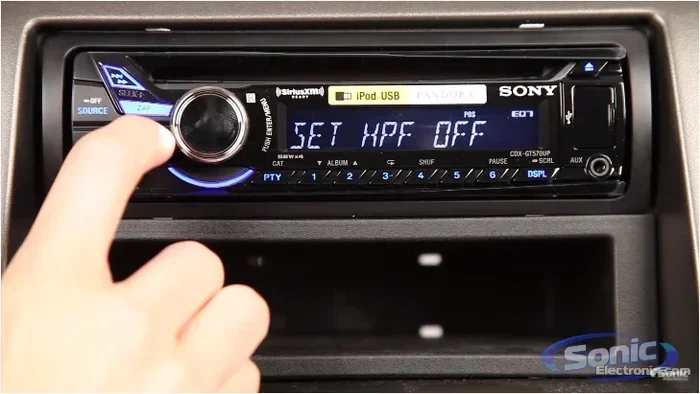
A soft reset is the first thing you should try. It restarts the radio’s software without erasing any of your saved stations, presets, or settings. Think of it like restarting your phone when it starts acting slow.
Here is how to do it:
- Turn off your car and remove the key from the ignition.
- Locate the power button on your radio unit.
- Press and hold the power button for about 10 to 15 seconds.
- Wait 30 seconds after the screen goes dark.
- Turn the car back on and check if the radio is working normally.
If the soft reset does not work, do not worry. Move on to the next method. A soft reset fixes about 60 percent of minor glitches, so your chances are good right out of the gate.
Method 2: The Factory Reset (Full Restore)
A factory reset wipes everything on your radio and returns it to the settings it had when you first bought it. You will lose all saved stations, custom EQ settings, Bluetooth pairings, and any personal adjustments. Use this method only when a soft reset does not solve the problem.
Here is how to perform a factory reset:
- Turn on your car but do not start the engine.
- Press and hold the “Setup” or “Menu” button on the radio face.
- Navigate to the “System” or “Factory” option using the tuning knob or touchscreen.
- Select “Reset to Factory Defaults.”
- Confirm your choice when prompted.
- Wait for the radio to restart — this may take one to two minutes.
After the reset, you will need to re-pair your phone, restore your favorite stations, and adjust the sound settings to your preference. It takes a few extra minutes, but it solves deep software issues that a soft reset cannot touch.
Some radios use a specific reset code. If your unit asks for a code, check your owner’s manual or look on the original packaging. For more on keeping your car’s electronics in top shape, read our guide on Can I Change The Sound System In My Car for helpful tips on managing your car audio setup.
Method 3: The Battery Disconnect Method
This method is the most powerful reset technique available. It resets every electronic system in your car, not just the radio. Use it when nothing else has worked, but be aware that you may need to reset your clock, power windows, and other settings afterward.
Here is what to do:
- Turn off your car and make sure the ignition is in the off position.
- Open the hood and locate the car battery.
- Use a wrench to loosen the negative (black) terminal first.
- Remove the cable from the battery post and tuck it away so it cannot touch the terminal.
- Wait at least 15 minutes — this allows all capacitors to fully discharge.
- Reconnect the negative cable and tighten it securely.
- Start your car and test the radio.
Important safety tip: Always disconnect the negative terminal first and reconnect it last. This prevents short circuits and protects your car’s electrical system. If you are uncomfortable working with a battery, have a friend help you or take your car to a mechanic.
Troubleshooting Common Radio Problems After a Reset
Resetting your radio often solves the problem, but sometimes new issues pop up afterward. Here is how to handle the most common post-reset scenarios.
Radio Screen Still Blank After Reset
If your display stays dark after a reset, the problem might be a blown fuse. Check the fuse box under your dashboard and look for the radio fuse. It is usually labeled “RADIO” or “AUDIO.” If the metal strip inside the fuse is broken, replace it with a new fuse of the same amperage.
Another possibility is a loose wiring harness behind the radio unit. If you are comfortable working behind the dashboard, you can gently pull the radio out and reseat the connections. Otherwise, a quick trip to a car audio shop can sort this out for you.
Static Noise Persists After Reset
Static after a reset often points to a grounding issue. Your radio needs a solid ground connection to produce clean audio. Check the ground wire behind the unit and make sure it is securely attached to the car chassis. Corrosion on the ground point can also cause static, so clean it with a wire brush if needed.
Weather changes can also affect radio reception. If you only hear static during certain seasons or in specific locations, the issue might be with your antenna rather than the radio itself. For more on car electrical issues that affect audio, see our article on Car Won’t Start And No Noise for related troubleshooting advice.
Radio Won’t Turn On Even After a Reset
This is usually a power supply problem. Check that the radio is getting power by looking for a dim glow or a brief flash when you turn the ignition on. If there is no response, the issue could be a faulty wiring harness, a blown fuse, or a damaged radio unit that needs replacement.
Before replacing the radio, try checking the ignition switch. Sometimes the accessory position on your ignition does not send power to the radio. Switching to the “ON” position instead of “ACC” can solve this. If you are interested in car technology and accessories, our piece on Can I Download An App To Start My Car explores other smart car features you might find useful.
Preventing Future Radio Problems
Once you get your digital car radio working again, you want to keep it that way. A little preventive maintenance goes a long way toward avoiding future headaches.
Simple Habits That Protect Your Car Radio
- Turn off the radio before shutting off your engine. This prevents power surges from hitting the unit when you restart.
- Keep your battery healthy. A weak battery causes voltage fluctuations that stress your radio’s internal components.
- Avoid spilling liquids near the radio unit. Even a small splash can cause short circuits and permanent damage.
- Update your radio firmware when available. Manufacturers release updates that fix bugs and improve performance.
- Use a surge protector or voltage regulator if you live in an area with frequent electrical storms.
When to Seek Professional Help
Most radio problems respond well to a reset, but some issues need a professional touch. If your radio produces a burning smell, makes popping sounds, or shows physical damage like cracked solder joints, stop using it immediately. Continuing to operate a damaged unit can cause further harm to your car’s electrical system.
A certified car audio technician can diagnose problems that go beyond a simple reset. They have specialized tools like multimeters, oscilloscopes, and diagnostic software that can pinpoint issues invisible to the naked eye. If you have tried every method in this guide and your radio still misbehaves, it is time to call in the experts.
Quick Tips for a Successful Radio Reset
Here are some extra tips to make your reset process smoother and more effective:
- Write down your radio code before resetting. Some units require a security code after a full reset. You can usually find this code on a sticker in your glove box or in your owner’s manual.
- Have your phone’s Bluetooth PIN ready. After a factory reset, you will need to re-pair your phone, so keep the PIN handy.
- Work in a well-lit area. Dashboards can be dark, and you do not want to accidentally pull the wrong cable.
- Take photos before disconnecting anything. This makes it easier to put everything back the way it was.
- Be patient. Some resets take longer than expected, especially after a battery disconnect. Give the system a full minute to boot up before assuming something went wrong.
Key Takeaways
- A soft reset is the fastest way to fix minor glitches without losing your saved stations and settings.
- A factory reset wipes all custom settings and returns your radio to its original state, which helps with persistent problems.
- Disconnecting the car battery is a reliable method that works when other reset options fail.
- Checking your fuse and wiring can reveal hidden issues that mimic radio problems.
- Updating your radio firmware can fix software bugs that cause display and sound issues.
- Knowing your car radio model helps you find the exact reset steps and avoid common mistakes.
- Regular maintenance of your car audio system prevents future issues and extends the life of your unit.
Conclusion
Resetting your digital car radio does not have to be stressful or complicated. Whether you choose a quick soft reset, a full factory restore, or the battery disconnect method, you now have the tools and knowledge to handle the job yourself. Most radio issues are minor software glitches that a simple reset can fix in just a few minutes.
Remember to start with the least invasive method and work your way up if needed. Check your fuses, inspect your wiring, and keep your radio firmware up to date to prevent future problems. Your car radio is an essential part of your driving experience, and taking care of it saves you time, money, and frustration.
Next time your digital car radio acts up, you will know exactly what to do. Grab your owner’s manual, follow the steps in this guide, and get back to enjoying clear music, traffic updates, and hands-free calls on the road. Happy listening!
Frequently Asked Questions
How long does it take to reset a digital car radio?
A soft reset takes about one to two minutes. A factory reset may take two to five minutes because the unit needs to restart and reload all default settings. The battery disconnect method requires waiting at least 15 minutes for the capacitors to fully discharge before reconnecting everything.
Will resetting my car radio erase my saved stations?
A soft reset keeps all your saved stations and settings intact. A factory reset, however, wipes everything and returns the radio to its original out-of-the-box state. After a factory reset, you will need to re-scan for stations and re-pair any Bluetooth devices.
Do I need any special tools to reset my digital car radio?
No special tools are needed for most resets. A soft reset simply requires pressing and holding a button. A factory reset uses the radio’s built-in menu system. The battery disconnect method only needs a basic wrench to loosen the battery terminal. You may want a flashlight to see behind your dashboard.
Why does my car radio keep needing resets?
If your radio keeps malfunctioning despite regular resets, there may be an underlying electrical issue. A weak car battery, a failing alternator, or corroded wiring can all cause repeated radio problems. In this case, it is best to have a mechanic inspect your car’s electrical system to find and fix the root cause.
Is it safe to reset my car radio while driving?
No, you should never attempt a reset while driving. Pull over to a safe location and turn off your engine before starting any reset procedure. Working on your radio while driving distracts you from the road and could lead to accidents. Always prioritize safety over convenience.
Can a power outage reset my car radio?
A power outage or a dead car battery can sometimes cause your radio to reset itself. When power is restored, the radio may display a security code or lose all saved settings. If this happens, simply enter your radio code (found in your owner’s manual) and re-scan for your favorite stations.