Can I Download an App to Start My Car From Anywhere
Yes, you can download an app to start your car from almost anywhere. Remote start apps use your phone and your vehicle’s built-in connectivity or an aftermarket device to let you turn the key without being inside the car. Whether you want comfort, safety, or just to avoid sitting in a freezing or sweltering car, these apps make it possible with a few taps on your screen.
Key Takeaways
- Remote start apps let you ignite your engine from your phone, no matter where you are.
- Most new vehicles with connected features support native mobile start apps right out of the box.
- Aftermarket devices can add remote start capability to older cars that lack built-in connectivity.
- Security features like encrypted signals and PIN codes keep your car safe from unauthorized access.
- Popular options include manufacturer apps like FordPass and Toyota Remote Connect, plus third-party tools like Viper SmartStart.
- You need a stable internet connection and a compatible vehicle to use these apps effectively.
📑 Table of Contents
Can I Download an App to Start My Car From Anywhere?
Let us get one thing straight. The idea of starting your car with your phone used to feel like science fiction. Today, it is a real, everyday convenience that millions of drivers enjoy. Can I download an app to start my car from my couch, my office, or even the grocery store parking lot? Absolutely. All you need is the right app, a compatible vehicle, and a working internet connection.
The rise of connected car technology has made this possible. Car makers now build smart car starter features directly into their vehicles. At the same time, aftermarket companies have created devices that bring this power to older models. Whether you drive a brand-new SUV or a classic truck, there is likely a way to start your engine remotely. Let us dive into how this works and what options are available to you.
How Remote Start Apps Work
Understanding how a remote start app works is simpler than you might think. The process relies on a connection between your phone and your car. Here is a breakdown of the basic steps involved.
The Technology Behind App-Based Car Starting
When you tap the start button in your app, it sends a signal through the internet to a cloud server. That server then relays the command to your vehicle’s onboard system. Your car receives the signal and fires up the engine. This whole process takes just a few seconds.
The key piece of technology here is car app connectivity. Modern vehicles use cellular modules built into the car. These modules stay connected to the internet at all times. When your phone sends a command, it reaches the cloud, which talks to the car’s module. No Bluetooth, no proximity needed. The car can be blocks away or even miles from where you stand.
Some mobile car starter systems also use GPS tracking. This lets you know exactly where your car is when you start it. It adds a layer of convenience and peace of mind, especially if you park in large lots or unfamiliar areas.
What You Need to Get Started
Before you rush to download an app, make sure you have the basics covered. Here is what you typically need:
- A compatible vehicle with built-in telematics or an aftermarket remote start module.
- A smartphone running iOS or Android.
- A working internet connection on both your phone and in the car.
- A subscription plan for some apps and vehicles. Not all services are free.
- A linked account with your car’s manufacturer or the app provider.
Without these pieces in place, your vehicle remote start experience will not work smoothly. Check your car’s manual or the manufacturer’s website to confirm compatibility before you commit.
Benefits of Starting Your Car From Anywhere
Why bother with a car starter app in the first place? The benefits go far beyond just looking cool. Real drivers use these tools every single day for practical reasons.
Comfort and Convenience
Imagine stepping outside on a freezing January morning. Your car is ice cold, and the windshield is covered in frost. With a smartphone car starter, you can warm up the engine, turn on the heat, and even start the defroster before you walk outside. You save time and avoid discomfort.
The same goes for summer. A remote engine start lets you cool down the interior before you get in. You do not have to sit in a sauna just to drive to work. These small conveniences add up to a much better daily experience.
Safety and Security
Starting your car remotely also improves safety. When you warm up the engine, the windows clear faster. You can see the road better, which reduces accident risk. Some app-based car starter systems also let you lock and unlock doors, honk the horn, or flash the lights. These features help you find your car in a crowded lot or deter potential thieves.
Many apps include keyless entry app features that let you unlock the car without taking your keys out of your pocket. This is especially helpful when your hands are full with groceries or luggage.
Popular Apps That Let You Start Your Car
The market is full of options, and choosing the right one can feel overwhelming. Let us look at the most popular auto start application choices and what makes each one stand out.
Manufacturer Apps vs. Third-Party Solutions
Manufacturer apps come built into your car’s system. They are designed by the same company that made your vehicle. Examples include FordPass for Ford vehicles, Toyota Remote Connect for Toyota, and BMW Connected for BMW models. These apps tend to offer the deepest integration with your car’s features.
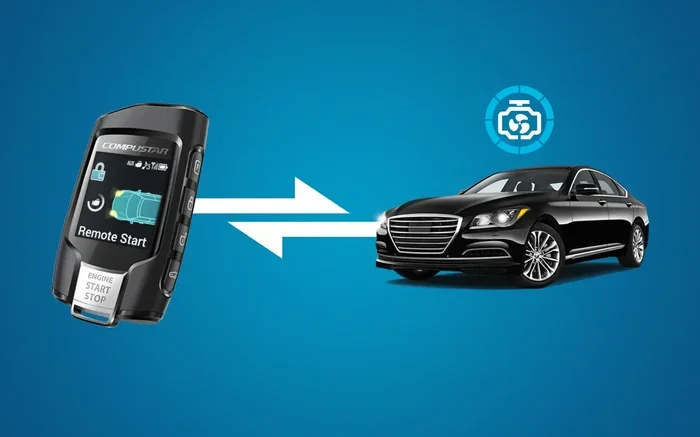
Third-party solutions work with a wider range of vehicles. Apps like Viper SmartStart, Compustar, and DroneMobile use a separate device installed in your car. They are a great choice if your car does not have native connectivity. These mobile app for cars tools often cost less upfront and support many brands and models.
Comparison of Top Car Start Apps
| App Name | Type | Compatibility | Monthly Cost | Key Features |
|---|---|---|---|---|
| FordPass | Manufacturer | Ford vehicles | Free (some features) | Remote start, lock/unlock, GPS tracking |
| Toyota Remote Connect | Manufacturer | Toyota/Lexus | Free trial, then paid | Remote start, climate control, roadside assist |
| Viper SmartStart | Third-Party | Most vehicles (with module) | $14.99+ | Remote start, GPS, theft alerts |
| Compustar | Third-Party | Most vehicles (with module) | $29.99+ | Two-way remote, app control, security |
| DroneMobile | Third-Party | Most vehicles (with module) | $19.99+ | Remote start, GPS tracking, text alerts |
As you can see, your choice depends on your vehicle, your budget, and the features you value most. Manufacturer apps are often cheaper or free, but third-party options give you more flexibility if you drive a non-supported brand.
Which Vehicles Are Compatible?
Not every car can run a car starter app out of the box. Compatibility depends on your vehicle’s age, model, and built-in technology. Here is what you need to know.
Newer Models with Built-In Connectivity
Most cars made after 2015 come with some form of connected car technology. Many 2020 and newer models include full app-enabled ignition support. If your car has a touchscreen infotainment system and a cellular connection, check the manufacturer’s app store. There is a good chance a native app already exists.
Popular brands with strong app support include Ford, Toyota, Chevrolet, BMW, Mercedes-Benz, and Tesla. These brands offer robust vehicle control app features that go well beyond just starting the engine. You can check tire pressure, lock doors, and even locate your car with a few taps.
Aftermarket Solutions for Older Cars
Driving an older model? You are not out of luck. Aftermarket app-based car starter devices can add remote start capability to almost any car. These systems plug into your car’s existing wiring and communicate with your phone through a dedicated module.
Popular aftermarket options include the Viper DS4+ and the Compustar Pro R5. These kits cost between $200 and $500, plus installation. They offer features like two-way remote control, GPS tracking, and theft alerts. A professional installer can set one up in a few hours, and you will have mobile car starter power for years to come.
Quick Tips for Using a Car Start App
Getting the most out of your car control app comes down to a few smart habits. Here are some quick tips that make a big difference.
- Always keep your app updated. Updates fix bugs and improve security. An outdated app can cause connection problems or leave vulnerabilities.
- Set a strong password. Use a unique password for your car app account. Combine letters, numbers, and symbols for the best protection.
- Enable two-factor authentication. If the app supports it, turn on 2FA. This adds an extra layer of security to prevent unauthorized access.
- Check your internet connection. Both your phone and your car need a solid data or Wi-Fi connection. Weak signals can delay or block commands.
- Know your local laws. Some areas have rules about idling cars unattended. Make sure you follow local regulations when using remote start features.
- Test your app regularly. Try starting your car remotely once in a while. This ensures everything works when you need it most.
Common Mistakes to Avoid
Even experienced users make mistakes with their vehicle remote start setup. Here are the most common ones and how to avoid them.
- Ignoring subscription costs. Some apps look free but charge monthly fees for full features. Read the fine print before you commit.
- Skipping installation for aftermarket kits. A sloppy install can cause electrical problems. Always use a certified professional for aftermarket devices.
- Forgetting to turn off the engine. Most apps have a timer that shuts the car off after a set period. But it is still good practice to double-check.
- Using public Wi-Fi to control your car. Public networks are less secure. Stick to your home Wi-Fi or cellular data for car commands.
- Not reading the manual. Every app and vehicle has specific instructions. Spend 15 minutes reading the guide to avoid frustration later.
Is It Safe to Start Your Car Remotely?
Safety is the number one concern for most drivers when they think about start car remotely technology. The good news is that modern car ignition app systems are built with security as a top priority.
Security Features to Look For
When evaluating a remote start app, look for these security features:
- Encrypted communication between your phone and the car. This prevents hackers from intercepting signals.
- PIN code or biometric login. These ensure that only you can send start commands.
- Automatic shutoff timers. Most systems turn the engine off after 10 to 15 minutes if no one enters the car.
- Real-time alerts. Good apps notify you if someone tries to access your car without permission.
- Geofencing. Some apps prevent the car from starting if it detects you are not within a certain distance from the vehicle.
Expert Insight: According to automotive security researchers, the biggest risk with remote start apps is not the technology itself, but poor user habits. Using weak passwords, ignoring updates, or connecting to unsafe networks creates vulnerabilities. Stay vigilant, and your smart car starter will be just as safe as your physical key.
Final Thoughts
So, can you download an app to start your car from anywhere? The answer is a clear yes. Whether you have a new vehicle with built-in connectivity or an older car with an aftermarket module, remote start apps put real power in your pocket. They save you time, boost comfort, and improve safety. The technology has matured to the point where these apps are reliable, secure, and easy to use.
Take some time to explore your options. Check if your car manufacturer offers a native app. Look into aftermarket solutions if needed. Pick the car starter app that fits your vehicle and your lifestyle. Once you experience the convenience of starting your car from anywhere, you will wonder how you ever drove without it. The future of vehicle control is here, and it starts with a single tap on your phone.
Frequently Asked Questions
Do I need a special phone to use a car start app?
No, you do not need a special phone. Most remote start apps work on any modern smartphone running iOS or Android. As long as your phone can connect to the internet, you should be good to go. Just make sure you keep your app updated for the best performance and security.
Can I start my car remotely if the battery is dead?
No, a car starter app cannot start your car if the battery is completely dead. The app sends a signal to the vehicle’s electrical system, which needs power to respond. If your battery is weak, you may still be able to start the car, but a fully dead battery will prevent any remote command from working.
Are remote start apps free to use?
Some manufacturer apps like FordPass offer free basic features, while others require a subscription. Third-party apps often charge a monthly fee for full functionality. Before downloading any app, check the pricing details so there are no surprises on your bill.
Is it legal to start my car remotely and walk away?
In most places, yes. However, some local laws restrict idling vehicles when no one is present. Always check your city or state regulations before using remote engine start features. Leaving your car running unattended in certain zones can result in fines.
Can I install a remote start app myself?
For manufacturer apps, you just download the app and link it to your car. For aftermarket devices, professional installation is strongly recommended. A certified installer ensures the wiring is done safely and the system integrates properly with your vehicle’s electronics.
What happens if someone hacks my car start app?
Reputable app-based car starter systems use encrypted signals and require secure login credentials. To minimize risk, use a strong password, enable two-factor authentication, and keep your app updated. Following these steps makes it extremely difficult for anyone to gain unauthorized access to your vehicle.
=== CONCLUSION ===
The ability to download an app to start your car from anywhere is no longer a luxury. It is a practical, affordable, and increasingly standard feature in today’s vehicles. Whether you choose a manufacturer app or an aftermarket solution, the convenience and peace of mind are hard to beat. With the right car starter system and a few smart habits, you can enjoy the power of remote start every single day.