How Do I Wipe My Car Touch Screen Safely and Quickly
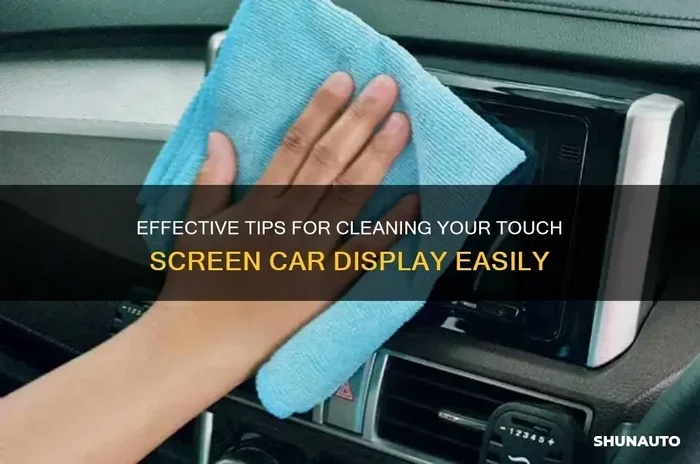
Learning how to wipe your car touch screen safely is essential for keeping your infotainment system looking great and working well. You need the right cloth, the right cleaner, and the right technique to avoid damage. Using harsh chemicals or rough fabrics can ruin your screen permanently. This guide walks you through every step so you can clean your display quickly and confidently at home.
Your car’s touch screen is one of the most-used features in your vehicle every single day. You tap it for directions, change the music, adjust the climate, and even answer calls. Over time, all that touching leaves behind fingerprints, smudges, grease, and dust. Knowing how to wipe your car touch screen safely makes a huge difference in both appearance and functionality.
A dirty screen is not just annoying. It can actually reduce visibility while driving, which creates a safety risk. Glare from fingerprints and streaks makes it harder to read maps or see buttons clearly. Cleaning your car display screen the wrong way, however, can cause permanent damage. Scratches, cloudiness, and coating damage are real risks if you use the wrong products or techniques. This guide covers everything you need to know to keep your screen spotless without any worries.
Whether you have a brand-new vehicle or a car that has been on the road for years, this article gives you practical steps you can follow right away. We will cover what products to use, what to avoid, and the exact method for a streak-free finish. By the end, you will feel confident tackling car touchscreen cleaning on your own. Let us get started.
Key Takeaways
- Use a microfiber cloth: This is the safest and most effective tool for cleaning any car touchscreen without scratching it.
- Avoid harsh chemicals: Ammonia, alcohol, and bleach-based cleaners can strip the anti-glare coating on your display.
- Spray cleaner on the cloth, not the screen: This prevents liquid from seeping into the edges and damaging internal components.
- Wipe gently in circular motions: Aggressive scrubbing creates micro-scratches and spreads dirt around instead of removing it.
- Apply a screen protectant after cleaning: A quality protectant adds a barrier that repels fingerprints and dust for longer.
- Clean your screen regularly: Weekly maintenance prevents buildup and makes each cleaning session faster and easier.
📑 Table of Contents
- Why Your Car Touch Screen Gets So Dirty
- What You Should Never Use on Your Car Touch Screen
- Best Products for Cleaning Your Car Touch Screen
- Step-by-Step Guide to Wiping Your Car Touch Screen Safely
- Quick Tips for Keeping Your Screen Clean Longer
- Common Mistakes People Make When Cleaning Car Screens
- Expert Insights on Automotive Touchscreen Care
- How Often Should You Clean Your Car Touch Screen
- Conclusion
Why Your Car Touch Screen Gets So Dirty
Understanding why your screen gets dirty helps you clean it more effectively and prevent buildup in the future. Several factors contribute to a grimy display, and most of them are completely normal.
Daily Touch and Oils From Your Skin
Every time you tap your screen, natural oils from your fingers transfer onto the surface. These oils attract dust and dirt particles from the air. Over a few days, this creates a greasy film that makes the screen look dull. Removing fingerprints from screen surfaces is the most common cleaning challenge car owners face.
Dust and Debris From the Environment
Your car sits in an environment full of dust, pollen, and tiny particles. Even with the windows closed, these particles enter through vents and settle on every surface. The screen acts like a magnet for this debris because of its smooth, static-prone surface. Regular dusting helps, but a proper wipe-down is necessary for deep cleaning.
Heat and Humidity Inside the Car
Hot weather causes the oils on your screen to soften and spread more easily. Humidity can also cause condensation to form on the display, which traps dust and creates water spots. This is why many people notice their screen gets dirtier faster during summer months. Interior car cleaning routines should account for these seasonal changes.
What You Should Never Use on Your Car Touch Screen
This is one of the most important sections of this guide. Using the wrong cleaning products can cause irreversible damage to your screen. Many common household cleaners that work fine for other surfaces are terrible for automotive displays.
Avoid Ammonia-Based Cleaners
Window cleaners like Windex contain ammonia, which is extremely harmful to touchscreen coatings. Ammonia strips away the anti-glare and oleophobic (oil-repelling) layers on your screen. Once these coatings are gone, they cannot be restored. Your screen will look hazy and feel sticky permanently. Avoid ammonia-based cleaners at all costs when cleaning any car display.
Stay Away From Alcohol and Bleach
High-concentration alcohol solutions and bleach-based products may seem like strong germ killers, but they dissolve the protective layer on capacitive touchscreens. Over time, this leads to discoloration and cracking of the screen surface. If a product label warns against use on plastics or coated surfaces, do not use it on your car screen.
Skip Paper Towels and Rough Fabrics
It might be tempting to grab a paper towel or a rough cloth from the kitchen, but these materials are too abrasive for delicate screen surfaces. They create tiny scratches called micro-scratches that build up over time and make the screen look cloudy. Always use a soft microfiber cloth designed for electronics or automotive use.
Do Not Spray Cleaner Directly on the Screen
Spraying liquid directly onto the screen is a mistake many people make. Liquid can seep into the edges and gaps around the display, reaching the internal electronics. This can cause short circuits, fogging between screen layers, and even complete display failure. Always apply cleaner to the cloth first, then wipe the screen.
Best Products for Cleaning Your Car Touch Screen
Choosing the right products makes the entire process safer and more effective. You do not need expensive specialty items, but you do need products specifically designed for screens.
Microfiber Cloths
A high-quality microfiber cloth is the single most important tool for car touch screen cleaning. Microfiber has ultra-fine fibers that trap dirt and oils without scratching. Look for lint-free microfiber cloths labeled safe for screens and optics. Keep a few clean ones in your car at all times.
Screen-Specific Cleaning Sprays
Many brands make cleaning sprays formulated specifically for touchscreens. These are alcohol-free and ammonia-free, making them safe for automotive displays. Popular options include electronics screen cleaners and automotive-specific screen wipes. Look for products that are labeled safe for capacitive and LCD screens.
Screen Protectants and Coatings
After cleaning, applying a screen protectant adds a thin hydrophobic layer that repels fingerprints and water. These products make future cleaning much easier. Some protectants also reduce glare, which improves visibility while driving. Choose a protectant that is non-greasy and does not interfere with touch sensitivity.
Distilled Water
If you prefer a simple, chemical-free approach, distilled water works well on its own for light cleaning. It does not leave mineral deposits like tap water does. For moderate grime, a mix of distilled water and a small amount of white vinegar creates a gentle, effective cleaning solution. This is a great option for those who want to avoid commercial products entirely.
Step-by-Step Guide to Wiping Your Car Touch Screen Safely
Now that you know what to use and what to avoid, here is the exact process for a safe and effective cleaning. Follow these steps every time for the best results.
Step 1: Gather Your Supplies
Before you start, make sure you have everything ready. You will need a clean microfiber cloth, a screen-safe cleaner (or distilled water), and a dry backup cloth. Having everything at hand prevents you from rushing or using substitutes that might damage the screen.
Step 2: Turn Off the Screen
Power off your infotainment system before cleaning. This makes it much easier to see dirt, smudges, and streaks. A dark screen highlights every spot and streak, so you can clean more thoroughly. It also reduces the risk of accidental inputs while you are wiping.
Step 3: Remove Loose Dust First
Use a dry microfiber cloth to gently wipe away loose dust and particles. This step is crucial because rubbing dust into the screen creates scratches. Use light, sweeping motions. Do not press hard. Let the cloth do the work.
Step 4: Apply Cleaner to the Cloth
Spray your cleaning solution onto the microfiber cloth, not directly on the screen. Two to three sprays are usually enough. If you are using a DIY solution, dampen the cloth lightly. The cloth should be moist, not soaking wet. Safe cleaning solution application is key to preventing liquid damage.
Step 5: Wipe in Circular Motions
Gently wipe the screen using small circular motions. Start from the center and work your way outward. This technique lifts dirt and oils effectively without spreading them around. Use light pressure only. Let the cleaning solution do the heavy lifting.
Step 6: Dry With a Clean Section of the Cloth
After cleaning, flip the cloth to a dry section and wipe the screen again to remove any remaining moisture and cleaner residue. This ensures a streak-free finish. Buff lightly in one direction for the best results. Your screen should feel smooth and look crystal clear.
Step 7: Apply a Protectant (Optional but Recommended)
Once the screen is completely dry, apply a thin layer of screen protectant using a fresh microfiber cloth. Spread it evenly with gentle circular motions and let it bond to the surface. This adds a protective barrier that repels future fingerprints and makes the next cleaning much faster.
Quick Tips for Keeping Your Screen Clean Longer
Regular maintenance reduces how often you need a deep clean. These simple habits keep your display looking great between thorough cleanings.
- Wash your hands before driving: Cleaner hands mean fewer oils on the screen. This single habit dramatically reduces smudge buildup.
- Keep a microfiber cloth in the center console: A quick wipe after every trip removes fresh fingerprints before they harden into a greasy film.
- Avoid touching the screen with wet fingers: Water droplets mix with skin oils and create stubborn spots that are harder to clean later.
- Use a screen cover or protector: A tempered glass or film protector takes the brunt of daily wear. You can replace it easily instead of cleaning the actual screen constantly.
- Clean your screen weekly: A five-minute weekly wipe-down prevents heavy buildup and makes the process faster each time.
Common Mistakes People Make When Cleaning Car Screens
Even with good intentions, many car owners make mistakes that harm their screens. Being aware of these errors helps you avoid them.
Using Your Shirt or Sleeve to Wipe
Your clothing fabric is not designed for delicate screens. It contains coarse fibers and trapped dirt particles that scratch the surface. Even soft-looking t-shirts can cause micro-scratches over time. Always reach for a proper microfiber cloth instead.
Cleaning Under Direct Sunlight
Cleaning your screen in direct sunlight causes the cleaner to evaporate too quickly. This leaves behind residue and streaks that are difficult to remove. Always clean in a shaded area or inside a garage. Streak-free cleaning works best when the product stays wet long enough to lift dirt properly.
Pressing Too Hard
Car touch screens are sensitive electronic devices. Pressing too hard can damage the touch sensors beneath the surface. It can also push dirt and particles into the screen coating, creating permanent marks. A light touch is all you need.
Neglecting the Edges and Bezels
Dirt and grime build up around the edges of the screen and on the bezels. When you wipe the screen, this debris gets pushed onto the clean surface. Always clean the edges and surrounding areas as part of your routine.
Using Household Glass Cleaners
Many household glass cleaners contain ammonia or other harsh chemicals. These products are formulated for home windows, not delicate automotive displays. They strip protective coatings and can cause cloudiness that cannot be reversed. Stick to products specifically made for screens.
Expert Insights on Automotive Touchscreen Care
Automotive professionals and detailers share a few insider tips that take your screen care to the next level.
Expert Insight 1: Detailers recommend keeping two separate microfiber cloths in your car. One for cleaning and one for drying. This prevents cross-contamination and ensures each step uses a fresh, lint-free surface. It is a small habit that makes a noticeable difference in the final result.
Expert Insight 2: Many professional car care specialists suggest using a screen-specific cleaner rather than homemade solutions for daily maintenance. Commercial screen cleaners are formulated to evaporate at the right speed, leaving no residue. They also contain ingredients that help maintain the oleophobic coating over time.
Expert Insight 3: If your screen has a stubborn grease spot that regular cleaning will not remove, dampen the cloth slightly with a mix of distilled water and isopropyl alcohol at a ratio of 10:1. This very mild solution is safe for most screens when used sparingly. Apply it to the cloth, not the screen, and wipe gently.
Expert Insight 4: For vehicles with LCD screens rather than OLED or AMOLED displays, extra care is needed. LCD screens are more sensitive to pressure and moisture. Use even lighter pressure and make sure no liquid pools near the edges. LCD screen car displays require gentler handling than other screen types.
How Often Should You Clean Your Car Touch Screen
The frequency of cleaning depends on how much you use your screen and your driving environment. As a general rule, a quick wipe with a dry microfiber cloth should happen every few days. A deeper clean with a proper screen cleaner should be done once a week or every two weeks.
If you drive in dusty areas, near the ocean, or in heavy traffic, you may need to clean more often. Pollen, salt air, and road grime all accelerate buildup. Pay attention to how your screen looks and feels. If it looks hazy or feels sticky, it is time for a cleaning session.
For families with young children who constantly touch the screen, weekly cleaning is a must. Kids’ fingers leave more oil and more fingerprints than adult hands. Keeping a pack of screen-safe wipes in the back seat makes quick cleanups easy for busy parents.
Conclusion
How do I wipe my car touch screen safely is a question every car owner should know the answer to. Your touch screen is a significant investment in your vehicle’s technology and convenience. Taking a few minutes to clean it properly protects that investment and keeps your driving experience enjoyable.
The key is to use the right tools, avoid harmful products, and follow a gentle technique. A microfiber cloth, a screen-safe cleaner, and light circular motions are all you need for a perfect result. Regular maintenance makes each session faster and keeps your display looking brand new for years.
Start implementing these steps today. Your screen will thank you with a clearer picture, better touch response, and a longer lifespan. Clean screens make for better driving. Make it a habit and enjoy the difference every time you tap your display.
Frequently Asked Questions
Can I use baby wipes to clean my car touch screen?
Most baby wipes contain chemicals and moisturizers that leave a residue on screens. They can also be too wet, allowing liquid to seep into the edges of the display. It is much safer to use a microfiber cloth with a screen-specific cleaner or distilled water for a streak-free result.
What is the best cloth for cleaning a car touchscreen?
A high-quality microfiber cloth is the best option for cleaning any car touchscreen. Microfiber is soft enough to avoid scratches and absorbent enough to lift oils and dirt effectively. Look for lint-free cloths designed specifically for electronics or automotive use.
Will vinegar damage my car touch screen?
A very diluted vinegar solution (one part vinegar to ten parts distilled water) is generally safe for occasional use. However, frequent use of vinegar can degrade the oleophobic coating over time. For regular cleaning, a dedicated screen cleaner is a better and safer choice.
How do I remove stubborn grease spots from my car screen?
For stubborn grease, dampen a microfiber cloth with a screen-safe cleaner and gently rub the spot in small circular motions. Do not press hard. Let the cleaner dissolve the grease for a few seconds before wiping it away. A dry section of the cloth can be used to buff the area afterward for a clear finish.
Is it safe to use hand sanitizer on my car touchscreen?
Hand sanitizer typically contains high levels of alcohol, which can damage the protective coating on your car screen over time. It may also leave a sticky residue that attracts more dirt. Avoid using hand sanitizer on your display. Stick to products made specifically for screens.
Can I use a wet wipes brand like Clorox wipes on my car screen?
No, Clorox and similar disinfecting wipes contain chemicals and surfactants that are too harsh for automotive touchscreens. They can strip coatings, leave streaks, and cause long-term damage. Always use a dedicated screen cleaner and a soft microfiber cloth instead for safe and effective cleaning.