How Do I Fix An Unresponsive Touch Screen
An unresponsive touch screen can be frustrating, but most issues are easy to fix at home. This guide walks you through simple resets, cleaning tips, calibration steps, and software updates that restore your screen’s responsiveness. We also cover when it is time to see a professional and how to prevent future problems.
Have you ever tapped your screen and nothing happened? A frozen or unresponsive touch screen can turn a simple task into a major headache. Whether it is your car’s infotainment system or your phone, the experience is always the same: frustration.
The good news is that you do not need to be a tech expert to fix this problem. Most of the time, a few simple steps bring your screen back to life. In this guide, we will walk you through every fix you need to try. We will cover everything from basic restarts to advanced troubleshooting. By the end, you will know exactly what to do when your touch screen stops responding.
Let us get started. No jargon, no complicated tools, just straightforward advice that actually works.
Key Takeaways
- Restart First: A simple soft reset solves the majority of unresponsive touch screen issues in minutes.
- Clean the Screen: Dirt, oil, and moisture are common culprits that block touch sensitivity.
- Check for Software Updates: Outdated firmware often causes freezing and lag on touch displays.
- Calibrate Your Screen: Recalibrating the touch sensor can fix accuracy and responsiveness problems.
- Avoid Extreme Temperatures: Heat and cold can temporarily disable your touch screen until conditions normalize.
- Know When to Seek Help: Hardware damage requires professional repair and should not be ignored.
📑 Table of Contents
- Why Does a Touch Screen Become Unresponsive?
- How Do I Fix an Unresponsive Touch Screen: Step-by-Step Fixes
- Advanced Troubleshooting for Persistent Issues
- How to Prevent Touch Screen Problems in the Future
- When Should You Replace the Touch Screen?
- Common Mistakes People Make When Their Touch Screen Stops Working
- Expert Insight: What Professionals Look For First
- Key Takeaways
Why Does a Touch Screen Become Unresponsive?
Understanding the cause helps you pick the right fix. Touch screens rely on sensors that detect pressure or electrical signals from your fingers. When something interferes with that process, the screen stops working properly. Here are the most common reasons your touch screen not responding issue happens.
Dirt and Grime Buildup
Your screen collects oil, dust, and fingerprints every day. A thick layer of grime can block the sensors from reading your touch. This is especially common on car dashboards where the screen sits in a hot, greasy environment. A quick wipe with a microfiber cloth often solves this instantly.
Software Glitches and Freezes
Just like any computer, a touch screen runs on software. Sometimes the system gets stuck in a loop or crashes. When this happens, the screen looks normal but does not react to any input. A software glitch can come from a bad update, a background app, or simply running the system for too long without a restart.
Temperature Extremes
Car touch screens are especially vulnerable to temperature swings. In freezing winter mornings, the screen may lag or freeze completely. In hot summer months, the display can become sluggish or unresponsive. Most screens work best between 50°F and 95°F. If your car has been sitting in the sun, give it a few minutes to cool down before you try using the screen again.
Hardware Damage
Sometimes the problem is physical. A cracked screen, loose connection, or damaged digitizer can make the entire touch surface stop working. Unlike software issues, hardware damage will not go away on its own. You will need professional repair or a full screen replacement.
Electrical Interference
Other electronic devices nearby can sometimes interfere with your touch screen’s sensors. This is less common but worth considering. For example, if you recently installed a new dash cam or phone charger, it might be causing the interference. Switching drive modes or turning off nearby devices can help you test this theory.
How Do I Fix an Unresponsive Touch Screen: Step-by-Step Fixes
Now that you know the common causes, let us dive into the fixes. We recommend trying these steps in order, starting with the simplest solutions first.
Step 1: Perform a Soft Reset
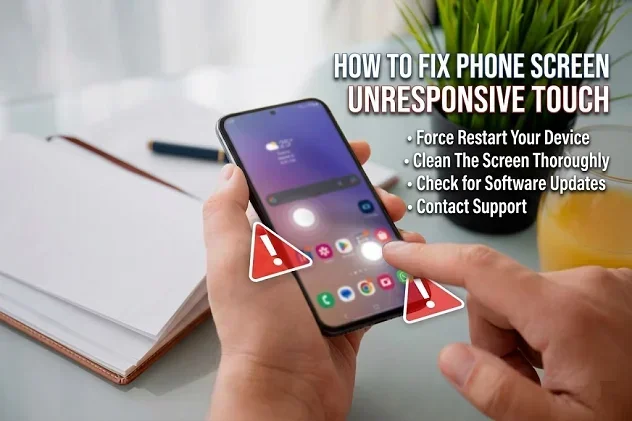
A soft reset is the easiest and most effective fix for most touch screen problems. It clears temporary glitches without deleting any of your data or settings.
For most devices, you just need to hold down the power button for 10 to 15 seconds. The screen will go black and then restart. Once it boots back up, try tapping the screen again.
For car infotainment systems, the process is slightly different. You usually need to press and hold the power knob or button on the unit itself. Some systems also allow you to unplug the fuse for 30 seconds and then reconnect it. Check your vehicle’s manual for the exact steps.
Quick Tip: Always try a soft reset first. It works more often than you might think and takes less than a minute.
Step 2: Clean the Screen Thoroughly
This sounds too simple, but it works more often than not. A dirty screen can mimic a broken touch sensor. Here is how to do it properly:
- Use a soft microfiber cloth — the kind you use for glasses.
- Dampen the cloth slightly with distilled water if needed.
- Gently wipe the entire screen in circular motions.
- Avoid using paper towels or rough fabrics, as they can scratch the surface.
- Do not spray liquid directly onto the screen. Always apply it to the cloth first.
After cleaning, wait a few seconds for the screen to dry completely. Then test the touch response again. You would be surprised how many touchscreen troubleshooting cases end right here.
Step 3: Update the Software
Outdated software is a hidden cause of many screen problems. Manufacturers release updates that fix bugs, improve performance, and address known issues with touch responsiveness.
For car systems, go to the settings menu and look for a “System Update” or “Software Update” option. If your car supports over-the-air updates, it will notify you when one is available. For phones and tablets, check your app store or system settings for pending updates.
Keeping your software up to date also helps prevent issues when you want to change the sound system or adjust other settings on your car’s display. An updated system ensures all features work smoothly together.
Step 4: Calibrate the Touch Screen
Over time, your touch screen can lose its calibration. This means the spots where you tap do not match where the system registers the input. Calibration fixes this misalignment.
Many devices have a built-in calibration tool in the settings menu. Look for “Touch Sensitivity” or “Screen Calibration” under the display settings. Follow the on-screen prompts to complete the process.
For car systems, calibration might require a trip to the dealership or a qualified mechanic. Some newer vehicles allow you to access calibration through a hidden menu. Search online for your specific model and year to find the right steps.
Step 5: Remove Screen Protectors and Cases
Thick or poorly fitted screen protectors can interfere with touch sensitivity. The same goes for bulky cases that press against the screen edges. If you recently added a protector or case and noticed the problem, try removing it temporarily to see if the screen responds better.
Use high-quality, device-specific protectors that are designed for your exact model. Cheap universal protectors often cause more problems than they solve.
Step 6: Check for Electrical Interference
If you have recently added new electronics to your car or device, they might be causing interference. Try turning off or unplugging nearby devices one at a time to see if the touch screen starts working again.
Common culprits include:
- Aftermarket phone chargers
- Dash cameras
- Bluetooth adapters
- GPS trackers
If removing one of these devices fixes the problem, you have found your answer. You may need to reposition the device or use a different model that produces less interference.
Advanced Troubleshooting for Persistent Issues
If the basic steps did not fix your unresponsive touch screen, it is time to dig deeper. These advanced solutions address more complex problems.
Perform a Factory Reset
A factory reset wipes all data and settings and returns the device to its original state. This is a powerful fix for stubborn software issues that a simple restart cannot handle.
Warning: A factory reset deletes everything on the device. Back up your data before proceeding. For car systems, this may also reset your radio presets, Bluetooth connections, and navigation saved addresses.
To perform a factory reset, go to the settings menu and look for “Reset” or “Factory Reset.” Follow the prompts carefully. The device will restart and you will need to set it up again from scratch.
Check for Hardware Problems
Sometimes the issue is physical damage that no software fix can address. Here are signs that your touch screen has a hardware problem:
- The screen is visibly cracked or shattered.
- Parts of the screen respond while others do not.
- You see discoloration or dark spots on the display.
- The screen flickers or shows lines across the surface.
- Touch response is completely absent even after a full reset.
If you notice any of these signs, the digitizer or display panel is likely damaged. You will need a professional inspection and possibly a replacement part.
Seek Professional Help
Do not hesitate to take your device or vehicle to a professional if the basic fixes do not work. A qualified technician can diagnose issues that are not visible to the naked eye. They have specialized tools to test the digitizer, display connections, and internal wiring.
For car touch screens, a dealership or certified auto electronics shop is your best bet. They have access to manufacturer-specific diagnostic tools and software. Changing your ECU yourself might seem tempting, but touch screen issues are better left to professionals who understand the full electrical system of your vehicle.
How to Prevent Touch Screen Problems in the Future
Prevention is always easier than repair. Here are simple habits that keep your touch screen working smoothly for years to come.
Keep the Screen Clean Regularly
Make it a habit to wipe down your screen at least once a week. A quick pass with a microfiber cloth removes oil and dust before they build up enough to cause problems. This is especially important for car screens that sit exposed to the elements.
Install Software Updates Promptly
When your device notifies you of an available update, install it soon. Updates often include bug fixes for touch responsiveness and overall system stability. Delaying updates leaves you vulnerable to known issues that have already been patched.
Avoid Extreme Temperatures
Do not leave your device or car in direct sunlight for extended periods. In winter, try to warm up the car before relying on the touch screen. Parking in a garage or shaded area helps maintain a stable temperature for your electronics.
Use Quality Accessories
Invest in screen protectors and cases from reputable brands. Cheap accessories may save money upfront but can cause touch sensitivity issues that cost more to fix later. When adding aftermarket electronics to your car, choose quality components that are compatible with your vehicle’s system.
Restart Your System Regularly
Just like your phone benefits from an occasional restart, so does your car’s infotainment system. A weekly reboot clears temporary files and refreshes the system. This simple habit can prevent many of the issues we have discussed in this guide.
When Should You Replace the Touch Screen?
Sometimes fixing the problem is not worth the cost or effort. Here are situations where replacement makes more sense than repair:
- The screen is cracked or shattered beyond repair.
- Multiple touch points have stopped working and calibration does not help.
- The repair cost exceeds 50% of the price of a new screen or device.
- The screen flickers constantly and resets do not fix it.
- Your vehicle is older and a new infotainment system would add more value.
Before you decide on replacement, get a quote from a professional. Sometimes what looks like a total failure is actually a simple fix that costs much less than you expect.
Common Mistakes People Make When Their Touch Screen Stops Working
Avoid these common pitfalls that make the problem worse or delay the fix:
- Ignoring the problem: A small glitch can become a bigger issue if left unaddressed. Restart the system at the first sign of trouble.
- Using harsh chemicals: Avoid alcohol-based cleaners or abrasive wipes. They can damage the screen’s protective coating and make touch sensitivity worse.
- Tapping too hard: Pressing aggressively on a frozen screen will not help and can cause further damage to the digitizer.
- Skipping backups before a reset: Always back up your data before performing a factory reset. Lost data cannot always be recovered.
- Attempting complex repairs yourself: Opening the device or car console without proper knowledge can cause additional damage and void your warranty.
Expert Insight: What Professionals Look For First
Automotive and electronics technicians follow a systematic approach when diagnosing touch screen issues. They start with the simplest possible explanation and work their way up. Most professionals agree that the first three things to check are:
- A soft reset or restart
- Screen cleanliness and physical condition
- Software version and update status
If these three steps do not reveal the problem, technicians move on to diagnostic tools that test the digitizer’s electrical output. This is where hidden hardware issues come to light. Understanding this process helps you appreciate why we recommend trying the simple fixes first before moving to advanced solutions.
Professionals also note that touch screen sensitivity problems in cars are becoming more common as vehicles add more electronic features. The more complex the system, the more potential points of failure. Keeping your system updated and clean is your best defense against these issues.
For those who have added safety features like blind spot monitoring or other driver-assist technologies, the touch screen often serves as the control hub. Keeping it responsive is not just about convenience — it is about safety on the road.
Key Takeaways
- A soft reset solves most issues: Start here every time your screen stops responding. It takes less than a minute and fixes the majority of problems.
- Clean your screen regularly: Dirt and oil are the most common and overlooked causes of touch screen unresponsiveness.
- Keep software updated: Manufacturers release fixes for known touch issues through updates. Staying current prevents many problems.
- Calibration matters: A misaligned touch screen can feel completely broken even when the hardware is fine.
- Know your limits: Hardware damage needs professional attention. Do not try to fix a cracked screen with software tricks.
- Prevention saves time and money: Regular maintenance and good habits keep your touch screen working smoothly for years.
Fixing an unresponsive touch screen does not have to be stressful. Most of the time, the problem is simple and the fix is quick. Start with a soft reset, clean the screen, and check for updates. If those steps do not work, move through the advanced troubleshooting options we covered. And remember, there is no shame in calling a professional when the problem goes beyond DIY fixes.
By following the steps in this guide, you will be able to handle almost any touch screen not responding situation with confidence. Keep this article saved for the next time your screen gives you trouble. A little knowledge goes a long way toward keeping your devices and your car running smoothly.
Stay proactive with maintenance, keep your software current, and treat your screen with care. Your touch screen will thank you with years of reliable, responsive performance.
Frequently Asked Questions
Why is my touch screen completely unresponsive even after a restart?
A restart that does not fix the issue usually points to a deeper software problem or hardware damage. Try performing a factory reset after backing up your data. If the screen still does not respond, the digitizer or display panel may be physically damaged and needs professional inspection.
Can cold weather make my car touch screen stop working?
Yes, cold temperatures can temporarily freeze the touch sensors and make the screen unresponsive. This is especially common in winter mornings. Let the car warm up for a few minutes before using the screen. If the problem persists in normal temperatures, you may have a hardware issue.
How often should I calibrate my car touch screen?
Most car touch screens do not need regular calibration. You should only recalibrate if you notice tapping errors or misaligned responses. This might happen after a screen replacement, a software update, or if the screen has been exposed to extreme conditions.
Will a screen protector affect touch sensitivity?
Some screen protectors, especially thick or low-quality ones, can reduce touch sensitivity. High-quality protectors designed for your specific device model should not cause noticeable problems. If you notice issues after applying a protector, try removing it to see if the screen responds normally.
How much does it cost to replace a car touch screen?
The cost varies widely depending on the vehicle make and model. A basic replacement can range from $200 to $500, while luxury or high-tech systems can cost $1,000 or more. Always get a quote from a certified technician before deciding on replacement.
Can I fix a cracked touch screen myself?
We strongly recommend against DIY repairs for cracked screens. Attempting to replace a screen without proper tools and experience can cause further damage to the display or internal components. A professional repair ensures the job is done correctly and safely.