Is There Really a Way to Turn Off Smart Cruise Control
Many drivers wonder if there is really a way to turn off smart cruise control. The good news is that yes, you can disable it in most vehicles. Whether you prefer manual driving or need to troubleshoot an issue, turning off smart cruise control is straightforward. We will walk you through the exact steps for different car brands and explain why you might want to do so.
Have you ever been driving down the highway and thought, “I wish I could just turn this thing off?” That is exactly how a lot of drivers feel about their smart cruise control system. It is supposed to make driving easier, but sometimes it gets in the way. You might be dealing with heavy traffic, winding roads, or you just want full control of your vehicle. Whatever the reason, the question remains the same: is there really a way to turn off smart cruise control?
The short answer is yes. You can turn off smart cruise control in almost every modern vehicle. But the method depends on your car brand, model, and year. Some vehicles have a simple button on the steering wheel. Others require you to dig through a settings menu on the dashboard screen. And in some cases, a simple tap on the brake pedal does the trick instantly.
In this article, we will show you exactly how to disable smart cruise control in different vehicles. We will also cover why you might want to turn it off, what happens when you do, and how to avoid common mistakes. By the end, you will know everything you need to take back full control of your driving experience.
Key Takeaways
- You can turn off smart cruise control: Most vehicles have a simple button or menu option to disable the system.
- Methods vary by car brand: Toyota, Honda, Ford, and Tesla all have different ways to cancel the feature.
- Tapping the brake cancels it instantly: This is the universal override for all smart cruise control systems.
- Disabling it gives you full manual control: You decide your speed and following distance without automation.
- Some systems auto-resume: Know how to prevent your car from reactivating smart cruise control after you turn it off.
- Regular maintenance helps: Clean sensors and cameras keep your cruise control system working properly when you need it.
📑 Table of Contents
- What Is Smart Cruise Control?
- Why Would You Want to Turn Off Smart Cruise Control?
- How to Turn Off Smart Cruise Control: Step by Step
- Smart Cruise Control vs Regular Cruise Control
- Common Problems When You Disable Smart Cruise Control
- Should You Keep Smart Cruise Control Enabled?
- Expert Tips for Managing Cruise Control Features
- Conclusion
What Is Smart Cruise Control?
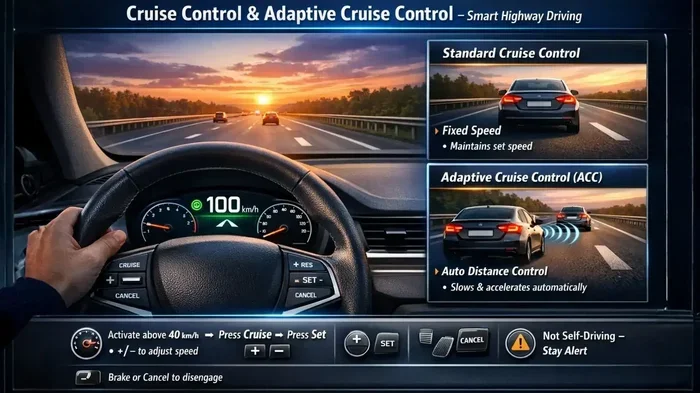
Before we dive into how to turn it off, let us quickly understand what smart cruise control actually does. Unlike traditional cruise control, which simply maintains a set speed, smart cruise control uses sensors and cameras to adjust your vehicle’s speed automatically. It keeps a safe distance from the car ahead of you.
This system is also called adaptive cruise control in many vehicles. It relies on a radar sensor and sometimes a forward-facing camera to detect other cars on the road. When the car in front slows down, your car slows down too. When the road clears, it speeds back up to your set speed.
Smart cruise control is part of a broader category of driver assistance features. These systems are designed to reduce fatigue on long drives and improve safety on highways. But they are not perfect. Sometimes the system reacts too slowly, or it does not work well in bad weather. That is when many drivers start looking for a way to take back the wheel, literally.
How Smart Cruise Control Works
The smart cruise control system uses a few key components to function:
- Radar sensor: Usually located in the front bumper, it sends out signals that bounce off other vehicles.
- Camera: Mounted near the rearview mirror, it reads road signs and detects lane markings.
- Control module: The brain of the system that processes data and adjusts the throttle and brakes.
- Throttle actuator: This controls how much gas the engine receives based on the system’s decisions.
All of these parts work together to give you a semi-automated driving experience. But when something goes wrong or you just want a break from the automation, knowing how to turn it off becomes essential.
Why Would You Want to Turn Off Smart Cruise Control?
There are several perfectly valid reasons to disable smart cruise control. Let us look at the most common ones that drivers tell us about.
Heavy Traffic and Stop-and-Go Driving
In dense city traffic or stop-and-go highway situations, smart cruise control can feel more like a nuisance than a help. The system constantly adjusts your speed, which can make the ride feel jerky. Some drivers find it easier to just control their own speed and distance from other cars.
Winding or Mountain Roads
Smart cruise control works best on straight, flat highways. On winding roads or steep mountain passes, the system may not respond quickly enough to sharp curves. This is when you want full manual control over your vehicle’s speed and braking.
Bad Weather Conditions
Rain, fog, snow, and ice can interfere with the radar sensor and camera that power smart cruise control. When these sensors get blocked or confused, the system may not work reliably. In these conditions, turning it off is the safer choice.
System Malfunctions
Sometimes the smart cruise control system simply malfunctions. You might see warning lights on the dashboard, or the system might not respond when you expect it to. In these cases, disabling it prevents unpredictable behavior while you drive.
Personal Preference
Some drivers just do not like the feel of automated systems. They prefer the traditional driving experience where they are fully in charge at all times. That is completely fine. Smart cruise control is a tool, and you should use it only when it makes your drive better.
How to Turn Off Smart Cruise Control: Step by Step
Now let us get to the part you have been waiting for. Here is how to turn off smart cruise control in some of the most popular car brands on the road today.
Toyota and Lexus
In most Toyota and Lexus vehicles, smart cruise control is part of the Toyota Safety Sense system. To turn it off:
- Press the CRUISE MAIN button on the steering wheel.
- The smart cruise control indicator light on the dashboard will turn off.
- Alternatively, press the CANCEL button to temporarily disengage the system.
If you want to completely disable the smart cruise control feature every time you start the car, you can go into the vehicle settings menu on the touchscreen. Look for Driver Assistance settings and toggle the Adaptive Cruise Control option off.
Honda and Acura
Honda vehicles use a system called Honda Sensing. Here is how to turn off smart cruise control:
- Press the MAIN button on the steering wheel controls.
- The ACC (Adaptive Cruise Control) indicator will turn off.
- To completely disable the system, press the CMBS button (this also turns off collision mitigation).
You can also access the Honda Sensing settings through the infotainment screen. Look for the CRUISE or DRIVER ASSISTANCE menu and switch it off.
Ford
Ford vehicles use Ford Co-Pilot360 technology. To disable smart cruise control:
- Tap the brake pedal. This immediately cancels the cruise control system.
- Press the SET or CRUISE button on the steering wheel to fully deactivate it.
- You can also go to Settings on the touchscreen and find the Driver Assist options to turn it off permanently.
Tesla
Tesla vehicles have a unique approach. Their Autopilot feature includes smart cruise control. To turn it off:
- Tap the Autopilot icon on the touchscreen.
- Select Autosteer Off or Full Autopilot Off depending on your model.
- You can also hold the Autopilot stalk for two seconds to temporarily disable it.
Keep in mind that Tesla allows you to re-enable Autopilot with a simple screen tap. So if you want to keep it off, you may need to adjust the Autopilot settings in the vehicle menu.
General Method: Brake Pedal Override
Here is a universal truth about smart cruise control systems. Tapping the brake pedal will almost always cancel the system immediately. This works in nearly every car on the road today. It is the simplest and fastest way to take control back when you need it.
However, this is a temporary cancellation. The smart cruise control system will usually re-engage if you press the RES (resume) button on the steering wheel. So if you want it completely off, you need to follow the brand-specific steps above.
Smart Cruise Control vs Regular Cruise Control
It helps to understand the difference between smart cruise control and regular cruise control. This knowledge makes it easier to decide when to use each one and when to turn them off.
| Feature | Regular Cruise Control | Smart Cruise Control |
|---|---|---|
| Maintains set speed | Yes | Yes |
| Adjusts for traffic | No | Yes |
| Uses sensors/cameras | No | Yes |
| Works in stop-and-go | No | Yes |
| Can be overridden by brake | Yes | Yes |
| Turn off method | Single button | Button or menu |
| Best for | Open highways | Mixed driving conditions |
Regular cruise control is simpler and easier to turn on and off. Smart cruise control offers more convenience but comes with more complexity. If you find yourself fighting the system more than using it, switching to regular cruise control or turning it off entirely might be the right move.
Common Problems When You Disable Smart Cruise Control
Turning off smart cruise control is usually simple, but sometimes you run into issues. Here are the most common problems and how to fix them.
The System Keeps Coming Back On
Some vehicles have a setting that automatically re-enables smart cruise control every time you start the engine. If you want it permanently off, you need to go into the vehicle settings and disable the auto-start feature. Check your owner’s manual for the exact steps.
Warning Lights Stay on the Dashboard
After you turn off smart cruise control, you might still see a warning light on the dashboard. This usually means the system is in standby mode, not fully disabled. Tapping the brake pedal again or cycling the ignition should clear it.
Sensors Are Dirty or Blocked
If your smart cruise control is not working properly even after you try to turn it off, the issue might be dirty sensors. Snow, mud, or debris on the front bumper can block the radar sensor. Cleaning the sensor area usually fixes the problem.
Software Glitches
Like any computerized system, smart cruise control can experience software glitches. If the system is acting up, try a full system reset. Turn off the engine, wait 30 seconds, and restart. If the problem persists, a visit to the dealership for a software update might be necessary.
Should You Keep Smart Cruise Control Enabled?
Now that you know how to turn off smart cruise control, the next question is: should you? The answer depends on your driving habits, the roads you travel, and your comfort level with automation.
Smart cruise control shines on long highway drives. It reduces fatigue and helps you maintain a safe following distance. If you drive mostly on open highways and clear roads, keeping it enabled can be a real benefit.
But if you drive in heavy city traffic, on winding roads, or in areas with unpredictable weather, turning it off makes a lot of sense. You know your driving best. Trust your instincts and use the tools that make you feel safer and more in control.
The key takeaway is that smart cruise control is there to assist you, not replace you. You are always the driver, and you should always feel comfortable with how your vehicle is behaving on the road.
Expert Tips for Managing Cruise Control Features
Here are some practical tips from experienced drivers and automotive experts to help you get the most out of your smart cruise control system.
- Clean your sensors regularly: A quick wipe of the front bumper area keeps the radar sensor and camera working properly.
- Know your override buttons: Always know where the brake pedal, cancel button, and resume button are on your steering wheel.
- Read your owner’s manual: Every vehicle is different. The manual has the exact steps for your specific model.
- Update your software: Manufacturers regularly release updates that improve smart cruise control performance and reliability.
- Do not rely on it in all conditions: The system is designed for certain driving scenarios. Use your judgment in others.
- Practice in safe areas: If you are new to your vehicle’s driver assistance features, practice in empty parking lots or quiet roads first.
Conclusion
So, is there really a way to turn off smart cruise control? Absolutely. Whether you tap the brake pedal, press a steering wheel button, or dig into your vehicle settings menu, you have full control over this feature. Smart cruise control is a helpful tool, but it should always serve you, not the other way around.
We have covered how to disable the system in Toyota, Honda, Ford, Tesla, and other brands. We have looked at why you might want to turn it off and what to do when things go wrong. The most important thing to remember is that you are the driver. Use smart cruise control when it makes sense, and turn it off when it does not.
Take some time to familiarize yourself with your specific vehicle’s controls. Read the manual, experiment with the settings, and find what works best for your driving style. Safe travels start with you being in the driver’s seat, both literally and figuratively.
Frequently Asked Questions
Can I permanently disable smart cruise control in my car?
Yes, most vehicles allow you to permanently disable smart cruise control through the settings menu on the infotainment screen. The exact steps vary by brand and model, but the option is usually found under Driver Assistance or Cruise Control settings.
Does tapping the brake pedal turn off smart cruise control?
Yes, tapping the brake pedal is the universal way to cancel smart cruise control in virtually every vehicle. However, this is a temporary cancellation. The system will usually re-engage if you press the resume button on the steering wheel.
Will turning off smart cruise control affect my car’s safety features?
Turning off smart cruise control does not disable other safety features like automatic emergency braking or lane departure warnings. These systems often work independently. However, some features like traffic jam assist may also turn off when you disable the cruise control system.
Can dirty sensors cause smart cruise control to malfunction?
Yes, dirt, snow, or debris on the radar sensor or front-facing camera can cause smart cruise control to malfunction or fail to activate. Keeping the sensor area clean is one of the easiest ways to maintain proper system function.
Is it legal to drive with smart cruise control turned off?
Absolutely. Turning off smart cruise control is completely legal and is actually recommended in many driving situations. Manual control of your vehicle gives you the flexibility to respond to road conditions that automated systems may not handle well.
How do I know if smart cruise control is turned off?
Most vehicles display an indicator light on the dashboard when smart cruise control is active. When you turn it off, this light will go out. If you are unsure, check your instrument cluster or infotainment screen for the current status of the system.