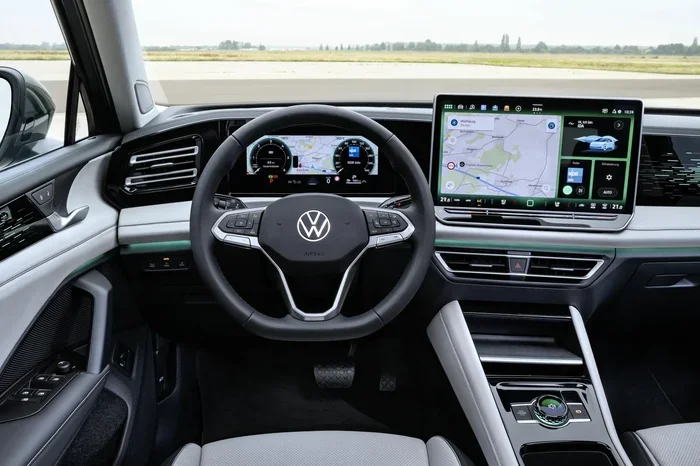
How to Change the Time on a Volkswagen Tiguan Guide
Changing the time on a Volkswagen Tiguan is simple once you know where to look. Whether you drive a newer model with a touchscreen or an older version with physical buttons, this guide walks you through every method. You will learn how to adjust the clock in the infotainment system, switch between 12-hour and 24-hour formats, and fix common issues. Keep your vehicle’s clock accurate with these easy tips.
Have you ever glanced at your dashboard and realized your Volkswagen Tiguan clock is off by a few hours? It happens to the best of us. Maybe you traveled across time zones, or perhaps your battery died over the winter. Whatever the reason, learning how to change the time on a Volkswagen Tiguan is a skill every owner should have. It takes just a couple of minutes and requires no special tools or dealer visits.
The Volkswagen Tiguan is a popular compact SUV that has won hearts since its launch. Known for its spacious cabin, strong build quality, and smart tech features, the Tiguan remains a top choice for families and daily commuters alike. With the vehicle weighing around 1,700 to 1,800 000 lbs heavy for a car of its class, it delivers a solid, stable ride on any road. The Tiguan also comes in a diesel variant, and many owners report that 000 miles a lot for a diesel engine is actually quite manageable with proper maintenance.
In this guide, we will walk you through every method to adjust the clock on your Tiguan. We cover the infotainment system, the instrument cluster, and even older models with physical buttons. By the end, you will feel confident making this simple adjustment yourself.
Key Takeaways
- Multiple Methods: You can change the time through the infotainment screen, the instrument cluster, or physical buttons depending on your Tiguan model year.
- Quick Process: Most Volkswagen Tiguan models let you adjust the clock in under two minutes with just a few taps.
- Common Issues Are Fixable: Time resets after a battery change are normal and easy to correct.
- 24-Hour Format Option: You can switch between 12-hour and 24-hour display formats in the settings menu.
- Model-Specific Steps: Different Tiguan generations have slightly different procedures, so knowing your model year helps.
- No Tools Needed: You do not need any special equipment or dealer visits to change the clock.
📑 Table of Contents
- Why Your Volkswagen Tiguan Clock Might Need Adjustment
- How to Change the Time on a Volkswagen Tiguan: Step-by-Step Methods
- Understanding the Volkswagen Tiguan Infotainment System
- Common Problems When Changing the Time on a Volkswagen Tiguan
- Expert Tips for Keeping Your Volkswagen Tiguan Clock Accurate
- How the Volkswagen Tiguan Compares to Competitors
- When to Seek Professional Help
- Conclusion
Why Your Volkswagen Tiguan Clock Might Need Adjustment
Before we dive into the steps, let us talk about why the clock on your Tiguan might need a reset. Understanding the reasons helps you prevent the issue from happening again.
Battery Replacement or Death
The most common reason for a clock reset is a dead or replaced car battery. When you disconnect the battery, the infotainment system loses its stored settings, including the time. This is completely normal and nothing to worry about. Your Tiguan is a well-built vehicle, and its electrical system is designed to handle these situations gracefully.
Daylight Saving Time Changes
In many regions, clocks spring forward or fall back twice a year. Some Tiguan models do not auto-adjust for daylight saving time. This means you may need to manually update the clock every time the seasons change.
Time Zone Travel
If you have recently driven across state or country borders, your clock may still show the old time zone. Adjusting it to your current location keeps your daily schedule on track.
System Glitches
Occasionally, a software glitch or a minor electrical issue can cause the clock to freeze or display incorrect information. A simple reset usually fixes this.
How to Change the Time on a Volkswagen Tiguan: Step-by-Step Methods
Now let us get into the heart of the guide. The method you use depends on your Tiguan model year and the type of infotainment system it has. We cover all the main approaches below.
Method 1: Using the Infotainment Touchscreen (2017 and Newer Models)
Most modern Volkswagen Tiguan models come with a touchscreen infotainment system. This system makes it very easy to change the clock. Here is how you do it.
- Press the Settings Button: On the bottom of the infotainment screen, look for the gear icon or the word “Settings.” Tap it to open the settings menu.
- Navigate to Vehicle Settings: Scroll through the options until you find “Vehicle” or “Car Settings.” Tap to enter this menu.
- Select Clock or Time Settings: Look for an option labeled “Clock,” “Time,” or “Display Settings.” This is where you control your vehicle’s time settings.
- Adjust the Time: You will see hours and minutes fields. Use the up and down arrows or tap the numbers to set the correct time.
- Choose AM or PM: If your Tiguan uses a 12-hour format, make sure to select AM or PM correctly.
- Save and Exit: Tap “Save” or press the back button to confirm your changes. The new time should display immediately on your dashboard.
Quick Tip: Some Tiguan models allow you to toggle between 12-hour and 24-hour formats in the same menu. If you prefer the 24-hour style, look for a “Format” or “Display” option and switch it. This is especially helpful if you are used to the military time style that many digital clocks use.
Method 2: Using the Instrument Cluster Controls (Older Models)
If you drive an older Volkswagen Tiguan, you may not have a touchscreen. Instead, the clock sits in the instrument cluster behind the steering wheel. Here is how to adjust it.
- Press and Hold the Trip Button: On the instrument cluster, locate the trip or reset button. Press and hold it for about three to five seconds.
- Enter the Clock Mode: The display should switch to a clock-setting mode. You will see the hours blinking.
- Adjust the Hours: Use the trip button or a dedicated scroll wheel to change the hours to the correct value.
- Move to Minutes: Press the button once more to move to the minutes section. Adjust it to the correct value.
- Save the Settings: Press and hold the trip button again to save. The clock should now display the correct time.
This method works on most Tiguan models from 2012 to 2016. The process is quick and straightforward once you get the hang of it. If your Tiguan is priced in the 5 to 8 lakh car range, these older models are still reliable and fun to drive.
Method 3: Using the Multi-Function Steering Wheel
Some Tiguan models let you access the clock through buttons on the steering wheel. This method is handy when you do not want to take your eyes off the road for too long.
- Press the Menu Button: Located on the left side of the steering wheel, press the menu button to bring up the on-screen options.
- Scroll to Settings: Use the arrow buttons to navigate to the settings or vehicle menu.
- Select Clock Settings: Scroll down to find the clock option and press OK to enter.
- Adjust and Confirm: Use the arrow buttons to change the time and press OK to save.
This method is especially useful for drivers who prefer keeping their hands on the wheel. It might take a little practice the first time, but it becomes second nature quickly.
Understanding the Volkswagen Tiguan Infotainment System
The infotainment system in the Volkswagen Tiguan is more than just a clock display. It is the central hub for your vehicle’s entertainment, navigation, and settings. Understanding how it works makes tasks like changing the time much easier.
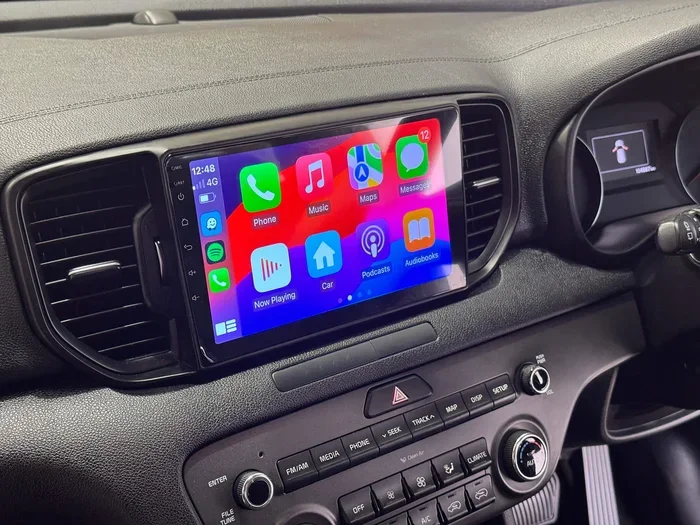
The system features a responsive touchscreen that responds to finger taps and swipes. It supports Apple CarPlay and Android Auto, so you can connect your phone seamlessly. The display also shows your trip computer data, fuel economy, and vehicle diagnostics. The multi-function display in the instrument cluster works alongside the infotainment screen to give you all the information you need at a glance.
When you open the settings menu, you will see several categories. These include display settings, sound settings, driver assistance, and vehicle settings. The clock falls under vehicle settings in most models. If you are having trouble finding it, try looking under “System” or “General” as well. Some Volkswagen models group the clock with other display preferences, so check there if the standard path does not work.
The infotainment system also supports voice commands in newer models. While voice commands are not always available for clock adjustments, it is worth checking your owner’s manual. Some models allow you to say a command like “Set time to 3 PM” and the system handles the rest.
Common Problems When Changing the Time on a Volkswagen Tiguan
Even though changing the clock is usually simple, sometimes you might run into issues. Here are the most common problems and how to fix them.
The Clock Resets After Every ignition
If your Tiguan clock resets every time you start the car, the most likely cause is a weak or failing battery. The clock needs a stable power supply to retain its settings. Consider getting your battery tested at a local auto shop. A new battery usually costs between 3,000 and 6,000 rupees depending on your model. After replacing the battery, you will need to set the time again.
The Touchscreen Is Unresponsive
Sometimes the touchscreen may not respond to your taps. Try restarting the infotainment system by holding the power button for ten seconds. Wait for the screen to turn back on and try again. If the problem persists, a full system reset may help. Refer to your owner’s manual for the reset procedure specific to your model.
The Clock Shows the Wrong Time Zone
If your clock is off by exactly one or more hours, you might be in the wrong time zone setting. Check your vehicle’s GPS or location settings. Some Tiguan models automatically detect your time zone based on GPS data. If this feature is turned off, you can manually set the correct time zone in the settings menu.
The 24-Hour Format Keeps Reverting
Some owners report that the 24-hour format resets to 12-hour after a battery disconnect. This is a known quirk in certain Tiguan models. To fix it, simply go back into the settings and switch it again. If this happens frequently, it is a sign that your battery may need attention.
Expert Tips for Keeping Your Volkswagen Tiguan Clock Accurate
Keeping your Tiguan clock accurate is easy with a few simple habits. Here are some expert tips to help you stay on time.
- Sync with Your Phone: If your Tiguan supports Apple CarPlay or Android Auto, your phone’s clock can sometimes sync with the vehicle display. This is a great backup method.
- Check After Battery Service: Every time your battery is replaced or jumped, make it a habit to check and adjust the clock immediately.
- Use GPS Time: Some Tiguan models pull the correct time from GPS satellites. Make sure this feature is enabled in your settings if available.
- Keep Your Manual Handy: The Volkswagen Tiguan owner’s manual contains model-specific instructions for clock adjustment. Keep a digital copy on your phone for quick reference.
- Update Your Software: Volkswagen occasionally releases infotainment updates that fix bugs, including clock-related issues. Check with your dealer for the latest software version.
If your Tiguan is positioned in the 7 to 8 lakh car category, you likely have the higher trim levels with more advanced features. These models often include auto-time sync and GPS-based clock adjustment, making the process even simpler. For those looking at a more budget-friendly option in the 5 to 8 lakh car range, the basic manual method still works perfectly well.
How the Volkswagen Tiguan Compares to Competitors
The Volkswagen Tiguan holds its own against competitors like the Honda CR-V, Toyota RAV4, and Ford Escape. One area where the Tiguan stands out is its intuitive infotainment layout. Adjusting the clock on a Honda CR-V, for example, involves a different button sequence on the audio head unit. The Toyota RAV4 uses a similar touchscreen approach but buries the clock setting deeper in the menu hierarchy.
The Ford Escape, on the other hand, relies heavily on its SYNC system for all settings, including the clock. Volkswagen keeps the process relatively straightforward, especially in the 2018 and newer models. The Tiguan’s digital clock display is bright and clear, making it easy to read during both day and night driving conditions.
In terms of overall vehicle maintenance, the Tiguan is quite user-friendly. Simple tasks like checking the oil, replacing the air filter, and adjusting the clock can all be done without visiting a service center. This DIY-friendly approach saves time and money over the long run.
When to Seek Professional Help
Most clock-related issues on the Volkswagen Tiguan are easy to fix at home. However, there are times when professional help is the right call.
- Persistent Electrical Issues: If your clock keeps resetting and you have already replaced the battery, there may be a deeper electrical problem. A certified Volkswagen technician can diagnose this.
- Infotainment System Failure: If the entire infotainment screen goes blank or stops responding, do not attempt to open the unit yourself. Seek professional assistance.
- Warranty Concerns: If your Tiguan is still under warranty, check with your dealer before making any changes to the infotainment system. Some modifications could void your warranty.
Regular Volkswagen maintenance, including software updates and electrical system checks, keeps your Tiguan running smoothly. A well-maintained Tiguan can serve you reliably for many years, and keeping the clock accurate is just one small part of that routine.
Conclusion
Learning how to change the time on a Volkswagen Tiguan is one of the simplest and most useful skills you can develop as an owner. Whether you use the touchscreen, the instrument cluster buttons, or the steering wheel controls, the process is quick and straightforward. A few minutes of your time is all it takes to keep your dashboard clock accurate and reliable.
Remember to check your clock after a battery change, when traveling across time zones, or whenever the time seems off. Keep your owner’s manual handy for model-specific instructions, and do not hesitate to seek professional help if you encounter persistent issues. With the tips and steps in this guide, you are now fully equipped to handle this common task with confidence. Your Volkswagen Tiguan is a great vehicle, and taking care of the small details like the clock keeps it running at its best.
Frequently Asked Questions
Can I change the time on my Volkswagen Tiguan without touching the touchscreen?
Yes, you can. Older Tiguan models have physical buttons on the instrument cluster or steering wheel that let you adjust the clock. Simply press and hold the trip button to enter clock mode, then use the arrows to set the correct time. This method works without ever touching the screen.
Why does the clock on my Volkswagen Tiguan reset after I replace the battery?
This happens because the infotainment system loses power when the battery is disconnected or dies. The clock settings are stored in the system’s memory, and a power loss wipes that memory temporarily. Once you reconnect the battery, you simply need to set the time again. It is a normal and quick fix.
Does the Volkswagen Tiguan automatically adjust for daylight saving time?
Some newer Tiguan models with GPS capability can auto-adjust for daylight saving time. However, many models still require a manual adjustment. Check your vehicle settings under the clock or display options to see if your model supports automatic daylight saving updates.
How long does it take to change the time on a Volkswagen Tiguan?
It usually takes less than two minutes. Once you know where to find the clock settings in your specific model, the process is very fast. Whether you use the touchscreen, buttons, or steering wheel controls, you will be done in no time.
Can I set a different time zone on my Volkswagen Tiguan?
Yes, many Tiguan models allow you to manually set or select your time zone in the vehicle settings. Some models with GPS can detect your location and set the time zone automatically. Check the display or vehicle settings menu for a time zone option.
Is it safe to adjust the clock while driving?
It is best to pull over or wait at a stoplight before adjusting the clock. While the touchscreen process is relatively simple, taking your eyes off the road, even for a few seconds, can be dangerous. If you are driving, use the steering wheel controls or wait until you are safely parked.