How to Charge BMW Key The Complete Step by Step Guide
Learning how to charge BMW key fob is simple and saves you time and money. This guide walks you through every method, from USB charging to battery replacement, so your BMW key stays powered and ready. You will also find quick tips, common mistakes, and expert advice to keep your key working perfectly.
Ever reached for your BMW key fob only to find it completely dead? It happens to the best of us. A BMW key dead battery can turn a simple morning into a frustrating scramble. Whether you drive a sleek sedan or a rugged SUV, your BMW key is one of the most used accessories in your daily life. Without it, you cannot start the engine, unlock the doors, or even locate your vehicle in a crowded parking lot.
The good news is that learning how to charge BMW key fob takes just a few minutes. You do not need to be a mechanic or a tech expert. This guide covers every method, from basic USB charging to battery replacement and wireless charging pads. By the end, you will know exactly what to do when your BMW key not working situation strikes. Let us get into it.
Key Takeaways
- Charging your BMW key is easy and can be done with a USB cable or a wireless charging pad depending on your model.
- A dead BMW key battery can leave you locked out, so regular maintenance is essential.
- Replacing the battery is a quick fix if charging does not solve the problem.
- BMW key fob troubleshooting starts with understanding the charging port or wireless pad location.
- Preventive habits like avoiding extreme temperatures extend your key battery life significantly.
- Knowing when to seek help from a dealer or specialist prevents costly mistakes.
📑 Table of Contents
Understanding Your BMW Key
Before you learn how to charge BMW key fob, it helps to understand what kind of key you have. BMW has used different key designs over the years, and each one has its own charging method. Knowing your key type makes the whole process much smoother.
Types of BMW Keys
BMW currently uses several key types. The most common ones are the BMW Comfort Access key, the BMW Remote Control key, and the newer BMW Digital Key. Each of these keys has a small internal battery that powers the wireless signals you rely on every day.
- BMW Comfort Access Key: This is the sleek, foldable key fob that supports hands-free entry. It uses a BMW key battery that typically lasts about three to four years.
- BMW Remote Control Key: A more traditional key fob with buttons for locking, unlocking, and trunk release. It also uses a replaceable or rechargeable battery.
- BMW Digital Key: A newer option that lets you use your smartphone as a key. The digital key still relies on the physical key fob for backup charging.
Understanding which key you have determines how you will charge BMW key fob. If you are unsure, check your owner manual or look at the key shape. The Comfort Access key is usually the most common in recent BMW models.
Why BMW Keys Lose Charge
Several factors cause a BMW key battery drain. The most common one is simply age. Over time, the internal battery loses its ability to hold a charge. Other reasons include frequent use, cold weather, and leaving the key too close to electronic devices that emit interference.
Sometimes, a BMW key battery low warning appears on your dashboard before the key completely dies. This warning is your chance to act early. Ignoring it can lead to a completely dead key, which is far more inconvenient. If you also own a car in the 7 to 8 lakh car range in India, you know how important it is to keep all accessories functioning.
How to Charge BMW Key Using USB Cable
The most direct method to charge BMW key fob is through a USB cable. Most modern BMW keys come with a small USB port hidden under a cover. This method works for keys with a built-in rechargeable battery.
Step-by-Step USB Charging
- Locate the charging port. Flip your BMW key over and look for a small cover, usually near the bottom. Gently pry it open with a fingernail or a small flat tool.
- Connect the USB cable. Use the cable that came with your BMW or any standard micro-USB or USB-C cable. Plug the smaller end into the key fob.
- Connect to a power source. Plug the other end into a computer USB port, a wall adapter, or a car charger.
- Wait for the charging light. Most BMW keys show a small LED light when charging. A solid or blinking light means the key is receiving power.
- Charge fully. Leave the key connected for at least two to three hours. A full BMW key charging time varies by model, so check your manual.
Once the light turns solid or goes off, your key is fully charged. Disconnect the cable and test the key by pressing a button or holding it near the car. This method is straightforward and works well for most BMW owners.
Quick Tip: Always use the cable that came with your BMW key. Third-party cables sometimes deliver inconsistent power, which can slow down charging or even damage the internal battery.
Wireless Charging for BMW Keys
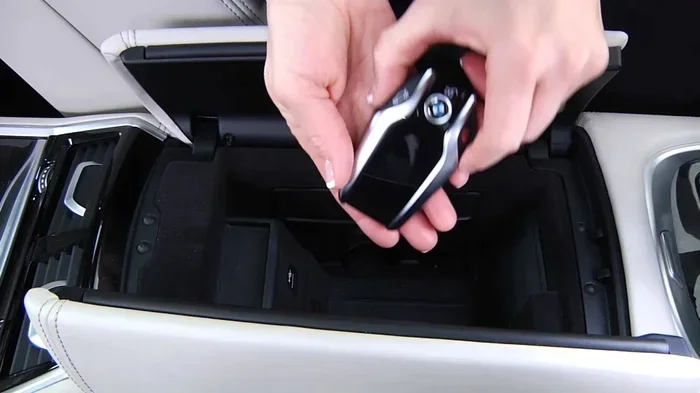
Some newer BMW models support wireless BMW key charging. If your car has a wireless charging pad in the center console, you can place your key fob directly on it. This method is incredibly convenient and eliminates the need for cables altogether.
How Wireless Charging Works
BMW wireless charging uses a Qi-compatible pad built into the vehicle. When you place your BMW key fob on the pad, it begins charging automatically. No cables, no plugs, no hassle. The key simply sits on the pad while you drive.
- Make sure the key fob is placed correctly on the pad. The charging coil inside the key needs to align with the pad coil.
- Remove any thick key covers or metal cases, as they can block the wireless signal.
- Check that the wireless charging system in your car is turned on. Some BMW models require you to enable it in the settings menu.
If you have been looking at cars in the 5 to 8 lakh car segment, you may notice that wireless key charging is becoming more common even in mid-range vehicles. It is a great feature that adds everyday convenience.
Troubleshooting Wireless Charging Issues
If your key does not charge on the wireless pad, try these steps. First, clean both the key fob and the charging pad with a soft cloth. Dust and debris can block the connection. Second, reposition the key on the pad and make sure it sits flat. Third, restart the car infotainment system, as a simple reboot often fixes charging recognition issues.
Sometimes the BMW key not responding even when placed on the pad. This usually means the key battery is too low to initiate the wireless handshake. In such cases, try a wired USB charge first to get enough power for the key to connect wirelessly.
When to Replace the BMW Key Battery
Not all BMW keys use rechargeable batteries. Some models use a standard coin-cell battery that cannot be recharged. In these cases, you need to replace the battery entirely. Knowing how to do this saves a trip to the dealer and keeps your car running smoothly.
How to Replace the BMW Key Battery
Replacing the BMW key battery replacement is one of the easiest maintenance tasks you can do at home. Here is how to do it step by step.
- Find the seam on the key fob. Most BMW keys have a small gap along the back or side where the two halves of the casing meet.
- Open the key fob. Use a small flat-head screwdriver or a coin to gently pry the two halves apart. Work slowly to avoid damaging the plastic clips.
- Remove the old battery. The battery is usually held in place by a small metal clip. Push the clip aside and lift the battery out carefully.
- Insert the new battery. Place the new battery in the same orientation as the old one. The positive side should face up. Common BMW key batteries include CR2032 and CR2025.
- Close the key fob. Press the two halves together until the clips snap into place.
- Test the key. Press a button and hold the key near the car to confirm it works.
After replacing the battery, you may need to BMW key reset the key fob. This process varies by model, but it usually involves pressing and holding a specific button combination while standing close to the car. Refer to your owner manual for the exact steps.
If you are dealing with electrical accessories in your vehicle, understanding your car’s power system helps too. For example, knowing how your 12V to 230V car inverter works can give you insight into how your BMW handles power delivery to accessories like the key fob.
Common BMW Key Problems and Solutions
Even with regular care, BMW keys can develop issues. Here are the most common problems and how to solve them.
BMW Key Not Working After Charging
If you have just charged your key and it still does not work, do not panic. First, check that the charging cable is properly connected. A loose connection often looks like a full charge but is actually just a partial one. Second, try resetting the key fob by holding the unlock button for ten seconds while near the car.
Sometimes the issue is with the car’s receiver, not the key itself. Walk around your vehicle and try standing closer to the door sensor or the start button. Interference from other electronic devices can weaken the signal temporarily.
BMW Key Battery Draining Too Fast
A BMW key battery low situation that keeps recurring is frustrating. This usually points to a deeper issue. The key fob may have a faulty internal component that draws too much power. Or the key may have been exposed to moisture, which can corrode the battery contacts.
To prevent fast battery drain, store your key in a cool, dry place. Avoid leaving it near laptops, tablets, or other devices that emit strong electromagnetic fields. If the problem persists, consider getting the key inspected at a BMW service center.
BMW Key Not Recognized by the Car
This issue often happens after a battery replacement or a long period of inactivity. To fix it, place the key fob directly against the start button or the designated recognition area in the center console. The car should detect the key and allow you to start the engine.
If this does not work, try the backup method. Most BMW keys have a hidden mechanical key blade inside the fob. Use it to manually unlock the driver’s door, then hold the key fob close to the start button to initiate recognition.
BMW Key Maintenance Tips
Taking care of your BMW key extends its lifespan and reduces the frequency of charging or battery replacement. Here are some simple habits that make a big difference.
- Charge regularly: Even if your key still has some charge, plug it in once a month to keep the battery healthy.
- Avoid extreme temperatures: Do not leave your key in a hot car or in freezing conditions. Heat and cold both degrade battery performance.
- Keep it clean: Wipe the key fob with a soft, damp cloth regularly. Dirt and grime can build up around the buttons and charging port.
- Store it safely: When not in use, keep the key in a dedicated spot away from metal objects and electronic devices.
- Update firmware: Some BMW keys receive software updates through the dealer. Ask your service advisor if an update is available for your key model.
These maintenance habits are similar to caring for other car accessories. For instance, keeping your 12V car socket to 3 pin adapter clean and functional ensures all your power accessories work properly, just like maintaining your key fob.
When to Seek Professional Help
Most BMW key issues can be resolved at home with the steps above. However, some situations require professional attention. If your key still does not work after a full charge and battery replacement, the internal electronics may be damaged. Water damage, physical impact, or manufacturing defects can all cause this.
In such cases, contact your nearest BMW dealer or a certified automotive locksmith. They have the tools and software to reprogram or replace your key fob. While this may cost more than a DIY fix, it ensures your key works reliably and securely.
If you are exploring car options and maintenance costs, it is also worth understanding the broader picture of vehicle ownership. Check out our guide on 7 to 8 lakh cars in India for insights into maintenance and ownership costs across different price ranges.
Final Thoughts
Learning how to charge BMW key fob is one of the simplest yet most valuable skills every BMW owner should have. Whether you use a USB cable, a wireless charging pad, or a traditional battery replacement, the process is straightforward and takes only a few minutes. Regular maintenance and good charging habits keep your key working reliably for years.
Remember, a dead key should not ruin your day. With the right knowledge and a little preparation, you can handle any BMW key fob troubleshooting situation confidently. Keep this guide bookmarked for future reference, and share it with fellow BMW owners who might benefit from it.
Your BMW key is more than just a remote. It is your connection to the vehicle. Treat it well, and it will serve you flawlessly every single day.
Frequently Asked Questions
How long does it take to charge a BMW key?
Most BMW keys take about two to three hours to fully charge using a USB cable. Wireless charging may take slightly longer depending on the power output of the charging pad in your vehicle.
Can I use any USB cable to charge my BMW key?
It is best to use the cable that came with your BMW key. If you need a replacement, any standard micro-USB or USB-C cable will work, but using a high-quality cable ensures safe and consistent charging.
Why is my BMW key fob not holding a charge?
This usually indicates an aging internal battery or a faulty charging port. If charging does not help, try replacing the battery or consult a BMW service center for a thorough inspection.
What type of battery does my BMW key use?
Most BMW keys use either a rechargeable internal battery or a standard CR2032 coin-cell battery. Check your owner manual to confirm the exact battery type for your specific key model.
Can I replace the BMW key battery myself?
Yes, replacing the BMW key battery is a simple DIY task. You just need a small screwdriver, a replacement battery, and a few minutes of your time. This guide walks you through every step.
How often should I charge or replace my BMW key battery?
Rechargeable BMW keys benefit from a monthly top-up charge. Replaceable batteries typically last three to four years before needing replacement. Keeping track of battery health helps prevent unexpected failures.