Does Kia Have Apple CarPlay Everything You Need To Know
Yes, most Kia models come with Apple CarPlay built in, making it easy to connect your iPhone for navigation, music, and hands-free calling. Whether you drive a Kia Soul, Sportage, Sorento, or Telluride, you can enjoy seamless smartphone integration with just a cable or wirelessly on newer models. This guide covers everything from setup steps to common troubleshooting tips so you can get the most out of your Kia infotainment system.
Let us talk about something that matters to almost every Kia owner and buyer today. Does Kia have Apple CarPlay? The short answer is yes. But the full story is much more interesting. If you have ever tried to plug your iPhone into your car and felt frustrated by a blank screen, you are not alone. Many drivers want that seamless connection between their phone and their vehicle.
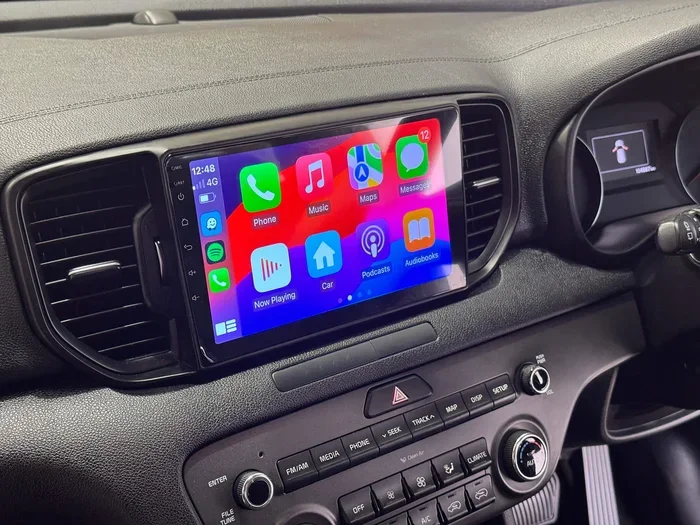
Apple CarPlay brings your favorite apps, maps, and music right to your Kia infotainment screen. It lets you use Siri, get directions, and make calls without taking your eyes off the road. In this article, we will walk you through everything you need to know. From which Kia models support Apple CarPlay to how to set it up and fix common problems, we have you covered.
Whether you just bought a new Kia or are considering one, understanding smartphone integration can make your daily commute or road trip so much better. Let us dive in and explore the world of Kia and Apple CarPlay together.
Key Takeaways
- Apple CarPlay is available on most Kia models from 2019 onward, with wireless support on select 2022 and newer vehicles.
- Kia models that support Apple CarPlay include the Soul, Sportage, Sorento, Telluride, Stinger, Niro, and EV6.
- Setting up Apple CarPlay in a Kia is simple, whether you use a USB cable or a wireless connection.
- Wireless Apple CarPlay is available on newer Kia models with the UVO Infotainment System.
- Common Apple CarPlay issues in Kia vehicles can often be fixed with a simple restart, cable replacement, or software update.
- Kia UVO and Apple CarPlay work together to offer a smooth, integrated driving experience.
- Apple CarPlay and Android Auto are both supported on most Kia models, giving you flexibility.
📑 Table of Contents
- What Is Apple CarPlay and Why Does It Matter for Kia Owners?
- Which Kia Models Support Apple CarPlay?
- How to Set Up Apple CarPlay in Your Kia
- Wired vs. Wireless Apple CarPlay in Kia Vehicles
- Common Apple CarPlay Issues in Kia Vehicles and How to Fix Them
- Apple CarPlay vs. Android Auto in Kia Vehicles
- Future of Apple CarPlay in Kia Vehicles
- Final Thoughts
What Is Apple CarPlay and Why Does It Matter for Kia Owners?
Apple CarPlay is a smart feature that mirrors your iPhone onto your car’s display. Once connected, you can access Phone, Messages, Music, Maps, and many third-party apps. The system uses a simple, driver-friendly interface that keeps things safe and easy.
For Kia owners, Apple CarPlay means you do not have to fumble with your phone while driving. You can ask Siri to send a text, play your favorite playlist, or find the nearest gas station. The whole experience feels natural and fast.
How Apple CarPlay Works in a Kia Vehicle
When you connect your iPhone to a Kia, the CarPlay interface appears on the center screen. You can interact with it using the touchscreen, steering wheel controls, or voice commands through Siri. The system supports both wired and wireless connections depending on your model and year.
Most Kia vehicles from 2019 and newer offer Apple CarPlay as standard or optional equipment. The feature works with the Kia UVO infotainment system, which is Kia’s proprietary software platform. This system handles everything from audio playback to navigation, and Apple CarPlay slots right into it.
One of the best things about Apple CarPlay in a Kia is that it updates along with your iPhone. New features, bug fixes, and app improvements come through automatically. You do not need to update anything in your car separately.
Which Kia Models Support Apple CarPlay?
Almost every Kia model on the road today offers Apple CarPlay in some form. The exact availability depends on the model year and trim level. Here is a breakdown of the Kia lineup and their Apple CarPlay support.
Kia Soul and Apple CarPlay
The Kia Soul has been a popular choice for city drivers and young families. Starting with the 2020 model year, the Soul comes with Apple CarPlay as a standard feature. The Soul’s upright infotainment screen makes CarPlay easy to see and use. Whether you have the base S trim or the top-tier Exclaim, you are covered.
Kia Sportage and Apple CarPlay
The Kia Sportage is a compact SUV that sells very well. Apple CarPlay has been available on the Sportage since the 2019 refresh. The latest generation Sportage, introduced in 2023, offers wireless Apple CarPlay on higher trims. This makes it one of the best Kia SUVs for seamless phone integration.
Kia Sorento and Apple CarPlay
The Kia Sorento is a three-row SUV that families love. Apple CarPlay has been standard on the Sorento for several model years now. The larger screen on the Sorento makes using CarPlay especially enjoyable. You get clear directions, easy music controls, and smooth hands-free calling on every trip.
Kia Telluride and Apple CarPlay
The Kia Telluride is the brand’s flagship SUV. It comes packed with features, and Apple CarPlay is no exception. The Telluride offers wireless Apple CarPlay on most trims, giving you a clean, cable-free setup. The large display screen makes everything from navigation to podcasts look great.
Kia Stinger and Apple CarPlay
The Kia Stinger is a sporty sedan that stands out on the road. Apple CarPlay is available on the Stinger, and it pairs well with the car’s modern interior design. The wireless option is available on higher trims, which fits the sporty, premium feel of the Stinger.
Kia Niro and Apple CarPlay
The Kia Niro is a hybrid SUV that focuses on efficiency. Apple CarPlay is available on the Niro, making it easy to stay connected even on long commutes. The wireless version is available on the 2022 and newer models, which is a nice touch for a hybrid driver who wants minimal cable clutter.
Kia EV6 and Apple CarPlay
The Kia EV6 is an electric vehicle that brings modern tech to the table. Apple CarPlay is supported on the EV6, and the wireless connection works smoothly. If you are driving an EV, you still get all the benefits of Apple CarPlay for navigation, messaging, and entertainment.
How to Set Up Apple CarPlay in Your Kia
Setting up Apple CarPlay in a Kia is straightforward. The process takes just a few minutes, and you will be up and running in no time. Here is a step-by-step guide that works for most Kia models.
Setting Up Wired Apple CarPlay
Wired Apple CarPlay uses a USB cable to connect your iPhone to your Kia. Here is what you need to do:
- Make sure your iPhone is updated to the latest iOS version.
- Plug one end of a Lightning-to-USB cable into your iPhone.
- Connect the other end to the USB port in your Kia.
- The CarPlay icon should appear on your Kia infotainment screen.
- Tap the icon and follow the on-screen prompts to pair.
Once connected, you will see the CarPlay home screen with your apps. You can customize which apps appear by going to Settings on your iPhone. This gives you control over what shows up on your Kia display.
Setting Up Wireless Apple CarPlay
Wireless Apple CarPlay is available on select Kia models. It eliminates the need for a cable entirely. Here is how it works:
- Make sure Bluetooth is turned on in your Kia infotainment system.
- On your iPhone, go to Settings and select CarPlay.
- Choose your Kia from the list of available vehicles.
- Follow the prompts to complete the pairing.
- Once paired, CarPlay will connect automatically whenever you start your car.
Wireless CarPlay is incredibly convenient. You do not have to dig for a cable every time you get in the car. It just works, and that is exactly what you want from a modern infotainment system.
Quick Tips for a Smooth Setup
- Use an Apple-certified USB cable to avoid connection issues.
- Restart your iPhone and your Kia infotainment system if CarPlay does not appear.
- Keep your iPhone close to the Kia’s antenna, which is usually near the center console.
- Make sure your Kia’s software is up to date for the best compatibility.
Wired vs. Wireless Apple CarPlay in Kia Vehicles
One of the most common questions Kia owners ask is whether wired or wireless Apple CarPlay is better. Both options have their strengths, and the right choice depends on your needs and your vehicle.
Wired Apple CarPlay
Wired Apple CarPlay connects through a USB cable. It is reliable and works on almost every Kia model that supports CarPlay. The connection is stable, and you do not have to worry about signal drops. The main downside is the cable. It can be messy, and you need to remember to bring it.
Wireless Apple CarPlay
Wireless Apple CarPlay uses Bluetooth and Wi-Fi to connect to your Kia. It is cleaner and more convenient. You do not need a cable, and the connection is seamless. The downside is that wireless CarPlay can sometimes use more battery on your iPhone, and it is only available on newer Kia models.
Comparison Table
| Feature | Wired Apple CarPlay | Wireless Apple CarPlay |
|---|---|---|
| Connection Method | USB Cable | Bluetooth and Wi-Fi |
| Availability in Kia | Most models 2019+ | Select 2022+ models |
| Setup Time | 1-2 minutes | First time: 3-5 minutes |
| Convenience | Good | Excellent |
| Battery Impact | None | Moderate |
| Reliability | Very High | High |
| Cable Needed | Yes | No |
For most Kia owners, wireless Apple CarPlay is the better choice if your vehicle supports it. It is more convenient and gives your dashboard a cleaner look. But if your Kia only offers wired CarPlay, you will still get a great experience with a good cable.
Common Apple CarPlay Issues in Kia Vehicles and How to Fix Them
Even though Apple CarPlay works well in most Kia vehicles, you might run into issues from time to time. These problems are usually easy to fix. Here are the most common ones and their solutions.
CarPlay Does Not Appear on the Screen
If Apple CarPlay does not show up on your Kia display, the first thing to check is your cable. A damaged or non-certified USB cable is the most common cause. Try a different Apple-certified cable and a different USB port in your Kia. Also, make sure CarPlay is enabled on your iPhone under Settings.
Connection Keeps Dropping
A connection that drops frequently can be annoying. This usually happens with wireless CarPlay. Try turning Bluetooth off and back on in both your iPhone and your Kia. If the problem persists, delete the Kia from your iPhone’s CarPlay settings and pair it again from scratch.
Audio or Siri Is Not Working
If you cannot hear audio through your car speakers or Siri is not responding, check your Kia’s audio settings. Make sure the volume is turned up and that the correct audio source is selected. Also, check that Siri is enabled on your iPhone under Settings.
CarPlay Is Slow or Unresponsive
A slow CarPlay experience can happen if your iPhone is low on storage or running an older iOS version. Update your iPhone to the latest iOS version and close background apps before connecting. Restarting both your iPhone and your Kia infotainment system can also help.
Quick Troubleshooting Checklist
- Restart your iPhone.
- Restart your Kia infotainment system.
- Try a different USB cable or USB port.
- Update your iPhone to the latest iOS version.
- Update your Kia’s infotainment software.
- Delete and re-pair the CarPlay connection.
- Check that CarPlay is enabled in iPhone settings.
Apple CarPlay vs. Android Auto in Kia Vehicles
If you have ever wondered how Apple CarPlay compares to Android Auto in a Kia, you are not alone. Both systems offer similar features, but they work differently and cater to different smartphone users.
Apple CarPlay is designed for iPhone users. It offers a clean interface, Siri integration, and deep compatibility with Apple apps like Maps, Music, and Messages. Android Auto is built for Android phones and offers Google Maps, Google Assistant, and a similar app ecosystem.
Most Kia vehicles that offer Apple CarPlay also support Android Auto. This means you have flexibility regardless of which phone you use. The Kia infotainment system handles both platforms smoothly, so switching between them is easy.
If you are an iPhone user, Apple CarPlay is the natural choice. If you use an Android phone, Android Auto will serve you well. Some drivers even keep both options available and switch based on whose phone is in the car.
Future of Apple CarPlay in Kia Vehicles
Kia continues to invest in smartphone integration technology. The company is always working on improving the CarPlay experience for its customers. Newer Kia models are coming with wireless Apple CarPlay as standard, and software updates keep making the system faster and more reliable.
With Apple releasing new CarPlay features every year, Kia owners can look forward to even better integration in the future. The next generation of Kia infotainment systems will likely support enhanced CarPlay features, including larger screen compatibility and more app support.
For now, if you own or are buying a Kia, you can feel confident that Apple CarPlay is there to make your driving experience smarter and safer. It is one of those features that you use every day and quickly wonder how you ever drove without it.
Final Thoughts
So, does Kia have Apple CarPlay? Absolutely. Whether you drive a Kia Soul, Sportage, Sorento, Telluride, or any other model in the lineup, you have access to one of the best smartphone integration systems on the market. Apple CarPlay in a Kia brings navigation, music, messaging, and hands-free calling together in a way that is safe and easy to use.
Setting up Apple CarPlay is simple, and most Kia owners find it works flawlessly from day one. If you do run into issues, the troubleshooting steps in this guide should help you get things back on track quickly. With wireless CarPlay available on newer models, the experience is more seamless than ever.
Take a few minutes to explore your Kia’s infotainment system and set up Apple CarPlay today. You will wonder how you ever drove without it. The connection between your iPhone and your Kia makes every trip more enjoyable and more connected.
Frequently Asked Questions
Does every Kia model come with Apple CarPlay?
Most Kia models from 2019 onward offer Apple CarPlay, but availability depends on the trim level and model year. Higher trims are more likely to include it as standard, while base trims on older models may offer it as an optional extra. Always check the specific trim details before purchasing.
Can I use Apple CarPlay wirelessly in my Kia?
Yes, wireless Apple CarPlay is available on select Kia models, particularly 2022 and newer vehicles. Models like the Kia Telluride, Sportage, and Sorento often include wireless CarPlay on higher trims. Check your owner’s manual or ask your dealer to confirm wireless support for your specific vehicle.
Why is my Apple CarPlay not working in my Kia?
The most common reasons include a faulty USB cable, an outdated iOS version, or a need to restart the infotainment system. Try using an Apple-certified cable, updating your iPhone, and restarting both your phone and your Kia’s system. Re-pairing the connection often solves persistent issues.
Does Apple CarPlay work with Kia UVO?
Yes, Apple CarPlay integrates seamlessly with the Kia UVO infotainment system. UVO handles the car’s native features like climate control and vehicle settings, while Apple CarPlay manages your phone’s apps and functions. Both systems work side by side without any conflicts.
Can I use Apple CarPlay and Android Auto at the same time in a Kia?
You cannot use both Apple CarPlay and Android Auto simultaneously because they are phone-specific systems. However, Kia vehicles that support both platforms allow you to switch between them easily depending on which phone you are using. Each system works independently when connected.
Is Apple CarPlay safe to use while driving in a Kia?
Yes, Apple CarPlay is designed to be safe for use while driving. It uses a simplified interface that minimizes distractions, and Siri Eyes Free lets you control everything with your voice. The system encourages hands-free interaction, which helps keep your eyes on the road and hands on the wheel.