Can I Drive My Hyundai Without the Key Fob Anywhere
Yes, you can drive your Hyundai without the key fob in certain situations. Most Hyundai models allow a backup start method when the fob battery dies, and there are emergency procedures to follow. Understanding your smart key system helps you stay calm and get back on the road quickly.
Key Takeaways
- Hyundai smart key systems allow limited driving without a working fob through backup start methods.
- A dead key fob battery is the most common reason drivers think they cannot start their car.
- Most Hyundai models have a hidden emergency key blade inside the fob for manual use.
- Knowing your specific model’s backup procedure saves time and reduces stress in urgent situations.
- Regularly replacing the key fob battery every 1-2 years prevents unexpected failures.
- Professional key fob programming and replacement services are widely available for all Hyundai models.
📑 Table of Contents
- How the Hyundai Smart Key System Works
- Can You Actually Drive Without the Key Fob
- What to Do When Your Key Fob Dies or Stops Working
- Emergency Backup Options for Hyundai Owners
- Tips to Prevent Key Fob Problems
- When It Is Time to Replace Your Key Fob
- Common Mistakes Hyundai Owners Make With Key Fobs
- Expert Insights on Hyundai Key Fob Reliability
- Key Takeaways
- Frequently Asked Questions
- Conclusion
How the Hyundai Smart Key System Works
Hyundai vehicles built in the last decade use a smart key system. This system lets you start the engine without inserting a physical key into the ignition. Instead, the car communicates wirelessly with the key fob through a proximity sensor. When the fob is inside the vehicle, the car recognizes it and allows the engine to start with the push of a button.
The Hyundai smart key does more than just start the car. It also handles remote locking, unlocking, and in some models, Hyundai remote start. The fob sends a coded signal to the car’s computer. This signal includes a transponder chip that authenticates the fob as a genuine Hyundai key. If the signal does not match, the Hyundai immobilizer prevents the engine from starting.
Understanding this system helps you know what happens when the fob stops working. The car is not just being stubborn. It is following a security protocol designed to protect your vehicle from theft.
The Role of the Proximity Sensor
The proximity sensor is usually located in the center console or steering column area. It detects the key fob signal within a certain range. Most Hyundai models work when the fob is within a few feet of the car. If the fob battery is weak or dead, the signal weakens and the sensor may not pick it up.
This is why many drivers think their car is broken when the fob battery dies. The car is actually working exactly as designed. It just needs a stronger signal from a working fob to proceed.
How Push Button Start Relies on the Fob
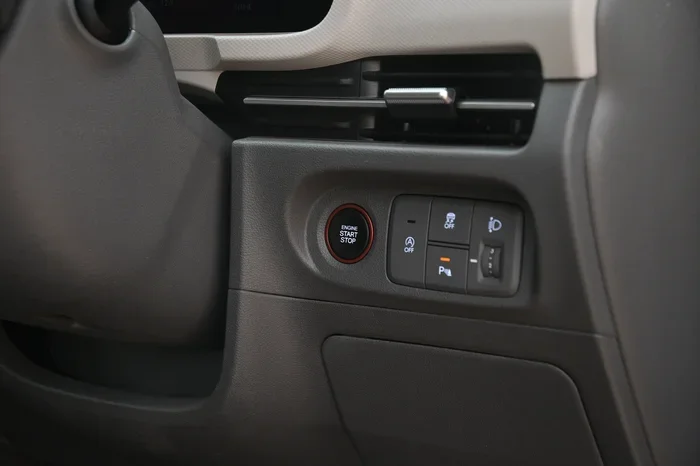
The push button start system is convenient but dependent on the fob. When you press the start button, the car checks for a valid fob signal first. If it finds one, it allows the engine to crank. If it does not find one, the system blocks the start sequence.
This is the Hyundai immobilizer at work. The immobilizer is a security feature that has been standard in Hyundai vehicles for many years. It ensures that only a recognized key fob can start the engine. This feature greatly reduces the risk of car theft.
Can You Actually Drive Without the Key Fob
The answer depends on what you mean by “without the key fob.” If your fob battery is dead but the fob itself is still in the car, you can often drive. If the fob is completely lost or damaged, the situation is different. Let us break this down clearly.
Scenario 1: Dead Key Fob Battery
This is the most common situation. The fob itself is fine, but the key fob battery has lost its charge. In this case, most Hyundai models have a backup method to start the car. You place the dead fob against a specific spot on the steering column or center console. This spot acts as an external antenna. It reads the fob’s signal even through a dead battery in some cases.
For many Hyundai models, you place the fob against the start button or a marked area near the steering wheel. The car reads the fob through contact rather than through the air. This allows you to start the engine and drive normally. The fob does not need to be working perfectly for this to work.
Scenario 2: Lost or Damaged Key Fob
If the fob is completely lost or physically destroyed, driving becomes much harder. The Hyundai immobilizer will not recognize the vehicle as authorized. In this case, you cannot simply start the car with a backup method. You will need a replacement fob or professional assistance.
However, you can still drive the car in an emergency if you have the hidden emergency key blade. Most Hyundai fobs contain a small metal key blade hidden inside the plastic shell. You use this blade to unlock the driver’s door manually. Once inside, you may still need to program a new fob or get the existing system reset.
Scenario 3: Fob Signal Interference
Sometimes the fob works but the car does not respond. This can happen due to signal interference. Electronic devices, metal structures, or even certain phone cases can block the key fob signal. If you are near a tall building, a parking garage, or a crowded area, interference is more likely.
Try moving closer to the car or stepping away from electronic devices. Sometimes simply taking a few steps solves the problem. The key fob range is typically short, so proximity matters a lot.
What to Do When Your Key Fob Dies or Stops Working
Finding yourself unable to start your Hyundai is stressful. But there are clear steps you can follow. Let us walk through them one by one.
Step 1: Check the Fob Battery
The first thing to do is check the key fob battery. Most Hyundai fobs use a CR2025 or CR2032 coin battery. These batteries last about 1 to 2 years. If your fob has been working inconsistently or not at all, the battery is likely the culprit.
You can test the battery with a multimeter or simply replace it. Replacing the battery is easy. Use a small flathead screwdriver to pry open the fob shell. Swap the old battery for a new one. Make sure the positive side faces up. Close the shell and test the fob again.
Step 2: Try the Backup Start Method
If the battery is dead and you are already inside the car, try the backup start method. Place the dead fob directly against the push button start or the designated spot on the steering column. Press the brake pedal and press the start button. The car should read the fob through direct contact and allow the engine to start.
This method works because the fob’s transponder chip still holds its code. The chip does not need battery power to transmit this code when in direct contact with the car’s antenna. This is a clever safety feature built into the smart key system.
Step 3: Use the Emergency Key Blade
If the fob is completely dead and the backup method does not work, use the emergency key blade. Slide the small release button on the fob to pop out the metal key blade. Use this blade to unlock the driver’s door manually.
Once inside, place the fob as close to the start button as possible. Even a completely dead fob can sometimes transmit a weak enough signal through direct contact. If this fails, you may need roadside assistance or a locksmith.
Step 4: Call for Professional Help
If none of the above steps work, call a professional. A certified Hyundai locksmith can replace key fob, program a new fob, or reset the immobilizer system. Many roadside assistance services also carry blank fobs and programming tools. Keep your dealer’s phone number and a trusted locksmith saved in your phone for emergencies.
Emergency Backup Options for Hyundai Owners
Hyundai builds several backup options into their vehicles. Knowing these options before you need them makes a big difference.
The Hidden Emergency Key Blade
Every Hyundai key fob has a hidden metal key blade. This blade is stored inside the plastic fob shell. You access it by pressing a small button or sliding a latch on the side of the fob. The blade can unlock the driver’s door in case the fob’s remote function fails completely.
Many owners do not even know this blade exists until they need it. Take a moment right now to check your fob. Find the release mechanism and practice sliding the blade out. This small habit can save you a lot of trouble later.
Hyundai Valet Mode
Some Hyundai models offer a valet mode or a temporary access feature. This mode limits what the car can do. It usually allows the engine to start but locks the glove box and trunk. Valet mode is useful when someone else needs to drive your car temporarily.
You can activate valet mode through the infotainment system in some models. Check your owner’s manual for specific instructions. This feature does not bypass the immobilizer but it does provide a controlled way to let someone else use the car.
Roadside Assistance and Hyundai Roadside Assistance Program
Hyundai offers a roadside assistance program for new vehicle owners. This program typically covers lockout service, towing, and battery jumps for a set period after purchase. If your key fob not working situation happens during the coverage period, Hyundai can send help directly to your location.
Even if your coverage has expired, many third-party roadside services like AAA offer similar help. Keep a membership or save a local locksmith number in your phone. Being prepared turns a stressful moment into a minor inconvenience.
Tips to Prevent Key Fob Problems
Prevention is always better than cure. A few simple habits can keep your Hyundai smart key working reliably for years.
Replace the Battery Regularly
Do not wait for the fob to stop working. Replace the battery every 12 to 18 months. Set a reminder on your phone or calendar. A fresh battery costs just a few dollars and prevents a lot of hassle.
When you replace the battery, clean the battery contacts with a dry cloth. Dirt and corrosion can weaken the connection even with a new battery. This small step extends the life of your fob significantly.
Keep the Fob Away from Strong Electronics
Avoid placing your fob near strong electronic devices. Large speakers, MRI machines, and certain power tools can interfere with the key fob signal. Also, do not store the fob near your phone or tablet for extended periods. These devices can drain the fob battery faster than normal use.
Store the Fob Properly
Store your fob in a safe, dry place when not in use. Avoid leaving it in direct sunlight or in extremely cold temperatures. Heat and cold can damage the battery and the internal electronics of the fob.
A small fob pouch or case offers extra protection. These pouches block external signals and physical damage. They are especially useful if you carry the fob in your pocket all day.
Update the Fob Software When Needed
Hyundai occasionally releases software updates for the smart key system. These updates can improve signal range, battery life, and overall reliability. Ask your dealer about available updates during your next service visit. Keeping the software current is an easy way to avoid unexpected problems.
When It Is Time to Replace Your Key Fob
No matter how well you take care of it, every fob eventually needs replacement. Here are signs that it is time for a new one.
Signs You Need a New Fob
- The fob buttons stop responding even after replacing the battery.
- The fob physically cracks, breaks, or shows signs of heavy wear.
- The car intermittently fails to recognize the fob even when it is close.
- The fob gets wet or exposed to extreme heat or cold.
- You have lost the fob and need a complete key fob replacement.
Cost of Key Fob Replacement
A new Hyundai key fob typically costs between 50 and 300 dollars depending on the model and features. Basic fobs without remote start are on the lower end. Fobs with advanced features like Hyundai remote start or proximity sensors cost more.
Dealer replacement includes programming the new fob to your specific vehicle. This ensures the transponder chip matches your car’s security system. Some aftermarket fobs are cheaper but may not offer the same level of compatibility or security.
DIY vs Professional Replacement
You can buy a replacement fob online and program it yourself in some Hyundai models. The owner’s manual usually includes programming instructions. However, professional programming ensures everything works correctly and avoids potential errors.
If you are not comfortable doing it yourself, visit a Hyundai dealer or a certified locksmith. They have the tools and expertise to program the new fob properly. This investment gives you peace of mind and reliable performance.
Common Mistakes Hyundai Owners Make With Key Fobs
Learning from other people’s mistakes can save you time and money. Here are common errors to avoid.
Ignoring weak fob signals. If your fob starts acting sluggish, replace the battery immediately. Waiting until the fob stops completely puts you at risk of getting stranded.
Not knowing the backup start method. Many drivers do not realize their Hyundai has a backup start option. Read your owner’s manual or search online for your specific model’s procedure.
Storing the fob near electronics. Keeping the fob next to your phone or laptop can drain the battery and interfere with the signal. Give it some space.
Using the wrong battery type. Always use the battery type specified for your fob model. Using the wrong battery can damage the fob or cause unreliable performance.
Forgetting to reprogram after battery replacement. In some cases, replacing the battery resets the fob’s programming. You may need to reprogram the fob after a battery swap.
Expert Insights on Hyundai Key Fob Reliability
Automotive experts agree that Hyundai key fobs are among the most reliable in the industry. The smart key system has been refined over many model years. However, no electronic system is immune to failure. Regular maintenance and awareness go a long way.
According to Hyundai service advisors, the most common fob issue is a dead battery. The second most common issue is physical damage from drops or water exposure. Keeping a spare fob at home or in the office provides an excellent safety net.
Experts also recommend having at least one spare key fob battery in your glove box. This way, if your primary fob dies unexpectedly, you can replace the battery on the spot. This simple preparation has saved countless drivers from long waits and expensive tows.
Key Takeaways
- Hyundai smart key systems allow limited driving without a working fob through backup start methods.
- A dead key fob battery is the most common reason drivers think they cannot start their car.
- Most Hyundai models have a hidden emergency key blade inside the fob for manual use.
- Knowing your specific model’s backup procedure saves time and reduces stress in urgent situations.
- Regularly replacing the key fob battery every 1-2 years prevents unexpected failures.
- Professional key fob programming and replacement services are widely available for all Hyundai models.
Frequently Asked Questions
Can I start my Hyundai if the key fob battery is completely dead?
Yes, in most Hyundai models you can still start the car with a dead fob battery. Place the dead fob directly against the start button or the designated spot on the steering column. The car’s antenna reads the fob through direct contact. This backup method works because the transponder chip inside the fob does not need battery power to transmit its code when in close proximity to the car’s antenna.
How much does it cost to replace a Hyundai key fob?
A Hyundai key fob replacement typically costs between 50 and 300 dollars. The price depends on the model year and features. Basic fobs without remote start are on the lower end. Fobs with advanced features like Hyundai remote start or proximity sensors cost more. Dealer replacement usually includes professional programming, which adds to the total cost but ensures full compatibility.
What type of battery does a Hyundai key fob use?
Most Hyundai key fobs use a CR2025 or CR2032 coin battery. Check your owner’s manual or look at the old battery to confirm the correct type. These batteries are widely available at grocery stores, pharmacies, and auto parts shops. Replacing the battery takes just a few minutes and requires only a small flathead screwdriver to open the fob shell.
Can I drive my Hyundai indefinitely without a working key fob?
No, you cannot drive indefinitely without a working key fob. The Hyundai immobilizer system requires a recognized fob to start the engine. You can use backup methods temporarily, but you should replace or reprogram the fob as soon as possible. Driving without a functioning fob long-term is not safe and may violate vehicle security protocols.
How do I know if my Hyundai key fob needs a new battery?
Signs that your key fob battery is dying include reduced range, intermittent button response, and the need to press buttons multiple times. Some Hyundai models also display a warning message on the dashboard when the fob battery is low. If you notice any of these signs, replace the battery right away to avoid being caught off guard.
What should I do if I lose my Hyundai key fob entirely?
If you lose your key fob completely, contact a Hyundai dealer or certified locksmith immediately. They can provide a replacement fob and program it to your vehicle. In the meantime, use the hidden emergency key blade inside the old fob (if you have it) to access the car. If you have no spare fob at all, you may need to have the vehicle towed to a dealer for key fob programming and immobilizer reset.
Conclusion
Can I Drive My Hyundai Without the Key Fob is a question many Hyundai owners ask at some point. The good news is that modern Hyundai vehicles are designed with backup systems that keep you moving even when the fob fails. Whether it is a dead battery, a lost fob, or signal interference, you have options. Understanding your smart key system and knowing the backup procedures puts you in control.
Keep your key fob battery fresh, store the fob properly, and familiarize yourself with the emergency key blade. These simple habits prevent most problems before they start. And when issues do arise, you will know exactly what to do.
Hyundai has built reliable and smart security into every vehicle. Trust the system, stay prepared, and you will always find a way to get back on the road. Take a few minutes today to check your fob and review the backup start method for your specific model. That small effort could save you a lot of trouble tomorrow.