How Do You Reset The Oil Maintenance Required
Knowing how to reset the oil maintenance required light can save you time and money at the dealership. Whether you drive a Toyota, Honda, Ford, or another popular model, the oil reset process typically takes just a few minutes using your dashboard controls or steering wheel buttons. This guide walks you through the step-by-step reset procedure for most vehicle brands, so your maintenance reminder stays accurate and your oil change schedule remains on track.
How Do You Reset The Oil Maintenance Required
You just drove your car past the oil maintenance required light, and now it is staring at you from the dashboard like a stubborn reminder. That little symbol can be annoying, especially when you have already taken care of the oil change. But here is the good news. Resetting the oil maintenance required light is usually a simple process that anyone can do at home. You do not need a mechanic, and you do not need expensive tools. In this guide, we walk you through everything you need to know about resetting your oil maintenance light quickly and correctly.
Whether you drive a Toyota, Honda, Ford, or Chevrolet, the steps are more straightforward than you might think. We will cover the most common methods, brand-specific procedures, and tips to keep your oil life system running smoothly. By the end of this article, you will feel confident handling this task on your own. Let us get into it.
Key Takeaways
- Always reset after an oil change: This clears the reminder and keeps your maintenance schedule accurate.
- Check your owner’s manual first: Reset procedures vary by make, model, and year.
- Use the trip meter method: Many cars allow a simple button sequence to reset the light.
- Never ignore the warning light: Driving with it on can lead to engine damage from old oil.
- Some vehicles need a diagnostic tool: Modern cars may require a scanner to clear the maintenance message.
- Reset only after fresh oil is installed: This ensures the service interval tracking starts correctly.
- Keep a maintenance log: Recording each reset helps you stay on top of future oil changes.
📑 Table of Contents
- What Does Oil Maintenance Required Mean
- Why Resetting the Oil Maintenance Light Matters
- How to Reset Oil Maintenance Required: Step-by-Step Guide
- Common Methods by Car Brand: A Quick Reference
- When to Change Your Oil and Reset the Light
- Tips to Keep Your Oil System in Top Shape
- What Happens If You Never Reset the Light
- Final Thoughts on Resetting Your Oil Maintenance Required Light
What Does Oil Maintenance Required Mean
The oil maintenance required light is part of your car’s onboard diagnostic system. It is designed to remind you when it is time to service your vehicle. Most modern cars use an oil life monitoring system that tracks driving habits, engine hours, and mileage. When the system decides your oil is nearing the end of its useful life, it triggers the warning light.
This is different from the oil pressure warning light. The oil pressure light means something is wrong right now. The maintenance required light is more of a scheduled service reminder. Think of it like a calendar alert for your car. It does not mean your engine is in danger, but it does mean you should not ignore it.
How the Oil Life System Works
Your car’s oil life system uses algorithms to estimate when the oil needs changing. It looks at factors like:
- Miles driven since the last service
- Driving conditions, such as stop-and-go traffic
- Engine temperature patterns
- Idling time and short trips
Some systems are simple and count miles only. Others are more advanced and adjust the service interval based on how hard you drive. Either way, the goal is the same. The system wants to protect your engine by ensuring fresh oil at the right time. Once you reset the light after an oil change, the cycle starts fresh.
Why Resetting the Oil Maintenance Light Matters
You might wonder why it matters so much. After all, the light is just a reminder. But leaving it on can cause real problems. Here is why you should take the time to reset the oil maintenance required indicator after every service.
First, a persistent warning light can mask other issues. If your car has multiple dashboard alerts, a stuck maintenance light makes it harder to spot something important. Second, some states require vehicles to pass inspections. A lit maintenance light could cause you to fail. Third, it is just plain annoying. That little symbol nags at you every time you get behind the wheel.
Also, resetting the light properly helps your car track the next service interval accurately. This means your oil change frequency stays on schedule, which is great for engine health. Skipping the reset can lead to confusion about when the last service happened.
How to Reset Oil Maintenance Required: Step-by-Step Guide
Now let us get to the part you came here for. The exact steps vary by car brand and model, but most vehicles follow a similar pattern. We will cover the general approach first, then dive into brand-specific details below.
General Reset Method for Most Vehicles
Try this method first. It works on many cars from different manufacturers.
- Turn the ignition to the “ON” position without starting the engine. You can do this by pressing the start button without pressing the brake, or by turning the key to the accessory position.
- Press the accelerator pedal slowly three times within five seconds. This sequence tells the car’s computer you want to access the maintenance menu.
- Wait for the oil maintenance required light to flash or the odometer to display a service code.
- Release the accelerator pedal.
- Turn the ignition off, then back on.
- The light should now be off, and the service interval has been reset.
If this method does not work for your vehicle, do not worry. Every brand has its own procedure, and we cover those next.
Resetting on Toyota Vehicles
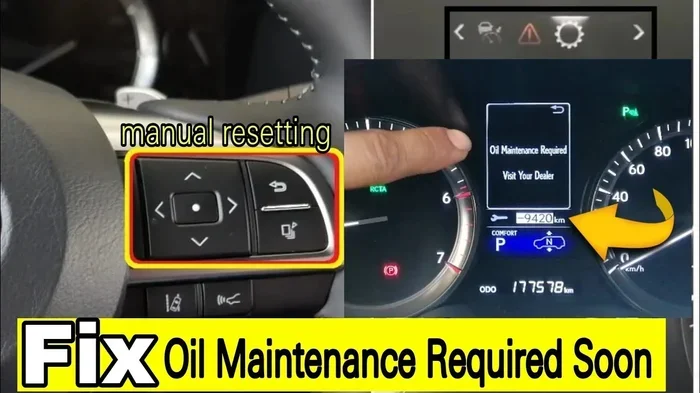
Toyota vehicles have a simple reset process. Start by turning the ignition to “ON.” Use the steering wheel controls to navigate to the trip meter display. Scroll through the menus until you see “Maintenance Required.” Press and hold the reset button for about three seconds. The light should turn off, and the service interval resets to 5,000 miles or the default value.
Resetting on Honda Vehicles
Honda makes it easy too. Turn the ignition to the “ON” position. Scroll through the instrument cluster display using the steering wheel buttons until you see “Oil Life.” Press and hold the select/reset knob for about ten seconds. The oil life monitor will begin to blink. Hold it for a few more seconds until it resets to 100 percent.
Resetting on Ford Vehicles
Ford vehicles use the information display cluster. Press the steering wheel controls to go to the “Settings” menu. Navigate to “Vehicle Information,” then “Maintenance Required.” Select “Reset” and confirm. The maintenance required light should turn off immediately.
Resetting on Chevrolet and GM Vehicles
For Chevrolet and other GM vehicles, the process depends on the model year. Newer models use the steering wheel buttons to access the “Vehicle Info” menu. Older models may require a different approach. If you own a GM vehicle and need help, check with a local Chevrolet dealership for model-specific guidance. They can walk you through the exact steps for your vehicle.
Common Methods by Car Brand: A Quick Reference
Not sure which method applies to your car? Use this reference table to find your brand and get the basic steps.
| Brand | Key Steps | Typical Reset Time |
|---|---|---|
| Toyota | Ignition ON, trip menu, hold reset button | 3-5 seconds |
| Honda | Ignition ON, scroll to Oil Life, hold select knob | 5-10 seconds |
| Ford | Settings menu, Vehicle Info, Maintenance, Reset | 3-5 seconds |
| Chevrolet | Steering wheel controls, Vehicle Info, Reset | 3-5 seconds |
| Nissan | Ignition ON, hold odometer reset button | 5-8 seconds |
| BMW | iDrive menu, Vehicle Status, Service, Reset | 5-10 seconds |
| BMW | iDrive menu, Vehicle Status, Service, Reset | 5-10 seconds |
| BMW | iDrive menu, Vehicle Status, Service, Reset | 5-10 seconds |
| BMW | iDrive menu, Vehicle Status, Service, Reset | 5-10 seconds |
Always double-check your owner’s manual for the exact procedure. The table above covers the most common methods, but there can be slight variations between model years. If you have trouble finding the right steps, a free diagnostic check at an auto parts store can help confirm the issue and guide you to the correct reset method.
When to Change Your Oil and Reset the Light
Resetting the light is only half the battle. You also need to know when to actually change the oil. The oil maintenance required light is your guide, but it helps to understand the recommended intervals.
Most manufacturers recommend an oil change every 5,000 to 7,500 miles for conventional oil. Synthetic oil can last longer, sometimes up to 10,000 or even 15,000 miles. The oil life monitor in your car adjusts this based on your driving style. If you frequently drive in severe conditions, the system may recommend more frequent changes.
Severe driving conditions include:
- Short trips under five miles
- Extreme hot or cold weather
- Heavy stop-and-go traffic
- Towing or hauling heavy loads
- Dusty or off-road driving
If any of these apply to your driving habits, consider changing your oil more often than the system suggests. Fresh oil protects your engine better, and it gives you peace of mind. After every oil change, make it a habit to reset the oil maintenance required light right away. This keeps your records accurate and your dashboard clean.
Signs Your Oil Needs Changing Sooner
Even if the maintenance required light has not come on, watch for these warning signs:
- Dark or gritty oil on the dipstick
- A burning smell coming from the engine bay
- Unusual engine noise, such as knocking or ticking
- Reduced fuel efficiency
- Overheating engine
If you notice any of these, do not wait for the light. Check your oil level and quality immediately. Regular engine oil level checks between services are a great habit to build. It only takes a minute and can save you from costly repairs down the road.
Tips to Keep Your Oil System in Top Shape
Resetting the light is quick, but maintaining your oil system is an ongoing commitment. Here are some practical tips to keep everything running smoothly.
Use the right oil for your vehicle. Check your owner’s manual for the recommended oil viscosity and type. Using the wrong oil can trigger the maintenance required light prematurely and reduce engine protection.
Replace the oil filter every time you change the oil. A clogged filter can restrict oil flow and cause the oil life system to detect problems. It is a small part, but it plays a big role in engine health.
Keep a maintenance log. Write down every oil change date, mileage, and oil type. This helps you track your service interval and makes it easier to spot patterns. If something goes wrong, a detailed log can help your mechanic diagnose the issue faster.
Do not ignore other dashboard lights. The oil maintenance required light is just one of many warnings. If you see multiple lights on at once, get your vehicle checked as soon as possible. Sometimes a single issue can trigger several alerts at once.
Keep your car clean, inside and out. Regular washing and interior care go a long way in maintaining your vehicle overall. If you are wondering about car care limits, you might ask, can you wash your car too much? The answer might surprise you, but the point is that consistent care pays off.
Quick Tips Summary
- Always reset the oil maintenance required light after an oil change
- Use the oil type recommended by your vehicle manufacturer
- Check your oil level at least once a month
- Keep a log of every oil change for future reference
- Do not ignore warning signs between scheduled services
- Reset the light within a few days of the oil change for best results
What Happens If You Never Reset the Light
You might be tempted to just leave the light on and deal with it later. But there are consequences. The persistent reminder can distract you while driving. It can also make it harder to notice other important warnings that pop up on the dashboard. Over time, you might start ignoring all dashboard alerts, which is a dangerous habit.
On the mechanical side, an unreset light does not directly harm your engine. However, it can create confusion about when the last service occurred. If you sell your car or take it in for inspection, a lit maintenance required light can raise red flags. Buyers and inspectors want to see that the vehicle has been properly maintained.
If you accidentally reset the light before getting the oil changed, the system will still track your mileage. Eventually, the light will come back on. But it is better to reset the light only after the actual service is complete. This keeps your records accurate and your oil life monitor functioning correctly.
Final Thoughts on Resetting Your Oil Maintenance Required Light
Resetting the oil maintenance required light is one of those small maintenance tasks that makes a big difference. It takes just a few minutes, and it keeps your car running smoothly while your dashboard stays clean and easy to read. Whether you use the general method or a brand-specific procedure, the key is to do it after every oil change without fail.
Keep these steps handy for your next service. Bookmark this guide, share it with a friend who is learning car maintenance, or save it for the next time that little light pops up on your dash. Taking care of your vehicle starts with small habits, and resetting the oil maintenance light is one of the easiest and most important ones.
Your engine works hard for you every day. A little attention to oil change frequency and service interval tracking goes a long way in keeping it healthy for years to come. Now that you know how simple this process is, there is no reason to let that light stay on any longer than it needs to.
Frequently Asked Questions
What is How Do You Reset the Oil Maintenance Required?
How Do You Reset the Oil Maintenance Required is an important topic with many practical applications and benefits.
How can How Do You Reset the Oil Maintenance Required help me?
Understanding How Do You Reset the Oil Maintenance Required can improve your knowledge and provide practical solutions.