Do I Really Need Subaru Starlink to Use Apple CarPlay
You do not always need Subaru Starlink to use Apple CarPlay. Many Subaru models support Apple CarPlay through their existing infotainment system, even without the Starlink package. Understanding the difference between Starlink and CarPlay can save you money and help you make the right choice for your vehicle.
Key Takeaways
- Starlink and Apple CarPlay are different systems: Starlink is Subaru’s connectivity suite, while CarPlay is Apple’s smartphone integration tool.
- Many Subaru models support CarPlay without Starlink: You can use Apple CarPlay on older and base trim models that lack the Starlink package.
- Wireless and wired options exist: Depending on your model year, you may get wired or wireless Apple CarPlay functionality.
- Upgrading to Starlink is optional: It adds features like remote start and navigation, but it is not required for CarPlay to work.
- Check your specific model and year: Not every Subaru supports CarPlay, so always verify compatibility before assuming.
- Aftermarket solutions are available: If your Subaru does not support CarPlay natively, you can explore aftermarket head units.
📑 Table of Contents
- Do I Really Need Subaru Starlink to Use Apple CarPlay?
- What Is Subaru Starlink?
- What Is Apple CarPlay and How Does It Work?
- Which Subaru Models Support Apple CarPlay?
- Starlink vs. Apple CarPlay: What Is the Difference?
- How to Get Apple CarPlay Without Starlink
- Is Upgrading to Starlink Worth It?
- Expert Insights
- How to Check if Your Subaru Has CarPlay
- Final Thoughts
Do I Really Need Subaru Starlink to Use Apple CarPlay?
If you own a Subaru or are thinking about buying one, you have probably wondered about Apple CarPlay and Subaru Starlink. These two names come up a lot when people talk about modern car technology. But here is the big question: do you actually need Starlink to get CarPlay working in your car?
The short answer is no. You do not need Subaru Starlink to use Apple CarPlay. They are two separate systems that happen to work together in some newer Subaru models. But the full story is a bit more detailed than that, and it is worth understanding before you make any decisions about your car’s tech setup.
In this article, we will walk through everything you need to know. We will explain what Starlink is, what CarPlay does, which Subaru models support each, and whether spending extra money on Starlink makes sense for you. By the end, you will have a clear picture of what you need and what you do not.
Let us start with the basics so we are all on the same page.
What Is Subaru Starlink?
Subaru Starlink is Subaru’s own infotainment and connectivity system. It comes built into many newer Subaru vehicles. The system lets you do things like remote start your car from your phone, lock and unlock your doors, and get live traffic updates. It also includes a touchscreen interface that controls your audio, navigation, and phone connections.
Starlink has different tiers of service. The base package gives you some connectivity features for a few years. After that, you may need a subscription to keep certain features active. Some of the features include:
- Remote vehicle diagnostics and alerts
- Weather and road condition updates
- Remote engine start through the mobile app
- Vehicle location tracking in case of theft
- Emergency assistance features
Now, here is where it gets confusing. Starlink handles a lot of the connectivity in your car, but it is not the same thing as Apple CarPlay. Starlink is Subaru’s system. CarPlay is Apple’s system. They can work together, but they are not the same thing.
If you are curious about how other car tech features work, you might also want to check out Can I Change The Sound System In My Car to learn more about upgrading your car’s audio setup.
Does Starlink Come Standard in All Subarus?
No, it does not. Starlink availability depends on your model, trim level, and model year. Some base trim Subarus come with a simpler infotainment system that does not include Starlink at all. Higher trims and newer models are more likely to have it. So if you are buying a used Subaru or a base model, there is a good chance it may not have Starlink.
What Is Apple CarPlay and How Does It Work?
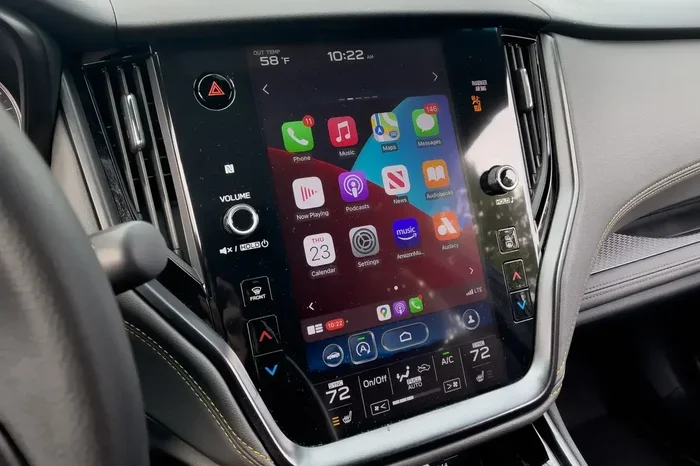
Apple CarPlay is Apple’s system for mirroring your iPhone onto your car’s display. It lets you access your phone’s features safely while driving. You can make calls, send messages, listen to music, and use navigation apps like Google Maps or Waze. All of this shows up on your car’s screen.
CarPlay connects your iPhone to your car either through a cable or wirelessly. Wireless CarPlay is newer and more convenient because you do not have to plug in your phone every time you get in the car. Wired CarPlay still works well and is found in more vehicles.
Here are some of the things CarPlay lets you do:
- Make and receive phone calls hands-free
- Send and receive text messages using voice commands
- Listen to music from Apple Music, Spotify, and other apps
- Use navigation apps like Apple Maps, Google Maps, and Waze
- Control Siri with voice commands
CarPlay has become one of the most popular smartphone integration features in cars today. It works with iPhones and is available in many car brands, not just Subaru.
Some people also wonder about Android Auto, which is the Google equivalent. If you are curious about how these systems compare to other car tech features, you can read about Can I Switch Drive Modes While Driving to understand how different car settings affect your driving experience.
Wired vs. Wireless CarPlay
There are two ways CarPlay connects to your car. Wired CarPlay uses a USB cable. It is reliable and works in almost every car that supports CarPlay. Wireless CarPlay does not need a cable. It connects through Bluetooth and Wi-Fi, which makes it more convenient. However, wireless CarPlay requires more advanced hardware in the car, and not all Subaru models have it.
Which Subaru Models Support Apple CarPlay?
This is where things get important. Not every Subaru has Apple CarPlay. And even among the ones that do, some need Starlink while others do not. It all depends on the model and the model year.
Here is a general breakdown:
- Subaru models from 2017 and newer: Many of these support Apple CarPlay, but some require a specific head unit or the Starlink system.
- Subaru models from 2013 to 2016: Some of these have CarPlay, but usually through a wired connection and often with an upgraded infotainment system.
- Subaru models from 2012 and older: These typically do not support CarPlay at all without aftermarket modifications.
The key takeaway is that CarPlay support depends more on the specific head unit and model year than on whether Starlink is installed. Many base Subaru models that do not have Starlink still support Apple CarPlay through their standard infotainment system.
Model-Specific CarPlay Compatibility
Let us look at some specific examples. The Subaru Outback, Forester, and Crosstrek are popular models that often support CarPlay. The Legacy and Impreza may also support it depending on the trim. Here are some things to keep in mind:
- 2017 and newer Subarus with the 7-inch or 8-inch touchscreen likely support CarPlay, with or without Starlink.
- Older models with factory upgrades may have CarPlay even if they do not have Starlink.
- Trim levels matter because higher trims often come with better infotainment systems that include CarPlay.
If you are not sure about your specific model, the best thing to do is check your owner’s manual or contact a Subaru dealer. They can tell you exactly what your car supports.
Starlink vs. Apple CarPlay: What Is the Difference?
This is one of the most common points of confusion. People think Starlink and CarPlay are the same thing, but they are not. Here is a simple way to think about it:
- Starlink is Subaru’s system. It handles remote features, diagnostics, and some connectivity functions.
- Apple CarPlay is Apple’s system. It handles phone mirroring, apps, and hands-free communication.
They can work together in some Subaru models, but they serve different purposes. Starlink gives you remote access to your car. CarPlay gives you access to your phone while driving.
Here is a quick comparison:
| Feature | Subaru Starlink | Apple CarPlay |
|---|---|---|
| Remote start | Yes | No |
| Phone mirroring | Limited | Full |
| Navigation apps | Built-in (subscription) | Google Maps, Waze, Apple Maps |
| Hands-free calling | Yes | Yes |
| Subscription required | Sometimes | No |
| Works with Android | Yes (limited) | No (iPhone only) |
As you can see, they are complementary systems. Starlink adds Subaru-specific features, while CarPlay adds Apple phone integration. You can have one without the other in many cases.
Can You Use Both Together?
Yes, in many newer Subaru models, you can use both Starlink and Apple CarPlay at the same time. Starlink handles the remote features and car diagnostics, while CarPlay handles your phone integration. They work side by side on the same touchscreen. This is the best of both worlds for Subaru owners who want full connectivity.
How to Get Apple CarPlay Without Starlink
If your Subaru does not have Starlink but you want Apple CarPlay, there are options. You do not need to buy the Starlink package just to get CarPlay working. Here are some ways to get CarPlay without Starlink:
Check Your Current Head Unit
First, check whether your current infotainment system already supports CarPlay. Many Subaru models from 2017 onward have CarPlay built in, even on base trims that do not include Starlink. Look for the CarPlay or smartphone icon on your touchscreen. If you see it, you already have CarPlay without needing Starlink.
Upgrade Your Infotainment System
If your current system does not support CarPlay, you can upgrade the head unit. Aftermarket head units from brands like Pioneer, Kenwood, and Alpine often support CarPlay and can be installed in place of your factory system. This is a popular option for older Subaru models that do not have CarPlay built in.
Just keep in mind that swapping out your head unit may void certain warranties, so check with your dealer first. Also, Can I Download An App To Start My Car is a related topic you might want to explore if you are looking for ways to add phone-based features to your vehicle.
Use a Wireless CarPlay Adapter
Another option is to use a wireless CarPlay adapter. These small devices plug into your car’s USB port and add wireless CarPlay functionality. They are relatively affordable and do not require replacing your entire head unit. Some popular options include devices from AAWireless and Carlinkit. These adapters work well if your car has wired CarPlay but you want the convenience of wireless.
Visit a Car Audio Shop
If you are not comfortable doing the upgrade yourself, visit a car audio shop. They can assess your current system and recommend the best CarPlay solution for your Subaru. Many shops offer installation services as well, so you do not have to worry about doing it yourself.
Is Upgrading to Starlink Worth It?
This is the big question for most Subaru owners. If you already have CarPlay working without Starlink, is it worth paying extra for Starlink? The answer depends on what you value.
Here are some reasons you might want Starlink:
- Remote start from your phone is very convenient in extreme weather.
- Vehicle tracking gives peace of mind if you are worried about theft.
- Remote diagnostics can alert you to issues before they become big problems.
- Roadside assistance is included with some Starlink plans.
Here are some reasons you might not need Starlink:
- You already have CarPlay and do not need the extra connectivity features.
- The subscription cost adds up over time, especially after the free trial ends.
- You use alternative apps for navigation and communication.
- Your current system meets your needs without the extra expense.
The truth is that Starlink is a nice-to-have, not a need-to-have. If you just want Apple CarPlay to work in your Subaru, you likely do not need Starlink at all. Save your money and stick with what you have.
Common Mistakes People Make
Many Subaru owners make the mistake of thinking they need Starlink for CarPlay. This leads to them paying for features they do not need. Another common mistake is not checking CarPlay compatibility before buying a used Subaru. Always verify what your car supports before making a purchase.
Also, some people assume that all Subarus from a certain year have CarPlay. This is not true. Always check the specific model and trim to confirm.
For more tips on car features and upgrades, you might want to read our guide on Can I Switch Drive Modes While Driving to learn how different vehicle settings can enhance your driving experience.
Expert Insights
According to Subaru experts and automotive tech reviewers, the trend in recent years has been toward including Apple CarPlay as a standard feature in more Subaru models. Subaru has been moving away from making CarPlay a premium add-on. Many 2020 and newer models include CarPlay as standard, even on lower trims.
Experts also note that wireless CarPlay is becoming more common in newer Subarus. If you are shopping for a used Subaru, look for models from 2019 onward if wireless CarPlay is important to you. These models are more likely to have the hardware needed for a wireless connection.
The bottom line is that you have options. Whether you want a simple wired connection or a full wireless setup, there is a way to get Apple CarPlay working in your Subaru without paying for Starlink.
How to Check if Your Subaru Has CarPlay
Not sure if your Subaru supports Apple CarPlay? Here are a few easy ways to find out:
- Look at your touchscreen. If you see a smartphone icon or a CarPlay logo, your car likely supports it.
- Check your owner’s manual. The manual will list all the infotainment features your car has.
- Call your local Subaru dealer. They can look up your specific VIN and tell you exactly what your car supports.
- Search online. Enter your Subaru model, year, and trim into a search engine with the words “Apple CarPlay” to find compatibility info.
Once you confirm your car supports CarPlay, you can start using it right away. Just plug in your iPhone or connect wirelessly, and you are good to go.
Final Thoughts
So, do you really need Subaru Starlink to use Apple CarPlay? The answer is a clear no. Starlink and Apple CarPlay are two different systems, and you can have CarPlay without Starlink in most Subaru models. Starlink adds some nice remote features, but it is not required for phone integration while driving.
If your Subaru already has CarPlay, you are all set. If it does not, you have several affordable options to add it. From checking your current head unit to upgrading to an aftermarket unit, there is a solution for almost every Subaru.
The most important thing is to know what your car supports before you spend any money. Do your research, check your model year and trim, and make an informed decision. You will save money and end up with the right setup for your needs.
Apple CarPlay is a fantastic feature that makes driving safer and more connected. Whether you have Starlink or not, CarPlay can make your daily commute or road trip much more enjoyable. So go ahead, connect your phone, and enjoy the drive.
Frequently Asked Questions
Can I use Apple CarPlay in a Subaru without Starlink?
Yes, in most cases you can. Many Subaru models support Apple CarPlay through their standard infotainment system, even without the Starlink package. Check your specific model and year to confirm compatibility.
Does every Subaru model support Apple CarPlay?
No, not every Subaru supports CarPlay. Models from 2017 onward are more likely to have it, but support depends on the specific trim level and head unit. Always verify before assuming.
Is wireless CarPlay available without Starlink?
Yes, wireless CarPlay can be available without Starlink if your Subaru’s head unit supports it. Newer Subaru models from 2019 onward are more likely to have wireless CarPlay as a standard or optional feature.
How much does it cost to add Apple CarPlay to a Subaru?
If your Subaru does not have CarPlay natively, you can add it through an aftermarket head unit. Costs range from $200 to $500 for the unit, plus installation fees if you have a shop do it.
What is the difference between Subaru Starlink and Apple CarPlay?
Starlink is Subaru’s connectivity system for remote features like remote start and vehicle tracking. CarPlay is Apple’s system for mirroring your iPhone on your car’s display. They are separate systems that can work together but serve different purposes.
Can I use both Starlink and Apple CarPlay at the same time?
Yes, in most newer Subaru models, Starlink and CarPlay can work simultaneously. Starlink handles remote features and diagnostics, while CarPlay handles phone integration. Both appear on the same touchscreen.