How Do I Turn On Cruise Control for Easy Highway Driving
Learning how to turn on cruise control is one of the easiest ways to make long drives more comfortable and less tiring. This guide walks you through every step, from finding the cruise control button to setting your speed on the highway. You will also learn about the different types of cruise control systems, common mistakes to avoid, and safety tips that keep you protected on the road. Whether you drive a sedan, SUV, or truck, this article has you covered.
Learning how to turn on cruise control is one of the simplest upgrades you can make to your driving experience. If you have ever spent hours on the highway gripping the accelerator, you know how tiring it can be. Cruise control takes that burden off your right foot and lets you focus more on the road ahead. This guide will show you exactly how to activate cruise control in any vehicle, whether you drive a new model or an older car.
We will walk you through every step in plain, simple language. You will learn where to find the cruise control button, how to set your speed, and what to do when you need to adjust things on the fly. We will also cover the different types of cruise control systems available today, including adaptive cruise control and standard automatic speed control. By the end of this article, you will feel confident using cruise control on your next road trip.
So, how do I turn on cruise control? The answer is easier than you think. Most modern vehicles make it a quick and straightforward process. Let us break it down step by step so you can start enjoying easier highway driving today.
Key Takeaways
- Easy activation: Turning on cruise control is simple and usually involves pressing a single button on your steering wheel or dashboard.
- Multiple system types: Standard cruise control and adaptive cruise control work differently, and knowing the difference helps you drive smarter.
- Safety first: Always stay alert and know when to cancel cruise control for safe driving.
- Fuel savings: Using cruise control on flat highways can improve your fuel efficiency over long drives.
- Quick tips matter: Small habits like adjusting your speed before setting cruise control make a big difference in comfort.
- Know your limits: Cruise control is not suitable for wet roads, heavy traffic, or winding mountain routes.
📑 Table of Contents
- What Is Cruise Control and Why Use It?
- How to Turn On Cruise Control: Step by Step
- Types of Cruise Control Systems
- Common Cruise Control Mistakes to Avoid
- Tips for Using Cruise Control Safely
- When NOT to Use Cruise Control
- Expert Insights on Cruise Control Usage
- How Cruise Control Affects Fuel Efficiency
- Key Takeaways for Your Next Drive
What Is Cruise Control and Why Use It?
Cruise control is a system in your vehicle that maintains a steady vehicle speed without you needing to press the accelerator. It was first introduced in luxury cars during the 1950s and has since become a standard feature in most new vehicles. The basic idea is simple: you set a speed, and the car handles the throttle for you.
How Cruise Control Works
When you activate cruise control, the system uses an electronic link to the throttle to keep your car moving at the speed you chose. You can typically find the cruise control button on the steering wheel, the dashboard, or a stalk on the steering column. Once turned on, the system holds your vehicle speed steady until you tap the brake, press cancel, or turn the system off.
The beauty of this system is that it reduces driver fatigue. On long, straight highway stretches, keeping your foot off the pedal helps you stay more relaxed and focused. It also promotes smoother acceleration, which can be easier on your car’s engine over time.
Benefits of Using Cruise Control
There are several real benefits to using cruise control on the right roads:
- Reduced foot fatigue: Your right foot gets a break on long drives, which helps you stay alert longer.
- Better fuel efficiency: Maintaining a steady vehicle speed avoids unnecessary acceleration and deceleration, which saves gas.
- Consistent speed: Cruise control helps you avoid accidentally speeding up or slowing down without realizing it.
- Less stress: Highway driving becomes more relaxing when you do not have to constantly manage your throttle.
- Improved traffic flow: When multiple drivers use cruise control at steady speeds, it can help reduce traffic congestion on busy highways.
How to Turn On Cruise Control: Step by Step
Now that you understand what cruise control is, let us get into the practical steps. The exact process can vary slightly depending on your vehicle, but the general steps are very similar across most makes and models.
Locate the Cruise Control Button
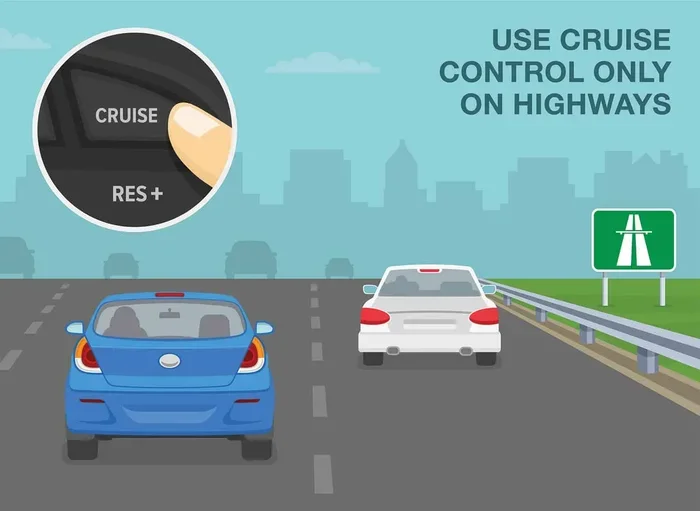
Your first step is to find where the controls are. In most cars, the cruise control button is on the steering wheel. Look for buttons labeled “Cruise,” “SET,” or icons that look like a speedometer with an arrow. Some older vehicles use a stalk on the steering column instead of steering wheel buttons.
Check your owner’s manual if you are not sure where yours is located. The manual will also tell you if your vehicle has cruise control at all, as some base models may not include it as standard.
Set Your Desired Speed
Once you have found the button, follow these simple steps:
- Accelerate to your desired speed: Drive at the speed you want to maintain, usually between 40 and 75 mph on highways.
- Press the “Set” or “On” button: This tells the system to remember and lock in your current speed.
- Release the accelerator pedal: The car will now maintain the speed on its own.
- Check the dashboard display: Most vehicles show a cruise control indicator on the dash, confirming the system is active.
That is it. You are now using cruise control. It really is that simple. You can adjust the speed up or down in small increments using the “+” and “-” buttons on the steering wheel controls.
Adjust and Fine-Tune Your Speed
Need to change your speed after setting cruise control? No problem. Most vehicles let you adjust the set speed in small increments, usually 1 mph at a time. Some models allow larger jumps of 5 mph. Simply press the up or down buttons on the steering wheel to make the adjustment.
If you need to slow down temporarily, you can tap the brake pedal. This temporarily pauses the cruise control. Once you are at the new speed, you can press the “Resume” button to return to your previous set speed.
Types of Cruise Control Systems
Not all cruise control systems are the same. Over the years, car manufacturers have developed several different types of cruise control technology. Here is a quick comparison of the most common systems you will find in vehicles today.
| Type | How It Works | Best For |
|---|---|---|
| Standard Cruise Control | Maintains a fixed speed you set manually | Long, straight highway drives with steady traffic flow |
| Adaptive Cruise Control | Uses sensors to maintain a safe following distance from the car ahead | Highway driving with varying traffic speeds |
| Radar-Based Cruise Control | Uses radar sensors to detect vehicles ahead and adjust speed automatically | All highway driving conditions |
| Speed Limiter | Prevents the vehicle from exceeding a set maximum speed | Urban driving or areas with strict speed limits |
| Driver Assistance Package | Combines cruise control with lane-keeping and other safety features | Full highway and semi-autonomous driving support |
Adaptive cruise control has become increasingly popular in recent years. Unlike standard systems, it uses sensors, cameras, or radar to detect the vehicle speed of the car in front of you. If the car ahead slows down, your car will slow down too, and then speed back up when the road clears. This makes highway driving much more convenient, especially in heavy traffic.
Standard cruise control is still very useful for open highways where traffic flows steadily. It is simple, reliable, and found in a wide range of vehicles. If you are shopping for a car and wondering which system to look for, consider your typical driving habits. For mostly open highway driving, standard cruise control works great. If you commute in busy traffic, adaptive cruise control is a worthwhile upgrade.
Common Cruise Control Mistakes to Avoid
Even though cruise control is easy to use, there are some common mistakes drivers make that can reduce safety and comfort. Here are the pitfalls to watch out for.
- Using cruise control in heavy traffic: Cruise control is designed for steady-speed driving. In stop-and-go traffic, it can be dangerous and impractical. Always cancel cruise control when traffic slows down significantly.
- Falling asleep at the wheel: Some drivers get too relaxed with cruise control and become drowsy. Remember that cruise control does not replace your attention. Keep your hands on the wheel and your eyes on the road at all times.
- Ignoring road conditions: Wet, icy, or gravel roads are poor conditions for cruise control. Sudden loss of traction can cause the system to behave unpredictably. Always turn it off on slippery surfaces.
- Not adjusting speed for curves: Standard cruise control does not slow down for curves. You will need to manually brake before sharp turns and then resume cruise control afterward.
- Forgetting to cancel after use: Some drivers forget to turn off cruise control when they reach their destination. This can cause unexpected acceleration if you accidentally hit the accelerator pedal.
- Relying too heavily on the system: Cruise control is a driver assistance tool, not a replacement for active driving. Always stay engaged with the road and your surroundings.
Avoiding these mistakes will help you get the most out of your cruise control system while keeping yourself and others safe on the road.
Tips for Using Cruise Control Safely
Using cruise control the right way makes your drives more comfortable and safer. Here are some practical tips to keep in mind.
Adjust Speed Before Setting Cruise Control
Make sure you are at a safe and legal speed before you press the “Set” button. Do not try to adjust the set speed while already driving at an unsafe pace. Get to your target speed first, then activate the system.
Keep Your Hands on the Wheel
Even with cruise control active, you should always keep at least one hand on the steering wheel. Some modern vehicles have sensors that detect this and will alert you if your hands leave the wheel for too long. This is a safety feature designed to keep you engaged.
Use Cruise Control on Flat or Gently Sloping Roads
Cruise control works best on flat or gently rolling terrain. On steep hills, the system may struggle to maintain your set speed. It might downshift aggressively on inclines or even slow down too much on declines. In these situations, you may want to manually control your throttle for a smoother experience.
Stay Alert for Road Signs and Changes
Cruise control does not read road signs or react to changing speed limits. Always pay attention to posted speed limits and be ready to adjust your speed manually if needed. This is especially important when transitioning from highways to local roads or entering construction zones.
Know Your Cancel and Resume Buttons
Take a moment to learn where the cancel and resume buttons are on your steering wheel. If you need to slow down quickly, tapping the brake is the fastest way to cancel cruise control. The resume button then brings back your previous speed when conditions allow. Familiarity with these controls builds confidence and helps you react faster in unexpected situations.
When NOT to Use Cruise Control
Cruise control is a fantastic tool, but it is not right for every situation. Knowing when to turn it off is just as important as knowing how to turn it on.
Avoid using cruise control in these situations:
- Wet or icy roads: Traction can change suddenly, and cruise control may cause wheel spin or loss of control.
- Heavy rain or fog: Low visibility means you need full control of your speed at all times.
- Winding mountain roads: Constant curves require active throttle and brake management that cruise control cannot provide.
- City or urban driving: Frequent stops, speed changes, and pedestrians make cruise control impractical and unsafe.
- Construction zones: Speed limits change frequently, and workers may be close to the roadway.
- When you are tired: Cruise control can make drowsy drivers feel more comfortable, which is a dangerous false sense of security.
The rule of thumb is simple: if the road conditions require constant attention and speed adjustments, turn off cruise control and drive manually. Your safety always comes first.
Expert Insights on Cruise Control Usage
Driving experts agree that cruise control, when used correctly, is a valuable tool for highway driving. According to traffic safety researchers, cruise control helps promote smoother acceleration and deceleration patterns, which can reduce the risk of rear-end collisions caused by inconsistent speed changes.
Automotive engineers also point out that modern adaptive cruise control systems have evolved significantly. Many new vehicles now include stop-and-go adaptive cruise control, which can bring your car to a complete stop in traffic and then resume moving when the car ahead of you starts again. This feature is particularly helpful for drivers who commute long distances in congested areas.
However, experts caution that no cruise control system replaces active driver engagement. The American Automobile Association (AAA) consistently emphasizes that drivers should remain fully attentive and ready to take control at any moment. Cruise control is a helper, not a substitute for safe driving habits.
Another insight from driving instructors is to practice using cruise control in low-risk environments first. Try it out on a clear, empty highway section before relying on it during rush hour or in complex driving conditions. Building familiarity with the system in a safe setting will boost your confidence and help you use it more effectively when it matters most.
Finally, keep your vehicle well-maintained for the best cruise control performance. Make sure your sensors and cameras (for adaptive systems) are clean and free of debris. A dirty radar sensor or camera can cause the system to malfunction or disengage unexpectedly, which can be startling while driving at high speeds.
How Cruise Control Affects Fuel Efficiency
One of the often-overlooked benefits of cruise control is its positive impact on fuel efficiency. Maintaining a steady vehicle speed avoids the fuel-wasting cycle of constant acceleration and braking. Studies have shown that using cruise control on flat highways can improve fuel economy by 7 to 14 percent compared to manual speed management.
However, this benefit is most noticeable on flat terrain. On hilly roads, cruise control may work harder to maintain speed on inclines, which can actually increase fuel consumption in some cases. The key is to use cruise control strategically: turn it on on long, flat highway stretches where steady speed is easy to maintain.
If you want to maximize your fuel savings, combine cruise control with other efficient driving habits. Keep your tires properly inflated, remove excess weight from your vehicle, and maintain a steady speed within the most fuel-efficient range for your engine, typically between 45 and 65 mph.
Key Takeaways for Your Next Drive
Using cruise control effectively comes down to knowing when and how to use it. Here is a quick recap of the most important points:
- Finding the cruise control button on your steering wheel or dashboard is the first step to activation.
- Setting your speed is quick: accelerate to your desired pace, press “Set,” and release the pedal.
- Standard cruise control works best on open, flat highways with steady traffic.
- Adaptive cruise control adds safety by automatically adjusting your speed based on the vehicle ahead.
- Always stay alert and keep your hands on the wheel, even when cruise control is active.
- Cancel cruise control in poor road conditions, heavy traffic, or when you feel fatigued.
- Regular maintenance of sensors and cameras ensures your cruise control system works reliably.
The more you practice using cruise control, the more natural it will feel. Soon, you will wonder how you ever drove long distances without it. Start with short highway trips to build your confidence, and gradually expand to longer journeys as you become more comfortable with the system.
Turning on cruise control is a skill every driver should have. It makes highway driving easier, more comfortable, and in many cases more fuel-efficient. With the steps and tips in this guide, you are fully equipped to use cruise control safely and confidently on your next trip. So the next time you hit the open road, press that cruise control button and enjoy the drive.
Frequently Asked Questions
Can I turn on cruise control at any speed?
Most vehicles allow you to activate cruise control at speeds above 25 to 30 mph. Check your owner’s manual for the exact minimum speed requirement. You cannot set cruise control while the vehicle is completely stopped in most standard systems.
What is the difference between cruise control and adaptive cruise control?
Standard cruise control maintains a fixed speed you set, while adaptive cruise control uses sensors to adjust your speed based on the vehicle ahead of you. Adaptive systems are more convenient for highway driving with varying traffic flow.
Does using cruise control save fuel?
Yes, cruise control can improve fuel efficiency by maintaining a steady speed and avoiding unnecessary acceleration and braking. The savings are most noticeable on flat, open highways where steady speed is easy to maintain.
Can I use cruise control in the rain?
It is best to avoid using cruise control on wet or slippery roads. Sudden loss of traction can cause the system to behave unpredictably. Turn off cruise control when road conditions are less than ideal.
How do I cancel cruise control if it is stuck on?
Tapping the brake pedal will immediately cancel cruise control in almost all vehicles. You can also press the “Cancel” button on the steering wheel. If the system does not respond, turn off the engine and restart the vehicle.
Is cruise control safe for long road trips?
Yes, cruise control is safe and helpful for long road trips on highways. However, you should take regular breaks to stretch and stay alert. Cruise control does not replace active driver attention and should always be used alongside safe driving practices.
=== CONCLUSION ===
Learning how to turn on cruise control is a simple yet powerful way to improve your highway driving experience. Whether you drive a compact car or a full-size truck, the process is straightforward and the benefits are significant. From reduced fatigue to better fuel efficiency, cruise control makes long drives more enjoyable and less stressful.
Remember to always use cruise control responsibly. Know when to activate it, when to adjust your speed, and when to turn it off. Stay alert, keep your hands on the wheel, and respect the road conditions around you. With the tips and guidance in this article, you are ready to hit the highway with confidence.
So go ahead, press that cruise control button, set your speed, and enjoy the open road. Safe travels and happy driving!