Easy Steps to Connect Key Fob to Car Push to Start
Connecting your key fob to a push to start car is simpler than you think. This guide walks you through every step, from battery replacement to fob programming and troubleshooting. Whether you have a new vehicle or a used one, you will learn how to sync your remote key fob and get your push start car running smoothly.
Have you ever stood by your car, fob in hand, wondering why the push button start does not respond? You are not alone. Millions of drivers face this issue every year, and the fix is almost always simpler than they expect.
This guide will show you exactly how to connect key fob to car push to start system in plain, easy steps. We will cover battery swaps, fob programming, signal issues, and common mistakes that trip people up. By the end, you will feel confident handling your remote key fob like a pro.
Modern cars use a smart key system that communicates wirelessly with your fob. When this connection breaks, it can feel frustrating. But most of the time, the problem is a weak battery, a lost sync, or a simple electrical glitch. Let us fix it together.
Key Takeaways
- Battery Matters: A dead car key fob battery is the most common reason for push start failure.
- Sync Is Key: Proper key fob sync ensures your vehicle recognizes the fob instantly.
- Troubleshooting Helps: Knowing key fob troubleshooting steps saves time and money at the mechanic.
- Signal Strength: Keep your key fob signal strong by replacing the battery every 1–2 years.
- Smart Key System: Modern smart key system vehicles require specific pairing steps.
- Car Electrical System: A healthy car electrical system supports seamless fob communication.
📑 Table of Contents
- Understanding Your Key Fob and Push to Start System
- How to Connect Key Fob to Car Push to Start: Step-by-Step
- Common Key Fob Problems and How to Fix Them
- Key Fob Battery Replacement: When and How Often
- When to Seek Professional Help
- Tips to Keep Your Key Fob Working Longer
- Expert Insights on Key Fob and Push Start Technology
- Key Takeaways
Understanding Your Key Fob and Push to Start System
Before you dive into the steps, it helps to understand what is happening under the hood. Your push to start car relies on a small computer called the immobilizer. This system checks whether your key fob signal matches the car’s expected code. If it does, the engine starts. If not, nothing happens.
How the Smart Key System Works
When you press the car start button, the vehicle sends out a low-frequency radio signal. Your fob picks up this signal and responds with its unique identification code. This whole process happens in milliseconds. You never see it, but it is always working.
Here are the key parts involved:
- Key Fob: The handheld device you carry. It contains a small chip and a battery.
- Antenna Ring: Located inside the car’s cabin. It reads the fob signal.
- Immobilizer Module: The brain that verifies the fob code.
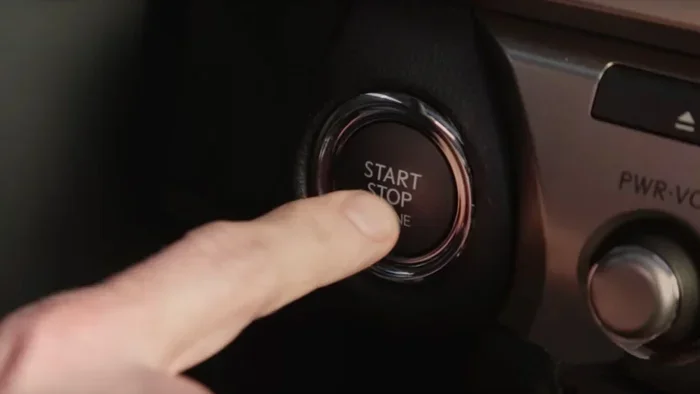
- Start Button: The button you press to ignite the engine.
- Car Electrical System: Powers all the components that allow communication.
Understanding these parts makes key fob programming much easier. When one piece fails, the whole chain breaks. That is why knowing where the problem sits saves so much time.
Many people also confuse a transponder key with a smart fob. A transponder key has a chip inside the physical blade. A smart fob does not need a blade at all. Both serve the same purpose: proving to the car that you are the rightful owner.
How to Connect Key Fob to Car Push to Start: Step-by-Step
Now that you understand the basics, let us walk through the actual process. These steps apply to most vehicles with push button ignition. Always check your owner manual first, as every brand has slight differences.
Step 1: Check and Replace the Fob Battery
The number one reason a key fob not working is a dead battery. Before you try anything else, swap it out. Most key fobs use a small CR2025 or CR2032 coin cell battery. You can find these at any grocery store or pharmacy.
Here is how to replace it:
- Flip open your remote key fob using a small flathead screwdriver.
- Note the battery orientation before removing it.
- Insert the new battery with the positive side facing up.
- Snap the fob back together securely.
After replacing the battery, stand close to your car and press the start button. If the vehicle startup works, your problem is solved. If not, move to the next step.
Step 2: Position the Fob Correctly
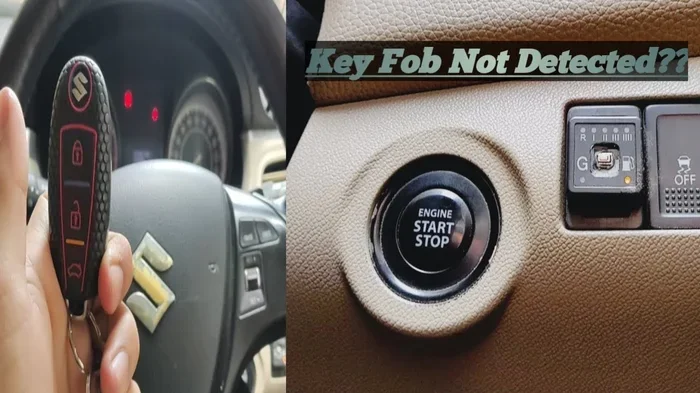
Some cars have a key fob signal range of only a few feet. If your battery is weak or the fob is in your back pocket, the car may not detect it. Try holding the fob directly against the start button or the steering column.
Many vehicles also have a backup mechanical key hidden inside the fob. Use this to physically unlock the door. Once inside, place the fob on the designated spot near the dashboard. Look for a small icon that shows where the fob should sit.
Step 3: Put the Car in Programming Mode
If replacing the battery does not help, you need to sync key fob with the car. This process is called programming or pairing. Here is the general method:
- Sit in the driver seat and close all doors.
- Turn the ignition to the “ON” position without pressing the start button.
- Press and hold the lock button on the fob for five seconds.
- Turn the ignition off and wait ten seconds.
- Repeat the process two more times.
- On the third cycle, the car should beep or flash the lights. This means it is in pairing mode.
- Press any button on the fob to complete the key fob programming.
Not all cars follow this exact sequence. Some require you to insert a physical key into a hidden slot. Others need you to press the start button three times quickly. Always refer to your vehicle manual for the exact steps.
Step 4: Test the Connection
Once programming is complete, step outside the car and try starting the engine from a few feet away. Walk around the vehicle to test the full range. The fob should work reliably from at least 10 to 15 feet.
If the fob works close up but not far away, the battery may still be weak or the antenna ring inside the car may have an issue. In that case, you might want to check the 12v power socket car connections or visit a mechanic to inspect the antenna system.
Common Key Fob Problems and How to Fix Them
Even after following the steps above, issues can still pop up. Here are the most common key fob troubleshooting problems and their solutions.
Fob Works Sometimes But Not Always
Intermittent fob issues usually point to a low battery or a weak signal. Try these fixes:
- Replace the battery with a fresh one from a trusted brand.
- Check for damage to the fob casing. Cracks can let moisture in.
- Keep the fob away from other electronic devices that may cause interference.
- Stand closer to the car when pressing the start button.
Sometimes electromagnetic interference from a nearby 12v to 230v car inverter or other accessory can disrupt the fob signal. If you recently installed any car electrical accessory, try turning it off and see if the fob works better.
Fob Does Not Work at All
A completely dead fob could mean several things:
- The battery is completely drained.
- The fob’s internal chip is damaged.
- The car’s antenna ring has failed.
- The immobilizer module needs resetting.
Start with the battery. If that does not work, try the backup mechanical key to enter the car. Once inside, place the fob directly against the start button. Many cars have a backup reading zone that works even when the fob battery is completely dead.
Car Starts but Fob Warning Light Stays On
If your engine starts but a warning light on the dashboard stays on, the car has detected an issue with the fob. This could mean the fob signal is weak or the pairing has been lost. Try re-syncing the fob using the programming steps above.
Also check your 12v car socket to 3 pin adapter if you use one. Poor-quality adapters can sometimes create electrical noise that confuses the car’s computer. A simple 12v power socket car check can rule this out quickly.
Fob Gets Wet or Damaged
Water damage is a silent killer of key fobs. If your fob has been dropped in water or exposed to heavy rain, dry it out immediately. Remove the battery and let the fob sit open for 24 hours. Once dry, reinsert the battery and test it.
If the fob still does not work after drying, the internal circuit board may be fried. In that case, you will need a key fob replacement. Many dealerships and auto parts stores can program a new fob for you.
Key Fob Battery Replacement: When and How Often
Your car key fob battery typically lasts between one and two years. However, cold weather, frequent use, and signal interference can shorten that lifespan significantly.
Signs Your Fob Battery Is Dying
- The fob needs to be very close to the car to work.
- The lock/unlock range has gotten shorter.
- The dashboard shows a low battery warning.
- The fob responds slowly or inconsistently.
Best Batteries for Key Fobs
Not all batteries are created equal. Here are some reliable options:
- CR2025: Common in many Toyota, Honda, and Ford models.
- CR2032: Used in BMW, Mercedes, and most modern vehicles.
- CR1632: Found in some older or compact fobs.
Buy batteries from reputable brands like Energizer or Duracell. Cheap generic batteries often die within weeks, and you will be replacing them again too soon.
Pro tip: Keep a spare battery in your glove box. It takes less than two minutes to swap, and it saves you from being stranded with a dead fob at the worst possible moment.
When to Seek Professional Help
Most key fob troubleshooting tasks are DIY-friendly. However, some situations call for a professional touch.
Signs You Need a Mechanic or Dealer
- The fob still does not work after battery replacement and reprogramming.
- The car’s immobilizer light stays on constantly.
- You have lost all fobs and need a new one programmed from scratch.
- The start button feels loose or unresponsive.
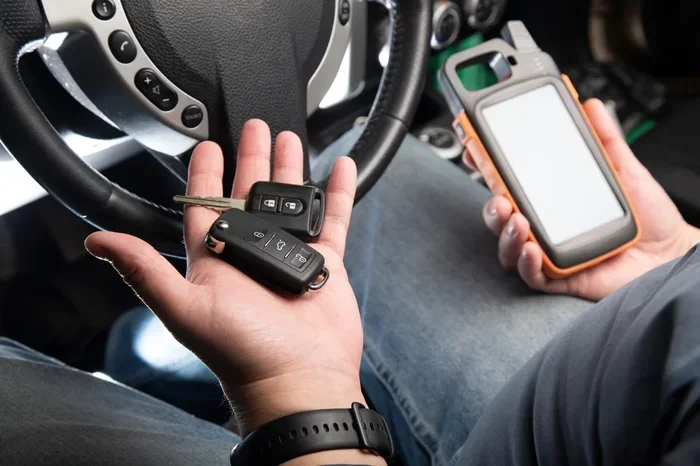
A dealer or certified locksmith can perform key fob programming with specialized equipment. They can also diagnose issues with the car immobilizer or antenna ring that are beyond a typical DIY fix.
If you use accessories like a 12v power socket car inverter or a 12v car socket to 3 pin adapter, make sure they are properly grounded. Poor grounding can interfere with the car’s electronic systems, including fob communication.
Also, if you recently had work done on your car electrical system, such as installing a new battery or alternator, the fob connection may have been disrupted during the process. A quick check by a professional can resolve this safely.
Tips to Keep Your Key Fob Working Longer
Prevention is always better than cure. Follow these simple habits to keep your push to start car fob in top shape.
1. Replace the Battery Proactively
Do not wait for the fob to die completely. Swap the battery every 12 to 18 months. Set a reminder on your phone if needed. This small habit prevents a lot of frustration.
2. Keep the Fob Away from Moisture
Water and electronics do not mix well. Store your fob in a dry place. If it gets wet, dry it immediately. Never charge a wet fob or press buttons on a damp device.
3. Avoid Dropping the Fob
The internal chip in your fob is delicate. Repeated drops can crack the circuit board or damage the antenna. A protective fob cover or case can help absorb shocks.
4. Store the Fob Away from Strong Signals
Keep your fob away from large metal objects, microwaves, and other strong electromagnetic sources. These can interfere with the key fob signal and even drain the battery faster.
5. Use the Backup Mechanical Key
Know where your hidden mechanical key is. In an emergency, you can use it to unlock the door and place the fob against the backup reading zone near the start button. This works even when the fob battery is completely dead.
6. Keep Your Car’s Electrical System Healthy
A strong car electrical system supports reliable fob communication. Make sure your car battery is in good condition. If you use accessories like a 12v dc motor for toy car kit or any other 12v device, ensure they are properly connected and do not overload the system.
Expert Insights on Key Fob and Push Start Technology
According to automotive experts, the push button start system has come a long way since its introduction. Early versions were prone to signal interference and battery drain. Today’s smart key system technology is much more reliable, but it still requires proper maintenance.
One common mistake drivers make is ignoring the fob warning on the dashboard. If your car displays a message like “Key Not Detected” or “Check Key Fob,” do not ignore it. Address it immediately. The longer you wait, the more complicated the fix can become.
Another expert tip: always have a second fob programmed to your vehicle. If your primary fob is lost or damaged, a backup fob saves you from expensive towing and locksmith calls. Most dealerships can program a second fob for a fraction of the cost of a full replacement.
Technology is evolving fast. Some new vehicles now support smartphone-based digital keys. These use Bluetooth and NFC instead of a traditional fob. While this is exciting, the same principles apply: keep your phone charged, maintain the connection, and troubleshoot signal issues promptly.
Key Takeaways
- Start with the Battery: A fresh car key fob battery solves most key fob not working issues instantly.
- Sync Regularly: Periodically re-pair your fob to maintain a strong key fob sync with your push start car.
- Know the Programming Steps: Every vehicle has a unique key fob programming sequence. Keep your manual handy.
- Watch for Warning Signs: Short range, slow response, and dashboard warnings are early signals of fob problems.
- Protect Your Fob: Keep it dry, avoid drops, and store it away from strong electromagnetic sources.
- Seek Help When Needed: Complex issues with the car immobilizer or electrical system require professional diagnosis.
Knowing how to connect key fob to car push to start system gives you confidence and independence. You do not need to call a mechanic every time the fob acts up. With the right knowledge and a fresh battery, you can handle most issues in under five minutes.
Take care of your remote key fob, and it will take care of you. A little maintenance goes a long way toward keeping your vehicle startup smooth and hassle-free every single day.
Frequently Asked Questions
Why won’t my push to start car recognize the key fob?
The most common reason is a dead or weak battery in the fob. Replace the battery with a new CR2025 or CR2032 cell and try again. If that does not work, the fob may need to be re-synced with the car. Stand close to the vehicle, hold the fob against the start button area, and follow the programming steps in your owner manual.
How do I program a new key fob for my push start car?
Put the car into programming mode by turning the ignition to “ON” and following the specific sequence for your vehicle model. Press and hold the lock button on the new fob, cycle the ignition off and on, and wait for the car to beep or flash its lights. Then press any fob button to complete the key fob programming. Refer to your vehicle manual for exact steps.
How often should I replace my key fob battery?
Most car key fob battery units last between 12 and 18 months. If you notice the fob working only at very close range or responding slowly, it is time for a replacement. Keeping a spare battery in your glove box ensures you are never caught off guard.
Can a dead key fob prevent a push start car from starting?
Yes, absolutely. The push start car relies on detecting the key fob signal before it allows the engine to start. If the fob battery is dead, the car cannot verify the fob’s identity. However, most vehicles have a backup reading zone near the start button where you can place the fob even with a dead battery.
What should I do if my key fob gets wet?
Remove the battery immediately and let the fob dry out for at least 24 hours in a warm, dry place. Do not use a hairdryer on high heat, as this can damage the internal components. Once dry, reinsert the battery and test the fob. If it still does not work, the circuit board may be damaged and you will need a key fob replacement.
Is it expensive to replace a lost key fob for a push start car?
The cost varies by vehicle brand and model. A basic fob replacement typically ranges from $50 to $200 for the part alone. Programming at a dealership may add another $50 to $100. Having a second fob programmed as a backup can save you significant money and inconvenience in the long run.
=== CONCLUSION ===
Learning how to connect key fob to car push to start system is one of the most useful skills any car owner can have. It saves time, money, and the frustration of being stranded by a simple fob issue. From battery replacement to key fob programming, the steps in this guide cover everything you need to know.
Keep your remote key fob maintained, replace the battery regularly, and pay attention to warning signs on your dashboard. A little care goes a long way. And when in doubt, consult your vehicle manual or seek professional help for complex car electrical system issues.
With the knowledge you have gained today, you are well-equipped to handle almost any key fob troubleshooting situation. Drive confidently, keep your push button ignition working smoothly, and enjoy the convenience of your modern smart key system every time you hit the road.