How Do You Code a Garage Door Opener With These Tips
Learning how to code a garage door opener is easier than most homeowners think. This guide walks you through every step, from locating the learn button to programming a universal remote and garage door keypad. You will also discover common coding mistakes, essential security tips, and expert insights that save time and money. Whether you own a Chamberlain, LiftMaster, Genie, or Craftsman opener, these practical tips apply to almost every brand on the market today.
Have you ever stood in your driveway, remote in hand, trying to figure out how do you code a garage door opener? You are not alone. Millions of homeowners face this exact situation every year, whether they are moving into a new home, replacing a lost remote, or upgrading their system.
The good news is that coding a garage door opener is not as complicated as it might seem. With the right guidance and a little patience, you can have your garage door remote working in just a few minutes. This guide breaks down the entire process into simple, easy-to-follow steps that anyone can handle.
We will cover everything from understanding how your opener works to programming remotes, keypads, and universal transmitters. You will also learn about common mistakes, security best practices, and expert tips that make the whole process smoother. By the end of this article, you will feel confident tackling your garage door opener coding project on your own.
Key Takeaways
- Know Your Opener Model: Always check your garage door opener brand and model before starting the coding process.
- Locate the Learn Button: The learn button on your motor unit is the gateway to programming any remote or keypad.
- Universal Remotes Work Wonders: A universal garage door remote can replace multiple remotes and simplify your setup.
- Avoid Common Mistakes: Skipping the manual, ignoring frequency mismatches, and forgetting to reset are the top errors homeowners make.
- Security Matters: Rolling code technology and regular code changes keep your garage door opener secure from unauthorized access.
- Keypads Add Convenience: Programming a garage door keypad lets you open your door without carrying a remote.
- Test After Every Step: Always test your garage door opener after programming to confirm everything works correctly.
📑 Table of Contents
- Understanding How Garage Door Openers Work
- How Do You Code a Garage Door Opener? Step-by-Step Guide
- Programming a Garage Door Keypad
- Universal Garage Door Remotes
- Common Mistakes When Coding a Garage Door Opener
- Garage Door Opener Security Tips
- Expert Tips for a Smooth Garage Door Opener Coding Experience
- Conclusion
Understanding How Garage Door Openers Work
Before you start pressing buttons, it helps to understand the basics of how a garage door opener actually functions. Knowing the core components and how they communicate with each other makes the coding process much easier.
What Is a Garage Door Opener?
A garage door opener is a motorized device that automatically opens and closes your garage door. It typically consists of a motor unit mounted on the ceiling, a track system, a chain or belt, and a remote control transmitter. When you press the button on your remote, it sends a signal to the receiver in the motor unit. The receiver then tells the motor to activate and move the door.
Modern garage door openers use radio frequency signals to communicate between the remote and the motor unit. The most common frequencies are 300 MHz and 310 MHz, though some older models use 390 MHz. Understanding this frequency is important because it determines compatibility between your remote and opener.
The Role of Frequency and Coding
Coding is the process of matching the signal from your remote or keypad to the receiver in your garage door opener motor. Think of it like setting a private radio channel that only your remote and opener can understand. When the codes match, the door responds when you press the button.
Older garage door openers used fixed codes, meaning the remote always sent the same signal every time. Today, most modern openers use rolling code technology, which changes the signal with every use. This rolling code feature greatly improves garage door security because the code never repeats, making it much harder for someone to intercept and replicate your signal.
How Do You Code a Garage Door Opener? Step-by-Step Guide
Now that you understand the basics, let us get into the actual process. Follow these steps carefully, and you will have your garage door opener programmed in no time.
Step 1: Find Your Opener Model and Brand
Not all garage door openers are programmed the same way. The first thing you should do is identify your opener brand and model. Common brands include Chamberlain, LiftMaster, Craftsman, Genie, and Overhead Door. You can usually find the model number on a sticker on the motor unit itself or in the owner’s manual.
Once you know your model, look up the specific programming instructions. While most openers follow a similar general process, there can be small differences between brands. Checking the manual or the manufacturer’s website takes just a few minutes and can save you a lot of frustration later.
Step 2: Locate the Learn Button on Your Motor Unit
The learn button is the key to programming your garage door opener. On most models, you will find this button on the back or side of the motor unit, which is the large box mounted on your garage ceiling. It is usually colored and may be labeled “Learn,” “Smart,” “Set,” or “Program.”
Some learn buttons are hidden behind a light cover or a small panel. If you do not see it right away, try removing the cover on the motor unit. Pressing the learn button activates the programming mode, which gives you a limited window of time to complete the next steps.
Step 3: Press the Learn Button and Enter Programming Mode
Press and release the learn button. You should see a light on the motor unit blink or hear a clicking sound. This means the opener is now in programming mode and ready to receive a new signal. You typically have about 30 seconds to complete the next step, so work quickly but carefully.
If you are programming a remote, hold down the button on the remote you want to use. Aim it directly at the motor unit and press the button firmly. The light on the motor unit should stop blinking or change pattern, confirming the remote has been accepted.
Step 4: Test Your Garage Door Opener Remote
After programming, always test your remote before walking away from the motor unit. Stand a reasonable distance away and press the button. The garage door should respond immediately by either opening or closing, depending on its current position.
If the door does not respond, try programming the remote again. Sometimes the signal does not register on the first attempt. Make sure you are within range of the motor unit and that the batteries in your remote are fresh. Weak batteries are one of the most common reasons programming appears to fail.
Step 5: Program Additional Remotes and Devices
Most garage door openers allow you to program multiple remotes. Simply repeat the learn button process for each additional remote you want to add. Some models can store codes for up to five or more remotes, which is handy for families with multiple vehicles or users.
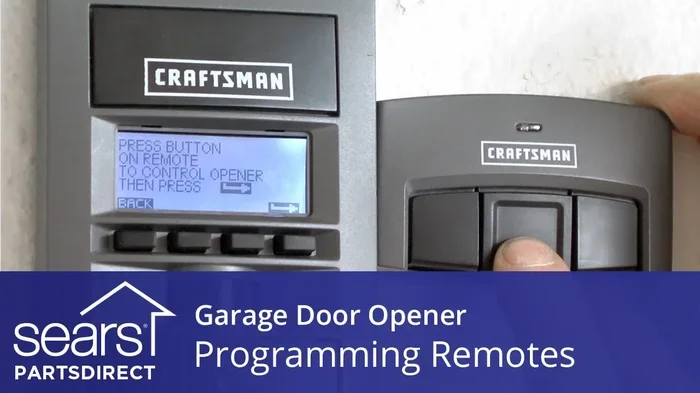
If you are also programming a garage door keypad, the process is similar. After pressing the learn button, enter your desired PIN on the keypad and press the enter or program button. The motor unit should confirm the connection, and you can then test the keypad from outside your garage.
Programming a Garage Door Keypad
A garage door keypad is one of the most convenient additions you can make to your opener system. It lets you open your garage door from outside without carrying a remote. Whether you are coming home with groceries, walking your dog, or letting in a service provider, a keypad makes life much easier.
Setting Up Your Keypad
To program a keypad, start by pressing the learn button on your motor unit just like you would for a remote. Then, on the keypad itself, enter a four to six digit PIN that you can remember easily but that others would not easily guess. Press the enter or program button on the keypad, and the motor unit should confirm the connection.
Place your keypad in a convenient location near the garage entrance. Make sure it is mounted at a comfortable height and protected from direct rain or extreme weather. A well-placed keypad ensures reliable performance and extends the life of the device.
Changing Your Garage Door Keypad Code
It is a good practice to change your garage door keypad code periodically, especially if you have shared it with others. To change the code, press the learn button on the motor unit, then enter your new PIN on the keypad and press enter. The old code is automatically replaced with the new one.
If you ever need to remove a keypad from your system, you can reset the opener by pressing and holding the learn button for about 10 seconds until the light turns off. This clears all programmed remotes and keypads, giving you a fresh start.
Universal Garage Door Remotes
A universal garage door remote is a handy device that can replace multiple remotes from different brands. Instead of juggling several remotes for different doors or vehicles, a single universal remote can control them all. This is especially useful for homeowners with multiple garage doors or those who have recently switched opener brands.
Why Choose a Universal Remote?
Universal remotes offer several advantages. They are typically affordable, easy to program, and compatible with most major garage door opener brands. If you have moved into a home with an existing opener and do not have the original remote, a universal remote is often the quickest and most cost-effective solution.
Universal remotes also come with extra features like keychain clips, backlit buttons, and multi-function capabilities. Some models can control not just your garage door but also your gate, security system, or lighting. The versatility makes them a popular choice among homeowners looking to simplify their setup.
How to Program a Universal Remote
Programming a universal remote follows a similar process to programming a brand-specific remote. Start by pressing the learn button on your garage door opener motor unit. Then, on the universal remote, press and hold the button you want to use for your garage door until the indicator light blinks or stays solid.
Next, aim the universal remote at the motor unit and press the garage door button on the universal remote. The motor unit should confirm the connection. Repeat this process for any additional doors or devices you want to control. Always test each programmed button to make sure it works correctly before relying on it daily.
Common Mistakes When Coding a Garage Door Opener
Even with clear instructions, homeowners often run into trouble when programming their garage door openers. Knowing what to avoid can save you time and frustration.
Skipping the Manual
One of the biggest mistakes people make is diving straight into programming without reading the manual. Every garage door opener has its own quirks and specific instructions. The manual contains valuable information about your particular model, including the exact location of the learn button, programming time limits, and troubleshooting tips.
Taking five minutes to read the manual can prevent hours of guesswork. If you have lost your manual, you can almost always find a digital copy on the manufacturer’s website by searching for your model number.
Ignoring Frequency Mismatches
Frequency mismatches are a common reason programming fails. If your remote operates on a different frequency than your opener, the two devices simply cannot communicate. This is especially common when using older remotes with newer openers or vice versa.
Before attempting to program, make sure your remote and opener are compatible. Check the frequency specifications on both devices. If there is a mismatch, you may need to replace the remote or purchase a compatible universal remote that supports both frequencies.
Forgetting to Reset the System
If your garage door opener is not responding to new codes, the system may need a reset. Sometimes old codes get stuck in the memory, causing conflicts with new programming. To reset, press and hold the learn button for 10 seconds or until the indicator light turns off. This clears all stored codes and gives you a clean slate.
After resetting, wait a few seconds and then begin the programming process again from the beginning. This simple step resolves many programming issues that homeowners struggle with for hours.
Using Weak or Dead Batteries
It sounds simple, but weak batteries in your remote are one of the most overlooked causes of programming problems. A remote with low battery power may not transmit a strong enough signal to reach the motor unit, especially if you are standing far away during the programming process.
Always replace the batteries in your remote before attempting to code it. Use fresh, high-quality batteries and make sure they are inserted correctly. This small step can make the difference between a successful programming session and repeated failures.
Garage Door Opener Security Tips
Coding your garage door opener is not just about convenience. It is also about keeping your home secure. A poorly secured garage door opener can be an invitation for intruders, so following security best practices is essential.
Rolling Code vs Fixed Code Technology
As mentioned earlier, rolling code technology is the modern standard for garage door security. Unlike fixed codes, which transmit the same signal every time, rolling codes generate a new code with each use. This means even if someone intercepts your signal, they cannot reuse it to gain access to your garage.
If your opener uses a fixed code system, consider upgrading to a model that supports rolling code technology. The added security is well worth the investment, especially if your garage provides access to your home or contains valuable items like vehicles, tools, and stored belongings.
Keeping Your Garage Door Opener Secure
There are several simple steps you can take to improve your garage door opener security. First, never leave your remote in plain sight in your vehicle. Thieves know to check glove compartments and center consoles. Instead, use a keychain remote or keep it in a secure pocket.
Second, change your garage door keypad code regularly, especially if you have shared it with neighbors, friends, or service providers. Third, consider installing a garage door lock for added physical security. Even the best electronic system benefits from a manual lock as a backup layer of protection.
Fourth, keep your garage door closed whenever you are not actively using it. An open garage door is an open invitation, and it also exposes your opener mechanism to the elements, which can lead to premature wear and damage.
Expert Tips for a Smooth Garage Door Opener Coding Experience
Professional technicians and experienced homeowners share a few insider tips that make the coding process smoother and more reliable.
Always work close to the motor unit. When programming a remote or keypad, stand within a few feet of the motor unit. This ensures a strong signal during the programming process. You can move further away for testing later.
Keep your owner’s manual handy. Even if you are familiar with the process, having the manual nearby helps you catch model-specific details you might otherwise overlook. It is a small habit that pays off big.
Replace batteries annually. Make it a routine to replace remote and keypad batteries once a year, even if they still seem to work. Fresh batteries ensure reliable signal strength and prevent unexpected failures when you need your garage door opener the most.
Label your remotes. If you have multiple remotes for different doors or vehicles, label them with tape or a marker. This saves confusion and helps you quickly identify which remote controls which door.
Consider smart home integration. Many modern garage door openers now support Wi-Fi connectivity and smart home systems like Google Home, Amazon Alexa, and Apple HomeKit. If you are already in the market for an upgrade, a smart opener lets you control your garage door from your phone, set schedules, and receive alerts when the door is opened or closed.
Know when to call a professional. While coding a garage door opener is a straightforward DIY task for most homeowners, there are times when professional help is the right call. If you have tried multiple times and cannot get your opener to accept a new code, if your motor unit is making unusual noises, or if your door is not responding at all, a qualified garage door technician can diagnose and fix the issue quickly and safely.
Conclusion
Learning how do you code a garage door opener does not have to be a frustrating experience. With the right approach and a clear understanding of your system, you can program your remote, keypad, or universal transmitter in just a few simple steps. The key is to take your time, follow the manufacturer’s instructions, and avoid the common mistakes that trip up so many homeowners.
Remember to always test your garage door opener after programming, keep your system secure with rolling code technology, and replace batteries regularly. These small habits go a long way in ensuring your garage door opener works reliably for years to come. Whether you are a first-time homeowner or someone looking to upgrade your existing setup, these tips give you the confidence to handle garage door opener coding on your own. Apply what you have learned here, and you will enjoy the convenience and peace of mind that comes with a properly programmed garage door opener.
Frequently Asked Questions
How long does it take to code a garage door opener?
For most homeowners, coding a garage door opener takes between five and fifteen minutes. The process is quick once you locate the learn button and follow the steps correctly. First-time coders may take a little longer while they get familiar with the process.
Can I code a garage door opener without the original remote?
Yes, you can. You do not need the original remote to code a new one. Simply press the learn button on your motor unit and follow the programming steps for your new remote or keypad. The original remote is not required to add new devices to your system.
Why is my garage door opener not accepting the new code?
This usually happens when the system needs a reset. Try pressing and holding the learn button for about 10 seconds until the indicator light turns off. This clears all stored codes and gives you a fresh start. Also check that your remote batteries are fresh and that you are within range of the motor unit.
Is it safe to program a garage door opener myself?
Absolutely. Programming a garage door opener is a safe and straightforward DIY task. You do not need any special tools or technical expertise. Just follow the manufacturer’s instructions carefully, and you will have your system programmed in minutes.
What is the difference between a rolling code and a fixed code garage door opener?
A fixed code opener sends the same signal every time you press the remote. A rolling code opener generates a new, unique signal with each use. Rolling code technology is more secure because the changing signal makes it nearly impossible for someone to intercept and replicate your code.
How many remotes can I program to one garage door opener?
Most garage door openers can store between five and ten remote codes, though the exact number varies by model and brand. Check your owner’s manual for the specific limit of your opener. Universal remotes often support even more devices on a single unit.
=== CONCLUSION ===
Coding your garage door opener is a simple yet essential skill every homeowner should have. With this guide, you now know exactly how to program remotes, keypads, and universal transmitters for almost any garage door opener brand. Remember to avoid common mistakes, keep your system secure, and test everything after programming. A well-coded garage door opener gives you convenience, reliability, and peace of mind every single day.