How Do I Know If My Car Has HomeLink Already Installed
HomeLink is a built-in convenience feature in many vehicles that lets you open your garage door without a separate remote. You can usually find the HomeLink buttons in your car’s overhead console or visor mirror. This guide will show you exactly how to check if your car already has HomeLink and how to get it up and running in minutes.
Have you ever parked your car in the garage and realized you forgot to bring the garage door remote? It happens to all of us. That small frustrating moment is exactly what HomeLink was designed to solve. But before you can enjoy the convenience, you need to know if your car already has this handy feature built in.
Many modern vehicles come with HomeLink installed right from the factory. It is a smart integration system that connects your car to your garage door opener, gate, or even your home automation setup. But not every car has it. Some vehicles leave it up to you to add an aftermarket solution. So how do you find out which one applies to your ride?
The good news is that checking for HomeLink is quick and easy. You do not need to be a mechanic or a tech expert. In just a few minutes, you can look at your car, check your owner manual, and confirm whether your vehicle supports this feature. This guide will walk you through every step of the process. By the end, you will know for sure if your car has HomeLink and how to use it.
Key Takeaways
- Check the overhead console: HomeLink buttons are typically located near the sun visor or on the ceiling of your car.
- Look for three buttons: HomeLink systems usually have three small square buttons labeled 1, 2, and 3.
- Consult your owner manual: Your vehicle manual will confirm if HomeLink came installed from the factory.
- Aftermarket options exist: If your car doesn’t have HomeLink, you can add a universal HomeLink-compatible remote.
- Programming is simple: Most HomeLink systems can be programmed in under five minutes using a few easy steps.
- Works with most garage doors: HomeLink is compatible with nearly all major garage door opener brands.
- Safety first: Always follow the programming instructions and keep your car in a safe location during setup.
📑 Table of Contents
- What Is HomeLink and Why Does It Matter?
- Where to Find HomeLink Buttons in Your Car
- How to Check If Your Car Has HomeLink Already Installed
- Programming Your HomeLink System
- Benefits of Having HomeLink in Your Vehicle
- HomeLink vs Aftermarket Universal Remotes
- How to Add HomeLink to a Car That Does Not Have It
- Common Mistakes to Avoid When Using HomeLink
- Expert Tips for Getting the Most Out of HomeLink
- Frequently Asked Questions
- Conclusion
What Is HomeLink and Why Does It Matter?
HomeLink is a wireless control system built into many cars. It replaces the need for a separate garage door remote. Instead of fumbling through your pockets for a small plastic device, you simply press a button inside your car. The system sends a signal to your garage door opener, and the door opens or closes automatically.
How HomeLink Technology Works
The HomeLink system uses a small transmitter inside your car. When you press one of the HomeLink buttons, it sends a wireless signal to your garage door opener receiver. Most modern garage door openers use rolling code technology, which changes the access code every time you use it. HomeLink is designed to work with this security feature, making it both convenient and safe.
There are two main types of garage door opener signals. The first is called fixed code. This is an older system where the signal stays the same every time. The second is rolling code, which is the modern standard. Almost all new garage door openers use rolling code today. HomeLink supports both types, but rolling code systems require you to follow a slightly different programming process.
What Can HomeLink Control Besides Garage Doors?
Here is something many people do not know. HomeLink is not just for garage doors. The system can also control:
- Gates – Open your driveway gate without leaving the car.
- Security systems – Arm or disarm your home alarm.
- Home automation – Control lights, thermostats, or smart home devices.
- Attic doors – Open access hatches to your attic or storage space.
- Pool covers – Manage your pool equipment directly from the car.
This is why HomeLink is such a valuable feature. It turns your car into a universal remote for your home. Once programmed, you can control multiple devices from a single convenient location inside your vehicle.
Where to Find HomeLink Buttons in Your Car
If your car has HomeLink, you need to know where to look. The buttons are not always obvious at first glance. Manufacturers place them in a few common spots depending on the car model and year.
Overhead Console Location
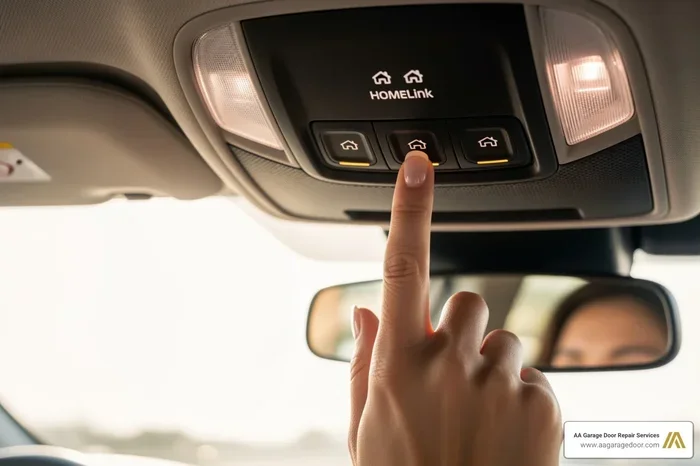
The most common place for HomeLink buttons is on the overhead console. This is the piece of trim that runs across the roof of your car, between the front seats. You will usually see three small square buttons arranged in a row. They are often labeled 1, 2, and 3. These buttons are typically recessed into the console and may have a small LED light next to them.
Some car models place the HomeLink system near the rearview mirror mount. Others hide it behind a small flip cover on the console. If you look up when you sit in the driver seat, you will likely spot them. They are usually black or match the color of your car’s interior trim.
Visor Mirror Location
In some vehicles, especially certain luxury brands or older models, the HomeLink controls are built into the sun visor. You might find a small button or a sliding switch attached to the visor mirror. Check both the driver and passenger side visors. Some cars only have one HomeLink unit, while others have separate controls on each side.
Dash or Center Console Placement
A few car models place the HomeLink system on the dashboard or in the center console area. This is less common but still happens. If you do not find the buttons in the overhead console or on the visor, check near the steering column or in the area between the front seats. Your vehicle owner manual will give you the exact location.
How to Check If Your Car Has HomeLink Already Installed
Now that you know where to look, let us walk through the actual process of checking your car. There are three easy methods you can use right now.
Method 1: Look for the Three Buttons
The fastest way to check is to simply look. Park your car and sit in the driver seat. Look up at the overhead console. Count the buttons. If you see three small square buttons arranged in a row, there is a very good chance your car has HomeLink. These buttons will not have any labels other than the numbers 1, 2, and 3 on most models.
Some HomeLink systems also have a small indicator light. When you press and hold one of the buttons, a green or red light may appear. This is a strong sign that your car is equipped with the system. If you see no buttons at all in the overhead area, move on to the next method.
Method 2: Check Your Vehicle Owner Manual
Your car’s owner manual is one of the best resources. Flip through the sections about convenience features, electrical systems, or garage door openers. If your vehicle came with HomeLink, the manual will have a dedicated section explaining how to use it. It will also include programming instructions specific to your car model.
If you do not have the physical manual anymore, do not worry. Most manufacturers offer a free digital version on their website. Just search for your car make, model, and year, and you can download the PDF. Look for the term “HomeLink” in the index or search function.
Method 3: Check the Car’s Label or Sticker
Some vehicles have a small label or sticker that identifies the HomeLink system. Check inside the driver door frame, the glove box, or the sun visor. The label might say something like “HomeLink equipped” or show the HomeLink logo, which looks like a small house with a signal wave.
Another place to look is on the window sticker if you bought the car used. The original window sticker, also called the Monroney sticker, lists all factory-installed features. Search for “HomeLink” or “garage door opener” in the convenience features section.
What If You Do Not See HomeLink Buttons?
If you have looked everywhere and still cannot find HomeLink buttons, your car likely does not have the system built in. This is more common in older vehicles or base model trims. But here is the good news. You are not out of options. You can still add HomeLink functionality using an aftermarket universal remote.
Aftermarket HomeLink universal remotes are widely available and easy to install. They plug into your car’s existing electrical system or mount discreetly on the console. Popular brands include Universal Electronics, STEELMATE, and Overhead Door. These remotes give you the same convenience as factory-installed HomeLink at a fraction of the cost.
Programming Your HomeLink System
Once you confirm that your car has HomeLink, the next step is programming it. The process is simpler than most people think. It typically takes less than five minutes to complete.
Step-by-Step Programming Guide
Here is a general guide for programming HomeLink in most vehicles. Always refer to your specific car manual for exact instructions.
- Step 1: Park your car in a safe, flat location within range of your garage door opener.
- Step 2: Locate the HomeLink buttons on your overhead console.
- Step 3: Press and hold the desired HomeLink button (1, 2, or 3) until the indicator light turns on. This usually takes about 20 seconds.
- Step 4: Release the button. You will have 30 seconds to move to the next step.
- Step 5: Go to your garage door opener motor unit. Press and hold the learn button on the motor. This button is usually on the back or side of the unit.
- Step 6: Return to your car and press and hold the same HomeLink button again until the door starts to move.
- Step 7: Release the button when the door begins to operate. The indicator light should stay solid.
- Step 8: Test the system by pressing the HomeLink button again.
Programming Tips for Rolling Code Systems
If your garage door opener uses rolling code technology, you may need to use the “smart” or “learn” button method described above. Some older fixed code systems allow you to simply enter a DIP switch code from the motor unit into the HomeLink system. Check your garage door opener manual for specific details on your model.
A quick tip that many people overlook. If the first HomeLink button does not work on the first try, do not give up. Simply repeat the process. Sometimes it takes two attempts for the signal to pair properly. Patience pays off here.
Common Programming Problems and Solutions
Here are some issues you might run into and how to fix them:
- Indicator light flashes but door does not open: The signals are not matching. Try clearing the HomeLink memory and starting the programming process again.
- Door opens but does not close: Check if your garage door opener has a separate learn button for open and close functions.
- Interference from neighbors: If a neighbor has a similar garage door opener frequency, you may experience interference. Reprogramming usually resolves this.
- Signal range is weak: Make sure you are close enough to the garage door motor unit during programming. You can also try repositioning the antenna wire inside the motor unit.
Benefits of Having HomeLink in Your Vehicle
Once you have HomeLink set up, you will wonder how you ever lived without it. The benefits go far beyond just convenience.
Hands-Free Convenience
The biggest advantage of HomeLink is that you never need to search for a remote again. You keep your hands on the wheel and your garage door opens automatically. This is especially helpful when you are carrying groceries, pushing a stroller, or walking your dog in the rain.
Increased Home Security
Because HomeLink uses encrypted signals, it is more secure than most standard garage door remotes. You do not have to worry about someone copying your remote signal from across the street. The rolling code technology ensures that your access code changes every single time you use it.
Better Curb Appeal and Clean Look
Without HomeLink, many people end up with a small remote dangling from their rearview mirror or a pile of remotes on the console. With HomeLink built into your car, everything stays clean and organized. Your dashboard stays clutter-free, and you only need one system to control your garage and other connected devices.
HomeLink vs Aftermarket Universal Remotes
If your car does not have factory HomeLink, you might be wondering whether to install an aftermarket universal remote instead. Let us compare the two options.
| Feature | Factory HomeLink | Aftermarket Universal Remote |
|---|---|---|
| Installation | Already built into the car | Plug-and-play or simple mount |
| Cost | Included with the vehicle | $20 to $80 |
| Aesthetics | Seamless, integrated look | Visible add-on device |
| Compatibility | Works with most openers | Works with most openers |
| Control Options | Three buttons for multiple devices | Usually one to three buttons |
| Signal Range | Optimized for your vehicle | Varies by brand |
| Smart Home Integration | Some models support smart home | Limited or none |
Both options get the job done. Factory HomeLink offers a cleaner, more integrated experience. Aftermarket remotes are a great budget-friendly alternative that still delivers solid performance. Choose the option that fits your car and your needs best.
How to Add HomeLink to a Car That Does Not Have It
Do not panic if your car does not have factory HomeLink. Adding this feature is entirely possible and much easier than you might think.
Universal HomeLink Remotes
The easiest way to add HomeLink functionality is with a universal HomeLink remote. These small devices plug into your car’s diagnostic port or mount on the console. They communicate with your car’s existing systems and give you the same garage door control as a factory-installed unit. Brands like STEELMATE and Universal Electronics make reliable options that work with most car models.
Professional Installation
If you are not comfortable installing a universal remote yourself, you can always visit a car electronics shop or your dealership. A professional installer can set up a HomeLink compatible system in about an hour. They will ensure everything is wired correctly and programmed properly. While this option costs more than a DIY universal remote, it gives you peace of mind and a clean, factory-like finish.
Smart Home Alternatives
Another modern alternative is to use a smart home hub system. Devices like Amazon Alexa, Google Home, or Samsung SmartThings can connect to your garage door opener through Wi-Fi. You can then control your garage door from your phone or with voice commands. While this is not the same as having HomeLink in your car, it does offer similar convenience and works well for many homeowners.
Common Mistakes to Avoid When Using HomeLink
Even though HomeLink is user-friendly, there are a few common mistakes that can cause frustration. Here is what to watch out for.
- Skipping the read step: Always read your car manual and garage door opener manual before programming. Each system has its own quirks.
- Programming too far from the motor unit: Stay within 10 feet of the garage door opener motor during programming for the best results.
- Not clearing old codes: If you are reprogramming a HomeLink button, always clear the old code first. Otherwise, the old and new signals can conflict.
- Ignoring the antenna wire: Some vehicles have a small antenna wire inside the motor unit that affects signal strength. Make sure it is hanging down properly.
- Using the wrong button: HomeLink buttons are labeled 1, 2, and 3 for a reason. Use each button for a different device to get the full benefit of the system.
Expert Tips for Getting the Most Out of HomeLink
HomeLink is a great feature, but you can get even more out of it with a few expert tips. Here are some insights from automotive professionals and smart home enthusiasts.
First, use each of the three HomeLink buttons for a different purpose. Assign one to your main garage door, one to a secondary gate or door, and one to a smart home function like your driveway lights. This way, you get maximum value from a single system.
Second, keep your HomeLink system clean. Dust and debris can build up around the buttons over time and affect responsiveness. A quick wipe with a dry cloth during your regular car cleaning routine keeps everything working smoothly.
Third, if you ever sell your car, remember that the next owner will need to reprogram the HomeLink system. Clearing the old codes before selling ensures a smooth transition and protects your garage door security.
Frequently Asked Questions
Can I install HomeLink myself, or do I need a professional?
If your car already has factory HomeLink, you do not need to install anything. You only need to program the system, which is a simple DIY process. If your car does not have HomeLink, you can install a universal aftermarket HomeLink remote yourself. These plug-and-play devices require no special tools or expertise. However, if you prefer a seamless factory-style installation, a professional can handle it for you.
Is HomeLink the same as a regular garage door remote?
Not exactly. HomeLink is a built-in system integrated into your car, while a regular garage door remote is a separate handheld device. HomeLink uses the same wireless technology but eliminates the need for a separate remote. It is more convenient and provides a cleaner, integrated experience inside your vehicle.
Does HomeLink work with all garage door opener brands?
Yes, HomeLink is designed to be universal and works with virtually all major garage door opener brands. This includes Chamberlain, LiftMaster, Craftsman, Genie, and many others. Whether your opener uses rolling code or fixed code technology, HomeLink can be programmed to work with it. Just follow the programming instructions for your specific opener model.
Can HomeLink control more than just garage doors?
Absolutely. HomeLink is a versatile home automation system. In addition to garage doors, it can control gates, security systems, lights, pool covers, and attic doors. Each of the three HomeLink buttons can be programmed to operate a different device. This makes it a powerful tool for managing multiple aspects of your home from your car.
What should I do if my HomeLink button stops working?
If a HomeLink button stops responding, the first step is to clear the memory and reprogram it. Press and hold the button for 10 seconds until the indicator light flashes, then start the programming process over. If the issue persists, check your garage door opener battery and antenna wire. Sometimes a weak opener battery or a loose antenna can interfere with the HomeLink signal.
Do all new cars come with HomeLink?
No, not all new cars have factory-installed HomeLink. It is more common in mid-range and luxury trim levels. Base models or older vehicle lines may not include it. If you are shopping for a new car and HomeLink is important to you, check the feature list or ask the dealer before purchasing. You can also add HomeLink functionality later with an aftermarket universal remote.
Conclusion
Knowing whether your car has HomeLink already installed is the first step toward a more convenient driving experience. Whether you find the three familiar buttons on your overhead console or discover that you need an aftermarket solution, the process is straightforward and well worth the effort.
HomeLink transforms your car into a smart home control center. It lets you open your garage door, manage your gate, and even control your lights without ever leaving the driver seat. The programming process is simple, the benefits are immediate, and the convenience is unmatched.
Take a few minutes today to check your car for HomeLink. Look at the overhead console, flip through your owner manual, or search for the label on your door frame. If you find it, you are already ahead of the game. If you do not, you now know exactly how to add it. Either way, you are one step closer to the effortless, hands-free garage access that HomeLink delivers every single time you get behind the wheel.