Does the Chrysler 300 Have Apple CarPlay or Not Today
The Chrysler 300 does offer Apple CarPlay, but availability depends on your model year and trim level. Most 2015 and newer Chrysler 300 models come with Apple CarPlay support through the Uconnect infotainment system. Whether you have a wired or wireless connection depends on the specific package your vehicle includes.
The Chrysler 300 has long been a favorite among sedan buyers. It offers a smooth ride, bold styling, and a cabin that feels more premium than its price tag suggests. But one question keeps popping up among buyers and current owners alike: does the Chrysler 300 have Apple CarPlay?
The short answer is yes. But the full story is a bit more nuanced. Your model year, trim level, and optional packages all play a role in whether Apple CarPlay is available and how you can use it. In this guide, we walk through everything you need to know. We cover which years support it, how to set it up, and what to do if it won’t connect.
Whether you just bought a Chrysler 300 or you are thinking about trading in your current ride, this article has you covered. Let us dive in and get you all the details you need about Apple CarPlay compatibility in this popular sedan.
Key Takeaways
- Apple CarPlay is available on most Chrysler 300 models from 2015 onward.
- Wireless Apple CarPlay is offered on higher trims and newer model years.
- Setup is simple and only takes a few steps once your phone is connected.
- You can use Siri for hands-free calling, texting, and navigation.
- Older model years may require a software update or retrofit solution.
- Android Auto is also available on many Chrysler 300 infotainment systems.
- Troubleshooting tips can fix most common Apple CarPlay connection issues.
📑 Table of Contents
- Understanding Apple CarPlay in the Chrysler 300
- Which Chrysler 300 Model Years Support Apple CarPlay
- How to Set Up Apple CarPlay in Your Chrysler 300
- Wireless vs. Wired Apple CarPlay in the Chrysler 300
- Troubleshooting Apple CarPlay Issues in the Chrysler 300
- Can You Add Apple CarPlay to an Older Chrysler 300?
- Apple CarPlay vs. Android Auto in the Chrysler 300
- Final Thoughts
Understanding Apple CarPlay in the Chrysler 300
Apple CarPlay is a smartphone integration system that lets you use your iPhone safely while driving. It mirrors key apps from your phone onto your car’s touchscreen. You can access maps, music, messages, and phone calls without taking your hands off the wheel.
The Chrysler 300 uses the Uconnect infotainment system to power Apple CarPlay. Uconnect has been a staple in Chrysler vehicles for years. It offers a clean interface, responsive touchscreen, and solid voice command features. But not every Chrysler 300 comes with the same version of Uconnect, and that is where things get interesting.
What Apple CarPlay Can Do in the Chrysler 300
Once Apple CarPlay is active, your Chrysler 300’s screen becomes a simplified version of your iPhone interface. Here is what you can typically access:
- Maps and Navigation – Use Google Maps, Apple Maps, or Waze for turn-by-turn directions.
- Music and Podcasts – Control Spotify, Apple Music, Pandora, and other audio apps.
- Phone Calls – Make and receive calls through Siri voice control.
- Messages – Send and receive texts using dictation and read-aloud features.
- Third-Party Apps – Access supported apps like WhatsApp, Spotify, and more.
The system is designed to keep you focused on the road. That is a big reason why smartphone integration has become a must-have feature for most car buyers today.
Which Chrysler 300 Model Years Support Apple CarPlay
Apple CarPlay made its way into the Chrysler 300 lineup starting with the 2015 model year. Before that, the car relied on older infotainment systems that did not support modern smartphone mirroring. Here is a breakdown by model year:
- 2011-2014: No native Apple CarPlay support. These models used older Uconnect systems.
- 2015-2020: Apple CarPlay is available on most trims, especially when the Uconnect touchscreen is equipped.
- 2021-2023: Full Apple CarPlay support across the board. The 2021 Chrysler 300 refresh brought updated tech features.
If you own an older model, do not lose hope. You may still be able to add Apple CarPlay functionality through an aftermarket head unit. More on that below. But if you are shopping for a used Chrysler 300, aim for a 2015 or newer model to get the full Apple CarPlay experience.
One thing to keep in mind: even within supported years, the base models sometimes came with a smaller non-touchscreen infotainment system. Those units do not support Apple CarPlay. You need the touchscreen version to get the feature. This is similar to how starting a car without the key fob depends on having the right keyless entry package.
How to Set Up Apple CarPlay in Your Chrysler 300
Setting up Apple CarPlay in your Chrysler 300 is straightforward. Follow these steps to get connected in just a few minutes:
- Start your vehicle and make sure the ignition is on.
- Plug in your iPhone using a Lightning cable into the USB port.
- Unlock your phone and tap “Trust” when prompted on the screen.
- Select Apple CarPlay from the Uconnect home screen.
- Allow permissions for maps, phone, and messaging when asked.
That is it. Your phone’s interface should now appear on the car’s display. If this is your first time connecting, the system may walk you through a quick tutorial.
Tips for a Smooth Setup
- Use a MFi-certified cable (Made for iPhone) to avoid connection issues.
- Make sure your iPhone is running the latest iOS version.
- Restart both your phone and the car’s infotainment system if things act up.
- Check that Siri is enabled on your phone for voice commands to work.
Once connected, you can change the screen time and display settings through the Uconnect menu. If you need help adjusting the display clock or date, you can refer to guides on how to change the time on your control panel for general tips that apply to many Chrysler systems.
Wireless vs. Wired Apple CarPlay in the Chrysler 300
One of the biggest differences you will notice is whether your Chrysler 300 offers wireless or wired Apple CarPlay. Both options give you the same app access, but the connection method is very different.
Wired Apple CarPlay
Wired Apple CarPlay requires you to plug your iPhone into a USB port every time you get in the car. It is reliable and generally offers a slightly faster connection. Most Chrysler 300 models from 2015 onward come with wired support as a standard feature on equipped trims.
The downside? You have to deal with cables. They can get tangled, worn out, or hard to reach. And if you have a wireless charging pad, plugging in a cable defeats the purpose of a clutter-free dash.
Wireless Apple CarPlay
Wireless Apple CarPlay connects to your phone through Bluetooth and Wi-Fi. No cables needed. You just pair your phone once, and the connection happens automatically every time you get in the car.
Wireless Apple CarPlay is available on higher trims of the Chrysler 300, particularly the Touring-L, 300C, and S models. If your vehicle did not come with wireless CarPlay from the factory, you may be able to add it through a dealer software update or an aftermarket module.
| Feature | Wired Apple CarPlay | Wireless Apple CarPlay |
|---|---|---|
| Connection Method | USB Cable | Bluetooth and Wi-Fi |
| Setup Speed | Fast | Fast (after initial pairing) |
| Convenience | Moderate | High |
| Availability | Most trims | Higher trims only |
| Reliability | Very High | High |
| Additional Cost | None | May require dealer update |
If you are curious about other convenience features in Chrysler vehicles, check out how starting a car without the remote key works on similar models.
Troubleshooting Apple CarPlay Issues in the Chrysler 300
Even with a supported model, Apple CarPlay can sometimes act up. Connection drops, blank screens, and unresponsive controls are common complaints. Here is what you can do to fix them.
Apple CarPlay Won’t Connect
If your Chrysler 300 does not recognize your iPhone, try these steps:
- Unplug and replug the cable at both ends.
- Try a different USB port in the vehicle.
- Restart your iPhone and the Uconnect system.
- Update your iPhone to the latest iOS version.
- Delete and re-pair the Apple CarPlay connection on your phone.
Apple CarPlay Is Slow or Laggy
A sluggish CarPlay experience is usually caused by a low-powered USB port or an outdated cable. Make sure you are using the USB port labeled for data, not just charging. A high-quality cable can make a huge difference. If the problem persists, a system reset often clears things up.
Siri Voice Commands Are Not Working
Siri needs to be enabled and configured correctly for hands-free use. Go to Settings > Siri & Search on your iPhone and make sure “Listen for Hey Siri” is turned on. Also check that your car’s microphone is not blocked or muted.
For general infotainment timing and display issues, you can also look into how to change the time on your Horizon system for troubleshooting steps that apply to Chrysler’s display settings.
Can You Add Apple CarPlay to an Older Chrysler 300?
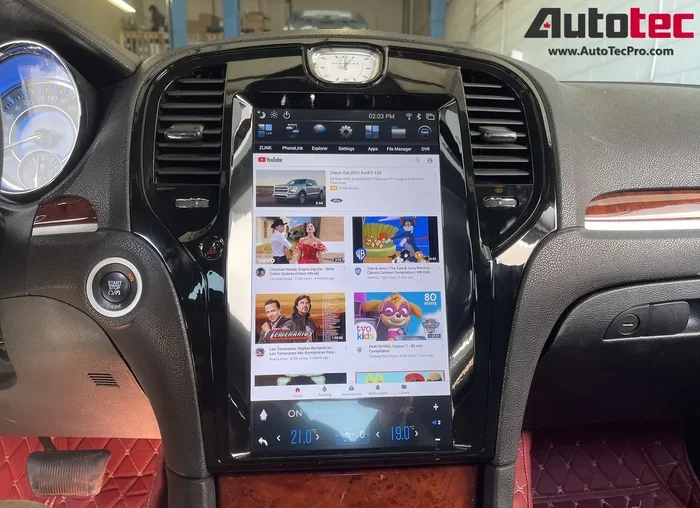
If your Chrysler 300 predates the Apple CarPlay era, you still have options. Aftermarket head units from brands like Pioneer, Kenwood, and Alpine can replace your factory infotainment system. These units come with Apple CarPlay built right in.
The process involves removing your old head unit and installing the new one. It is not overly complicated, but it does require some basic tools and a bit of patience. Many car audio shops offer installation services for around $200 to $500, depending on the unit you choose.
Another option is a standalone CarPlay adapter that plugs into your existing system. These adapters add wireless CarPlay capability without replacing the whole head unit. They are a great middle-ground solution for owners who want modern features without a full swap.
Keep in mind that adding Apple CarPlay to an older Chrysler 300 may also improve your vehicle compatibility with other modern tech features. Some owners report better Bluetooth connectivity and clearer audio quality after an upgrade.
Apple CarPlay vs. Android Auto in the Chrysler 300
While this article focuses on Apple CarPlay, it is worth noting that many Chrysler 300 models also support Android Auto. Both systems offer similar functionality, but they cater to different smartphone ecosystems.
If you use an iPhone, Apple CarPlay is the natural choice. If you use an Android phone, Android Auto will be your go-to option. Some higher-trim Chrysler 300 models offer both, giving you flexibility no matter what phone you prefer.
Both systems support navigation, music, calls, and messaging. The interface is clean and driver-focused. And both work seamlessly with hands-free calling and Siri voice control on Apple devices.
Final Thoughts
So, does the Chrysler 300 have Apple CarPlay? Yes, it absolutely does. Most model years from 2015 onward support this feature, and newer trims even offer wireless connectivity. Whether you are using it for navigation, music, or hands-free communication, Apple CarPlay makes the Chrysler 300 a more connected and convenient daily driver.
If your current car does not support CarPlay or you are having trouble getting it to work, the troubleshooting steps above should help. And if you own an older model, an aftermarket upgrade can bring your Chrysler 300 into the modern era.
The bottom line is this: the Chrysler 300 remains a strong contender in the midsize sedan segment, and Apple CarPlay support is just one of the many reasons why. Make sure your specific model has it before you buy, and you will enjoy a seamless smartphone experience every time you hit the road.
Frequently Asked Questions
Does every Chrysler 300 come with Apple CarPlay?
No, not every trim level includes Apple CarPlay as standard. Base models may only have a basic infotainment system without smartphone mirroring. The feature is more commonly found on mid-level and higher trims. Always check the specific trim and model year before purchasing.
Can I use Apple CarPlay wirelessly in a Chrysler 300?
Yes, wireless Apple CarPlay is available on select Chrysler 300 trims, particularly the Touring-L, 300C, and S models. If your vehicle came with the technology package, wireless CarPlay should be included. You can confirm this by checking your owner’s manual or asking your dealer.
What year did the Chrysler 300 get Apple CarPlay?
The Chrysler 300 first offered Apple CarPlay starting with the 2015 model year. All model years from 2015 onward include some level of Apple CarPlay support, though the connection method (wired or wireless) varies by trim and package.
How do I update Apple CarPlay on my Chrysler 300?
Apple CarPlay updates come through your iPhone’s software update, not the car itself. Make sure your iPhone is running the latest iOS version. Some Uconnect systems also receive updates through the dealer, so check with your service center if you are experiencing issues.
Can I use Apple CarPlay and charge my phone at the same time?
Yes, when you use wired Apple CarPlay, your iPhone charges through the USB connection at the same time. If you use wireless Apple CarPlay, your phone will charge through its own wireless charging pad if your Chrysler 300 has one. Otherwise, you may need to keep a charger plugged in separately.
Is Apple CarPlay safe to use while driving?
Apple CarPlay is designed with driver safety in mind. It limits distracting features and encourages the use of Siri voice commands for calls, texts, and navigation. The simplified interface makes it easy to access apps without taking your eyes off the road for long periods.