Do Car Clocks Change Automatically Across Time Zones
Do car clocks change automatically? The answer depends on your vehicle’s technology. Modern cars with GPS and smart systems do adjust car clock settings across time zones on their own, but older models may need a manual clock reset. This guide covers everything you need to know about automatic time zone adjustment in vehicles.
Have you ever driven across state lines and noticed your car clock showing the wrong time? It is a small thing, but it throws off your whole day. You miss a call. You are late for dinner. You wonder, does my car know what time zone it is in?
The short answer is it depends. Some modern vehicles handle automatic time zone adjustment like a breeze. They sync with satellites and update the digital car clock without you lifting a finger. But many cars, especially older ones, still need a manual clock reset every time you cross into a new zone.
In this guide, we will break down exactly how car clocks work, why they sometimes fail to update, and what you can do about it. Whether you drive a brand-new SUV or a trusty older sedan, this article has you covered. Let us dive in.
Key Takeaways
- GPS-enabled cars often adjust the clock automatically when crossing time zones.
- Older vehicles without smart systems require a manual clock reset every time you cross a zone.
- Daylight saving time changes can also affect your car clock if it lacks auto-sync features.
- A weak car battery or dead clock battery can cause timekeeping errors.
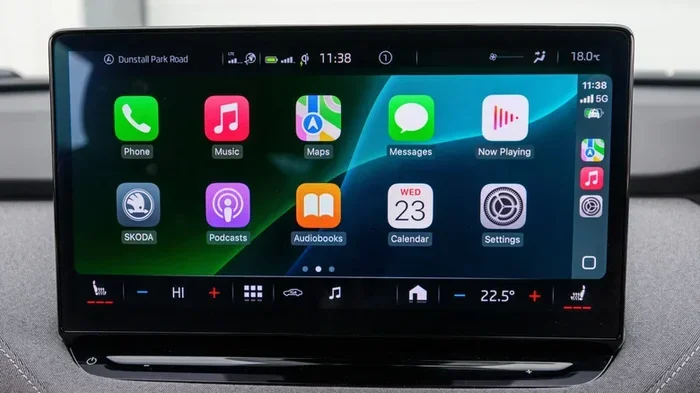
- Using your 7-inch display for car settings can help you manage clock preferences easily.
- Keeping your 12v power socket car system stable supports consistent clock performance.
- Knowing how to troubleshoot a stuck car clock saves time and frustration on road trips.
📑 Table of Contents
- How Do Car Clocks Work?
- Do Car Clocks Change Automatically Across Time Zones?
- Why Does My Car Clock Sometimes Fail to Update?
- How to Manually Adjust Your Car Clock
- Driving Across Time Zones: What to Expect
- Common Car Clock Problems and How to Fix Them
- Expert Insights on Car Clock Technology
- Quick Tips for Road Trippers
- Conclusion
How Do Car Clocks Work?
Car clocks might seem simple, but the technology behind them has come a long way. Understanding how they work helps you figure out why some cars handle time zone changes better than others.
The Basics of a Vehicle Clock
At its core, a car clock is a small electronic device powered by your vehicle’s electrical system. It draws a tiny amount of current from the 12v power socket car network or a dedicated circuit. The clock keeps time using a quartz crystal oscillator, just like a wall clock at home.
Older cars used analog clocks with moving hands. These were reliable but never updated on their own. You had to twist a knob or pull a reset tab every time the time changed. Today, most cars use digital car clock displays that can connect to larger infotainment screens, such as a 7-inch display for car dashboard system.
What Powers the Car Clock?
Your car clock runs on the vehicle’s main electrical system. Here is what keeps it going:
- Vehicle battery: The primary power source when the engine runs.
- Backup battery: A small coin-cell battery that preserves clock memory when the car is off.
- Infotainment system: In modern cars, the clock is part of the central display unit.
- GPS module: In advanced vehicles, GPS provides location and time data automatically.
If any of these components fail, your clock may stop, reset, or show the wrong time. A dead backup battery is the most common reason a car clock loses its settings after the vehicle sits unused for a while.
Do Car Clocks Change Automatically Across Time Zones?
This is the big question, and the answer is not a simple yes or no. It depends entirely on the technology in your vehicle.
Cars With GPS and Smart Systems
Modern vehicles equipped with GPS and connected infotainment systems can absolutely handle automatic time zone adjustment. Here is how it works:
- The GPS receiver picks up your current location.
- The system cross-references your location with a built-in time zone database.
- The digital car clock updates to match the local time.
- Some systems also adjust for daylight saving time automatically.
This process happens in seconds, often without you even noticing. Brands like Tesla, BMW, Mercedes-Benz, and many newer Toyota and Honda models come with this feature standard. If your car has a built-in navigation system, there is a good chance it handles clock sync car functions automatically.
Cars Without GPS or Smart Features
Older vehicles or base-model cars without navigation systems typically do not adjust the clock on their own. If you drive a car from 2010 or earlier, you probably need to change the time yourself. This means stopping at a gas station, pulling out the manual, and following the reset steps.
Some cars have a simple “auto clock” feature that uses the radio signal from a time broadcast station. This is more common in European models. It is not as precise as GPS, but it does handle basic time zone changes if the signal is strong in your area.
Hybrid and Electric Vehicles
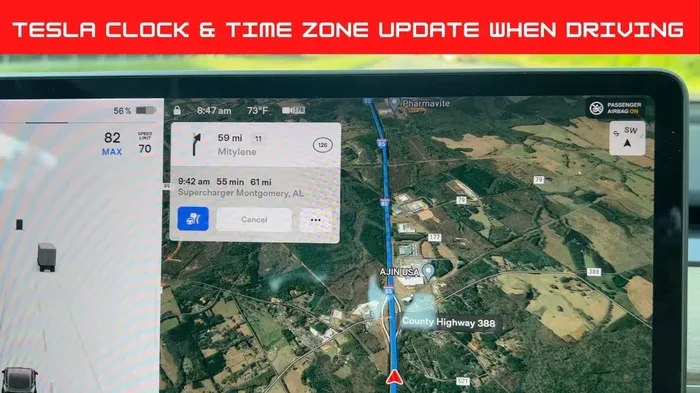
Hybrid and electric vehicles (EVs) tend to have the most advanced clock systems. Because these cars rely heavily on software and connectivity, their vehicle clock settings are often tied to cloud-based updates. Tesla, for example, updates its clock through over-the-air software. Your car clock stays accurate even if you drive from New York to California in a single trip.
Why Does My Car Clock Sometimes Fail to Update?
Even in modern cars, the automatic clock car feature can sometimes fail. Here are the most common reasons.
GPS Signal Issues
If your car relies on GPS for time updates, a weak signal will cause problems. Driving through mountains, tunnels, or dense urban canyons can block the signal temporarily. When the signal returns, the clock should update again. But if the GPS antenna is damaged or obstructed, the clock may stay stuck on the wrong time.
Software Glitches
Modern cars run on software, and software can glitch. A failed update, a corrupted file, or a simple bug can cause the car clock not updating even when everything else works fine. In most cases, a soft reset of the infotainment system fixes the problem.
Dead or Weak Backup Battery
Every car has a small backup battery that keeps the clock running when the main battery is disconnected or dead. If this backup battery dies, the clock resets to a default time, usually midnight on January 1st, 2000. Replacing this tiny battery is inexpensive and easy, but many car owners do not even know it exists.
Daylight Saving Time Confusion
Not all car systems handle daylight saving time correctly. Some older models do not know about the changed DST dates in the US (which shifted in 2007). If your car was manufactured before 2007 or never received a software update, it may adjust the clock at the wrong time or not at all.
How to Manually Adjust Your Car Clock
Sometimes you just need to do it the old-fashioned way. Here is how to handle a manual clock reset in most vehicles.
Step-by-Step Guide
- Press the Menu or Settings button on your infotainment screen or dashboard cluster.
- Navigate to the Clock or Time Settings menu. On older cars, this might be behind a small panel near the radio.
- Select the Time Zone option if available. Choose your current zone from the list.
- Set the time manually using the up/down or plus/minus buttons.
- Save your settings and exit the menu.
If your car has a 12v car socket to 3 pin adapter or any aftermarket electronics plugged in, unplug them temporarily. Sometimes these devices interfere with the clock settings and cause it to reset unexpectedly.
Tips for Keeping Your Car Clock Accurate
- Check the backup battery every two years.
- Update your car’s software whenever a new version is available.
- Keep the GPS antenna clean and unobstructed.
- Use the auto-sync feature if your car supports it.
- Note the time zone before a long road trip so you can adjust quickly if needed.
Driving Across Time Zones: What to Expect
Road trips across multiple time zones are fun, but they can wreak havoc on your automobile timekeeping. Here is what happens and how to prepare.
Short Trips (Crossing One or Two Zones)
If your car has GPS, it will likely update the clock within a minute of crossing the border. You might not even notice it happening. If your car does not have GPS, plan to make a quick stop and reset the clock. It only takes a minute or two.
Long Trips (Crossing Three or More Zones)
On long trips, you may cross several time zones in a single day. In a modern car, the clock will keep updating as you drive. In an older car, you will need to stop and adjust at each zone change. This is where a quick reference note on your phone or a printed time zone map can save you hassle.
International Travel by Car
Driving internationally adds another layer of complexity. Different countries use different time formats, DST rules, and even different clock conventions. If you are planning a cross-border trip, check your car’s manual for time zone car display settings before you go.
Common Car Clock Problems and How to Fix Them
Car clocks are reliable, but they are not perfect. Here are some common issues and their solutions.
The Clock Resets Every Time You Turn Off the Car
This almost always means the backup battery is dead. Replace the CR2032 or equivalent coin cell battery in the clock module or infotainment unit. It costs about two dollars and takes five minutes.
The Clock Runs Slow or Fast
A quartz clock that runs slightly off is normal over time. But if it is off by more than a minute or two, the internal oscillator may be damaged, or the clock module may need replacement. In GPS-enabled cars, this should not happen because the system constantly corrects itself.
The Clock Shows the Wrong Time Zone
Check if the auto-time zone feature is turned on. If it is, the GPS antenna may be blocked or malfunctioning. If it is off, simply go into settings and select the correct zone. For vehicles with a 7-inch display for car, the clock settings are usually found under Display or System Preferences.
The Clock Won’t Turn On At All
Check the fuse related to the infotainment or instrument cluster. Also verify that the 12v to 230v car inverter or any accessory plugged into the power socket is not drawing too much current and causing a voltage drop. Resetting the infotainment system by holding the power button for 10 seconds often fixes this issue too.
Expert Insights on Car Clock Technology
Automotive engineers say that car clock accuracy has improved dramatically over the last decade. “Modern vehicles are essentially rolling computers,” says automotive tech expert Mark Dawson. “The clock is just one small part of a much larger system that handles navigation, connectivity, and even automobile timekeeping across borders.”
According to industry reports, over 70 percent of new cars sold in the US now come with some form of GPS-connected clock system. This number is expected to reach nearly 100 percent within the next five years as even budget models adopt basic connectivity features.
However, mechanics warn that aftermarket electronics can interfere with factory clock systems. If you have installed a new stereo, dash cam, or 12v power socket car adapter, it might be worth checking whether these devices are causing clock issues. Disconnecting them temporarily can help you isolate the problem.
Quick Tips for Road Trippers
- Before you leave: Check your car clock and set it to the correct local time.
- During the drive: If your car has auto-sync, let it handle the updates. If not, note the time zone changes on your route.
- At your destination: Double-check the clock before scheduling anything important.
- Keep a backup: Use your phone’s clock as a reference to verify your car clock is accurate.
- After the trip: Reset the clock if needed, especially if you have a vehicle that does not auto-adjust.
Road trips are about the journey, not the time on your dashboard. But a simple clock error can turn a relaxing drive into a stressful one. A little preparation goes a long way.
Conclusion
So, do car clocks change automatically across time zones? The answer really comes down to your vehicle’s technology. If you drive a modern car with GPS and smart infotainment, your car clock likely handles automatic time zone adjustment without any input from you. If you drive an older or base-model vehicle, you will need to perform a manual clock reset at each time zone change.
Either way, understanding how your car clock works helps you stay on schedule and avoid unnecessary stress. Keep your vehicle clock settings updated, replace the backup battery when needed, and do not let a simple clock error ruin your day. A few minutes of attention to your digital car clock can save you hours of confusion on the road.
Next time you cross a time zone, take a moment to check your clock. It is one of those small things that makes a big difference, whether you are commuting to work or driving across the country.
Frequently Asked Questions
Do all new cars automatically change the clock across time zones?
Most new cars with GPS and connected infotainment systems do adjust the clock automatically. However, some base models may still require manual adjustment. Check your vehicle’s manual or settings menu to confirm if your car has this feature.
Why does my car clock reset when I disconnect the battery?
When you disconnect the main battery, the car clock loses its power source and resets to a default time. The small backup battery (usually a CR2032 coin cell) is supposed to prevent this, but if it is dead or weak, the clock will reset. Replacing the backup battery solves this problem.
Can aftermarket electronics affect my car clock accuracy?
Yes, aftermarket electronics like dash cams, amplifiers, or 12v car socket to 3 pin adapters can sometimes interfere with the clock circuit. If you notice clock issues after installing new electronics, try disconnecting them to see if the problem resolves.
How often should I check my car clock for accuracy?
It is a good habit to check your digital car clock at least once a month. You should also verify it before long road trips and after any battery replacement or electrical work on the vehicle.
What should I do if my car clock won’t update after crossing a time zone?
First, check if the auto-time zone feature is enabled in your settings. If it is, the GPS signal may be weak or blocked. Try moving to an open area and waiting a few minutes. If the clock still does not update, a manual reset or infotainment system restart usually fixes the issue.
Is there a way to make my older car clock update automatically?
You can add a GPS-based clock sync device that plugs into your 12v power socket car port. These small adapters connect to satellite signals and automatically update your clock. They are affordable and easy to install, making them a great upgrade for older vehicles.
=== INTERNAL LINKS ===
For more on car displays and electronics, check out our guide on the 7-inch display for car and learn how to optimize your dashboard setup.
Keeping your electrical system stable helps your car clock stay accurate. Read our article on the 12v power socket car to understand your vehicle’s power connections better.
If you use power converters on the road, our guide on the 12v to 230v car inverter explains how to keep all your electronics running smoothly.
Finally, for tips on maintaining your car’s electrical accessories, visit our page on 12v car socket to 3 pin adapters and compatibility.