Do All Toyota Camrys Have Remote Start Capability
Not all Toyota Camrys come with remote start built in. Remote start availability depends on the trim level, model year, and whether the vehicle has a keyless entry system. Lower trims often skip this feature, but you can add it through aftermarket solutions or the Toyota app.
Key Takeaways
- Remote start is not standard on all Camry trims: It typically comes on higher-end trims like the XLE, XSE, and TRD models.
- Model year matters a lot: Older Camrys may not support remote start at all, while newer ones include it as a standard or optional feature.
- You can add remote start aftermarket: Kits from brands like Compustar and Viper work with most Camry models.
- The Toyota Remote Connect app offers a workaround: Some Camrys can use the app for remote engine start if equipped with the right package.
- Keyless entry is a prerequisite: Vehicles without a smart key system usually cannot support remote start.
- Check your owner’s manual or trim sheet: This is the fastest way to confirm whether your specific Camry has remote start.
📑 Table of Contents
- Do All Toyota Camrys Have Remote Start?
- What Is Remote Start and How Does It Work?
- Which Toyota Camry Trims Include Remote Start?
- How to Check if Your Camry Has Remote Start
- Adding Remote Start to a Camry That Does Not Have It
- Common Issues with Toyota Camry Remote Start
- Benefits of Having Remote Start on Your Camry
- Frequently Asked Questions
- Final Thoughts
Do All Toyota Camrys Have Remote Start?
The short answer is no. Not every Toyota Camry rolls off the lot with remote start already installed. Whether your Camry has this convenient feature depends on several factors, including the trim level, the model year, and the package options you chose at the time of purchase.
Remote start lets you fire up your engine from a distance. You can warm up the car on a cold morning or cool it down during a hot summer afternoon. It is a feature that many drivers take for granted once they have it. But if you are shopping for a Camry or wondering about your current one, it is important to understand what is available and what is not.
In this article, we will walk through everything you need to know about Toyota Camry remote start. We will cover which trims include it, how to check if your car has it, and what you can do if your Camry does not come with it from the factory.
What Is Remote Start and How Does It Work?
Remote start is a system that allows you to start your car’s engine without being inside the vehicle. You press a button on your key fob, and the engine turns on. The car stays locked, and the climate control system begins running based on your last settings.
Most modern Toyota Camrys use a push button start system paired with a smart key. When you remote start the car, the engine runs but the vehicle remains inoperable from the outside. You still need to insert the key or have the smart key inside the car to drive it. This is a safety feature designed to prevent theft.
How the System Works Step by Step
Here is how a typical remote start sequence works on a Toyota Camry:
- You press the remote start button on your key fob.
- The car’s computer receives the signal and verifies the key is nearby.
- The engine starts and the climate control activates.
- The car remains locked and in park.
- You must insert the physical key or press the start button inside the car to drive.
This process usually takes about 10 to 15 seconds from button press to engine ignition. Most systems allow the engine to run for 10 minutes before shutting off automatically. You can extend this by repeating the process if your car supports it.
Which Toyota Camry Trims Include Remote Start?
Remote start availability varies widely across Toyota Camry trim levels. Higher-end trims are more likely to include factory remote start, while base models often leave it out. Let us break this down by trim level and model year.
Base Model Camry (L and LE Trims)
The lower trims of the Camry lineup, such as the L and LE, typically do not include remote start as a standard feature. These are the entry-level trims designed to offer a solid driving experience at an affordable price. Toyota often reserves remote start for the more premium trims to give buyers a reason to step up.
If you buy a base Camry, you may still have keyless entry and push button start, but the remote engine start function will be missing. This can be frustrating in extreme weather, but there are solutions we will cover later in this article.
Mid-Level Trims (SE and XLE)
The SE and XLE trims are where remote start starts to appear more frequently. On many model years, the XLE trim includes remote start as part of its convenience package. The SE trim may offer it as part of an optional technology or convenience bundle.
However, this is not guaranteed across all years. Some model years made remote start standard on the XLE, while others made it an add-on. You need to check the specific model year and build sheet for your Camry to be sure.
Upper Trims (XSE and TRD)
The XSE and TRD trims almost always come with factory remote start. These are the sportier, more premium versions of the Camry. Toyota bundles remote start into these trims as part of a broader package of comfort and convenience features.
If you are looking for a Camry with remote start already installed, the XSE or TRD trims are your best bet. You will also get additional perks like leather seating, upgraded infotainment, and sport-tuned suspension on these models.
How to Check if Your Camry Has Remote Start
Not sure whether your specific Camry has remote start? There are several easy ways to find out. You do not need to be a mechanic or a tech expert to check.
Method 1: Check the Key Fob
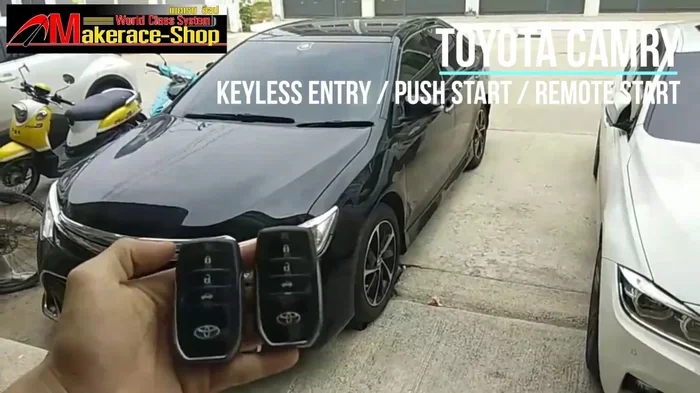
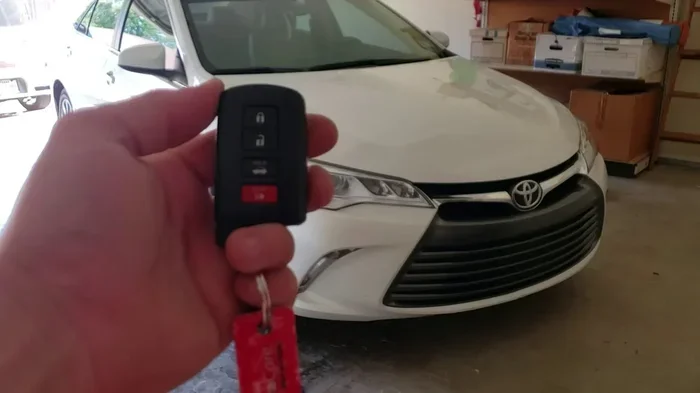
Look at your key fob. If your Camry has remote start, there should be a dedicated button labeled with a circular arrow or the word “Remote.” This button is usually separate from the lock and unlock buttons. On some Toyota key fobs, the remote start function is built into a sliding cover or a secondary button.
Method 2: Consult the Owner’s Manual
Your owner’s manual is one of the best resources. Look for the section on the remote entry system or the security system. If remote start is a feature of your vehicle, the manual will describe how to use it and what the limitations are.
Method 3: Check the Trim Sheet or Build Sheet
You can look up your Camry’s build sheet online using the VIN. This document lists every option and feature that came with your vehicle. Search for “remote start” or “engine start system” in the list of features. This is the most accurate way to confirm what your car has.
Method 4: Test the System
Stand a safe distance from your car with the doors locked. Press and hold the remote start button on your fob for at least two seconds. If the engine starts, you have remote start. If nothing happens, your Camry likely does not have this feature.
Adding Remote Start to a Camry That Does Not Have It
Just because your Camry did not come with factory remote start does not mean you cannot enjoy the convenience. There are several ways to add remote start to your vehicle. Each option has its pros and cons, so let us explore them.
Aftermarket Remote Start Kits
Aftermarket remote start systems are the most popular option. Brands like Compustar, Viper, and Avital offer reliable kits that work with the Toyota Camry. These kits typically cost between $200 and $500 for the parts, plus installation fees.
Professional installation is highly recommended. A qualified installer will integrate the remote start module with your car’s existing systems, including the ignition, door locks, and keyless entry. A proper installation ensures that your warranty is not voided and that the system works seamlessly.
Some aftermarket systems offer smartphone integration. You can start your car from your phone using a dedicated app. This is especially useful if you forget to start your car before leaving the house.
The Toyota Remote Connect App
For Camrys equipped with the Toyota Connected Services package, you may be able to use the Toyota app for remote engine start. This feature works through your smartphone and connects to your car via the cellular network.
Not all Camrys support this feature. It requires the Remote Connect subscription service and the appropriate hardware already installed in the vehicle. You can check with your Toyota dealer to see if your Camry qualifies for this upgrade.
Some owners wonder if they can download an app to start their car even without the factory hardware. The answer is usually no. The app requires specific modules and subscriptions that are tied to the vehicle’s original equipment.
Keyless Start and Smart Key Considerations
One important thing to note is that remote start generally requires a keyless entry and smart key system. If your Camry uses a traditional key with no proximity sensor, adding remote start may be more complicated or not possible at all.
Before purchasing any aftermarket system, confirm that your Camry has the necessary hardware. A professional installer can assess your vehicle and recommend the best solution. They can also help you understand any limitations, such as range distance or climate control compatibility.
Common Issues with Toyota Camry Remote Start
Even if your Camry has remote start, you may run into issues from time to time. Understanding these common problems can save you time and frustration.
Remote Start Does Not Work in Extreme Cold
In very cold temperatures, some remote start systems fail to engage. This is often due to a low battery voltage in the key fob or the car’s electrical system. Replacing the fob battery or letting the car run for a few minutes before driving can help.
Car Starts but Will Not Stay Running
If your Camry starts remotely but shuts off after a few seconds, the issue is often related to the brake pedal position sensor or the transmission range sensor. The car’s computer may not detect that the vehicle is in park, which causes it to shut down the engine.
Anti-Theft Mode Interference
Sometimes the anti-theft system can interfere with remote start. If your car is in anti-theft mode, the remote start function will not work. You may need to reset the anti-theft system using your key fob or by following specific steps in the owner’s manual.
Remote Start Not Working After Battery Replacement
If you recently replaced your car battery or had work done on the electrical system, the remote start may need to be reprogrammed. This is a common issue that many Camry owners overlook. A quick visit to the dealer or a qualified auto electrician usually resolves it.
Benefits of Having Remote Start on Your Camry
Remote start is more than just a luxury. It offers real, practical benefits that improve your daily driving experience.
- Comfort in extreme weather: Warm up your car in winter or cool it down in summer before you get in.
- Engine health: Letting the engine warm up before driving reduces wear and tear on cold mornings.
- Safety: Clearing frost or fog from your windshield before you drive improves visibility.
- Convenience: Start your car from inside your home or office without walking out to the driveway.
- Resale value: Cars with factory remote start tend to hold their value better and attract more buyers.
For Camry owners in northern climates, remote start is almost essential. There is nothing worse than climbing into a freezing cold car on a January morning. The few extra minutes of warmth make a huge difference in your comfort and safety.
Frequently Asked Questions
Can I Start My Toyota Camry Without the Remote Key?
Yes, you can still start your Camry without the remote key in some situations. If you have the physical key or the smart key inside the vehicle, you can use the push button start to turn the engine on. However, you cannot use remote start without the key fob being within proximity of the car. Learn more about starting your Camry without the remote key.
Does the Toyota Camry Hybrid Have Remote Start?
Yes, the Camry Hybrid can have remote start, but it depends on the trim level and model year. Higher trims like the XLE and XSE typically include it as part of their convenience packages. The hybrid system works the same way as the gas-powered version when it comes to remote engine start.
How Far Away Can I Start My Camry Remotely?
Most factory remote start systems on the Toyota Camry work from a range of about 200 to 600 feet. Aftermarket systems may offer a longer range, sometimes up to 3,000 feet with a high-quality antenna upgrade. Walls, buildings, and other obstacles can reduce the effective range.
Is Aftermarket Remote Start Safe for My Camry?
Yes, aftermarket remote start is generally safe when installed correctly by a professional. Modern kits are designed to work with your car’s existing systems without causing damage. However, always choose a reputable installer and a quality brand to ensure reliability and safety.
Can I Use My Key Fob to Remote Start if the Car Is Already Running?
No, you cannot remote start a car that is already running. The system is designed to start the engine only when it is off. If you accidentally remote start the car and then get in and drive, the system will shut off automatically when you insert the key or press the start button inside the vehicle.
Will Adding Remote Start Void My Toyota Warranty?
This depends on how the system is installed and whether it causes any issues with your vehicle’s electronics. In most cases, having a professional install a remote start system will not void your warranty. However, if the installation causes a problem that can be directly traced back to the remote start kit, Toyota may deny coverage for that specific issue. Always check with your dealer before installing any aftermarket electronics.
Final Thoughts
So, do all Toyota Camrys have remote start? The answer is a clear no. Remote start is a feature that varies by trim level, model year, and package options. If you have a higher trim like the XSE or TRD, your Camry likely has it. If you have a base model, you probably do not.
The good news is that you are not stuck without this feature if your Camry lacks it. Aftermarket kits are widely available, and the Toyota Remote Connect app offers a modern alternative for compatible models. Whether you choose a factory-installed system or an aftermarket solution, remote start is a feature that adds real value to your daily driving routine.
Take the time to check your specific Camry’s features. Look at your key fob, consult your owner’s manual, or run a VIN lookup. Once you know what you have, you can decide whether adding remote start is worth it for your lifestyle. A warm car on a cold morning is a small luxury that makes a big difference.