Can You Really Program a Key Fob Yourself at Home Now
Yes, you can program a key fob yourself at home in most cases. With the right key fob programming steps and a little patience, many car owners save hundreds of dollars by skipping the dealership or automotive locksmith. This guide walks you through every method, from self-programming to using a programming tool, so you can get back on the road fast.
Have you ever dropped your car keys and thought, “I wish I could just program a new one myself”? You are not alone. More car owners are asking whether they can handle key fob programming without visiting a dealership or paying a hefty bill to an automotive locksmith. The good news is that in many cases, the answer is yes.
Programming a remote key fob at home has become easier over the years. Car manufacturers know that people want convenience. That is why many brands now include self-programming options in the owner’s manual. Still, the process is not always straightforward. Different cars use different methods, and some vehicles make it harder than others.
In this guide, we will walk you through everything you need to know about programming a key fob yourself. We will cover the tools you need, step-by-step instructions for popular brands, common mistakes to avoid, and when it makes sense to call a professional. By the end, you will know exactly whether DIY key fob programming is right for your situation.
Key Takeaways
- DIY Programming Is Possible: Many vehicles allow you to program a key fob yourself using simple button sequences.
- You Need the Right Tools: A working key fob, fresh battery, and sometimes a programming tool are essential.
- Methods Vary by Brand: Each car manufacturer has a unique self-programming process you must follow.
- Common Mistakes Cost Time: Skipping steps or using the wrong battery are the top reasons DIY programming fails.
- Aftermarket Fobs Work Too: You can use a compatible aftermarket key fob instead of paying dealership prices.
- When in Doubt, Call a Pro: Complex systems or lost all keys may require a professional automotive locksmith.
📑 Table of Contents
- What Is Key Fob Programming and Why Does It Matter?
- Can You Really Program a Key Fob Yourself? The Short Answer
- Tools and Preparation You Need Before Starting
- Step-by-Step Key Fob Programming Methods by Brand
- Common Mistakes That Cause Key Fob Programming to Fail
- Aftermarket Key Fobs: Worth It or Not?
- When Should You Call a Professional Instead?
- Maintaining Your Key Fob After Programming
- Final Thoughts on Programming a Key Fob Yourself
What Is Key Fob Programming and Why Does It Matter?
A key fob is a small remote device that lets you lock, unlock, and sometimes start your car without using a physical key. Inside every fob is a tiny chip that sends a coded signal to your vehicle. This transponder key technology is part of your car’s vehicle security system. Without the correct code, your car simply will not respond.
Key fob programming is the process of teaching your car to recognize a new or replacement fob. When you buy a replacement fob, it comes blank. It does not know your car’s unique code. Programming creates that connection between the fob and the ignition system. Once programmed, the fob communicates seamlessly with your vehicle.
This matters because a dealership programming session can cost anywhere from $50 to $400 or more. DIY programming costs you nothing but a few minutes of your time. For car owners who like to handle their own maintenance, learning how to program a fob is a valuable skill.
How Does a Key Fob Communicate with Your Car?
Your car’s smart key system uses radio frequency signals. When you press a button on the fob, it sends a coded signal at a specific frequency. Your car’s immobilizer system receives that signal and checks it against stored codes. If the code matches, the car unlocks or starts. If it does not match, the system stays locked.
This is why programming is so important. The fob and the car must share the same unique code. Think of it like a secret handshake. Until both sides learn the handshake, they will not work together. Programming is simply the process of teaching both sides that secret handshake.
Can You Really Program a Key Fob Yourself? The Short Answer
The short answer is yes, you can program many key fobs yourself at home. However, not all vehicles support DIY programming. Some brands require specialized equipment that only dealerships or locksmiths have. The good news is that most popular brands from the last 15 years do allow self-programming with basic steps.
Before you start, you need to know three things about your vehicle. First, what brand and model do you have? Second, what year is it? Third, do you have at least one working key fob? Most self-programming methods require at least one working fob to program a second one. If you have lost all fobs, you may need professional help.
Also, keep in mind that programming a key fob is different from replacing a fob battery. Swapping a battery is simple. Programming involves syncing the fob’s signal to your car’s computer. Make sure you are trying to solve the right problem before you start.
Which Cars Support DIY Key Fob Programming?
Many popular brands support home key fob programming. Ford, Chevrolet, Toyota, Honda, Nissan, and Jeep are among the brands that often include self-programming options. European brands like BMW and Mercedes sometimes require dealer-level tools, but even some of these allow basic programming for certain models.
Your best resource is always the vehicle owner manual. It will tell you exactly whether your car supports DIY programming and walk you through the steps. You can also search online for your specific make, model, and year. Car forums are full of real owners sharing their programming a key fob experiences.
Tools and Preparation You Need Before Starting
Before you sit down to program a new fob, make sure you have everything ready. Being prepared saves time and prevents frustration. Here is what you need:
- A replacement key fob that is compatible with your vehicle. You can buy an aftermarket key fob online or from an auto parts store. Make sure it matches your car’s frequency and model.
- A fresh battery for the new fob. Most key fobs use a CR2025 or CR2032 coin battery. A dead battery is the number one reason programming attempts fail.
- Your existing working key fob (if you have one). Most self-programming methods require at least one fob that is already programmed.
- Your vehicle owner manual for reference. It contains the exact steps for your specific car.
- A quiet environment with no distractions. You need to follow button sequences carefully and quickly.
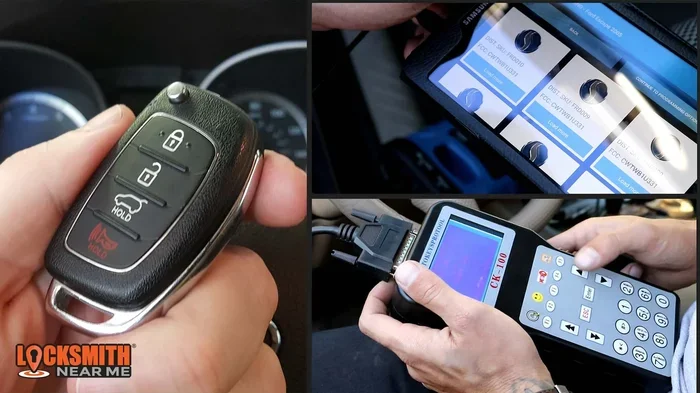
Some vehicles also require a key fob programming tool. These are small devices that connect to your car’s OBD-II port under the steering column. They are affordable and widely available online. If your car requires one, buy it before you start the process. You do not want to get halfway through and realize you need a tool you do not have.
Quick Tip: Always Check the Battery First
If your current fob is working but the new one is not, check the battery in the new fob first. It sounds simple, but many people skip this step. A brand-new fob can sometimes ship with a weak or dead battery. Replace it and try again before you assume the programming method is wrong.
Step-by-Step Key Fob Programming Methods by Brand
Every car brand has its own key fob programming process. Below are the general methods for some of the most popular brands. Always double-check these steps against your specific model’s owner manual.
Ford Key Fob Programming
Ford vehicles are among the most DIY-friendly when it comes to programming a key fob. Here is the general process:
- Sit in the driver’s seat and close all doors.
- Turn the ignition from OFF to RUN eight times within 10 seconds. The eighth time, leave it in RUN.
- Within 20 seconds, press any button on the new fob.
- The doors will lock, confirming the fob has been programmed.
- Turn the ignition OFF to exit programming mode.
Ford allows you to program up to four fobs using this method. If you already have a working fob, you can use it to add a new one. Simply follow the same steps but press a button on the working fob first to enter programming mode.
Chevrolet Key Fob Programming
Chevrolet also offers a self-programming option for many models:
- Close all doors and sit in the driver’s seat.
- Insert the key into the ignition and turn it to ON (do not start the engine).
- Press and hold the UNLOCK button on the driver’s door panel for more than 20 seconds.
- While still holding UNLOCK, turn the key from ON to OFF and back to ON within 5 seconds.
- Release the UNLOCK button.
- Within 10 seconds, press and hold both the LOCK and UNLOCK buttons on the new fob for more than 1 second.
- The doors will lock and unlock to confirm successful programming.
Chevrolet vehicles typically allow you to program up to three additional fobs. The process is straightforward but requires timing precision. Go slowly and follow each step exactly.
Toyota and Honda Key Fob Programming
Toyota and Honda use slightly different approaches. For Toyota, you usually need to remove the key from the ignition, open and close the driver’s door, then insert and remove the key from the ignition multiple times within a specific timeframe. For Honda, the process involves turning the ignition to specific positions and pressing buttons on the fob in a particular sequence.
Because these steps vary so much by model and year, always refer to your vehicle owner manual. You can also search for your specific model online. Many car owners have posted detailed video tutorials that walk you through every click and button press.
What If Your Car Does Not Support DIY Programming?
Some vehicles, particularly luxury brands and newer models, do not allow self-programming. In these cases, you will need to visit a dealership or a professional automotive locksmith. The good news is that even in these situations, a locksmith is usually much cheaper than a dealership. A locksmith might charge $50 to $150 for programming, while a dealership could charge $200 or more.
If you are unsure whether your car supports DIY programming, call a local locksmith and ask. Most will give you a free phone consultation. They can tell you over the phone whether you can do it yourself or need professional help.
Common Mistakes That Cause Key Fob Programming to Fail
Programming a key fob is not difficult, but small mistakes can cause the whole process to fail. Here are the most common errors car owners make:
- Using a dead or weak battery in the new fob. This is the single biggest reason programming fails. Always install a fresh battery before you start.
- Not following the timing correctly. Most programming methods require you to complete steps within a specific time window. Going too slow or too fast will reset the process.
- Not having a working fob when required. Many methods need at least one already-programmed fob to teach the car to accept a new one.
- Using an incompatible fob. Not every fob works with every car. Make sure the replacement fob matches your vehicle’s make, model, and year.
- Skipping the reset step. After programming, you must exit programming mode properly. Simply walking away may leave the system in an unfinished state.
- Trying to program too many fobs at once. Some brands limit how many fobs you can program in one session. Stick to the recommended number.
If your first attempt fails, do not get frustrated. Wait 30 seconds, then start over from the beginning. Often, the car simply needs a fresh start. Also, make sure you are not standing too far from the car. Some key fob programming methods work best when you are close to the vehicle.
Expert Insight: The Importance of Timing
Timing is everything when it comes to self-programming. Many people rush through the steps and wonder why it does not work. Take your time. Count out loud if you need to. The few extra seconds of care can save you an entire trip to the dealership. If you keep failing, try again when you are relaxed and focused. Distractions are the enemy of successful key fob programming.
Aftermarket Key Fobs: Worth It or Not?
One of the biggest ways to save money on key fob replacement is to buy an aftermarket key fob instead of an OEM (original equipment manufacturer) part. Aftermarket fobs cost anywhere from $10 to $40, while OEM fobs can run $50 to $200 or more depending on the vehicle.
The question is whether aftermarket fobs actually work. The short answer is yes, in most cases. An aftermarket key fob that is correctly matched to your vehicle’s frequency and model will program just as well as an OEM fob. The signal range and button feel may be slightly different, but the core function is the same.
Here are some tips for buying the right aftermarket fob:
- Check the part number on your existing fob and match it exactly.
- Buy from a reputable seller with good reviews.
- Make sure the fob is labeled as compatible with your specific make and model.
- If you are unsure, ask the seller for confirmation before purchasing.
Keep in mind that some vehicles with advanced security features may not accept aftermarket fobs easily. In these cases, you might still need a professional to complete the programming. But for most standard vehicles, an aftermarket fob is a perfectly fine and affordable option.
Comparing OEM vs Aftermarket Key Fobs
| Feature | OEM Fob | Aftermarket Fob |
|---|---|---|
| Price | $50 – $200+ | $10 – $40 |
| Compatibility | Guaranteed | Usually compatible |
| Signal Range | Factory optimized | Slightly shorter range |
| Build Quality | Premium materials | Good quality |
| Programming Ease | Works with all methods | Works with most methods |
| Warranty | Includes manufacturer warranty | Varies by seller |
For most car owners, an aftermarket key fob is the smart choice. You save money and get a fob that works just as well for everyday use. The only time you should consider an OEM fob is if your vehicle has very advanced security features or if the aftermarket option does not work for your specific model.
When Should You Call a Professional Instead?
DIY key fob programming is great, but it is not the right solution for every situation. Here are times when you should call a professional:
- You have lost all key fobs. If you do not have any working fob left, self-programming is usually not an option. You will need a professional to create and program a new fob from scratch.
- Your vehicle has advanced security features. Luxury cars and newer models with encrypted smart key systems often require dealer-level equipment.
- You have tried multiple times and failed. If you have followed the steps correctly and the fob still will not program, there may be a deeper issue with your car’s immobilizer system.
- You need a key cut in addition to programming. Some situations require both a physical key cut and electronic programming. A locksmith can handle both in one visit.
Professional locksmiths are often faster and cheaper than dealerships. They carry programming tools for most vehicle brands and can usually come to your location. If you are stuck, do not hesitate to call one. It is better to spend a little money and get it done right than to keep struggling on your own.
A Note About Push-to-Start Vehicles
If your car has a push button start system, the key fob programming process may be slightly different. Push-to-start vehicles rely heavily on the fob’s signal to recognize the driver. Some models require you to place the fob in a specific location (like a pad near the steering column) during programming. Always check your vehicle owner manual for push-start-specific instructions. You can also learn more about how push-start systems work in our guide on are you supposed to hold the push start button, which covers common questions about push-to-start functionality.
Maintaining Your Key Fob After Programming
Once you have successfully programmed your key fob, a little maintenance goes a long way. Here are simple tips to keep your fob working reliably:
- Replace the battery every 1 to 2 years. A weak battery causes signal problems and can lead to failed programming attempts in the future.
- Keep a spare fob programmed. If you ever lose your primary fob, having a backup saves you time and money.
- Store the fob away from strong magnets and electronics. These can interfere with the key fob signal and cause intermittent issues.
- Clean the buttons periodically. Dirt and grime can cause buttons to stick or become unresponsive.
- Update your fob if your car receives a software update. Some vehicles require fob re-syncing after a software update at the dealership.
Taking care of your remote key fob is simple but often overlooked. A few small habits can prevent the frustration of a dead or unresponsive fob when you need it most.
Final Thoughts on Programming a Key Fob Yourself
Programming a key fob yourself at home is absolutely possible for most vehicle owners. With the right preparation, a compatible replacement fob, and the correct steps for your car brand, you can save significant money and time. The process is not always easy, but it is almost always doable if you follow the instructions carefully.
Start by checking your vehicle owner manual to confirm your car supports DIY programming. Gather your tools, install a fresh battery, and follow each step precisely. If you run into trouble, do not force it. Take a break and try again, or reach out to a professional automotive locksmith for help.
Remember that key fob programming is a skill that gets easier with practice. The more you do it, the more confident you will become. And the next time a fob dies or you need a spare, you will know exactly what to do. Happy programming, and enjoy the savings!
Frequently Asked Questions
How long does it take to program a key fob yourself?
Most DIY key fob programming sessions take between 5 and 20 minutes. The exact time depends on your vehicle brand and the method required. Simple programs for common brands like Ford or Chevrolet usually take less than 10 minutes.
Can I program a key fob without any working fobs?
In most cases, you need at least one working fob to program a new one. However, some vehicles and professional locksmiths can handle programming from scratch with no existing fobs. Check your vehicle owner manual or call a locksmith for guidance.
Is aftermarket key fob programming different from OEM programming?
The programming process is usually the same for both aftermarket key fobs and OEM fobs. The difference is in the physical hardware and build quality. As long as the aftermarket fob is compatible with your vehicle, the programming steps will be identical.
What should I do if my newly programmed key fob does not work?
First, check the battery in the new fob. A weak battery is the most common cause. Next, make sure you followed the timing steps correctly. If it still does not work, try resetting the process and starting over. If you have repeated failures, consult your vehicle owner manual or contact a professional.
Do I need any special equipment to program a key fob at home?
Most vehicles do not require special equipment for basic self-programming. You only need a replacement fob, a fresh battery, and your vehicle owner manual. Some models may require a key fob programming tool that connects to the OBD-II port, which costs around $20 to $50.
Can I program multiple key fobs at the same time?
It depends on your vehicle brand. Some manufacturers allow you to program multiple fobs in one session, while others require you to program each one individually. Always check your owner manual for the exact process and any limits on how many fobs you can add at once.
=== CONCLUSION ===
Programming a key fob yourself at home is one of the simplest and most rewarding DIY car tasks you can tackle. It saves money, builds your confidence, and keeps you moving without waiting for a dealership appointment. With the right preparation and your vehicle’s owner manual in hand, most car owners can complete the process in under 20 minutes.
Remember to use a fresh battery, follow the timing carefully, and choose a compatible aftermarket key fob if you want to save even more. And if you ever feel stuck, a professional automotive locksmith is always there to help. Now you have everything you need to take on key fob programming with confidence. Go ahead and give it a try, your wallet will thank you!