Can You Use the Toyota App Instead of Your Key Fob
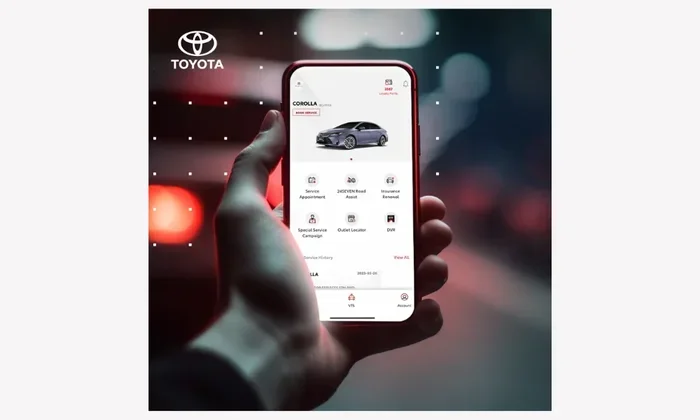
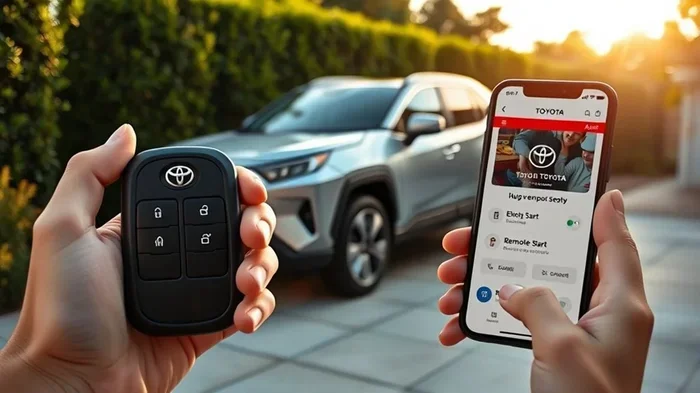
Yes, you can use the Toyota app as an alternative to your key fob in many situations. The Toyota app lets you lock, unlock, and even start your car remotely using just your smartphone. However, it works best as a supplement to your key fob, not a full replacement in every scenario.
Have you ever walked out to your Toyota and realized you left your key fob inside? Or maybe your fob battery died right when you needed it most. It happens to the best of us. And when it does, one question pops up fast: can you use the Toyota app instead of the key fob?
The short answer is yes, in many cases. Toyota has built a robust mobile app that lets you do a lot of what your key fob does. You can lock the doors, unlock them, and even start the engine from your phone. But there are some important limits to know about too. Let us walk through everything you need to know about using the Toyota app as your key fob alternative.
This guide covers how the app works, which features it offers, what you still need the physical fob for, and tips to get the most out of your Toyota experience. Whether you are dealing with a dead fob battery or just want to go fully keyless, you are in the right place.
Key Takeaways
- The Toyota app offers keyless functions like remote start, lock, and unlock from your phone.
- You still need your physical key fob for certain situations like battery replacement and initial vehicle pairing.
- Setting up the app is straightforward and takes just a few minutes through the Toyota Connected Services portal.
- Not all Toyota models support full app-based keyless operation, so check your specific vehicle’s compatibility.
- The app can replace your fob in a pinch if your key fob battery dies or you lose your remote.
📑 Table of Contents
- What the Toyota App Can Do Instead of Your Key Fob
- How to Set Up the Toyota App as a Key Fob Replacement
- When You Still Need the Physical Key Fob
- Toyota App vs. Key Fob: A Comparison
- Tips for Using the Toyota App as Your Primary Key
- Common Mistakes to Avoid
- Expert Insights on Going Keyless with Toyota
- Final Thoughts
What the Toyota App Can Do Instead of Your Key Fob
The Toyota app is more than just a remote control. It is a full-featured tool that connects your smartphone directly to your vehicle. Here are the main functions you can use to replace your key fob in day-to-day driving.
Remote Lock and Unlock
One of the most used features of the Toyota app is the ability to lock and unlock your doors remotely. This works through the cloud, so you do not need to be within a few feet of your car like you do with a traditional fob. You can unlock the driver door from the parking lot, or lock up after you have already walked away.
This feature is especially handy when your hands are full, you are carrying groceries, or someone needs to grab something from your car quickly. Just open the app, tap the lock or unlock button, and your Toyota responds.
Remote Engine Start
Another big one is remote engine start. On supported Toyota models, the app lets you fire up the engine before you even get in. This is perfect for cold mornings when you want the heater running or hot summer days when you need the AC to cool things down.
To use this feature, you simply open the app, press the remote start button, and your Toyota comes to life. You can set a timer so the engine starts a few minutes before your usual departure time. It is a game changer for comfort and convenience.
Vehicle Location and Status
The app also shows you where your car is parked. This is useful in large parking lots or when you forget where you left it. You can also check the status of your doors, windows, and even the fuel level right from your phone.
Some Toyota models also support vehicle health reports through the app. You can see maintenance reminders, tire pressure readings, and oil life status without ever opening the hood.
How to Set Up the Toyota App as a Key Fob Replacement
Setting up the Toyota app is simple, but there are a few steps you need to follow. Here is a quick walkthrough to get you started.
Step 1: Download the App
First, download the Toyota app from the App Store or Google Play Store. It is free to download and works on both iPhone and Android devices. Make sure your phone is compatible and has a stable internet connection.
Step 2: Create Your Account
Once the app is installed, create your account using your email address and a secure password. You will need your Toyota vehicle information handy, including the VIN and your dealer registration details.
Step 3: Link Your Vehicle
After logging in, follow the prompts to link your vehicle to your account. This usually involves entering your VIN and confirming your ownership. Some models may require a one-time visit to the dealership to activate the connected services feature.
Once your vehicle is linked, you should see all available features in the app dashboard. From there, you can start using the app right away as a partial key fob replacement.
Step 4: Test Your Features
Before you rely on the app fully, test each feature in a safe environment. Try locking and unlocking from a short distance, then increase the range. Test the remote start and make sure the engine responds properly. This way, you know everything works when you really need it.
When You Still Need the Physical Key Fob
Here is the honest truth. The Toyota app is powerful, but it cannot fully replace your physical key fob in every situation. There are specific scenarios where the fob is still essential.
Initial Vehicle Pairing
When you first get your Toyota, you need the physical key fob to pair the vehicle with the app. The app cannot do this on its own. You must have the fob present during the initial setup process at the dealership or in your vehicle.
Dead Fob Battery Situations
If your key fob battery dies, the app can save the day. You can use the app to unlock your doors and start the engine without the fob. However, you will still need a working fob at some point to replace the battery or reprogram the fob. You can program a key fob without going to the dealership in many cases, which saves time and money.
Some owners wonder if they can start their car without the remote key using just the app. The answer depends on your model year and trim level. Newer Toyotas with smart key systems may allow push-button start using your phone as a digital key. But older models may still require the physical fob to be present inside the vehicle.
Lost or Damaged Fob
If you lose your key fob entirely, the app alone cannot get you a new one. You will need to order a replacement fob and have it programmed. The good news is that you can reprogram your key fob yourself in many Toyota models, which means you do not always need a dealer to help.
Driving Without Any Key
Some drivers want to know if they can start their car without the key fob at all. While the app provides a lot of keyless functionality, you still need some form of authentication inside the vehicle. Most Toyotas require the fob to be inside the cabin for push-button start. The app does not currently replace this in-car authentication step on most models.
Toyota App vs. Key Fob: A Comparison
So how does the app stack up against the traditional key fob? Here is a side-by-side look at what each one offers.
| Feature | Toyota App | Physical Key Fob |
|---|---|---|
| Remote Lock/Unlock | Yes | Yes |
| Remote Engine Start | Yes | Yes |
| Works Without Phone Signal | No | Yes |
| Range | Unlimited (cloud-based) | Limited (line of sight) |
| In-Car Push Start | Limited/Model Dependent | Yes |
| Battery Dependency | Phone Battery | Fob Battery |
| Initial Setup | Requires Fob | Included with Vehicle |
| Replacement Cost | Free (app download) | $50-$400+ for new fob |
As you can see from the comparison, both the app and the fob have their strengths. The app wins on range and convenience features. The fob wins on reliability and not needing an internet connection. The best approach is to use both together for maximum flexibility.
Tips for Using the Toyota App as Your Primary Key
If you plan to rely on the Toyota app more than your key fob, here are some practical tips to keep things running smoothly.
Keep Your Phone Charged
The app requires a working smartphone, so battery life matters. Make sure your phone is charged before you head out, especially on long trips. Consider carrying a portable charger in your car as a backup.
Download Offline Features When Possible
Some Toyota app features work better with a cached connection. Open the app while you have good Wi-Fi so that key functions load faster when you need them on the go.
Keep Your Fob as a Backup
Even if you prefer the app, keep your physical fob somewhere safe in your vehicle. If your phone dies or you lose service in a dead zone, the fob becomes your lifeline. You do not want to be stranded in a parking lot with no way to get into your car.
Update the App Regularly
Toyota releases app updates that improve performance, fix bugs, and add new features. Keep your app updated to ensure the best experience and security. Outdated app versions can sometimes cause connection issues with your vehicle.
Know Your Vehicle’s Smart Key Compatibility
Not every Toyota model supports full phone-as-a-key functionality. Check your owner’s manual or contact your dealer to confirm what your specific model can do. Some newer models support digital key sharing, which lets you give family or friends temporary access through the app.
Use the App to Monitor Fob Battery Life
Many Toyota owners do not realize that the app can alert you when your fob battery is low. This gives you a heads-up so you can replace the battery before it dies completely. If your fob battery does die, you can use the app to start your car without the remote key as a temporary solution until you get a new battery.
Common Mistakes to Avoid
Using the Toyota app instead of your key fob comes with a few pitfalls. Here are common mistakes owners make and how to avoid them.
- Forgetting to log out on shared phones. If you let someone else use your phone, make sure they do not have access to your Toyota app. Lock the app or use your phone’s built-in app lock feature for security.
- Ignoring app notifications. Toyota sends alerts about service needs, low fob battery, and security warnings. Ignoring these can lead to surprises later.
- Assuming the app works everywhere. The app needs an internet connection. In areas with poor cell service, your fob is your best backup.
- Not setting up the app before you need it. Do not wait until your fob dies to try setting up the app for the first time. Set it up in advance so you are familiar with how it works.
- Relying solely on the app for long-term fob replacement. The app is a great supplement but not a permanent fob replacement. Keep a working fob for emergencies.
Expert Insights on Going Keyless with Toyota
Automotive experts agree that the Toyota app is a strong step toward a keyless future. However, most recommend keeping the physical fob as a backup. Technology can be unpredictable, and having a fallback option gives you peace of mind.
If you are dealing with a situation where your fob is not working properly, there are steps you can take before giving up on it entirely. For instance, if your worn-out key prevents your car from starting, the app can bypass the fob altogether in the meantime. Similarly, if your car goes into anti-theft mode with a fob, the app may help you reset the system without needing a physical key present.
Some Toyota owners have found creative ways to integrate the app into their daily routine. They use the app for remote start every morning, lock and unlock with their phone, and keep the fob in the glove box as a last resort. This hybrid approach gives you the best of both worlds.
The automotive landscape is shifting toward digital keys and smartphone integration. Toyota is at the forefront of this change with its connected services and app features. As technology improves, we can expect the app to handle even more functions currently reserved for the physical fob.
Final Thoughts
So, can you use the Toyota app instead of your key fob? The answer is a qualified yes. The app handles many of the everyday functions you rely on, including remote start, lock, unlock, and vehicle monitoring. It is convenient, easy to set up, and free to use.
But the physical key fob is not obsolete yet. You still need it for initial setup, certain in-car authentication steps, and as a backup when your phone is not available. Think of the app as a powerful complement to your fob, not a full replacement.
By combining both the Toyota app and your key fob, you get the best of convenience and reliability. You can start your car without the key fob in most situations using the app, while keeping the fob handy for the moments when technology falls short. The key is to stay prepared, keep your app updated, and enjoy the modern Toyota driving experience.
Whether you are a new Toyota owner or have been driving one for years, the app adds a layer of convenience that is well worth exploring. Give it a try, and you might find yourself reaching for your phone instead of your fob more often than you expected.
Frequently Asked Questions
Can I use the Toyota app to start my car if I do not have the key fob?
In most cases, yes. The Toyota app allows you to remotely start your engine without the physical fob present. However, this depends on your specific model and whether you have set up the app correctly beforehand. You still need to have linked your vehicle to the app while the fob was available during initial setup.
Does the Toyota app work if my phone has no internet connection?
No, the Toyota app requires an internet connection to communicate with your vehicle. If you are in an area with no cell service, the app will not be able to lock, unlock, or start your car. This is why keeping a physical key fob as a backup is always recommended.
Can I replace my key fob entirely with the Toyota app?
Not completely. The app serves as a great alternative for daily use, but you still need a physical fob for initial pairing, certain in-car authentication steps, and as a backup. Think of the app as a supplement, not a full substitute for your key fob.
Is the Toyota app free to use?
The app itself is free to download and use for basic features. Some advanced connected services may require a subscription plan, which varies by model and dealer. Check with your Toyota dealer for details on available plans and pricing for premium features.
What should I do if my key fob battery dies and I do not have the app set up?
If your fob battery dies and the app is not set up, you can still access your vehicle using the physical key blade that is hidden inside most Toyota key fobs. Simply remove the blade from the fob and use it to unlock the door. Once inside, you can insert the fob into the start button slot to start the engine.
Can I share Toyota app access with family members?
Yes, on supported models, the Toyota app allows you to share digital key access with family members or trusted friends. This feature lets them lock, unlock, and in some cases start the vehicle using their own smartphone. You can set permissions and time limits for shared access through the app settings.