How Do I Reset My Audio Settings Quickly and Easily
Finding out how do I reset my audio settings is simpler than most car owners think. Whether your car stereo sounds muffled, your Bluetooth keeps cutting out, or the equalizer is acting strange, a reset often solves the problem fast. This guide walks you through the exact steps for different car brands and audio systems. You will learn quick fixes, common mistakes to avoid, and expert tips that save time and money. Keep reading to get your car sound system back to sounding its best.
Have you ever been driving down the road, enjoying your favorite playlist, when suddenly the sound gets distorted or the stereo freezes up? It is frustrating. You wonder, how do I reset my audio settings and get things back to normal? The good news is that resetting your car audio settings is usually a quick and easy process. You do not need to be a mechanic or a tech expert to figure it out.
Car audio systems are complex. They handle radio, Bluetooth, equalizer settings, balance controls, and more. When one part of that system glitches, it can throw everything off. A reset clears out temporary errors and brings things back to a clean slate. This guide will show you exactly how to do it, no matter what kind of car you drive.
We will cover everything from basic soft resets to full factory resets. You will also learn about common car audio problems, Bluetooth troubleshooting, and tips to keep your sound system running smoothly. Let us dive in and get your car audio sounding great again.
Key Takeaways
- Resetting car audio settings is a simple fix for most common sound problems like distortion, static, or Bluetooth issues.
- The process varies by car brand, but most vehicles share similar reset steps through the infotainment screen or a factory reset option.
- Bluetooth audio reset is one of the most common reasons car owners need to reset their audio settings.
- Quick tips like keeping your firmware updated can prevent audio problems from returning.
- Knowing when to seek professional help saves you from unnecessary frustration and costly DIY mistakes.
- Common mistakes like skipping the power cycle can make resets ineffective.
- A factory reset restores all audio settings to default, which is different from a simple soft reset.
📑 Table of Contents
- Why Your Car Audio Settings Might Need a Reset
- How Do I Reset My Audio Settings in Different Car Brands
- Resetting Car Bluetooth and Wireless Audio Settings
- Common Car Audio Problems That a Reset Can Fix
- Quick Tips to Keep Your Car Audio Running Smoothly
- When to Seek Professional Help for Car Audio Issues
- Key Takeaways
- Conclusion
Why Your Car Audio Settings Might Need a Reset
Car audio systems work hard every day. They deal with temperature changes, vibrations, electrical fluctuations, and constant use. Over time, these factors can cause settings to drift or software to hiccup. Understanding why resets are needed helps you act faster when problems pop up.
Common Signs Your Audio Settings Need a Reset
How do you know it is time to reset? Here are the most common signs:
- Sound distortion or crackling comes from the speakers even at low volumes.
- Bluetooth audio keeps disconnecting or fails to pair with your phone.
- The equalizer settings revert on their own or look grayed out.
- Radio stations fail to tune in properly or sound fuzzy.
- The car stereo freezes or becomes unresponsive to button presses.
- Volume controls work inconsistently or one speaker sounds louder than the others.
- Audio delay or lag happens when playing music through Bluetooth.
Any of these issues can point to a software glitch or a settings conflict. Before you rush to a repair shop, try a reset first. In most cases, it solves the problem completely.
Soft Reset vs Factory Reset: What Is the Difference
Not all resets are the same. A soft reset simply restarts the audio system without deleting any of your personal settings. Think of it like restarting your phone. A factory reset wipes everything and brings the system back to its original out-of-the-box state. You will lose custom EQ settings, paired Bluetooth devices, and saved radio presets.
Start with a soft reset. Only move to a factory reset if the soft reset does not fix the issue. This approach keeps your data safe while still solving most problems.
How Do I Reset My Audio Settings in Different Car Brands
The exact steps to reset your car audio settings depend on your vehicle make and model. However, most car brands follow a similar pattern. Here is a detailed breakdown for popular car manufacturers.
Toyota and Lexus Audio Reset
Toyota and Lexus vehicles have a straightforward reset process. Start by turning off the ignition. Then, press and hold the power button on the audio system for about 10 to 15 seconds. Release the button and wait a few seconds before turning the system back on. This soft reset clears most temporary audio glitches.
For a factory reset on newer Toyota models with the Entune system, go to the Settings menu on the infotainment screen. Look for the Audio or System option. Select Restore Factory Settings and confirm your choice. The system will reboot with all audio settings back to default.
Ford and Lincoln Audio Reset
Ford vehicles use the SYNC infotainment system. To perform a soft reset, press and hold the power button on the SYNC screen for about 10 seconds. The screen will go dark and then restart. Your audio settings will refresh without losing any saved data.
If you need a full reset, go to Settings, then System, and choose Restore Factory Defaults. This option resets all audio and system settings at once. It is helpful when multiple features are acting up, not just the audio.
Chevrolet and GMC Audio Reset
Chevrolet and GMC trucks and SUVs use the Infotainment system. To reset the audio, press and hold the volume knob for about 15 seconds. The system will power off and then restart automatically.
For a deeper reset, navigate to Settings, then Device Preferences, and choose Reset. You can reset just the audio settings or the entire system depending on your needs. Always note your preferred EQ settings before doing a full reset so you can restore them afterward.
Honda and Acura Audio Reset
Honda and Acura vehicles often require a slightly different approach. Turn the ignition to the accessory position without starting the engine. Press and hold the power button on the audio unit for 10 seconds. The screen should turn off and back on.
Some Honda models also allow you to reset audio settings through the Display Audio menu. Go to Setup, then System, and select Restore Factory Settings. This clears all custom audio adjustments and returns the system to its original state.
BMW and Mercedes Audio Reset
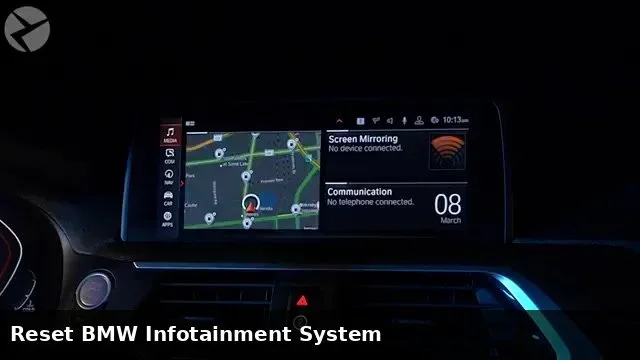
Premium brands like BMW and Mercedes have more advanced audio systems, such as the Harman Kardon or Burmester systems. To reset, go to the iDrive or MBUX system menu. Navigate to Settings, then Audio, and look for a Reset or Default option.
For a full system reset, you may need to access the vehicle settings menu. Hold down the volume knob or the reset button on the audio unit for 10 to 20 seconds. The system will restart and load default audio configurations.
Resetting Car Bluetooth and Wireless Audio Settings
Bluetooth audio problems are one of the top reasons car owners search for how to reset their audio settings. When your phone keeps disconnecting or the sound quality drops, a Bluetooth reset often helps.
How to Reset Bluetooth Audio Connection
Start by turning off Bluetooth on your phone. Then, go to your car audio system settings and delete the paired device. Turn Bluetooth back on on your phone and search for available devices. Re-pair your phone with the car stereo. This simple process fixes most Bluetooth audio issues.
If the problem continues, try resetting the entire Bluetooth module. In most cars, you can do this through the infotainment settings. Look for the Bluetooth or Connection option and choose Reset Bluetooth Settings. This clears all paired devices and network data.
Fixing Bluetooth Audio Delay and Lag
Bluetooth audio delay can be incredibly annoying, especially when watching videos or using navigation voice prompts. A reset helps, but there are a few extra steps you can take:
- Make sure your phone and car system are both updated to the latest software versions.
- Clear the Bluetooth cache on your phone if you are using an Android device.
- Move closer to the car antenna during the pairing process for a stronger connection.
- Avoid connecting too many devices at once, as this can slow down the system.
- Restart both your phone and car infotainment system before attempting to pair again.
These steps combined with a reset usually resolve Bluetooth audio lag completely.
Common Car Audio Problems That a Reset Can Fix
Not every car audio problem requires a trip to the mechanic. Many issues stem from software glitches or settings conflicts that a simple reset can fix. Here are the most common problems and how a reset helps.
Car Stereo Static Noise
Static noise from your car speakers is a common annoyance. It often happens when the radio antenna connection is loose or when the audio settings get corrupted. A soft reset clears the corrupted settings and restores clean audio output. If static persists after a reset, check the antenna connection or consider a professional inspection.
Uneven Speaker Volume
When one speaker sounds louder than the others, the balance and fade settings may be off. Sometimes these settings get shifted accidentally or due to a software glitch. A reset restores the balance and fade to their default middle positions. If the problem remains, the issue might be a blown speaker or a wiring problem.
Car Audio Equalizer Not Working
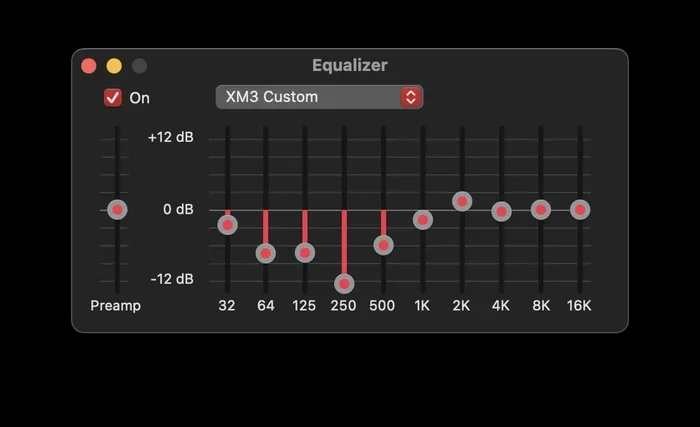
The equalizer lets you customize bass, midrange, and treble levels. When it stops responding or resets randomly, your audio settings may be corrupted. A factory reset clears the issue and gives you a fresh start with the default EQ profile. You can then rebuild your custom settings from scratch.
Car Audio System Freezing or Crashing
Infotainment systems can freeze just like any other computer. A soft reset restarts the system and clears temporary memory issues that cause crashes. If your car audio system freezes frequently, a factory reset often solves the root cause by eliminating accumulated software conflicts.
Quick Tips to Keep Your Car Audio Running Smoothly
Prevention is always better than cure. A few simple habits can keep your car audio system in great shape and reduce the need for resets.
Keep Your System Updated
Many car manufacturers release firmware updates for their infotainment systems. These updates fix bugs, improve performance, and add new features. Check for updates through your car dealer or the manufacturer’s website. Keeping your system current prevents many audio problems before they start.
Avoid Overloading the System
Connecting too many Bluetooth devices or storing too much media on the system can slow it down. Keep your paired devices list manageable. Regularly delete devices you no longer use. This keeps the audio system running fast and smoothly.
Protect Your System from Power Surges
Power surges from the car battery or alternator can damage audio components and corrupt settings. Use a surge protector or voltage regulator if you frequently experience electrical issues. This simple step can extend the life of your car audio system significantly.
Clean Your Audio Connections
Dust and debris can build up around audio connections over time. Use a soft, dry cloth to gently clean the audio ports and connections. Clean connections ensure better signal quality and fewer audio problems.
When to Seek Professional Help for Car Audio Issues
Most audio issues respond well to a reset. But some problems go beyond what a simple reset can fix. Knowing when to call a professional saves you time and prevents further damage.
Seek professional help if you notice any of the following:
- Physical damage to speakers such as tears in the cone or rattling sounds.
- No sound at all even after a full factory reset.
- Flickering or dimming of the audio screen along with sound problems.
- Burning smell or unusual heat coming from the audio unit.
- Audio problems that return immediately after a reset, suggesting a hardware issue.
A certified car audio technician can diagnose hardware problems that a software reset cannot fix. They have the tools and expertise to repair or replace damaged components safely.
Common Mistakes to Avoid When Resetting Audio Settings
Even with the best intentions, car owners sometimes make mistakes during the reset process. Here are the most common ones and how to avoid them:
- Skipping the power cycle. Always turn the system completely off before attempting a reset. A partial shutdown does not clear the temporary memory properly.
- Not saving your preferred settings first. Before a factory reset, write down your favorite EQ settings, Bluetooth pairings, and radio presets. This saves you time when setting everything up again.
- Resetting too frequently. If you need to reset your audio settings every week, there is likely an underlying hardware problem. A reset is a fix, not a permanent solution for recurring issues.
- Ignoring the user manual. Every car model is slightly different. Checking the owner manual for model-specific reset instructions can save you a lot of trial and error.
Expert Insights on Car Audio Resets
According to automotive audio specialists, most car audio problems that seem serious are actually just software glitches. A reset clears these glitches and restores normal function. The key is to act quickly when problems arise. The longer you wait, the more the corrupted settings can interfere with other system functions.
Experts also recommend performing a soft reset once every few months as a maintenance routine. Just like restarting your phone keeps it running smoothly, a periodic audio system reboot prevents small issues from becoming big problems. This simple habit can extend the life of your car audio system and keep it sounding great for years.
Key Takeaways
- Resetting car audio settings is a simple fix for most common sound problems like distortion, static, or Bluetooth issues.
- The process varies by car brand, but most vehicles share similar reset steps through the infotainment screen or a factory reset option.
- Bluetooth audio reset is one of the most common reasons car owners need to reset their audio settings.
- Quick tips like keeping your firmware updated can prevent audio problems from returning.
- Knowing when to seek professional help saves you from unnecessary frustration and costly DIY mistakes.
- Common mistakes like skipping the power cycle can make resets ineffective.
- A factory reset restores all audio settings to default, which is different from a simple soft reset.
Conclusion
Now you know exactly how do I reset my audio settings and get your car sound system back on track. Whether you need a quick soft reset or a full factory reset, the steps are straightforward and easy to follow. Start with the basics, try a soft reset first, and only move to a factory reset if needed.
Remember to back up your preferred settings before any reset. Keep your system updated and clean to prevent problems from returning. Most audio issues are temporary and fixable with a simple reset. You do not need expensive repairs or professional help in most cases.
Take action today. The next time your car stereo acts up, do not panic. Follow the steps in this guide and get back to enjoying clear, crisp audio on every drive. Your ears will thank you, and your driving experience will be so much better.
Frequently Asked Questions
How long does it take to reset car audio settings?
A soft reset usually takes less than a minute. A factory reset may take 5 to 10 minutes, depending on your car model. The system will restart and reload default settings during this time. Plan your reset when the car is parked and you have a few spare minutes.
Will resetting my car audio settings delete my Bluetooth pairings?
A soft reset keeps your Bluetooth pairings intact. A factory reset, however, will delete all paired devices. You will need to re-pair your phone after a factory reset. Always note your Bluetooth settings before performing a full reset.
Can I reset just the equalizer settings without a full reset?
Yes, most car audio systems let you reset individual settings. Go to the EQ menu and look for a Reset or Default option. This restores only the equalizer without affecting other audio settings. Check your car manual for model-specific instructions.
Why does my car audio keep needing to be reset?
If you find yourself resetting your audio settings frequently, there may be an underlying hardware issue. Loose wiring, a failing amplifier, or a damaged speaker can cause recurring problems. In this case, it is best to consult a professional car audio technician for a proper diagnosis.
Is it safe to reset the audio system while driving?
No, you should always reset your car audio system while the vehicle is parked. A reset can cause the screen to go dark or the system to restart unexpectedly. This can distract you while driving and create a safety hazard. Always pull over before performing any reset.
Do I need any special tools to reset my car audio settings?
No special tools are needed. A soft reset requires only the car ignition and the audio system controls. A factory reset is done through the infotainment screen menus. All you need is access to the car and a few minutes of time. The process is designed to be simple and user-friendly for all car owners.