Is There an App to Find a Key Fob Quickly and Easily
Yes, there are apps designed to help you find a lost key fob fast. These key fob finder apps use Bluetooth, GPS, and proximity alerts to locate your car remote. Whether you misplaced your car key remote at home or in a parking lot, the right app can save you time and stress.
Have you ever walked into your house and realized your key fob was not in your pocket? It happens to the best of us. One moment you are unlocking your car, and the next moment, you are turning your entire bag inside out looking for it.
The good news is that technology has come a long way. Is there an app to find a key fob? Yes, there is. Several apps and digital tools can help you locate your lost car remote quickly. In this guide, we will walk you through everything you need to know about finding a key fob using your phone.
We will cover how these apps work, which ones are worth your time, and what to do when the app is not enough. Whether you drive a 5 to 8 lakh car or a luxury model, this guide is for you. Let us get started.
Key Takeaways
- Apps exist: Several apps can help you locate a lost key fob using Bluetooth and phone sensors.
- They work differently: Some use Bluetooth tracking, while others rely on smart home integration.
- Prevention matters: Simple habits can stop you from losing your key fob in the first place.
- Battery health counts: A weak key fob battery can mimic a lost fob.
- Physical trackers help too: Tile and AirTag are great companions to key fob apps.
📑 Table of Contents
What Is a Key Fob and Why Do People Lose Them?
Understanding Your Car Key Remote
A key fob is a small wireless device that lets you lock, unlock, and sometimes start your car remotely. It uses radio signals or Bluetooth to communicate with your vehicle. Most modern cars come with smart key systems that make driving more convenient.
But convenience comes with a downside. Key fobs are small. They slip out of pockets. They fall out of bags. They end up in the washing machine. And before you know it, you cannot find your car key remote anywhere.
Here are some common reasons people lose their key fobs:
- Distracted routines: Rushing out the door without paying attention.
- Multiple pockets: Fumbling through similar-looking jacket pockets.
- Shared households: Family members moving the fob to a different spot.
- Bag clutter: The fob gets buried under coins, receipts, and other items.
- No designated spot: Not having a consistent place to put the fob at home.
A key fob is not heavy for a car, but losing it can cause big headaches. Replacement costs can add up fast, especially if you need to reprogram the remote. That is where key fob finder apps come in handy.
The Cost of Losing a Key Fob
Replacing a lost key fob is not cheap. Depending on your vehicle, a new car key replacement can cost anywhere from a few hundred to several thousand rupees. For owners of a 7 to 8 lakh car in India, the expense can feel even more significant.
Beyond the cost, there is the inconvenience. Without your fob, you may not be able to start your car or even unlock the doors. This is why finding a quick solution matters so much.
Apps That Can Help You Find a Lost Key Fob
How Key Fob Finder Apps Work
So how does an app actually help you find a key fob? Most key fob finder apps use one or more of these technologies:
- Bluetooth tracking: The app connects to your fob via Bluetooth and shows the distance on your phone screen.
- Proximity alerts: Some apps beep louder as you get closer to the fob.
- Last known location: The app records where your fob was last connected to your phone.
- Smart home integration: Certain apps work with smart speakers to make the fob ring.
It is important to understand that these apps do not magic your fob out of thin air. They work within the key fob signal range, which is typically 30 to 100 feet for Bluetooth. If your fob is at home and you are at the office, the app cannot track it across town.
Popular Apps for Finding Key Fobs
Several apps on the market are designed to help you locate lost remotes and small devices. Here are some of the most popular options:
- Find My Device (Android): Google’s built-in tool can help locate Bluetooth-connected devices.
- Find My (iOS): Apple’s native app supports tracking Bluetooth items, including key fobs.
- Tile: A dedicated tracker app that works with Tile Bluetooth tags you can attach to your fob.
- Samsung SmartThings: Works with Samsung phones and supports finding nearby Bluetooth devices.
- Chipolo: Another popular tracker app that pairs with Chipolo Bluetooth tags.
Not all of these apps are specifically built for key fobs. However, they are effective tools for locating any Bluetooth-enabled device. If your fob has a Bluetooth chip, there is a good chance one of these apps can help.
Using Find My Device and Find My Effectively
If you use an Android phone, Find My Device is already on your device. You do not need to download anything extra. Simply open the app, and it will scan for nearby Bluetooth devices, including your key fob.
For iPhone users, Find My works similarly. You can use the “Items” tab to track Bluetooth-connected accessories. Both apps show you the approximate distance and direction of your fob.
Here is a quick tip: make sure your phone’s Bluetooth is turned on before you start searching. Also, move slowly around your home. The signal strength changes as you get closer or farther from the fob.
How Key Fob Finder Apps Actually Work
Bluetooth Signal Detection
Most key fob finder apps rely on Bluetooth Low Energy (BLE) signals. Your key fob constantly broadcasts a weak radio signal. When your phone is nearby, it picks up this signal and estimates the distance based on signal strength.
This is similar to how you can tell someone is getting closer by the volume of their voice. The stronger the signal, the closer you are to the fob.
Crowdsourced Location Networks
Some apps use a crowdsourced network to help find lost devices. This means that if another user with the same app walks near your lost fob, their phone can detect it and send you the location. This feature works even when your own phone is far away.
Tile and Chipolo both use this technology. It is a clever way to extend the range beyond what Bluetooth alone can offer.
Limitations of App-Based Tracking
While apps are helpful, they have limits. Here are some things to keep in mind:
- Range is limited: Bluetooth only works within about 100 feet.
- Battery dependency: If your fob battery is dead, the app cannot detect it.
- No GPS on the fob: Most key fobs do not have GPS chips, so they cannot be tracked remotely over long distances.
- Interference: Walls, furniture, and other electronics can block the Bluetooth signal.
For these reasons, app-based tracking works best for finding a fob that is nearby, not one that is truly lost in a parking lot miles away.
Best Key Fob Tracking Apps You Can Try Today
Tile: The Gold Standard for Item Tracking
Tile is one of the most well-known item-tracking solutions. You can attach a Tile Mate or Tile Pro to your keychain or place it inside your fob case. The Tile app then shows you the last known location and helps you get closer with proximity alerts.
Tile also offers a feature called “Community Find.” If another Tile user comes within range of your lost fob, you will receive its location. This is a powerful way to extend your search beyond Bluetooth range.
AirTag: Apple’s Answer to Lost Items
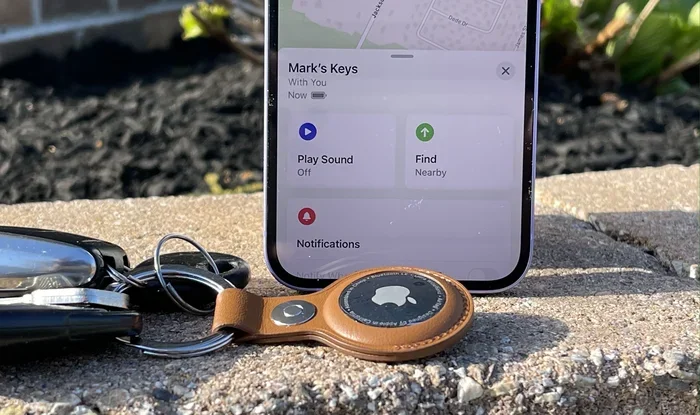
If you use an iPhone, Apple AirTag is an excellent option. You slip an AirTag into your keychain or fob holder, and the Find My app shows you exactly where it is. AirTag uses a combination of Bluetooth, Ultra Wideband, and Apple’s massive network of devices to pinpoint locations.
AirTag is especially useful because it supports precision finding on newer iPhones. This means your phone can guide you to the fob with on-screen arrows, almost like a treasure hunt.
Samsung SmartThings Find
For Samsung Galaxy users, SmartThings Find is a built-in solution. It uses Bluetooth and Ultra Wideband to locate paired devices, including key fobs and trackers. It works even when the device is offline, as long as it is within Bluetooth range of another Samsung device.
Third-Party Key Fob Apps
Some car manufacturers offer their own apps that include key fob features. For example, certain brands let you unlock your car using your phone. While these apps are not designed to find a lost fob, they can serve as a backup if you lose your physical remote.
It is also worth noting that some aftermarket car accessories, like a 12V to 230V car inverter, pair with apps that can enhance your overall car experience. These are not fob finders, but they show how connected modern car tools have become.
What to Do When Apps Cannot Find Your Key Fob
Check the Battery First
Before you panic, check your fob battery. A weak key fob battery can cause the remote to stop working, which feels exactly like a lost fob. Most key fobs use a small CR2025 or CR2032 coin cell battery.
Replacing the battery is easy and inexpensive. Here is how:
- Find the small seam on the back of the fob.
- Use a coin or small flathead screwdriver to pry it open.
- Remove the old battery and note the orientation.
- Insert a new battery with the positive side facing up.
- Snap the fob back together and test it.
A fresh battery can sometimes solve the problem entirely. Your fob might not be lost at all.
Retrace Your Steps
When was the last time you had your fob? Go back to that location and search carefully. Check your coat pockets, your bag compartments, and any surfaces you may have set it down on.
Many people find their fob in the most obvious places: the kitchen counter, the nightstand, or the console in the car. A 12V car socket to 3 pin adapter or other car accessories might be sitting right next to where the fob was left.
Use a Physical Tracker as Backup
If you frequently misplace your fob, consider investing in a physical Bluetooth tracker. Devices like Tile, AirTag, or Chipolo can be attached directly to your keychain or fob.
These trackers are small and lightweight. They do not add noticeable weight to your keychain. Think of it this way, the tracker is not heavy for a car, and it is certainly not heavy for your keychain either.
Physical trackers also work independently of apps. Even if your phone dies, someone else with the same tracker brand can help locate your device through their app.
When to Call a Professional
If you have tried everything and the fob is still missing, it may be time to call a professional. A locksmith or car dealership can help you with a car key replacement and reprogramming.
For owners of budget vehicles like a 5 to 8 lakh car or a 12V car socket to 3 pin-equipped compact model, the replacement cost is usually more manageable. Luxury vehicles may cost more, but the process is similar.
Preventing Key Fob Loss in the Future
Create a Fob Station at Home
The best way to find your key fob is to always know where it is. Designate a specific spot in your home where you place your fob every time you come inside. A small tray near the entrance works perfectly.
Make this habit automatic. Over time, you will not even think about it. Your fob will always be in the same place.
Use a Keychain with a Built-In Tracker
Many keychains now come with integrated Bluetooth trackers. These are a proactive way to ensure you never lose your fob again. Attach one to your keychain, and you will always have a digital trail.
Keep a Spare Fob
Most dealerships and locksmiths can cut and program a spare key fob. Keep the spare at a trusted friend’s house or in a safe place at home. If your primary fob goes missing, the spare will save you from a stressful situation.
Regular Battery Checks
Make it a habit to check your fob battery every three to six months. A dying battery often gives warning signs, such as reduced range or intermittent working. Catching a weak battery early can prevent the confusion of thinking your fob is lost.
Be Mindful During Transitions
Key fobs most often go missing during transitions: leaving the house, arriving at work, or switching bags. Pay extra attention during these moments. Take a second to confirm your fob is where it should be.
Frequently Asked Questions
Can I use a free app to find my lost key fob?
Yes, several free apps can help you locate a Bluetooth-enabled key fob. Find My Device for Android and Find My for iOS are both free and come pre-installed on most phones. These apps scan for nearby Bluetooth devices and show you the approximate distance to your fob. They are the easiest and most affordable option to try first.
Do key fob finder apps work if the fob is in another room?
They can work if the fob is within Bluetooth range, which is typically 30 to 100 feet. Walls and furniture can weaken the signal, so the app may be less accurate through multiple rooms. For best results, move through your space slowly and let the app guide you closer to the fob.
What is the best physical tracker for a key fob?
Apple AirTag is the top choice for iPhone users, while Tile Mate works well across all phone types. Both are small, affordable, and reliable. They attach easily to your keychain or slip inside a fob case. These trackers use Bluetooth and crowdsourced networks to help you find your fob even when it is not in direct range.
How much does it cost to replace a lost key fob?
Replacement costs vary widely depending on your car brand and model. A basic fob might cost a few hundred rupees, while a smart key with push-button start can cost several thousand. For a 5 to 8 lakh car, expect to pay a moderate amount for a replacement. Contact your dealership or a trusted locksmith for an accurate quote.
Can a dead key fob battery be confused with a lost fob?
Absolutely. A dead battery often causes the same symptoms as a lost fob. The car will not respond to the remote, and you may think the fob is gone. Always replace the battery first before assuming the fob is lost. It is a quick fix that can save you time and money.
Are there any risks to using key fob finder apps?
Most reputable apps are safe and do not collect personal data beyond what is needed for tracking. However, always download apps from official sources like the Google Play Store or Apple App Store. Read reviews and check permissions before installing. Avoid any app that asks for unnecessary access to your phone or personal information.
Conclusion
Is there an app to find a key fob? Yes, and it is easier than you might think. Whether you use Find My Device, Tile, AirTag, or any other tracking tool, you have real options for locating a lost car remote quickly.
The key is to act fast and use the right combination of tools. Start with a free app on your phone. If that does not work, check the battery and retrace your steps. For long-term peace of mind, invest in a physical tracker and build a consistent fob routine.
Losing a key fob does not have to be a major event. With the right key fob finder app and a few smart habits, you can find your remote in minutes and get back to your day. Take action today, set up your tracking system, and never worry about a missing fob again.