Does CarPlay Use Bluetooth or Wi-Fi for Streaming Music
Does CarPlay use Bluetooth or Wi-Fi? The answer depends on how you connect your iPhone to your car. Wireless CarPlay relies on Wi-Fi for music streaming, while Bluetooth handles calls and basic audio. Wired CarPlay uses a USB cable for the fastest and most stable connection. Understanding these differences helps you get the best sound quality and the smoothest experience every time you drive.
This is a comprehensive guide about Does CarPlay Use Bluetooth or Wi-Fi.
Key Takeaways
- CarPlay uses both Bluetooth and Wi-Fi: Wireless CarPlay uses Wi-Fi for streaming music and Bluetooth for initial pairing and calls.
- Wired CarPlay bypasses both: A USB cable delivers the most reliable connection with no lag or dropouts.
- Wi-Fi gives you faster data transfer: This means better music quality and quicker app loading times.
- Bluetooth is slower but more universal: Almost every car supports it, even older models.
- Setup matters a lot: Proper wireless CarPlay setup can make a big difference in performance.
- Not all cars support wireless CarPlay: Check your vehicle before assuming it works without a cable.
- Siri works on both connections: You can use voice commands whether you are on Bluetooth or Wi-Fi.
[FEATURED_IMAGE_PLACEHOLDER]
You get into your car, plug in your iPhone, and want to stream your favorite playlist. But then a question pops into your head. Does CarPlay use Bluetooth or Wi-Fi for streaming music? It is a simple question, but the answer is not as straightforward as you might think.
The truth is that Apple CarPlay uses both technologies, depending on how you connect. Sometimes it uses Bluetooth. Sometimes it uses Wi-Fi. And sometimes it uses a good old USB cable. Each method has its own strengths and weaknesses. Some give you better sound quality. Others give you more convenience.
This guide breaks it all down for you. You will learn exactly how CarPlay connects to your car. You will find out which connection type is best for streaming music. And you will discover tips to get the most out of your setup. By the end, you will know exactly what is happening behind the scenes every time you hit play on your favorite song.
How CarPlay Connects to Your Car
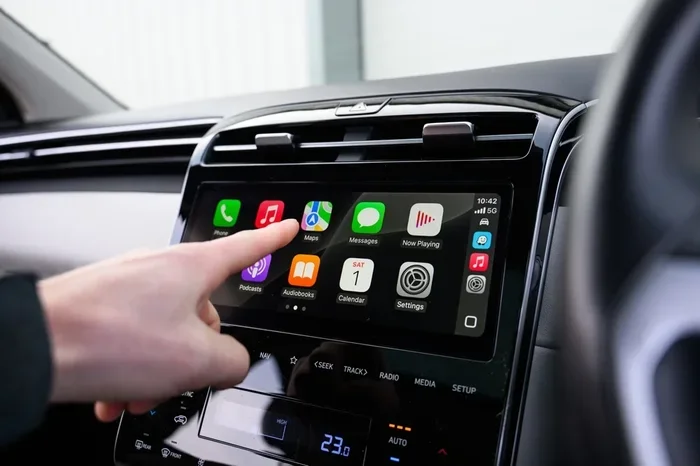
Apple CarPlay is a smart system that mirrors your iPhone onto your car’s display. It lets you access maps, music, podcasts, and messages safely while driving. But how does it actually connect? The answer depends on the type of CarPlay your car supports.
There are three main ways CarPlay connects. The first is through a USB cable. The second is through Bluetooth. The third is through Wi-Fi. Each method works a little differently. And each one affects your music streaming experience in its own way.
Wired CarPlay: The USB Connection
Wired CarPlay is the original method. You plug your iPhone into your car’s USB port using a Lightning or USB-C cable. This creates a direct link between your phone and the car’s infotainment system. The connection is fast, stable, and almost always works perfectly.
With wired CarPlay, your phone does not need to rely on Bluetooth or Wi-Fi at all. The USB cable handles all the data transfer. This means you get the best audio quality and the lowest latency. There is no buffering. There is no lag. Your music plays exactly when you want it to.
Wired CarPlay also charges your phone while you drive. This is a big plus for long road trips. You do not have to worry about your battery draining while you use your phone for navigation and music.
Wireless CarPlay: Bluetooth and Wi-Fi Together
Wireless CarPlay does not use just one connection. It uses two. First, Bluetooth handles the initial pairing between your iPhone and your car. Then, Wi-Fi takes over for the heavy lifting. This is how wireless CarPlay streams music, maps, and other data wirelessly.
Here is the simple breakdown. Bluetooth is like the handshake. It introduces your phone to your car. Wi-Fi is like the conversation. It handles all the data that flows back and forth. Without Bluetooth, your phone would not know how to talk to your car. Without Wi-Fi, the connection would be too slow for smooth music streaming.
Not all cars support wireless CarPlay. Some older models only offer wired connections. If your car was made before 2019 or so, check whether it has wireless CarPlay built in. You can also add wireless CarPlay support through aftermarket adapters.
Bluetooth vs Wi-Fi: What Is the Difference?
To understand how CarPlay streams music, you need to know the difference between Bluetooth and Wi-Fi. These two wireless technologies work very differently, even though they both send data through the air.
How Bluetooth Works in CarPlay
Bluetooth is a short-range wireless technology. It connects devices that are close to each other, usually within 30 feet. Bluetooth uses very little power, which makes it great for phones and car systems.
In CarPlay, Bluetooth handles basic audio and phone calls. It also handles the initial connection process. When you first get in your car, Bluetooth wakes up and pairs with your iPhone. Once paired, Bluetooth stays active for calls and notifications.
But Bluetooth has limits. Its data transfer speed is relatively slow. This means it cannot handle high-quality music streaming very well on its own. Bluetooth audio can sound compressed or less detailed compared to other methods. It works fine for phone calls and voice commands, though.
How Wi-Fi Works in CarPlay
Wi-Fi is a much faster wireless technology. It uses a different frequency band and has a much higher data capacity. Wi-Fi can transfer large amounts of data quickly, which is exactly what you need for streaming music.
In wireless CarPlay, Wi-Fi takes over once the Bluetooth handshake is complete. Your phone connects to the car’s Wi-Fi network. This creates a fast, stable link for streaming high-quality audio. Maps load faster. Apps respond quicker. Music plays without interruptions.
Wi-Fi also has a longer range than Bluetooth. It can reach across the entire car cabin easily. This means you can move your phone around without losing the connection.
Speed Comparison Table
| Feature | Bluetooth | Wi-Fi |
|---|---|---|
| Max Speed | About 3 Mbps | Up to 50+ Mbps |
| Range | About 30 feet | About 50+ feet |
| Power Usage | Low | Moderate |
| Best For | Calls, pairing | Music streaming, maps |
| Audio Quality | Good (compressed) | Excellent (high bitrate) |
| Latency | Higher delay | Lower delay |
As you can see, Wi-Fi is much faster than Bluetooth. This is why wireless CarPlay uses Wi-Fi for streaming music. Bluetooth alone would not be fast enough to deliver smooth, high-quality audio.
Does CarPlay Use Bluetooth for Music Streaming?
The short answer is no, not directly. CarPlay does not use Bluetooth alone to stream music. Bluetooth is part of the process, but it is not the main pipeline for your music data.
When you use wireless CarPlay, Bluetooth handles the initial setup. It connects your phone to your car. It also manages phone calls and basic notifications. But when it comes to streaming music from Apple Music, Spotify, or any other app, CarPlay switches to Wi-Fi.
This is an important distinction. Many people assume Bluetooth is what plays their music in the car. In a standard Bluetooth audio setup, that would be true. But CarPlay is different. It is a smart system that uses the best connection for each task.
Here is what Bluetooth handles in CarPlay:
- Initial device pairing when you first connect
- Hands-free phone calls and incoming call alerts
- Siri voice commands for basic tasks
- Notification alerts for messages and app updates
So Bluetooth is still important. It just is not the main channel for your music. If you only had Bluetooth, your CarPlay music would sound compressed and might buffer often. Wi-Fi gives you the full experience.
Does CarPlay Use Wi-Fi for Music Streaming?
Yes. Wireless CarPlay uses Wi-Fi as the primary connection for streaming music. When you tap play on your favorite song, the music data flows through Wi-Fi from your iPhone to your car’s display.
This is a big advantage over regular Bluetooth audio. Wi-Fi CarPlay can stream music at a much higher bitrate. This means better sound quality. You hear more details in your music. Bass is richer. Vocals are clearer. Instruments sound more distinct.
Wi-Fi also makes CarPlay apps feel faster. When you switch between Spotify and Apple Music, there is almost no waiting. Maps load quickly. You can browse playlists without any lag. This smooth experience is thanks to Wi-Fi’s high data speed.
But Wi-Fi is not perfect. It uses more battery than Bluetooth. Your iPhone may drain faster when using wireless CarPlay for long trips. Also, Wi-Fi connections can sometimes be interrupted if your car moves through areas with weak signals.
Tips to Improve Wireless CarPlay Wi-Fi Performance
If you use wireless CarPlay, there are a few simple things you can do to get the best performance:
- Keep your iPhone updated. Newer iOS versions often improve CarPlay Wi-Fi stability.
- Restart your car’s infotainment system if you notice connection issues.
- Forget and reconnect your CarPlay network in your iPhone settings from time to time.
- Avoid placing your phone far from the car’s antenna. Keep it on the dash or console.
- Turn off other Wi-Fi devices in the car that might cause interference.
These small steps can make a big difference. Your wireless CarPlay connection will be smoother and more reliable.
Which Connection Type Is Best for Music?
Now that you know how Bluetooth and Wi-Fi work with CarPlay, you might be wondering which one is best for streaming music. The answer depends on your situation.
If you want the absolute best audio quality, wired CarPlay is the winner. The USB cable delivers a direct, uninterrupted connection with no compression. Your music sounds exactly as it was meant to be heard. This is the choice of audiophiles and music lovers.
If you want the most convenience, wireless CarPlay is the way to go. You do not have to plug in a cable every time you get in the car. Wi-Fi handles all your music streaming needs. The sound quality is still excellent, even if it is not quite as good as wired.
Bluetooth alone is not ideal for CarPlay music streaming. It works fine for regular phone audio and calls. But for the full CarPlay experience, you need Wi-Fi for wireless setups or a USB cable for wired setups.
Quick Comparison: Wired vs Wireless CarPlay
| Factor | Wired (USB) | Wireless (Wi-Fi + Bluetooth) |
|---|---|---|
| Audio Quality | Best | Very Good |
| Convenience | Less convenient | Most convenient |
| Connection Stability | Most stable | Good (can vary) |
| Phone Battery | Charges your phone | Drains your phone faster |
| Setup Effort | Plug in cable | Automatic after first setup |
| Music Streaming | Excellent | Excellent |
Both options work great for streaming music. Your choice really comes down to personal preference. If you hate cables, wireless CarPlay is a game changer. If you care most about sound quality, wired CarPlay is hard to beat.
Common CarPlay Connection Problems and Fixes
Even with the best setup, CarPlay connection issues can happen. Here are some common problems and how to fix them.
CarPlay Keeps Disconnecting
If your wireless CarPlay keeps dropping, the Wi-Fi connection might be unstable. Try restarting your iPhone and your car’s infotainment system. Also check that your car firmware is up to date. Sometimes a simple software update fixes connection problems.
Music Sounds Scratchy or Low Quality
If your music does not sound right, check which connection type you are using. Wired connections almost never cause audio issues. Wireless CarPlay problems are often related to Wi-Fi interference. Move your phone closer to the center console and try again.
CarPlay Won’t Connect at All
This can happen if Bluetooth or Wi-Fi is turned off on your iPhone. Make sure both are enabled. Also check that your car supports CarPlay. Not every vehicle is compatible. If you have a wired connection, try a different USB cable or port.
Expert Tips for the Best CarPlay Music Experience
Want to get the most out of CarPlay for music? Here are some expert tips that really make a difference.
- Use lossless audio apps when possible. Apple Music, Tidal, and Amazon Music HD support high-quality streaming over Wi-Fi CarPlay.
- Download playlists for offline use. This way you do not need a strong Wi-Fi signal to enjoy your music.
- Use Siri to control playback. Say “Hey Siri, play my driving playlist” without taking your hands off the wheel.
- Clean your USB port regularly. Dust and debris can cause wired CarPlay connection problems.
- Set CarPlay to connect automatically. Go to Settings > General > CarPlay on your iPhone and choose your car. This saves time every time you get in.
These small habits add up over time. You will have a smoother, more enjoyable CarPlay experience every single drive.
Conclusion
So, does CarPlay use Bluetooth or Wi-Fi for streaming music? The answer is both, but in different ways. Bluetooth handles the initial connection and phone calls. Wi-Fi handles the music streaming in wireless CarPlay setups. And a USB cable handles everything in wired setups, giving you the best quality of all.
Understanding how these connections work helps you troubleshoot problems and get the best experience. Whether you prefer the convenience of wireless CarPlay or the reliability of a wired connection, you now know exactly what is happening behind the scenes.
The next time you get in your car and hit play on your favorite song, you will know the technology that makes it all work. CarPlay is a smart system that uses the best of both Bluetooth and Wi-Fi to deliver a seamless music experience. And now you are equipped with the knowledge to make the most of it.
Take a few minutes to check your CarPlay setup. Make sure your wireless connection is optimized. Update your iPhone and car software. These small steps will pay off every time you drive. Enjoy your music, stay safe, and happy driving.
Frequently Asked Questions
Can I use CarPlay with just Bluetooth and no Wi-Fi?
You can use basic CarPlay features over Bluetooth alone, but music streaming will not work the same way. Wireless CarPlay needs Wi-Fi to stream music properly. Without Wi-Fi, you will only get phone calls and basic audio, not the full CarPlay music experience.
Does wired CarPlay use Bluetooth at all?
No. Wired CarPlay uses a USB cable for all data transfer. It does not need Bluetooth or Wi-Fi. This is why wired connections are the most stable and give the best audio quality for streaming music.
Why does my CarPlay music sound better on Wi-Fi than Bluetooth?
Wi-Fi transfers data much faster than Bluetooth. This means your music streams at a higher bitrate with less compression. The result is clearer, richer sound. Bluetooth audio is more compressed, which can reduce quality.
Can I stream Spotify through CarPlay using Bluetooth only?
Spotify works with CarPlay, but it needs Wi-Fi for wireless streaming. If you are using wireless CarPlay, Spotify music flows through Wi-Fi. If you only have Bluetooth, you will get a limited experience with lower audio quality.
Does wireless CarPlay drain my phone battery faster?
Yes, wireless CarPlay uses Wi-Fi continuously, which drains your battery faster than a wired connection. To reduce battery drain, you can switch to wired CarPlay for long trips or keep a car charger handy.
What cars support wireless CarPlay with Wi-Fi?
Many newer cars support wireless CarPlay, including models from BMW, Mercedes, Honda, and Ford. Check your car’s manual or the manufacturer’s website to confirm wireless CarPlay support before buying.