Everything You Need in a Car Rear View Camera With Display
A car rear view camera with display is one of the simplest upgrades you can make for safer driving. It gives you a clear view behind your vehicle every time you reverse. Whether you drive a truck, SUV, or compact car, the right setup makes parking and backing up much easier and more confident.
Every year, thousands of reversing accidents happen in driveways and parking lots. Many of them could be avoided with a simple piece of technology. A car rear view camera with display gives drivers a clear, real-time view of what’s behind them. It is one of the most impactful safety upgrades you can make to any vehicle.
If you have ever felt unsure while backing into a tight spot, you know exactly why these systems are so popular. They remove the guesswork. They show you exactly what is behind your car, truck, or SUV. And modern systems are easier to install and more affordable than ever before.
This guide covers everything you need to know. We will walk through the types of systems available, the key features to look for, installation tips, and common mistakes to avoid. By the end, you will feel confident choosing the right backup camera with monitor for your ride.
Key Takeaways
- Safety First: A backup camera with a display dramatically reduces reversing accidents and blind spot risks.
- Multiple Options: You can choose from wired, wireless, and built-in systems depending on your vehicle and budget.
- Key Features Matter: Look for night vision, wide-angle lenses, and waterproof ratings for the best performance.
- Easy Installation: Most kits are DIY-friendly and take under an hour to set up.
- Smart Add-Ons: Parking sensors, recording capabilities, and mirror monitors boost the value of your system.
- Budget-Friendly: Great options exist at every price point, from under $50 to premium setups over $300.
📑 Table of Contents
- What Is a Car Rear View Camera With Display?
- Types of Car Rear View Camera Systems
- Key Features to Look For
- How to Choose the Right System for Your Vehicle
- Installation Tips and Common Mistakes
- Benefits of Having a Rear View Camera With Display
- Expert Tips to Get the Most From Your System
- Key Takeaways
- Conclusion
What Is a Car Rear View Camera With Display?
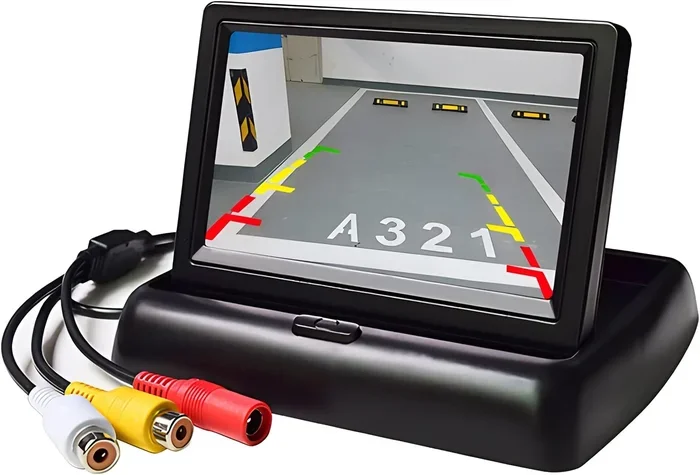
A car rear view camera with display is a system that includes two main parts. The first part is a camera mounted on the rear of your vehicle. The second part is a screen or monitor that shows the camera’s live feed. When you put your car in reverse, the system turns on automatically. You get a real-time video of the area behind your car.
These systems go by many names. People call them backup cameras, reversing cameras, or rear parking cameras. The core idea is the same. A small camera sends video to a display so you can see behind you while backing up.
Most modern systems include helpful extras. These can be grid lines that show your turning path, night vision for low-light conditions, and wide-angle lenses for a broader view. Some advanced setups even include front cameras and recording features.
Types of Car Rear View Camera Systems
Not all backup camera systems are the same. Understanding the different types helps you pick the best one for your vehicle and your needs. Here is a closer look at the most common options.
Wired Rear View Camera Systems
A wired backup camera system connects the camera to the display using physical cables. The camera sends a signal through a wire that runs from the rear of the vehicle to the dashboard or mirror-mounted screen.
Wired systems are known for their reliability. The signal stays strong because it travels through a direct connection. You do not have to worry about interference or signal drops. This makes wired setups a popular choice for daily drivers and work vehicles.
However, installation can be more involved. You need to route cables through the vehicle’s interior. This may require removing trim panels or running wires along headliners. If you are comfortable with basic car electronics, you can handle it yourself. Otherwise, a professional installer can do it quickly.
Wireless Rear View Camera Systems
A wireless backup camera transmits the video signal from the camera to the display using radio frequency. There are no cables running between the two components. This makes installation much simpler and faster.
Wireless systems are great for people who want a clean look without drilling extra holes or running long cables. Most wireless kits come with a transmitter on the camera side and a receiver connected to the display. You just mount both pieces and pair them.
The trade-off is occasional signal interference. In rare cases, you might see static or brief signal loss. This is especially true in vehicles with a lot of electronic components nearby. Overall though, wireless systems have improved a lot in recent years and work very well for most drivers.
Built-In Factory Display Systems
Many newer vehicles come with a factory-installed rear view camera. These systems use the vehicle’s existing infotainment screen as the display. The camera is usually integrated into the rear license plate area or the trunk handle.
Factory systems look clean and work seamlessly with the car’s other electronics. They often include advanced features like dynamic grid lines that adjust based on steering angle. If your vehicle already has a backup camera, you may only need to replace or upgrade the camera unit itself.
Aftermarket Mirror-Mounted Displays
An aftermarket mirror monitor replaces your existing rearview mirror with one that has a built-in screen. When you shift into reverse, the mirror flips down or switches to show the camera feed. When you drive forward, it looks like a normal mirror again.
These are excellent for vehicles that do not have a factory display screen. They keep your dashboard clean and uncluttered. Mirror monitors come in different sizes, from compact 4.3-inch screens to larger 7-inch or even 10-inch displays.
Key Features to Look For
Not every car rear view camera with display offers the same quality or features. Knowing what to look for helps you avoid cheap products that underperform. Here are the most important features to consider.
Night Vision Capability
Reversing at night or in dim garages is common for many drivers. A backup camera with night vision uses infrared LEDs to illuminate the area behind your car in low light. The result is a clear image even when it is almost dark outside.
Not all cameras have this feature. Basic models rely on the camera sensor alone, which produces a grainy image at night. If you park in a dark garage or often back up after sunset, night vision is a must-have.
Wide-Angle Lens
The lens angle determines how much of the area behind your car you can see. A wide-angle rear view camera typically offers a 120 to 170-degree field of view. This captures more of the space behind you and reduces blind spots.
Be careful with ultra-wide lenses though. They can distort the image at the edges, making objects appear farther away than they really are. A 150-degree lens is usually the sweet spot between coverage and accuracy.
Waterproof and Weatherproof Rating
The camera on your car is exposed to rain, snow, dirt, and extreme temperatures. You need a waterproof backup camera with a solid IP rating. Look for at least IP67 or IP69K, which means the camera can handle heavy rain and high-pressure water.
A weatherproof camera lasts longer and performs better in all conditions. This is especially important if you live in an area with harsh winters or heavy rainfall.
Resolution and Image Quality
The display quality matters just as much as the camera quality. A high-definition rear view camera with at least 720p resolution gives you a sharp, clear image. You can see details like small children, pets, curbs, and low obstacles.
Budget cameras often have lower resolution. The image may look blurry or washed out. Spending a little more on a higher-resolution camera makes a big difference in daily use.
Dynamic Grid Lines
Dynamic parking grid lines are one of the most useful features on a backup camera system. These lines adjust based on your steering wheel position. They show you exactly where your car will go when you reverse and turn.
Some systems also include distance guidelines that change color from green to yellow to red. This gives you a visual cue of how close you are to objects behind you.
Monitor Size and Screen Quality
The display size affects how easy it is to see the camera feed. Car backup camera monitors typically range from 4.3 inches to 10 inches. A larger screen is easier to read, but it should not block your forward view.
Screen brightness also matters. A bright display is readable in direct sunlight. A dim screen becomes useless on a sunny day. Look for monitors with high nits or auto-brightness adjustment.
How to Choose the Right System for Your Vehicle
Choosing the right rear view camera system depends on several factors. Your vehicle type, your budget, and your driving habits all play a role. Here is a simple way to think about your options.
If you drive a compact car or sedan, a basic wired or wireless kit will work great. These vehicles have smaller rear windows and shorter backing distances. You do not need the most expensive system to get good results.
For trucks, SUVs, and RVs, consider a larger monitor and a wider-angle camera. These vehicles have bigger blind spots and longer rear ends. A high-resolution camera with dynamic grid lines helps you navigate tight spaces with confidence.
If you frequently tow a trailer or boat, look for systems with extra features. Some cameras include a wide-view or multi-camera input. This lets you connect additional cameras on the sides or front of your vehicle.
Budget is another key factor. You can find solid backup camera kits for as low as $30 to $50. Mid-range systems with better image quality and extra features run from $80 to $200. Premium setups with large monitors, recording features, and dual-camera systems can cost $300 or more.
Here is a quick comparison to help you decide.
| Feature | Budget Kit | Mid-Range Kit | Premium Kit |
|---|---|---|---|
| Price Range | $30 – $50 | $80 – $200 | $200 – $500+ |
| Resolution | 480p – 720p | 720p – 1080p | 1080p – 4K |
| Monitor Size | 4.3″ – 5″ | 5″ – 7″ | 7″ – 10″ |
| Night Vision | Basic or None | Yes (IR LEDs) | Advanced IR / Color |
| Installation | DIY Easy | DIY or Pro | Professional Recommended |
| Extra Features | Grid Lines | Dynamic Lines, Waterproof | Recording, Multi-Camera |
As you can see, there is a system for every need and budget. The most important thing is to choose one that fits your vehicle and your daily driving routine.
Installation Tips and Common Mistakes
Installing a car rear view camera with display is easier than most people think. Many kits come with everything you need, including the camera, monitor, cables, and a wiring harness. Here are some tips to make the process smooth.
Tips for a Clean Installation
- Plan your route first. Before you start drilling or running cables, map out the path the wire will take from the rear of the car to the dashboard.
- Use a wire loom or cable cover. This protects the wires from chafing against sharp edges or hot surfaces.
- Test before you finish. Connect everything temporarily and test the camera feed before securing all the components in place.
- Mount the camera at the right height. The camera should be centered on the rear of the vehicle, ideally near the license plate area.
- Keep the camera lens clean. A dirty lens produces blurry images. Use a microfiber cloth during and after installation.
Common Mistakes to Avoid
- Skipping the waterproof seal. If your camera is not properly sealed, moisture can get inside and ruin the lens. Always use the included gasket or silicone sealant.
- Running cables near heat sources. Exhaust pipes and engine components generate a lot of heat. Keep cables away from these areas to prevent melting or damage.
- Choosing the wrong monitor size. A monitor that is too large can obstruct your forward view. Measure your available space before purchasing.
- Ignoring the power source. Most backup cameras are powered through the reverse light circuit. Make sure you connect to the correct wire to avoid electrical issues.
- Not adjusting the camera angle. A poorly angled camera shows too much sky or ground. Take a few minutes to aim it correctly before finalizing the install.
If you are not comfortable with car electronics, do not hesitate to hire a professional. Many auto parts stores and car audio shops offer installation services for a reasonable fee. A proper installation ensures your system works reliably for years.
Benefits of Having a Rear View Camera With Display
The benefits of a car rear view camera with display go far beyond convenience. Here is why so many drivers make this upgrade.
Safety is the number one benefit. According to the National Highway Traffic Safety Administration, backup accidents cause hundreds of injuries and deaths each year, especially among children and elderly individuals. A backup camera gives you direct visibility of the area behind your car, which was previously a major blind spot.
Parking becomes much easier. Parallel parking, backing into tight spaces, and navigating crowded parking lots all become less stressful. You can see curbs, posts, and other vehicles clearly.
It protects your vehicle from damage. Bumping into poles, walls, or other cars in parking lots is common without a camera. A rear view camera system helps you avoid these costly accidents.
Insurance discounts may apply. Some insurance companies offer discounts for vehicles equipped with backup cameras and parking assist systems. It is worth asking your provider.
Resale value improves. A vehicle with a backup camera is more attractive to buyers. It is now considered a standard safety feature on most modern cars.
Expert Tips to Get the Most From Your System
Getting the most out of your backup camera with monitor is about more than just installation. Here are some expert tips that make a real difference in daily use.
First, clean your camera lens regularly. Dirt, mud, and snow can block the lens and reduce image quality. A quick wipe during your regular car wash routine keeps the camera working at its best.
Second, adjust your driving habits. A backup camera is a helpful tool, not a replacement for checking your mirrors and turning your head. Always use it as a supplement to your awareness, not the sole source of information.
Third, consider adding parking sensors to your system. Sensors beep or display distance indicators on the screen, giving you an extra layer of protection when backing up. Many car rear view camera kits now come with sensors included.
Fourth, if you tow a trailer or carry large cargo, recalibrate your camera angle after loading. Heavy loads change the vehicle’s rear height and can shift the camera’s field of view.
Finally, keep your system’s firmware or software updated if the manufacturer offers updates. This ensures the best performance and fixes any bugs over time.
Key Takeaways
- Safety Boost: A car rear view camera with display significantly reduces reversing accidents and blind spot risks.
- Multiple Types Available: Choose from wired, wireless, factory, or aftermarket mirror monitor systems based on your vehicle and preferences.
- Must-Have Features: Night vision, wide-angle lens, waterproof rating, HD resolution, and dynamic grid lines are the features that matter most.
- Easy DIY Installation: Most kits are designed for straightforward installation with basic tools and a little patience.
- Avoid Common Mistakes: Proper sealing, correct wiring, and correct camera angle are essential for long-lasting performance.
- Worth the Investment: From safety benefits to parking ease and insurance savings, a backup camera pays for itself quickly.
Conclusion
A car rear view camera with display is one of the most practical and affordable upgrades you can make to any vehicle. It makes you a safer driver, a more confident parker, and it protects your car from costly damage. Whether you choose a simple wired kit or a premium wireless system with recording features, the benefits are clear and immediate.
The right system depends on your vehicle, your budget, and your driving needs. Use the tips in this guide to narrow down your options and make a confident choice. Focus on the features that matter most to you, and do not skimp on image quality and durability.
Once you experience the difference a backup camera makes, you will wonder how you ever drove without one. Take the time to choose wisely, install it properly, and enjoy the added safety and convenience every time you hit the road.
Frequently Asked Questions
Is a car rear view camera with display hard to install?
Most kits are designed for straightforward DIY installation. You will need basic tools and about 30 to 60 minutes. Wireless systems are especially easy since there are no cables to route. If you are not comfortable with car electronics, a professional installer can handle it quickly.
Can I add a rear view camera to an older car?
Absolutely. Aftermarket backup camera kits work with virtually any vehicle, including older models. You just need a power source for the camera and a place to mount the monitor. Many kits come with universal mounting hardware to fit different vehicles.
Do backup cameras work at night?
Yes, but only if the camera has night vision capability. Cameras with infrared LEDs illuminate the area behind your car in low light. Without night vision, the image will be dark and grainy at night. Always check for this feature if you frequently back up after dark.
What is the best monitor size for a rear view camera?
A 5 to 7-inch monitor is the most popular and practical size. It is large enough to see clearly but small enough not to block your forward view. Larger monitors work well for trucks and SUVs where there is more dashboard space available.
Do rear view cameras help with insurance rates?
Some insurance companies offer discounts for vehicles with backup cameras and parking assist systems. While the savings vary, it is always worth asking your provider. Even without a discount, the safety benefits alone make it worthwhile.
Can I connect more than one camera to my display?
Many aftermarket monitors support multiple camera inputs. This is great if you want front and rear cameras or side-view cameras. Check the specifications of the monitor before purchasing to make sure it supports the number of cameras you need.