Does Toyota RAV4 Come With CarPlay Wireless Built In
Yes, the Toyota RAV4 comes with Apple CarPlay on most recent model years, and select trims offer wireless Apple CarPlay as standard or optional. Whether you drive the RAV4 LE, SE, XLE, or Limited, you can get seamless smartphone integration through the Toyota infotainment system. This guide covers which trims include it, how to set it up, and common troubleshooting tips.
So you just bought a Toyota RAV4, or you are thinking about doing so. One of the first things you probably want to know is whether your new ride supports Apple CarPlay. The short answer is yes, but the full answer depends on your model year and trim level. In this guide, we break down everything you need to know about Toyota RAV4 CarPlay support, from wireless connectivity to setup steps and common issues.
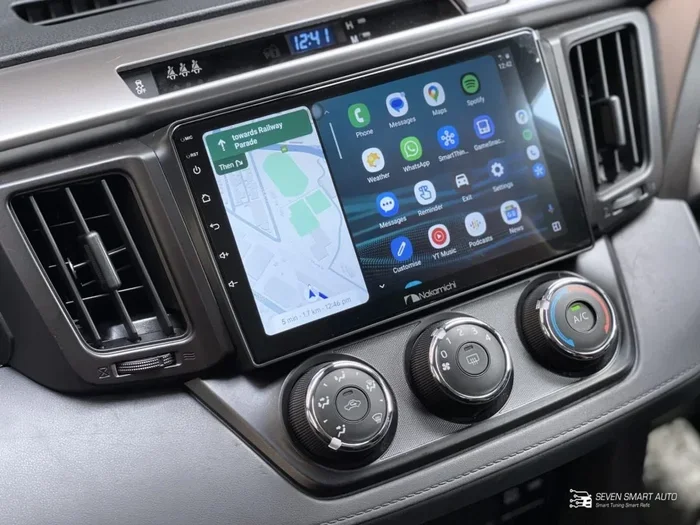
Apple CarPlay has become a must-have feature for most drivers today. It lets you access your phone’s key apps right on your Toyota RAV4 touchscreen. You can make calls, send messages, listen to music, and use navigation without taking your eyes off the road. It is a huge safety and convenience upgrade. And the good news is that Toyota has made this feature widely available across the RAV4 lineup.
Whether you are looking at a brand new 2024 model or a used 2017 RAV4, there is a good chance CarPlay is in the picture. But the way it connects, and which trims include it, can vary. Let us dive into all the details so you know exactly what to expect.
Key Takeaways
- Wireless CarPlay is available: Many 2019+ Toyota RAV4 trims offer wireless Apple CarPlay built in.
- Not all trims are equal: Higher trims like XLE and Limited are more likely to include wireless connectivity.
- Wired CarPlay works on most models: Even older RAV4s and base trims typically support wired Apple CarPlay via USB.
- Setup is simple: Connecting your iPhone takes just a few steps once your RAV4 is on.
- Troubleshooting is straightforward: Most CarPlay issues can be fixed with a simple reset or cable swap.
- Android Auto is also supported: Many RAV4 models offer both Apple CarPlay and Android Auto.
📑 Table of Contents
- What Is Apple CarPlay and Why Does It Matter?
- Does the Toyota RAV4 Come With CarPlay?
- Which Toyota RAV4 Trims Include CarPlay Wireless?
- Wireless vs. Wired Apple CarPlay in the RAV4
- How to Set Up Apple CarPlay on Your Toyota RAV4
- Toyota RAV4 CarPlay: Troubleshooting and Tips
- Toyota RAV4 CarPlay vs. Android Auto
- Final Verdict: Does the Toyota RAV4 Come With CarPlay Wireless Built In?
What Is Apple CarPlay and Why Does It Matter?
Apple CarPlay is a smartphone integration system developed by Apple. It mirrors key functions from your iPhone onto your car’s display. Think of it as a safer, simpler way to use your phone while driving. You get access to maps, music, messages, and phone calls through a clean, driver-friendly interface.
Here is why smartphone integration matters so much in a vehicle like the Toyota RAV4:
- Safety first: CarPlay reduces the need to pick up your phone while driving.
- Voice control: You can use Siri to send messages, make calls, and get directions hands-free.
- Familiar apps: You use the same apps you already love, like Maps, Spotify, and Messages.
- Easy connectivity: You can connect via a USB cable or wirelessly, depending on your model.
For many buyers, CarPlay is a dealbreaker. If you rely heavily on your phone for navigation and communication, you want it built right into your car’s Toyota infotainment system. The RAV4 delivers on this front across most of its recent generations.
Does the Toyota RAV4 Come With CarPlay?
The answer is a resounding yes for most model years. Starting with the 2019 model year, Apple CarPlay became a standard or widely available feature on the Toyota RAV4. Before that, some 2017 and 2018 models offered CarPlay as part of an optional package, but it was not universal.
Model Year Matters
Here is a quick look at how Toyota RAV4 CarPlay availability has evolved over the years:
- 2013-2018 RAV4: CarPlay was available on select trims, usually with the upgraded touchscreen infotainment system. Base models often lacked it entirely.
- 2019 RAV4: Apple CarPlay and Android Auto became standard on most trims. This was a big step forward for Toyota.
- 2020-2024 RAV4: CarPlay is standard across nearly all trims. Wireless CarPlay is available on higher-end configurations.
If you are shopping for a used RAV4, always confirm the infotainment system before buying. A quick way to check is to look for the Apple CarPlay or Android Auto icon on the screen when the car is started. If you see it, you are good to go.
It is also worth noting that Toyota occasionally updates its software. Even if your older RAV4 did not come with CarPlay from the factory, a dealer may be able to add it through a software update in some cases. This is not guaranteed, but it is worth asking about.
Which Toyota RAV4 Trims Include CarPlay Wireless?
This is where things get a bit more specific. Not every RAV4 trim offers wireless Apple CarPlay. The availability depends on the trim level and the technology package included.
Toyota RAV4 LE and SE
The base LE trim and the sportier SE trim typically come with a standard 8-inch touchscreen. These trims support wired Apple CarPlay through a USB connection. Wireless CarPlay may not be included on the LE, but it is often available on the SE depending on the optional technology package.
Toyota RAV4 XLE and XSE
The XLE and XSE trims are where things get more interesting. These mid-level trims often come with wireless Apple CarPlay as part of the Toyota RAV4 technology package. The XLE, especially when paired with the upgraded audio and navigation system, usually includes wireless connectivity out of the box.
Toyota RAV4 Limited and Platinum
The top-tier Limited and Platinum trims almost always include wireless CarPlay as standard. These models come with the full suite of Toyota RAV4 technology features, including a larger display, JBL audio, and wireless smartphone integration. If you want the best Toyota RAV4 infotainment experience, these are the trims to look at.
Toyota RAV4 Hybrid Trims
The RAV4 Hybrid lineup follows a similar pattern. Base Hybrid trims offer wired CarPlay, while higher trims like the Hybrid Limited and Hybrid Platinum include wireless connectivity. If you are considering a Toyota RAV4 Hybrid, you can absolutely get CarPlay. And since the RAV4 Hybrid does a hybrid recharge while driving, you get the added benefit of fuel efficiency alongside all the tech features.
Wireless vs. Wired Apple CarPlay in the RAV4
One of the most common questions we get is about the difference between wireless and wired CarPlay. Both options work well, but they have distinct advantages.
Wired Apple CarPlay
Wired CarPlay connects your iPhone to the RAV4’s infotainment system using a Lightning cable or USB-C cable (for newer iPhones). Here is what you need to know:
- Reliable connection: A physical cable means a stable, consistent connection every time.
- No setup needed: Just plug in and go. No pairing required.
- Charging benefit: Your phone charges while connected, which is great on long trips.
- Widely available: Every RAV4 with CarPlay support offers wired connectivity.
The downside? You have to deal with a cable. It can feel a bit cluttered, and you need to remember to bring the right cable. Also, some USB connection CarPlay setups can be finicky if the cable is not compatible or if the port is loose.
Wireless Apple CarPlay
Wireless CarPlay connects through Bluetooth and Wi-Fi. No cables needed. Here is what makes it appealing:
- Convenience: Your RAV4 connects automatically when you get in the car.
- Clean setup: No cables cluttering your center console.
- Faster reconnection: The system remembers your phone and reconnects instantly.
The trade-off is that wireless CarPlay requires a compatible head unit. Not every RAV4 has it, especially in older or base models. If you are shopping used, this is an important detail to verify.
Quick Comparison
Here is a side-by-side look at wired vs. wireless CarPlay in the Toyota RAV4:
- Connection type: Wired uses USB cable; wireless uses Bluetooth and Wi-Fi.
- Availability: Wired is available on almost all CarPlay-equipped RAV4s; wireless is limited to higher trims and newer model years.
- Setup effort: Wired requires plugging in; wireless pairs once and connects automatically after that.
- Phone charging: Wired charges your phone; wireless does not (unless you have wireless charging).
- Stability: Wired tends to be slightly more stable; wireless is very reliable on newer systems.
If your RAV4 does not come with wireless CarPlay from the factory, you can sometimes add it through an Apple CarPlay wireless adapter. These small devices plug into your USB port and create a wireless bridge between your phone and the car’s system. However, compatibility varies, so check with your dealer before purchasing one.
How to Set Up Apple CarPlay on Your Toyota RAV4
Setting up Apple CarPlay on your RAV4 is straightforward. Whether you have a wired or wireless setup, the process is simple. Here is how to get it running.
Setting Up Wired CarPlay
- Start your Toyota RAV4 and make sure the infotainment system is on.
- Plug your iPhone into the USB port. The port is usually located in the center console or armrest area.
- Your screen should display the CarPlay icon. Tap it to launch.
- If this is your first time, you may need to trust the device on your iPhone. Follow the on-screen prompts.
- Once connected, you can access Maps, Music, Messages, Phone, and other supported apps.
Setting Up Wireless CarPlay
- Make sure Bluetooth and Wi-Fi are turned on your iPhone.
- Start your RAV4 and ensure the infotainment system is active.
- Your car should detect your iPhone automatically. A CarPlay prompt will appear on the screen.
- Tap “Connect” and follow any on-screen instructions.
- For future trips, your RAV4 should reconnect automatically when you sit in the car with your phone.
Quick Tips for a Smooth Experience
- Use a high-quality cable: Cheap USB cables can cause connection issues with wired CarPlay.
- Keep your iPhone updated: iOS updates often improve CarPlay compatibility.
- Restart both devices: If CarPlay is not connecting, restart your phone and the infotainment system.
- Check your settings: Go to Settings > General > CarPlay on your iPhone to manage connected vehicles.
- Disable other Bluetooth devices: Sometimes other paired devices can interfere with CarPlay connectivity.
One thing that helps a lot is keeping your iPhone’s screen unlocked during setup. Some users forget this step, and it can cause the connection to fail. Also, if you have a can you start a keyless car with a key setup in your RAV4, make sure the car is fully in accessory or running mode before trying to connect.
Toyota RAV4 CarPlay: Troubleshooting and Tips
Even with a reliable system like Apple CarPlay, you may run into issues from time to time. Here are the most common problems RAV4 owners face and how to fix them.
CarPlay Not Showing Up on the Screen
This is the most common complaint. If your RAV4 screen does not display CarPlay, try these steps:
- Check your USB cable. Try a different cable if possible. Damaged cables are the number one culprit.
- Make sure CarPlay is enabled on your iPhone. Go to Settings > General > CarPlay and confirm your RAV4 is listed.
- Restart the infotainment system. Hold the power button on the touchscreen for about 10 seconds.
- Restart your iPhone. A simple reboot often resolves connectivity glitches.
CarPlay Disconnects Randomly
If your connection drops during a drive, it can be frustrating. Random disconnections are usually caused by:
- Loose USB connection. Try a different USB port in your RAV4.
- Software bugs. Check for Toyota software updates at your local dealer.
- iPhone background apps. Some apps can interfere with CarPlay. Close unnecessary apps before connecting.
- Low iPhone battery. Some iPhones limit CarPlay when battery is critically low to preserve charge.
Audio Quality Issues
Sometimes CarPlay works fine visually, but the audio sounds muffled or cuts out. This is often a settings issue. Make sure your RAV4’s audio source is set to CarPlay, not the radio. Also check that no other audio app is actively playing on your phone in the background.
When to Visit a Dealer
If you have tried all the basic troubleshooting steps and CarPlay still is not working, it may be time to visit a Toyota dealer. They can run diagnostics on your Toyota RAV4 infotainment system and check for software updates. In some cases, a simple firmware update resolves all issues. And just like does Jiffy Lube do diagnostics for routine maintenance checks, your Toyota dealer can pinpoint infotainment issues with specialized tools.
Keeping Your RAV4 System Updated
Toyota periodically releases software updates for the RAV4’s infotainment system. These updates can improve CarPlay compatibility, fix bugs, and add new features. You can check for updates through your dealer or, on some models, over-the-air if your RAV4 supports it. Keeping your system current ensures the best Toyota RAV4 CarPlay experience.
Maintaining Your RAV4’s Electrical System
Good CarPlay performance starts with a healthy electrical system. If you notice flickering screens, slow response times, or intermittent connectivity, it could be related to your vehicle’s battery or wiring. A healthy electrical system keeps all your electronics running smoothly. Just like does your car run better with a new serpentine belt, maintaining key components keeps everything performing at its best.
Toyota RAV4 CarPlay vs. Android Auto
While this article focuses on Apple CarPlay, it is worth noting that most Toyota RAV4 models also support Android Auto. Both platforms offer similar functionality, but they cater to different smartphone ecosystems.
If you use an iPhone, Apple CarPlay is the natural choice. It integrates deeply with iOS and offers a polished, intuitive interface. If you use an Android phone, Android Auto provides a similar experience tailored to the Google ecosystem. Many RAV4 trims support both, giving you flexibility no matter which phone you use.
Some drivers prefer one over the other based on their app preferences, navigation choices, or voice assistant habits. Both systems work well in the RAV4 and offer excellent smartphone integration. The key is to pick the one that matches your phone and daily habits.
Final Verdict: Does the Toyota RAV4 Come With CarPlay Wireless Built In?
The bottom line is clear. Yes, the Toyota RAV4 comes with CarPlay, and wireless CarPlay is available on many trims, especially in the XLE, XSE, Limited, and Platinum categories. Whether you are buying new or used, the RAV4 offers one of the best Toyota RAV4 infotainment experiences in its class.
If wireless CarPlay is a must-have for you, focus on the 2019 model year or newer and aim for a mid-level or higher trim. These models come with the hardware and software needed for a seamless wireless connection. If you are on a tighter budget, even the base trims offer wired CarPlay, which still provides all the core functionality you need.
The Toyota RAV4 has earned its reputation as a practical, tech-friendly compact SUV. With Apple CarPlay wireless support, it keeps you connected, informed, and entertained on every drive. Just make sure to confirm the specific features on the trim you are considering, and you will be all set.
Before you hit the road, take a few minutes to explore the CarPlay settings on your phone and in your RAV4. Customize your favorite apps, set up your preferred navigation app, and get comfortable with the interface. A little setup time goes a long way toward a safer, more enjoyable driving experience. Your Toyota RAV4 is ready to keep you connected. All you have to do is plug in or pair up and go.
Frequently Asked Questions
Does every Toyota RAV4 come with Apple CarPlay?
Most Toyota RAV4 models from 2019 onward come with Apple CarPlay standard. However, some older models and base trims from before 2019 may only offer it as part of an optional package. Always confirm with the specific vehicle’s features before purchasing.
Can I add wireless CarPlay to a Toyota RAV4 that does not have it?
In some cases, yes. An Apple CarPlay wireless adapter can add wireless functionality to a RAV4 that only supports wired CarPlay. However, compatibility depends on your infotainment system, so check with your dealer first.
Is CarPlay free to use in the Toyota RAV4?
Yes, Apple CarPlay is free to use. It does not require a subscription or additional fees. You only need an iPhone and a compatible RAV4 infotainment system. Some third-party apps accessed through CarPlay may require their own subscriptions.
Can I use CarPlay and charge my phone at the same time?
Yes, if you use a wired connection. Plugging your iPhone into the USB port while using CarPlay charges your phone simultaneously. With wireless CarPlay, your phone does not charge through the car’s system, but it does charge if you have a wireless charging pad.
Which Toyota RAV4 model year is best for CarPlay?
The 2019 RAV4 and newer are the best choices for CarPlay. These models offer standard wired CarPlay, and higher trims include wireless connectivity. The 2019 and newer systems are more reliable and feature-rich than older generations.
Does the Toyota RAV4 Hybrid support Apple CarPlay?
Yes, the Toyota RAV4 Hybrid supports Apple CarPlay across its trim lineup. Base Hybrid trims offer wired CarPlay, while higher trims like the Hybrid Limited and Hybrid Platinum include wireless CarPlay built in.