Does the Dodge Charger Have Apple CarPlay Built In
Yes, the Dodge Charger supports Apple CarPlay, but the experience depends on your model year and trim level. Apple CarPlay built in comes standard on many recent Charger models, while older trims may need a simple adapter or cable. Whether you drive a Dodge Charger GT, R/T, or SRT, this guide covers everything you need to know about smartphone integration and getting CarPlay up and running.
If you are a Dodge Charger owner or thinking about buying one, you have probably asked yourself a simple question: does the Dodge Charger have Apple CarPlay built in? The short answer is yes, but the full story is a bit more nuanced. Apple CarPlay compatibility depends on your model year, trim level, and the specific infotainment system your Charger comes with.
In this guide, we walk through everything you need to know about Apple CarPlay on the Dodge Charger. We cover which model years support it, how to set it up, common problems you might run into, and tips to get the most out of smartphone integration in your vehicle. Whether you drive a Dodge Charger GT, Dodge Charger R/T, or the powerful SRT variant, this article has you covered.
Let us start with the basics so you can quickly find the information you need.
Key Takeaways
- Apple CarPlay is available on most Dodge Charger models from 2015 onward, with full wireless support on newer trims.
- Model year matters — the 2021+ Charger offers the best infotainment system with built-in wireless Apple CarPlay.
- Older Chargers (2015–2020) may need a USB cable or an aftermarket Apple CarPlay adapter for full functionality.
- Setup is simple — just connect your iPhone, trust the device, and follow the on-screen prompts.
- Common issues like CarPlay not working can often be fixed with a quick restart or cable swap.
- Android Auto is also available on most Charger models, giving you dual smartphone integration options.
- Regular software updates keep your Dodge Charger infotainment system running smoothly.
📑 Table of Contents
- What Is Apple CarPlay and Why Does It Matter?
- Does the Dodge Charger Have Apple CarPlay Built In?
- How to Set Up Apple CarPlay on Your Dodge Charger
- Common Apple CarPlay Issues on the Dodge Charger
- Can You Add Apple CarPlay to an Older Dodge Charger?
- Apple CarPlay vs Android Auto on the Dodge Charger
- Tips to Get the Most Out of Apple CarPlay on Your Dodge Charger
- Expert Insights on Dodge Charger Apple CarPlay
- Key Takeaways
- Frequently Asked Questions
- Final Thoughts
What Is Apple CarPlay and Why Does It Matter?
Apple CarPlay is a smart feature that lets you mirror your iPhone on your car’s touchscreen. Once connected, you can access your favorite apps, make calls, send messages, and use navigation — all without taking your hands off the wheel. It is one of the most popular smartphone integration tools on the road today.
For Dodge Charger owners, Apple CarPlay built in means you get a safer and more convenient driving experience. Instead of fumbling with your phone, you can use voice commands through Siri or tap the touchscreen to control your apps. Wireless Apple CarPlay takes it a step further by removing the need for cables entirely.
Here is why Apple CarPlay matters for Charger drivers:
- Hands-free calling and messaging keeps you focused on the road.
- Turn-by-turn navigation using Apple Maps or Google Maps.
- Music and podcast streaming from apps like Spotify, Apple Music, and Podcasts.
- Siri voice commands let you control functions without touching your phone.
- Seamless switching between your phone and the car’s infotainment system.
Now that you understand what Apple CarPlay does, let us look at which Dodge Charger models actually support it.
Does the Dodge Charger Have Apple CarPlay Built In?
The answer depends on when your Charger was made. Dodge has offered Apple CarPlay as an option or standard feature on most Charger models from the mid-2010s onward. However, the type of CarPlay — wired or wireless — varies by year and trim.
Model Year Breakdown
Here is a quick look at how Apple CarPlay availability breaks down across Charger generations:
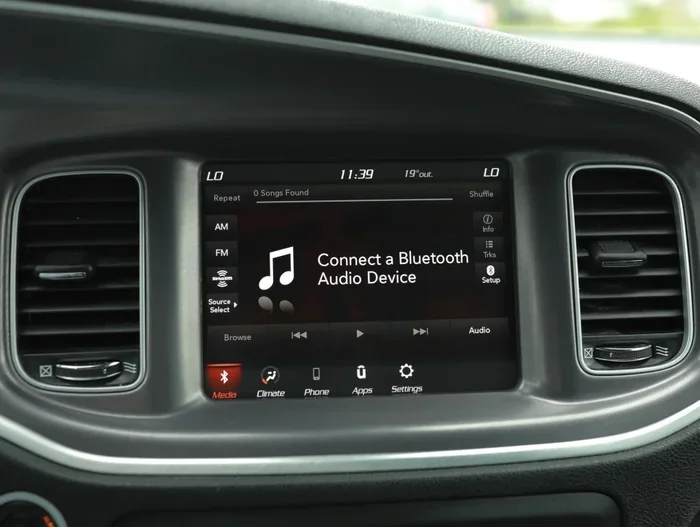
- 2015–2020 Chargers: Most models in this range offer Apple CarPlay as part of the Uconnect infotainment system. However, it is usually wired, meaning you need a USB cable to connect your iPhone.
- 2021–2023 Chargers: These models brought significant upgrades to the Dodge Charger infotainment system. Many trims now include wireless Apple CarPlay as a standard or available feature.
- 2024+ Chargers: The latest generation Chargers offer the most advanced smartphone integration, with wireless Apple CarPlay available across nearly all trims.
It is always a good idea to check the specific features of your exact model year and trim. A quick look at your owner’s manual or the Dodge website will confirm whether your Charger includes Apple CarPlay. If you are unsure about how your push button start system works with your infotainment setup, you can also check out our guide on are you supposed to hold the push start button for helpful tips on navigating your Charger’s start-up process.
Trim-Level Differences
Not every Dodge Charger trim offers the same Apple CarPlay experience. Here is how the different trims compare:
- SXT and GT Trims: These base and mid-level trims typically include a Uconnect touchscreen with wired Apple CarPlay. You will need a Lightning cable to connect your iPhone.
- R/T and Scat Pack Trims: Higher trims often come with upgraded infotainment systems that support wireless Apple CarPlay, especially on 2021 and newer models.
- SRT and Hellcat Trims: The performance-focused trims usually feature the most advanced Dodge Charger features, including wireless smartphone integration and larger touchscreens.
If your Charger does not come with Apple CarPlay standard, you can still add it. Aftermarket Apple CarPlay adapters are widely available and relatively easy to install. We will cover that in a later section.
How to Set Up Apple CarPlay on Your Dodge Charger
Getting Apple CarPlay running on your Charger is straightforward. Whether you have a wired or wireless setup, the process is simple and takes just a few minutes.
Wired Apple CarPlay Setup
Follow these steps to connect your iPhone using a cable:
- Start your Dodge Charger and make sure the engine is running.
- Plug a Lightning cable into your iPhone and connect the other end to the USB port in your center console.
- On the touchscreen, select the Apple CarPlay icon when it appears.
- If prompted, tap Trust on your iPhone to allow the connection.
- Your CarPlay home screen will appear on the Charger’s display. You are now ready to go.
One thing to keep in mind: the USB port needs to support data transfer, not just charging. Some older Chargers have ports that only charge your phone. If CarPlay does not appear after connecting, try a different USB port or a different cable. This is one of the most common reasons Apple CarPlay not working issues happen.
Wireless Apple CarPlay Setup
For Chargers with wireless Apple CarPlay, the process is even easier:
- Make sure Bluetooth and Wi-Fi are turned on your iPhone.
- Start your Dodge Charger.
- On the infotainment screen, go to Settings and select Apple CarPlay.
- Choose Wireless and your iPhone should appear on the screen.
- Tap Connect and your CarPlay interface will load automatically.
Wireless CarPlay is a game-changer. You never have to dig for a cable again. Just get in the car, and your iPhone connects automatically if you have set it up that way.
Common Apple CarPlay Issues on the Dodge Charger
Even though Apple CarPlay is a reliable feature, you might run into problems from time to time. Here are the most common issues Charger owners face and how to fix them.
CarPlay Will Not Connect
If your CarPlay screen does not appear when you connect your iPhone, try these quick fixes:
- Unplug the cable and plug it back in firmly.
- Restart your iPhone and your Dodge Charger’s infotainment system.
- Make sure your iPhone is unlocked and you have tapped Trust on the prompt.
- Try a different USB cable — some cables are charging-only and do not support data.
- Check that Apple CarPlay is enabled in your iPhone settings under General.
Sometimes the simplest fix works best. A quick restart of both your phone and the car’s system resolves most CarPlay connection issues.
CarPlay Disconnects Frequently
If your Apple CarPlay keeps dropping, the problem is often related to the cable or the USB port. Here are some tips:
- Use an Apple-certified Lightning cable for the most reliable connection.
- Clean the USB port in your Charger to remove dust or debris.
- For wireless CarPlay, make sure your iPhone and the car’s system are on the same Wi-Fi network.
- Update your iPhone to the latest iOS version.
- Reset the infotainment system by holding the power button for 10 seconds.
Keeping your Dodge Charger infotainment system updated is important. Dodge releases software updates that improve smartphone integration and fix bugs. If you are not sure how to update your system, consult your owner’s manual or visit a Dodge dealership.
CarPlay Works but Apps Load Slowly
Slow app loading can be frustrating. This usually happens when your iPhone is low on storage or when the infotainment system is running older software. Free up space on your iPhone and check for Apple CarPlay updates in your settings. Also, make sure your Charger’s Uconnect system is up to date.
Can You Add Apple CarPlay to an Older Dodge Charger?
Great news — you do not have to buy a new Charger just to get Apple CarPlay. If your older model does not support it natively, you can add it with an aftermarket solution.
Aftermarket Apple CarPlay Adapters
Several companies make Apple CarPlay adapters that work with the Dodge Charger’s existing infotainment system. These adapters plug into your USB port and add wireless CarPlay capability. Popular brands include Carlinkt, AAUW, and AutoDetective. Most adapters cost between $100 and $300 and are easy to install yourself.
aftermarket Head Units
For a more comprehensive upgrade, you can replace your entire infotainment head unit. A new aftermarket head unit with Apple CarPlay and Android Auto built in transforms your Charger’s touchscreen. You get better sound quality, faster performance, and full smartphone integration. Just keep in mind that this option requires professional installation and can cost anywhere from $300 to $800 depending on the brand and features.
Before you buy any aftermarket product, make sure it is compatible with your specific Charger model year. Check the product specs carefully and read customer reviews to find the best fit for your vehicle.
Apple CarPlay vs Android Auto on the Dodge Charger
One of the great things about the Dodge Charger is that it supports both Apple CarPlay and Android Auto. This gives you flexibility whether you use an iPhone or an Android device. Here is a quick comparison:
| Feature | Apple CarPlay | Android Auto |
|---|---|---|
| Compatible Device | iPhone | Android Phone |
| Wired Support | Yes | Yes |
| Wireless Support | Yes (newer models) | Yes (newer models) |
| Voice Assistant | Siri | Google Assistant |
| Navigation Apps | Apple Maps, Google Maps | Google Maps, Waze |
| Setup Difficulty | Easy | Easy |
| Availability on Charger | 2015+ models | 2017+ models |
Both systems work well on the Dodge Charger. If you use an iPhone, Apple CarPlay is the natural choice. If you have an Android phone, Android Auto offers a similar experience. Some Charger owners even use both by switching cables or pairing different phones on different days.
For more tips on getting the most out of your Charger’s tech features, including how to properly handle the push button ignition, check out our detailed guide on are you supposed to hold the push start button. It is a quick read that can save you time and confusion at the ignition.
Tips to Get the Most Out of Apple CarPlay on Your Dodge Charger
Once you have Apple CarPlay set up, a few simple tips can make your experience even better:
- Use Siri for hands-free control. Say “Hey Siri” to make calls, send texts, or get directions without touching your phone.
- Keep your cable short and high-quality. A six-foot Apple-certified cable gives you flexibility without creating clutter on your center console.
- Organize your CarPlay apps. You can rearrange apps on the CarPlay home screen so your most-used ones are easy to find.
- Enable wireless charging. If your Charger has a wireless charging pad, place your iPhone on it while using wireless Apple CarPlay for a cable-free experience.
- Update regularly. Both your iPhone and your Charger’s infotainment system benefit from regular software updates that improve CarPlay performance.
These small habits add up over time. You will wonder how you ever drove without smartphone integration in your Charger.
Expert Insights on Dodge Charger Apple CarPlay
Automotive experts consistently praise the Dodge Charger for its strong smartphone integration capabilities. According to reviews from major automotive publications, the Charger’s infotainment system ranks well among full-size sedans and muscle cars for ease of use and feature availability.
One thing experts often highlight is the importance of keeping your Dodge Charger features up to date. Dodge has steadily improved Apple CarPlay support across model years, with wireless capability becoming more standard in recent generations. If you own an older Charger, an aftermarket adapter is a cost-effective way to bring your vehicle up to date.
Another expert tip: always use OEM or Apple-certified cables. Cheap, uncertified cables can cause connection drops, slow data transfer, and even damage your phone’s charging port over time.
Key Takeaways
- Apple CarPlay is available on most Dodge Charger models from 2015 onward, with wireless support on newer trims.
- Model year matters — the 2021+ Charger offers the best infotainment system with built-in wireless Apple CarPlay.
- Older Chargers can add Apple CarPlay through aftermarket adapters or head unit replacements.
- Setup takes minutes — just connect your iPhone and follow the on-screen prompts.
- Common issues like disconnects or slow loading are usually fixed with a cable swap or system restart.
- Dual compatibility with both Apple CarPlay and Android Auto makes the Charger versatile for any smartphone user.
- Regular updates keep your Dodge Charger infotainment system running at its best.
Frequently Asked Questions
Which Dodge Charger model years have Apple CarPlay?
Most Dodge Charger models from 2015 onward offer Apple CarPlay. The 2021 and newer models are more likely to include wireless Apple CarPlay as a standard feature. Always check your specific trim and model year for exact details.
Can I use wireless Apple CarPlay on a 2019 Dodge Charger?
Wireless Apple CarPlay is not standard on 2019 Chargers. Most 2019 models support wired CarPlay through a USB connection. However, you can add wireless capability with an aftermarket Apple CarPlay adapter that plugs into your USB port.
Why is Apple CarPlay not working on my Dodge Charger?
The most common reasons are a faulty cable, an unclean USB port, or an outdated software version. Try using a different Apple-certified cable, restarting both your iPhone and the Charger’s infotainment system, and checking for software updates. If the problem persists, a dealership visit may be needed.
Does the Dodge Charger support Android Auto too?
Yes, most Dodge Chargers from 2017 onward support both Apple CarPlay and Android Auto. This gives you the flexibility to use either smartphone integration system depending on your phone type. Newer models support wireless versions of both systems.
How much does it cost to add Apple CarPlay to an older Dodge Charger?
Aftermarket Apple CarPlay adapters typically cost between $100 and $300 and are easy to install yourself. Replacing the entire infotainment head unit costs more, usually between $300 and $800 including professional installation. Both options are much cheaper than buying a new car.
Is Apple CarPlay safe to use while driving?
Yes, Apple CarPlay is designed to be safe and hands-free. You can use Siri voice commands to make calls, send messages, and get directions without touching your phone. The Dodge Charger’s touchscreen also lets you control CarPlay apps with minimal distraction.
Final Thoughts
So, does the Dodge Charger have Apple CarPlay built in? The answer is a clear yes for the vast majority of model years and trims. From the base SXT to the powerful Hellcat, Dodge Charger Apple CarPlay support is widely available and easy to use.
Whether you have a wired setup or enjoy the convenience of wireless Apple CarPlay, this feature makes your daily drive safer and more connected. Smartphone integration is no longer a luxury — it is a standard expectation, and the Dodge Charger delivers.
If your Charger is an older model without native CarPlay, do not worry. Affordable aftermarket adapters and head units can bring this feature to virtually any Dodge Charger on the road. A quick search online will show you plenty of options that fit your budget and your vehicle.
Take a few minutes today to set up or upgrade your Apple CarPlay experience. You will wonder how you ever drove without it. Your Dodge Charger is already a great car — Apple CarPlay just makes it even better.