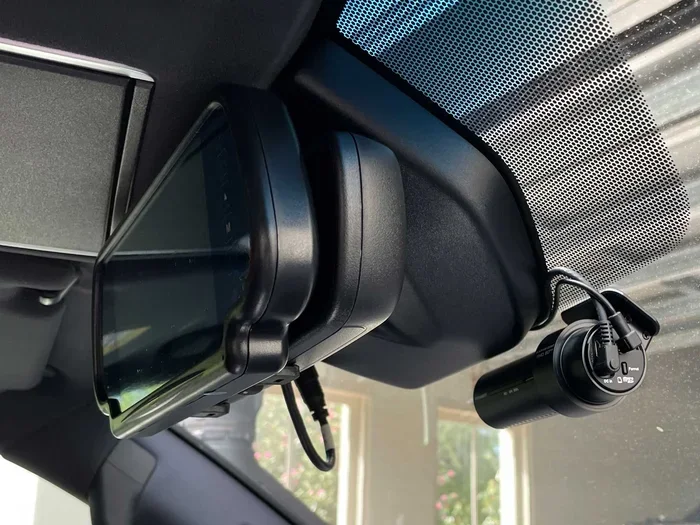
Does the Toyota Dash Cam Come With an SD Card Included
The Toyota Dash Cam does not always come with an SD card included in the box. Depending on your Toyota model and trim level, you may need to purchase a compatible microSD card separately. This guide covers everything about the Toyota Dash Cam SD card requirements, setup, and features so you can get recording right away.
If you own a Toyota or are thinking about buying one, you might be wondering about the built-in dash cam. Toyota has been adding dash cam technology to more of its vehicles in recent years. But one question keeps coming up: does the Toyota Dash Cam come with an SD card included?
The short answer is: it depends. Some Toyota models ship with a dash cam that has an SD card already inserted. Others leave you needing to buy one yourself. This can be confusing if you are not sure what to expect when you pull your new vehicle out of the dealership.
In this article, we will walk you through everything you need to know about the Toyota Dash Cam and SD card situation. We will cover which models include a card, what type of card you need, how to set it up, and what features the dash cam offers. By the end, you will have a clear picture of what to expect and how to get your dash cam running smoothly.
Key Takeaways
- SD Card Not Always Included: Most Toyota Dash Cam systems do not come with a pre-installed SD card, and you may need to buy one separately.
- Check Your Vehicle Trim: Higher trim levels sometimes include a dash cam with a card, while base models may not.
- microSD Card Required: The Toyota Dash Cam uses a microSD card for storing footage, typically up to 256GB.
- Loop Recording Is Standard: The dash cam overwrites old footage automatically, so you don’t need to manage storage constantly.
- Easy Setup: Inserting the SD card and activating the dash cam is a simple process anyone can do.
- Security Features Matter: The dash cam works alongside Toyota’s safety and security systems for full vehicle protection.
📑 Table of Contents
- What Is the Toyota Dash Cam System?
- Does the Toyota Dash Cam Come With an SD Card Included?
- What Type of SD Card Does the Toyota Dash Cam Use?
- How to Insert and Set Up the SD Card
- Dash Cam Features and Recording Capabilities
- Common Issues and Troubleshooting
- Final Thoughts on the Toyota Dash Cam and SD Card
What Is the Toyota Dash Cam System?
Toyota has been integrating dash cam technology into its vehicles under different names and systems. The most common setup is the Toyota Safety Sense package, which includes a forward-facing camera mounted near the rearview mirror. This camera serves multiple purposes, including pre-collision warning, lane departure alert, and road sign recognition.
In some Toyota models, the dash cam also records video footage that you can save and review. This is especially useful after a minor fender bender or when you need to document something that happened on the road. The recording feature adds real value to the safety technology Toyota has built into its cars.
The dash cam system connects to the vehicle’s main computer and uses the front camera to capture everything happening on the road ahead. Some newer Toyota models also offer a rear-facing camera that can record footage from behind the vehicle. Together, these cameras give you a comprehensive view of what is happening around your car.
How the Camera Works
The front-facing camera sits at the top of the windshield behind the rearview mirror. It captures video in high definition, usually 1080p or better. The camera activates when you start the engine and begins recording automatically. You do not need to press any buttons or toggle any switches to get it running.
The camera uses a wide-angle lens to capture as much of the road as possible. This wider field of view helps document more of the surrounding environment, which can be crucial if you ever need to file an insurance claim or review an accident. The footage is stored on a memory card, which brings us to the main question: does the Toyota Dash Cam come with an SD card?
Does the Toyota Dash Cam Come With an SD Card Included?
This is the question on everyone’s mind, and the answer is not as straightforward as you might hope. The Toyota Dash Cam does not always come with an SD card included. Whether your vehicle includes a card depends on several factors, including the model year, trim level, and market region.
In some Toyota models, particularly higher-end trims, the dash cam system arrives pre-configured with a microSD card already installed. In these cases, you can simply turn on the vehicle, and the dash cam starts recording right away. However, in base or lower trim levels, the dash cam may be present but without a memory card to store footage.
If you are buying a used Toyota or are unsure whether your specific vehicle includes an SD card, the best approach is to check the owner’s manual or contact your local Toyota dealership. They can confirm whether your particular model and trim came with a dash cam memory card in the box.
What to Check Before Buying
If you are shopping for a new Toyota and want the dash cam with a full setup, here is what you should do before finalizing the purchase:
- Ask the salesperson if the dash cam comes with a pre-installed SD card.
- Check the vehicle specifications in the window sticker or build sheet.
- Look for the memory card slot near the rearview mirror and see if a card is already inserted.
- Review the owner’s manual for details on the dash cam and storage components.
Taking these steps upfront saves you the hassle of discovering later that you need to buy a card separately. It also ensures you are not caught off guard when you try to review your first dash cam recording.
What Type of SD Card Does the Toyota Dash Cam Use?
If your Toyota Dash Cam does not come with a card, you will need to purchase one yourself. The Toyota Dash Cam uses a microSD card for storing video footage. Not just any microSD card will work, though. You need to choose the right type and size for optimal performance.
Toyota recommends using a microSD card with a minimum storage capacity of 32GB and a maximum of 256GB. Cards smaller than 32GB may fill up quickly, especially if you use the dash cam frequently. Cards larger than 256GB may not be recognized by the dash cam system.
Speed class also matters. Look for a microSD card rated at least Class 10 or UHS-I (Ultra High Speed). These cards have fast write speeds that ensure smooth, uninterrupted video recording. A slow card can cause dropped frames or recording errors, which defeats the purpose of having a dash cam in the first place.
Recommended microSD Cards for Toyota Dash Cam
Here are some quick tips for choosing the right card:
- SanDisk Ultra microSDHC – A reliable and affordable option that works well with Toyota dash cams.
- Samsung EVO Plus microSD – Known for fast write speeds and durability in varying temperatures.
- Lexar Play microSD – Designed for continuous video recording, making it ideal for dash cam use.
Avoid using microSD cards that are marketed primarily for smartphones or cameras without video-specific features. Dash cams require cards that can handle sustained write operations over long periods, especially in hot conditions inside a vehicle.
How to Insert and Set Up the SD Card
Once you have the right microSD card, setting up the Toyota Dash Cam is straightforward. The process takes just a few minutes and does not require any special tools or technical knowledge.
First, locate the memory card slot on your Toyota vehicle. In most models, the slot is hidden behind a small cover near the rearview mirror mount. Gently remove the cover to reveal the SD card slot. Some models may have the slot located inside the overhead console area.
Next, take your microSD card and carefully insert it into the slot. Make sure the card is oriented correctly, with the label side facing up and the metal contacts facing down. Push the card in gently until it clicks into place. Do not force the card, as this could damage the slot or the card itself.
After inserting the card, start the vehicle and check the dash cam display or infotainment screen. The system should recognize the new card automatically. You may see a message confirming that the dash cam is ready to record. If the system does not recognize the card, try removing it and reinserting it firmly.
Some Toyota models also allow you to format the SD card through the vehicle’s display screen. Formatting ensures the card is clean and optimized for the dash cam system. Always format the card through the vehicle’s menu rather than on a computer, as this ensures the file system is compatible with the dash cam.
Quick Setup Tips
- Always format a new card before first use in the Toyota Dash Cam system.
- Label your card so you know it is dedicated to the dash cam and not for other uses.
- Keep the card inserted securely and avoid removing it while the vehicle is running.
- Check the card periodically for dust or debris that could affect the connection.
Dash Cam Features and Recording Capabilities
The Toyota Dash Cam offers several useful features beyond basic video recording. Understanding these features helps you get the most out of your dash cam and ensures your dash cam footage is always available when you need it.
One of the most important features is loop recording. With loop recording enabled, the dash cam continuously records and overwrites the oldest footage when the memory card fills up. This means you do not need to manually delete old videos or manage storage space. The dash cam handles it all automatically.
Most Toyota dash cams also include a parking mode feature. When your vehicle is parked and turned off, the dash cam can continue to monitor the area. If it detects motion or a collision, it starts recording automatically. This is incredibly useful for capturing hit-and-run incidents or vandalism while your car is parked.
Video Quality and Storage
The video quality of the Toyota Dash Cam is generally very good. Most models record at 1080p resolution with a wide-angle lens that captures a broad view of the road. The footage is clear enough to read license plates at a reasonable distance, which is essential for any dash cam.
Storage capacity directly affects how much footage you can keep before the card loops. A 32GB card typically holds about 2 to 3 hours of 1080p footage. A 64GB card doubles that, and a 128GB or 256GB card can store many hours of continuous recording. Choose the card size that matches how frequently you use the dash cam and how long you want to keep footage.
The dash cam also works in conjunction with Toyota’s broader safety suite. For example, if the collision mitigation system activates, the dash cam may automatically save the footage leading up to and during the event. This ensures that critical footage is not overwritten by the loop recording feature.
Common Issues and Troubleshooting
Even with a proper setup, you may encounter occasional issues with the Toyota Dash Cam. Understanding common problems and their solutions helps you stay prepared and avoid frustration.
Card Not Recognized: If the dash cam does not recognize your microSD card, try reinserting it or formatting it through the vehicle’s menu. A loose connection or an incompatible file system is usually the culprit.
Recording Stops Suddenly: This often happens when the card is full or there is a speed issue with the card. Make sure you are using a Class 10 or higher card and that it has enough free space.
Footage Is Corrupted: Corrupted video files can result from removing the card while the dash cam is still writing data. Always let the vehicle complete its shutdown cycle before removing or inserting the card.
Dust or Debris in the Slot: Over time, small particles can accumulate in the SD card slot and cause connection problems. Use a soft, dry brush to gently clean the area around the slot.
When to Replace the SD Card
MicroSD cards have a limited lifespan, especially with the constant read and write cycles a dash cam demands. As a general rule, replace your SD card every 1 to 2 years for optimal performance. Signs that your card may be failing include frequent recording errors, slow save times, or files that will not play back correctly.
Keeping a spare card in your glove box is a smart move. If your primary card fails unexpectedly, you can swap it out quickly and keep your dash cam running without interruption.
Final Thoughts on the Toyota Dash Cam and SD Card
The Toyota Dash Cam is a valuable safety feature that adds peace of mind to your daily driving. Whether your vehicle comes with an SD card included or you need to purchase one separately, setting up the system is simple and straightforward. The key is to use the right type of microSD card, format it properly, and maintain it regularly.
Remember that the dash cam works alongside Toyota’s other safety systems to provide comprehensive protection on the road. From collision warnings to parking mode recording, the dash cam captures important moments that could prove invaluable in an emergency. Take the time to understand your specific Toyota model’s dash cam setup, and you will be well-prepared for whatever the road throws your way.
If you are still unsure about your vehicle’s dash cam configuration, reach out to your Toyota dealer or consult the owner’s manual. They can give you model-specific guidance and help you get everything running smoothly. A well-set-up dash cam is one of the best investments you can make for your Toyota ownership experience.
Frequently Asked Questions
Do all Toyota models come with a dash cam?
No, not all Toyota models come with a dash cam. Dash cam availability depends on the model, trim level, and model year. Higher trims and newer models are more likely to include a dash cam as part of the Toyota Safety Sense package. Always check the specific features of the vehicle you are interested in before assuming it has one.
Can I use any microSD card with the Toyota Dash Cam?
You should use a microSD card that is at least Class 10 or UHS-I rated with a capacity between 32GB and 256GB. Using a low-quality or incompatible card can cause recording errors, corrupted files, or the card not being recognized at all. Stick with reputable brands like SanDisk, Samsung, or Lexar for the best results.
How do I know if my Toyota Dash Cam has an SD card?
Check the owner’s manual for your specific Toyota model, or look behind the rearview mirror for the SD card slot. If a card is already inserted, you should see it when you remove the cover. You can also check with your Toyota dealership or look at the vehicle’s build sheet for confirmation.
Does the Toyota Dash Cam record when the car is parked?
Yes, many Toyota Dash Cam systems include a parking mode feature. When the vehicle is turned off, the dash cam can continue to monitor for motion or collisions. If it detects an impact or movement, it begins recording automatically. This feature is especially useful for capturing incidents that happen while your car is parked.
How long does a 32GB microSD card last for dash cam recording?
A 32GB microSD card typically holds about 2 to 3 hours of 1080p dash cam footage at standard recording settings. With loop recording enabled, the dash cam automatically overwrites the oldest footage when the card is full. If you want longer recording times without overwriting, consider using a 64GB or 128GB card instead.
Can I watch my Toyota Dash Cam footage on my phone?
Some Toyota models with connected features allow you to access dash cam footage through the Toyota mobile app or the vehicle’s infotainment system. However, this depends on your specific model and whether your Toyota supports app connectivity. Check your owner’s manual or visit your Toyota dealer for details on accessing footage remotely.
=== CONCLUSION ===
The Toyota Dash Cam is a fantastic safety tool, but the question of whether it comes with an SD card included does not have a one-size-fits-all answer. The Toyota Dash Cam SD card situation varies by model, trim, and year. Some vehicles include a card right out of the box, while others require you to purchase one separately.
By understanding your specific Toyota model’s dash cam setup, choosing the right microSD card, and following proper installation and maintenance steps, you can ensure your dash cam is always ready to capture what matters most on the road. Take a few minutes to verify your vehicle’s configuration today, and you will have full confidence in your dash cam’s ability to protect you when it counts the most.