Can You Install CarPlay in Any Car Heres the Answer
Not every car supports Apple CarPlay out of the box, but you can still add it to most vehicles. Whether your car has a factory-installed infotainment system or an older stereo, there are ways to get CarPlay running. This guide covers every method, from OEM upgrades to aftermarket adapters, so you can make an informed choice.
Can you install CarPlay in any car? The short answer is no, but the longer answer is much more encouraging. Most cars can be upgraded to support Apple CarPlay with the right approach. Whether you drive a budget hatchback or a luxury sedan, there is likely a way to get CarPlay up and running.
Apple CarPlay has become one of the most popular car infotainment features in the world. It lets you access maps, music, messages, and calls right on your car screen. But not every vehicle comes with it built in. That is where the real question begins. If your car does not have factory CarPlay, can you still add it? The answer is yes in most cases, and this guide will show you exactly how.
In this article, we will walk through every method of CarPlay installation. We will cover factory options, aftermarket adapters, and everything in between. By the end, you will know exactly what works for your car and your budget. Let us dive in.
Key Takeaways
- CarPlay is not universal: It depends on your car model, year, and infotainment system.
- Aftermarket adapters work well: Devices from brands like Carlinkit let you add wireless CarPlay to almost any car.
- Factory install is the best option: If your car supports it, a dealer can add CarPlay during manufacturing or via a firmware update.
- Cost varies widely: You can spend as little as ₹1,000 or as much as ₹30,000 depending on the method.
- A good 7 inch display for car makes a big difference: Larger screens improve your CarPlay experience significantly.
- Power matters: A reliable 12V power socket car setup ensures your CarPlay adapter stays powered.
📑 Table of Contents
- What Is Apple CarPlay and How Does It Work?
- Can You Install CarPlay in Any Car? The Truth
- How to Install CarPlay in Your Car
- Cost of Installing CarPlay
- Wireless vs Wired CarPlay: Which Is Better?
- Common CarPlay Installation Problems and Fixes
- Expert Tips for the Best CarPlay Experience
- Is It Worth Installing CarPlay in an Older Car?
- Final Thoughts
What Is Apple CarPlay and How Does It Work?
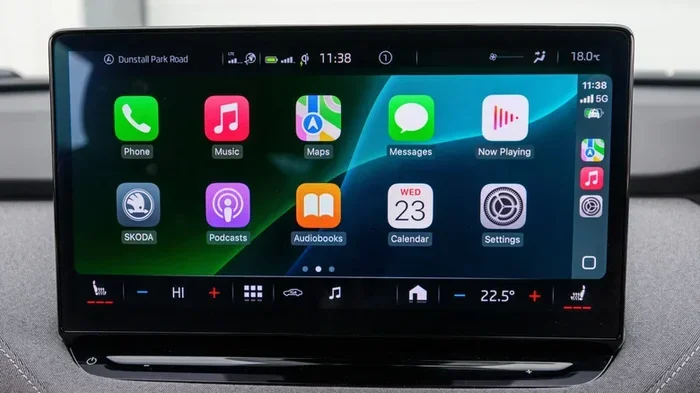
Apple CarPlay is a smart system that mirrors your iPhone on your car screen. It was launched by Apple in 2014 and has grown rapidly since then. The system lets you use your phone features safely while driving. You get access to navigation, music, phone calls, and messaging.
The way it works is simple. Your iPhone connects to the car either through a USB cable or wirelessly. Once connected, the car display shows a simplified version of your iPhone interface. You can then use Siri voice commands to control everything hands-free. This makes driving safer and more convenient.
There are two types of CarPlay. The first is wired CarPlay, which uses a Lightning or USB-C cable. The second is wireless CarPlay, which connects through Wi-Fi. Wireless CarPlay is more convenient because you do not need to plug in your phone every time. However, not all cars support wireless CarPlay natively.
Apple keeps a list of CarPlay supported vehicles on its official website. This list grows every year as more automakers adopt the technology. If your car is on that list, you may just need a software update to activate it.
Can You Install CarPlay in Any Car? The Truth
Here is the honest truth about CarPlay installation. You cannot install CarPlay in literally any car, but you can add it to most cars with some effort. The key factor is your car existing infotainment system. Some cars have head units that are simply not compatible with CarPlay, no matter what you do.
Cars made after 2016 are more likely to support CarPlay. Many manufacturers started offering it as a standard or optional feature during this period. If your car is older than that, you will likely need an aftermarket solution. But even then, there are workarounds that work surprisingly well.
Factory CarPlay vs Aftermarket CarPlay
Factory CarPlay means the system came with your car from the manufacturer. It is built into the original head unit. This is always the best option because it integrates seamlessly with your car. The interface looks native, and the system is very stable.
Aftermarket CarPlay means you add it yourself or through a third-party installer. This involves replacing your existing head unit or adding an external adapter. Aftermarket solutions have improved a lot in recent years. Many modern adapters offer wireless connectivity and smooth performance.
The table below compares factory and aftermarket CarPlay options:
- Factory CarPlay: Built-in, seamless integration, no extra hardware needed, but requires buying a compatible car.
- Aftermarket CarPlay: Works with most cars, costs less than buying a new vehicle, but may require professional installation.
How to Install CarPlay in Your Car
If your car does not have CarPlay, you have several options. Each method has its pros and cons. Let us look at them one by one.
Method 1: Check for a Software Update
Before you buy anything, check if your car already supports CarPlay. Many manufacturers hide CarPlay behind a software update. Go to your car settings and look for a system update option. If an update is available, install it and see if CarPlay appears.
This is the easiest and cheapest method. It costs nothing and takes just a few minutes. You can also visit your car dealer and ask them to check for updates. Some dealers will flash the software for free.
Method 2: Replace the Head Unit
If your car does not support CarPlay at all, you can replace the factory head unit with an aftermarket one that does. Many brands make CarPlay-compatible head units. Brands like Pioneer, Sony, and Alpine offer units with both wired and wireless CarPlay.
Replacing a head unit is not as hard as it sounds. You can buy a compatible unit online and install it yourself if you are comfortable with basic car electronics. Alternatively, you can pay a local car audio shop to do the job for you. The cost of a new head unit ranges from ₹5,000 to ₹25,000 depending on features.
When choosing a new head unit, make sure it fits your car dash. You may need a car stereo upgrade kit to ensure a perfect fit. Also, check if the unit supports your car features like steering wheel controls and backup cameras.
Method 3: Use a CarPlay Adapter
This is the most popular option for people who want to keep their original head unit. A CarPlay adapter plugs into your existing system and adds CarPlay capability. The adapter connects to your iPhone and sends the CarPlay interface to your car screen.
Popular brands like Carlinkit and AAWireless make great adapters. These devices are small and easy to install. You simply plug them into your car USB port or connect them to the auxiliary input. Some adapters also need a power source, so make sure your 12V power socket car is working properly.
Wireless adapters are the most convenient. They connect to your phone through Bluetooth and Wi-Fi. You do not need to deal with cables every time you get in the car. Wired adapters are cheaper but require you to plug in your phone each time. Both options work well for daily driving.
Method 4: Upgrade Your Car Display Screen
If your car has a small or outdated screen, upgrading the display can improve your CarPlay experience. A larger screen makes maps easier to read and menus more responsive. Many modern 7 inch display for car units come with built-in CarPlay support.
You can also add a tablet mount and use an iPad as your CarPlay display. This is a creative solution that some car owners love. It gives you a big, bright screen for navigation and media. Just make sure the tablet is securely mounted and does not block your view.
Cost of Installing CarPlay
The cost of CarPlay installation varies depending on the method you choose. Let us break down the costs so you can plan your budget.
| Method | Estimated Cost (INR) | Difficulty Level |
|---|---|---|
| Software Update | Free | Very Easy |
| CarPlay Adapter (Wired) | ₹1,000 – ₹5,000 | Easy |
| CarPlay Adapter (Wireless) | ₹3,000 – ₹10,000 | Easy |
| Aftermarket Head Unit | ₹5,000 – ₹25,000 | Moderate |
| Professional Installation | ₹2,000 – ₹5,000 extra | Easy (but costs more) |
The cheapest option is always a software update if your car already supports CarPlay. If you need an adapter, expect to spend between ₹1,000 and ₹10,000. A full head unit replacement will cost more but gives you the best experience.
Keep in mind that some cars may need additional wiring or harness adapters. These small extras can add ₹500 to ₹2,000 to the total cost. Always check compatibility before buying any part.
Wireless vs Wired CarPlay: Which Is Better?
This is one of the most common questions we get about CarPlay installation. Both wireless and wired CarPlay have their strengths. Let us compare them so you can decide which is right for you.
Wired CarPlay
Wired CarPlay uses a physical cable to connect your iPhone to the car. This connection is very stable and rarely drops. The data transfer speed is also faster with a cable, which means maps load quicker and Siri responds faster.
The downside is convenience. You need to plug in your phone every time you drive. The cable can also wear out over time and may need replacement. If your 12V car socket to 3 pin setup is not working properly, wired CarPlay can be frustrating.
Wireless CarPlay
Wireless CarPlay connects through Wi-Fi and Bluetooth. It is much more convenient because your phone pairs automatically when you get in the car. No cables, no fuss. Just get in and drive.
The main drawback is stability. Wireless connections can sometimes drop, especially in areas with poor Wi-Fi signal. Maps may also load slightly slower compared to wired connections. However, for most daily drivers, wireless CarPlay works perfectly fine.
If you want the best of both worlds, some adapters support both wired and wireless modes. You can switch between them depending on your needs. This flexibility is great for people who want reliability and convenience.
Common CarPlay Installation Problems and Fixes
Even with the right setup, you may run into issues with CarPlay. Here are the most common problems and how to fix them.
CarPlay Not Showing Up on Your Car Screen
This is the most common issue. First, make sure your iPhone is running the latest iOS version. Apple updates CarPlay compatibility with every iOS release. Next, try using a different USB cable. Many cables are charge-only and do not support data transfer. A good quality cable can solve this problem instantly.
CarPlay Disconnects Frequently
If your CarPlay keeps disconnecting, the issue is usually with the connection. For wired setups, try a different USB port in your car. For wireless CarPlay, restart both your iPhone and your car infotainment system. You should also check if other devices are interfering with the Wi-Fi connection.
CarPlay Is Slow or Unresponsive
A slow CarPlay experience is often caused by an older iPhone or a weak processor in the car head unit. Make sure you close unnecessary apps on your iPhone before using CarPlay. If you are using an adapter, try restarting it. Sometimes simply unplugging and replugging the adapter fixes the issue.
No Sound Through CarPlay
If you can see CarPlay on screen but hear no sound, check your car audio settings. Make sure the car is set to use the CarPlay audio source. Also check that your iPhone volume is not muted. Sometimes the car and phone volume need to be adjusted separately.
Expert Tips for the Best CarPlay Experience
Here are some quick tips that will help you get the most out of your CarPlay setup:
- Use a high-quality USB cable: Cheap cables often cause connection issues. Invest in a braided, data-capable cable from a trusted brand.
- Keep your iPhone updated: Apple regularly improves CarPlay with each iOS update. Staying current ensures the best performance.
- Clean your USB ports: Dust and debris can block the connection. Use a toothpick or compressed air to clean your car USB ports regularly.
- Restart your system often: A simple restart of both your iPhone and car infotainment system fixes most minor glitches.
- Use Siri for safety: Always use voice commands instead of tapping the screen while driving. It keeps your eyes on the road.
These small habits make a big difference over time. Your CarPlay setup will stay fast and reliable with minimal effort.
Is It Worth Installing CarPlay in an Older Car?
Many people wonder if adding CarPlay to an older car is worth the money. The answer depends on how much you use your phone while driving. If you rely on navigation, listen to Spotify or Apple Music, and make calls on the road, CarPlay is absolutely worth it.
An older car without CarPlay can feel outdated. Adding CarPlay brings your vehicle into the modern age. You get access to real-time traffic updates, voice-controlled messaging, and all your favorite apps on the road. It also adds resale value to your car. Buyers love vehicles with smartphone integration.
The cost of adding CarPlay is relatively low compared to buying a new car. A CarPlay adapter costs a fraction of what you would spend on a new vehicle with factory CarPlay. For most car owners, the investment pays off quickly in convenience and safety.
Final Thoughts
So, can you install CarPlay in any car? The answer is close to yes for most vehicles. Whether you choose a software update, an adapter, or a full head unit replacement, there is a solution for almost every car on the road today. CarPlay installation has become easier and more affordable than ever before.
Start by checking if your car already supports CarPlay. If not, explore the adapter or head unit options that fit your budget. Always buy from trusted brands and consider professional installation if you are not confident with DIY projects. With the right setup, you will wonder how you ever drove without CarPlay.
The future of car technology is all about seamless smartphone integration. Apple CarPlay leads the way in making driving safer, smarter, and more connected. Take the steps today to bring CarPlay into your car and enjoy a better driving experience every day.