Car Rental Business Card Template Free Design Ideas
A well-designed car rental business card template helps your rental company make a powerful first impression. Free templates save you time and money while giving your brand a polished, professional look. You will learn creative design ideas, essential elements, and easy customization steps. This guide covers everything from layout tips to printing best practices so your business cards actually work for you. Whether you run a small fleet or a large rental agency, these ideas will elevate your marketing game.
Running a car rental business means you compete with big names and local competitors every single day. Your first impression often comes down to a simple exchange of a business card. A car rental business card template gives you a head start. It saves time, looks professional, and costs you nothing or very little. In this guide, we will walk you through free design ideas that make your brand unforgettable.
You might wonder why a tiny card matters so much. Think about it. When someone needs a rental car, they remember the company that gave them a clean, well-designed card. That card sits in their wallet or phone case for weeks. It keeps your rental service top of mind. A car rental business card template turns a simple piece of paper into a marketing tool that works around the clock.
Key Takeaways
- Free templates are everywhere: You do not need to hire a designer or spend big bucks to create a professional car rental business card template.
- Key elements matter: Logo, contact info, services offered, and a clean layout make your card memorable and useful.
- Customization is simple: Most free templates let you swap colors, fonts, and images in minutes.
- Printing quality affects perception: Choosing the right paper stock and finish gives your cards a premium feel.
- Distribution strategy counts: Handing out cards at the right places boosts your rental business far more than random distribution.
- Avoid common mistakes: Cluttered designs, missing info, and low-resolution logos hurt your brand credibility.
📑 Table of Contents
- Why a Car Rental Business Card Template Matters
- Best Free Design Ideas for Car Rental Business Cards
- Key Elements of a Winning Car Rental Business Card
- How to Customize Your Car Rental Business Card Template
- Printing and Distribution Tips for Your Business Cards
- Common Mistakes to Avoid with Your Business Card Design
- Free Tools to Create Your Car Rental Business Card Template
- How Your Business Card Supports Your Overall Rental Marketing Strategy
- Key Takeaways
Why a Car Rental Business Card Template Matters
First impressions happen fast. Studies show people form an opinion about a business within seconds of seeing its branding materials. Your business card is often the very first physical item a potential customer holds in their hands. A car rental business card template ensures that first impression is a good one.
Using a template also keeps your branding consistent. When every card looks the same, your team builds a recognizable identity. Customers start to trust a brand that looks polished and put together. Free templates give you this consistency without the hassle of designing from scratch.
Saves Time and Money
Hiring a graphic designer can cost hundreds of dollars. Even basic design work takes hours you might not have. A car rental business card template cuts that time down to just a few minutes. You pick a layout, add your details, and you are done. Many free options look just as good as paid designs.
Builds Professional Credibility
Small businesses often struggle to look as professional as larger companies. A well-chosen template bridges that gap. It gives your rental company a sleek, established feel. Customers feel more confident renting from a business that presents itself well on paper. Your rental car business card becomes a symbol of reliability.
Best Free Design Ideas for Car Rental Business Cards
Not all templates are created equal. Some work better for car rental companies because they capture the spirit of the industry. Let us explore the design ideas that work best for your car rental business card template.
1. The Sleek and Minimalist Layout
Minimalist designs never go out of style. They use clean lines, plenty of white space, and simple fonts. This style works great for premium rental services. A minimalist car rental business card template focuses on your logo and contact details. Nothing distracts from the essentials.
Use a single accent color like deep blue or charcoal gray. Add your company logo in the center or top-left corner. Keep the back of the card simple or use it for a QR code that links to your booking page. Minimalist cards feel modern and trustworthy.
2. The Bold Automotive Theme
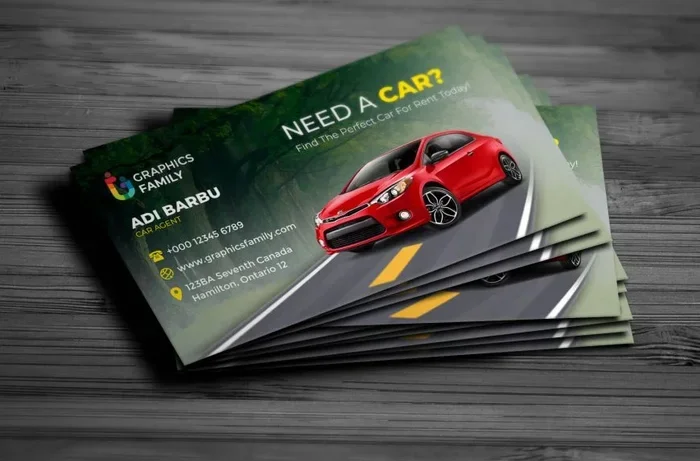
Want your card to scream speed and power? Go with an automotive-themed design. This style uses tire track patterns, road-inspired graphics, or silhouette images of cars. A car rental business card template with an automotive twist stands out in a stack of plain white cards.
Use bold typography and strong colors like red, black, and orange. These colors evoke energy and excitement. Perfect for sports car rentals or luxury vehicle services. Just make sure the text stays readable. Too much flair can overwhelm the important details.
3. The Nature and Adventure Theme
Many people rent cars for road trips and outdoor adventures. A nature-themed design taps into that feeling. Think mountain silhouettes, sunset gradients, or forest green tones. This approach works well for rental companies that cater to travelers and explorers.
A car rental business card template with an adventure theme creates an emotional connection. Customers associate your brand with freedom and exploration. Add a tagline like “Your Journey Starts Here” to reinforce the message. This style feels warm and inviting.
4. The Corporate and Trustworthy Style
For larger rental agencies or corporate fleet services, a professional and clean design builds trust. Use navy blue, white, and gold accents. Include your company motto or a brief promise like “Reliable Rides, Every Time.” This style works best for business-to-business rentals and corporate contracts.
A corporate car rental business card template should feature a professional headshot of the owner or team. People trust faces. They remember people. Adding a photo makes your card more personal and approachable.
Key Elements of a Winning Car Rental Business Card
A great car rental business card template includes specific elements that make it useful and memorable. Let us break down what belongs on your card.
Your Logo and Brand Identity
Your logo is the heart of your business card. It should be clear, high-resolution, and placed prominently. A blurry or tiny logo hurts your professional image. Make sure your rental car business card logo looks crisp on both sides of the card.
Use your brand colors consistently. If your rental company uses green and white, carry those colors onto the card. Consistency builds brand recognition over time. Customers should recognize your card even without reading your company name.
Essential Contact Information
Do not make people work hard to reach you. Include these key details on your car rental business card template:
- Company name and tagline
- Phone number (local and toll-free)
- Email address
- Website URL
- Physical address or service area
- Social media handles
- QR code linking to your booking page
Keep the text large enough to read easily. A card is tiny, so cramming too much information backfires. Prioritize the details customers need most. For most rental companies, phone number and website top the list.
Services and Specialties
Use the back of the card to highlight what makes your rental business special. Do you offer luxury vehicles? Airport pickup? Long-term discounts? A car rental business card template with a services summary gives customers a quick reason to choose you. Keep this section short and scannable.
How to Customize Your Car Rental Business Card Template
Customizing a free template is easier than you might think. Most online platforms let you drag and drop elements, change colors, and swap text. Here is a simple step-by-step process to customize your car rental business card template.
Step-by-Step Customization Process
- Pick a template. Browse free design sites like Canva, VistaCreate, or Adobe Express. Choose a layout that matches your rental brand.
- Upload your logo. Replace the placeholder logo with your high-resolution brand mark.
- Add your contact details. Type in your phone number, email, website, and address carefully. Double-check for typos.
- Choose your brand colors. Match the template colors to your existing branding. Consistency is key.
- Select fonts wisely. Use no more than two fonts. One for headings and one for body text. Sans-serif fonts read well on small cards.
- Preview and download. Check the design at actual size before downloading. Look for alignment issues or overlapping text.
Quick Tips for Customization Success
- Keep your design simple. Less is more on a business card.
- Use high-resolution images only. Low-res graphics look blurry when printed.
- Leave white space. It makes the card easier to read and looks more elegant.
- Test print a sample before ordering a full batch.
- Ask a friend for honest feedback before finalizing your car rental business card template.
Printing and Distribution Tips for Your Business Cards
Designing a beautiful card means nothing if the print quality is poor. How and where you distribute your cards also makes a huge difference. Let us cover both sides of the equation.
Choosing the Right Paper and Finish
Your car rental business card template can look amazing on screen but fall flat with cheap paper. Invest in a heavier stock, at least 350 GSM. This weight feels substantial and durable. It also resists bending and wear in wallets and pockets.
Consider a matte or soft-touch finish. Matte cards resist fingerprints and glare. They also feel smooth and premium in the hand. A soft-touch coating gives cards a velvety texture that people notice and remember. These small touches set your rental business apart from competitors using flimsy cards.
Where to Distribute Your Rental Business Cards
Handing out cards randomly rarely works. Focus on high-impact locations for your rental car business card distribution:
- At your physical rental office or counter
- During airport or train station pickup and drop-off
- At local travel fairs and tourism events
- Partner hotels and hostels
- Car shows and auto expos
- Local business networking events
- Inside welcome packets at hotels
Train your staff to hand out cards during every customer interaction. A polite follow-up like “Here is my card for future bookings” feels natural and professional. Over time, consistent distribution builds a steady stream of repeat customers and referrals.
Common Mistakes to Avoid with Your Business Card Design
Even with a great car rental business card template, mistakes can undermine your efforts. Watch out for these common pitfalls.
Overloading the Card with Information
Trying to fit everything onto one card creates a cluttered mess. Customers cannot focus on what matters most. Stick to the essentials. Use the back of the card for secondary information or a QR code. A clean design always outperforms a crowded one.
Using Low-Quality Logos or Images
A pixelated logo screams amateur. Always use vector files or high-resolution PNGs for your car rental business card template. If your logo looks fuzzy on screen, it will look even worse in print. Take the time to source or recreate your logo in a crisp format.
Ignoring the Back of the Card
Many people waste the back of the card by leaving it blank. The back is valuable real estate. Use it to list your top services, a special offer, or a QR code that links directly to your booking website. A car rental business card template that uses both sides maximizes its marketing potential.
Skipping the Proofread
Typos on business cards damage your credibility instantly. A misspelled phone number or wrong email address means lost customers. Always proofread your design three times before sending it to print. Have a colleague review it too. Fresh eyes catch mistakes you might overlook.
Free Tools to Create Your Car Rental Business Card Template
You do not need expensive software to design a stunning card. Several free tools make the process easy and fun:
- Canva offers hundreds of free business card templates. Its drag-and-drop editor works for beginners and pros alike.
- VistaCreate (formerly Crello) provides professional-grade templates at no cost. Great for automotive-themed designs.
- Adobe Express gives you access to Adobe-quality design tools for free. Perfect for polished, corporate-style cards.
- Microsoft Publisher works well for users already familiar with Microsoft Office. Simple and straightforward.
- Google Slides can surprisingly double as a card design tool. Set the slide size to a business card dimension and get creative.
Each of these tools supports car rental business card template customization. You can download your finished design as a print-ready PDF. Most also offer direct printing options if you prefer not to visit a separate print shop.
How Your Business Card Supports Your Overall Rental Marketing Strategy
A business card is just one piece of your marketing puzzle, but it plays a surprisingly important role. It connects your digital presence with real-world interactions. When someone scans the QR code on your card, they land on your booking page. When they call the number on the card, they become a customer.
Your car rental business card template should align with your website, social media, and vehicle branding. Use the same colors, fonts, and logo across all platforms. This unified approach builds a strong, recognizable brand. Customers who see consistency everywhere trust your business more.
Consider pairing your cards with other marketing materials. A small flyer or discount coupon on the back of the card adds extra value. You can also include a short testimonial or star rating from a happy customer. Social proof on a physical card creates a powerful impression. Your rental car business card becomes more than contact information. It becomes a mini marketing piece that works for you every single day.
Key Takeaways
- Free templates save time and money: You can create a professional-looking car rental business card template without spending a dime.
- Design style should match your brand: Whether minimalist, automotive-themed, or adventure-inspired, your card should reflect your rental company’s personality.
- Essential elements include logo, contact info, and services: These core components make your card useful and memorable.
- Customization is quick and easy: Most free online tools let you personalize a template in under 30 minutes.
- Print quality and distribution strategy matter: Invest in good paper and hand out cards in strategic locations for maximum impact.
- Avoid common mistakes: Clutter, low-res images, and typos can undermine even the best design.
- Your card is part of a bigger strategy: Align it with your digital marketing for a consistent, trustworthy brand image.
Your car rental business card template is more than a piece of cardstock. It is a walking advertisement, a trust builder, and a direct line to your next customer. By choosing a free template that fits your brand, customizing it with care, and distributing it strategically, you turn a small investment into big returns. Start with one of the design ideas in this guide today. Your future customers are waiting to meet you. Make sure they remember you.
Take action now. Pick a template, add your details, print a batch, and start handing them out. You will be amazed at how a simple, well-designed card can grow your rental business over time. The road to more customers starts with a single card in their hand.
Frequently Asked Questions
Where can I find free car rental business card templates?
You can find free templates on platforms like Canva, VistaCreate, Adobe Express, and Microsoft Publisher. Simply search for “car rental business card template” on these sites and browse the options. Most platforms let you customize the template for free before downloading.
What should I include on my car rental business card?
Include your company logo, name, phone number, email, website, and a brief description of your services. Adding a QR code that links to your booking page is also a smart move. Keep the design clean and make sure all information is easy to read.
Can I customize a free template to match my rental brand?
Absolutely. Most free template platforms let you change colors, fonts, logos, and text. You can match the template to your existing brand colors and style. Customization usually takes less than 30 minutes and requires no design experience.
What paper stock is best for printing car rental business cards?
A heavy paper stock of at least 350 GSM works best. It feels premium and holds up well in wallets and pockets. A matte or soft-touch finish adds an extra layer of quality and makes your card stand out from competitors.
How many business cards should I order for my rental business?
Start with a small batch of 250 to 500 cards. This lets you test the design and see how many you actually use. You can always order more once you know what works. Ordering in small batches also lets you update your design if needed.
Is a QR code on my rental business card worth it?
Yes, a QR code is highly valuable. It gives customers instant access to your booking website or special offer. It saves them time and shows you are tech-savvy. Many rental companies see a boost in online bookings after adding a QR code to their cards.
=== CONCLUSION ===
A car rental business card template is one of the simplest and most effective tools in your marketing toolkit. It costs little to nothing, takes minutes to customize, and works hard for your business every single day. From choosing the right design style to printing on quality paper and distributing cards in smart locations, every step counts. Follow the tips in this guide, avoid common mistakes, and watch your rental brand grow one card at a time. Your next customer might just find you through a card you handed out today.