Does Toyota Camry Have Android Auto and Apple CarPlay
The Toyota Camry does offer Android Auto and Apple CarPlay on most recent model years, making it a strong pick for drivers who want seamless smartphone integration. Whether you drive a Toyota Camry 2023 or a Toyota Camry 2024, you can access navigation, music, and messaging right on your car display screen. Let us break down exactly which trims support these features and how to get them working.
You slide into your Toyota Camry, turn the key, and the first thing you want is your phone on the screen. Music. Maps. Messages. Everything at your fingertips without taking your eyes off the road. But does your Camry actually support Android Auto? And what about Apple CarPlay?
The answer is mostly yes. The Toyota Camry has been one of the most reliable midsize sedans on the road for years, and Toyota has kept up with the demand for smartphone integration. Whether you are shopping for a used model or picking up a brand-new Toyota Camry 2024, understanding what your infotainment system can do makes a huge difference in your daily driving experience.
In this guide, we will walk through everything you need to know about Android Auto and Apple CarPlay on the Toyota Camry. From which trims support these features to how to set them up, we have you covered. No fluff. No jargon. Just clear, practical information you can use right away.
Key Takeaways
- Android Auto is available: Most Toyota Camry models from 2021 onward support Android Auto, with wireless options on newer trims.
- Apple CarPlay comes standard: Nearly every Camry trim offers Apple CarPlay, both wired and wireless depending on the year.
- Trim level matters: Higher trims like the XSE and TRD include better infotainment systems with faster processors and smoother performance.
- Setup is simple: Connecting your phone takes just a few steps, whether through USB or wirelessly.
- Hybrid models also support these features: The Camry Hybrid carries the same smartphone integration as the gas-powered version.
- Common issues are fixable: Most Android Auto glitches can be resolved with a quick update or cable swap.
📑 Table of Contents
- What Is Android Auto and Why Does It Matter?
- Does the Toyota Camry Support Android Auto?
- Apple CarPlay on the Toyota Camry
- Toyota Camry Infotainment System Explained
- Which Toyota Camry Trims Offer Smartphone Integration?
- Troubleshooting Common Android Auto Issues on the Toyota Camry
- Tips to Get the Most from Your Camry Smart Features
- Final Thoughts on the Toyota Camry’s Smartphone Features
What Is Android Auto and Why Does It Matter?
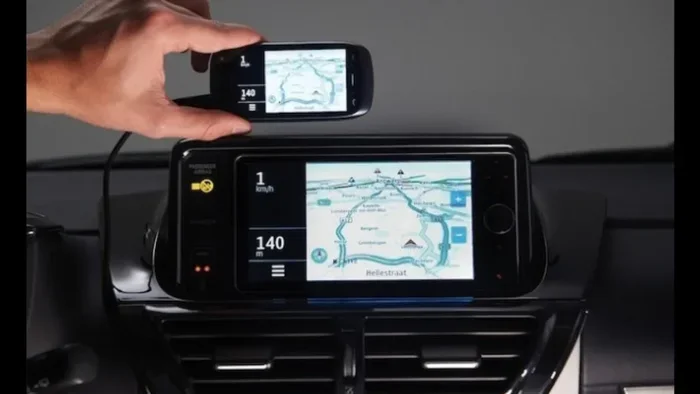
Android Auto is a technology built by Google that mirrors your phone onto your car display screen. Once connected, you can access your favorite apps safely and legally. Think of it as a bridge between your phone and your vehicle.
With Android Auto, you get:
- Turn-by-turn navigation with Google Maps
- Hands-free calling and texting
- Streaming music from Spotify, YouTube Music, and Pandora
- Voice commands through Google Assistant
- Quick access to your most-used apps
The whole point is safety. Instead of holding your phone while driving, you interact with a simplified, driver-friendly interface on your car display screen. Big buttons. Large text. Minimal distractions. For many drivers, this feature alone makes a car worth buying.
Toyota has embraced this technology across its lineup, and the Camry is no exception. But the availability depends on a few factors, which we will get into shortly.
Does the Toyota Camry Support Android Auto?
Yes, the Toyota Camry supports Android Auto, but the details vary by model year and trim level. Here is what you need to know.
Android Auto by Model Year
Starting with the 2021 model year, Toyota made Android Auto standard on most Camry trims. Before that, it was available on higher trims or as part of an optional package. Here is a quick breakdown:
- 2019-2020 Camry: Android Auto available on higher trims (SE, XSE, XLE) with the right infotainment package.
- 2021-2023 Camry: Android Auto standard on nearly all trims.
- 2024 Camry: Android Auto available across the board, including on the base L trim.
If you are buying used, always confirm the infotainment system before purchasing. A Toyota Camry from 2018 or earlier may not have this feature without an aftermarket upgrade.
How to Set Up Android Auto on Your Camry
Setting up Android Auto on your Camry is straightforward. Follow these steps:
- Make sure your phone runs Android 10 or later.
- Download the Android Auto app from the Google Play Store.
- Connect your phone using a USB cable that supports data transfer.
- Follow the on-screen prompts on your car display screen.
- Grant the necessary permissions for calls, messages, and location.
For models that support wireless Android Auto, the process is even easier. You simply connect through Bluetooth the first time, and your phone pairs automatically after that. No cables needed. Just get in and go.
Pro tip: If your connection is unstable, try a different USB cable. Not all cables support data transfer, and a charging-only cable will not work. This is one of the most common reasons people think their Toyota Camry does not support the feature.
Apple CarPlay on the Toyota Camry
If you are an iPhone user, you will be happy to know that Apple CarPlay is widely available on the Toyota Camry. In fact, Toyota has supported Apple CarPlay for several years now, making the Camry a great choice for Apple users.
Here is what Apple CarPlay brings to your Camry:
- Siri voice commands for hands-free operation
- Apple Maps and other navigation apps like Google Maps and Waze
- Music from Apple Music, Spotify, and podcasts
- Text message reading and replying
- Seamless switching between your phone and the car system
Wireless vs Wired Apple CarPlay
Newer Toyota Camry models, especially the 2022 and 2024 versions, offer wireless Apple CarPlay. This means your iPhone connects without a cable, and the experience is just as smooth as the wired version.
Older models may only support wired Apple CarPlay, which still works perfectly fine. You just need to keep a Lightning or USB-C cable in your car. Either way, the functionality is the same.
If you are comparing the Toyota Camry to other sedans, this is a strong selling point. Most competitors offer both Android Auto and Apple CarPlay, and the Camry holds its own. It is one of those features that you appreciate every single time you get behind the wheel.
Toyota Camry Infotainment System Explained
The Toyota Camry infotainment system has come a long way over the years. Toyota updated the system significantly in recent model years, and the results are impressive.
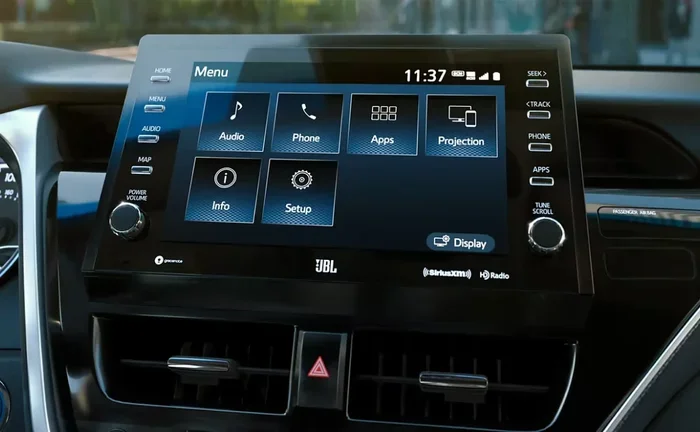
The current generation Camry uses an 8-inch or 9-inch touchscreen display, depending on the trim. The interface is clean and intuitive. Large icons. Clear menus. You do not need to be a tech expert to figure it out.
Key features of the Toyota infotainment system include:
- Apple CarPlay and Android Auto compatibility
- Bluetooth connectivity for calls and audio streaming
- AM/FM radio with HD Radio support
- USB ports for charging and data transfer
- Integration with Toyota Safety Connect
- Wireless phone charging on select trims
The system also supports smartphone integration beyond just Apple and Google. You can use apps like Waze, iHeartRadio, and Spotify directly through the car display screen. This level of smartphone integration puts the Camry ahead of many competitors in the midsize sedan class.
One thing to note: the Toyota Camry does not use a proprietary app ecosystem like some other brands. Instead, it relies on the familiar Android Auto and Apple CarPlay platforms. This is actually a plus for most users because you do not need to learn a new system. Everything you already know from your phone works the same way in the car.
Which Toyota Camry Trims Offer Smartphone Integration?
Not every Camry trim is created equal when it comes to technology features. Here is a breakdown of what you can expect across the trim levels.
| Trim Level | Android Auto | Apple CarPlay | Wireless Support |
|---|---|---|---|
| L | Yes (2024+) | Yes | No (wired only) |
| LE | Yes | Yes | Yes (2023+) |
| SE | Yes | Yes | Yes (2023+) |
| XLE | Yes | Yes | Yes |
| XSE | Yes | Yes | Yes |
| TRD | Yes | Yes | Yes |
As you can see, smartphone integration is available across nearly every trim. The base L trim only recently gained Android Auto support starting with the 2024 model year. If you are shopping for a used Camry, the LE and SE trims are the sweet spot for getting both Android Auto and Apple CarPlay without paying for a top-tier trim.
Also worth mentioning: the Toyota Camry Hybrid comes with the same infotainment features as the gas-powered version. If you are interested in a hybrid, you will not lose any smartphone connectivity. The hybrid system and the infotainment system operate independently, so there are no trade-offs there.
Troubleshooting Common Android Auto Issues on the Toyota Camry
Even with a great system, you may run into occasional hiccups. Android Auto issues are usually easy to fix. Here are the most common problems and their solutions.
Android Auto Will Not Connect
This is the most common complaint. If Android Auto will not connect to your Camry, try these steps:
- Use a high-quality USB cable that supports data transfer
- Clean the USB port on both your phone and your car
- Restart your phone and the car infotainment system
- Update the Android Auto app on your phone
- Clear the app cache in your phone settings
Often, the issue is simply a faulty cable. Not all USB cables are created equal, and a cable that charges your phone might not transfer data. This trips up a lot of people.
Android Auto Keeps Disconnecting
If your connection drops frequently, the problem might be Bluetooth interference or a software glitch. Try disabling and re-enabling Bluetooth on your phone. Also check for any available infotainment system updates through your Toyota dealer.
Some owners report that Android Auto works better after a full system reboot. To do this, put the car in park, hold the power button on the infotainment screen for 10 seconds, and wait for the system to restart.
Audio Quality Issues
Sometimes the music sounds muffled or the voice guidance is unclear. This usually happens when the phone is connected through a low-quality cable. Switching to a braided, short USB cable often resolves the issue. If you are using wireless Android Auto, make sure your phone has a strong Bluetooth signal to the car.
Remember, if you are having persistent issues that you cannot resolve on your own, a visit to your local dealer or a service center like Jiffy Lube can help. They can run diagnostics on your infotainment system and check for software updates that might fix the problem.
Tips to Get the Most from Your Camry Smart Features
You have got Android Auto and Apple CarPlay working on your Camry. Now what? Here are some tips to make the most of your setup.
Use Voice Commands While Driving
Both Android Auto and Apple CarPlay support voice commands. Say “Hey Google” or “Hey Siri” to make calls, send texts, or get directions without touching your phone. This keeps your hands on the wheel and your eyes on the road.
Download Offline Maps
Navigation apps work best when you have offline maps downloaded. Google Maps lets you save entire regions for offline use. This is especially helpful when you are driving through areas with weak cell signal.
Keep Your Phone Charged
Using smartphone integration drains your battery faster than normal. If you have a long commute, make sure your Camry has a working USB port or wireless charging pad. Some trims come with a built-in wireless charging pad, which is a nice convenience.
Customize Your Home Screen
Both Android Auto and Apple CarPlay let you pin your favorite apps to the home screen. Put your navigation app front and center, and keep your music app easily accessible too. A clean home screen means less fiddling while driving.
Stay Updated
Both Google and Apple regularly update their car platforms. These updates bring new features, bug fixes, and performance improvements. Keep your phone and your car system up to date for the best experience.
If you are also curious about other tech features on the Camry, you might want to check out whether the Toyota Camry hybrid model can recharge while driving. Understanding how the hybrid system works alongside the infotainment features gives you a complete picture of this vehicle.
Final Thoughts on the Toyota Camry’s Smartphone Features
The Toyota Camry delivers solid support for both Android Auto and Apple CarPlay. Across most model years and trims, you get reliable smartphone integration that makes daily driving more convenient and safer. The addition of wireless connectivity on newer models is a welcome upgrade that puts the Camry right in line with modern expectations.
Whether you are a long-time Camry owner or shopping for a new one, the infotainment system should not be a dealbreaker. It works well, it is easy to use, and it supports the apps you already love. Toyota has done a good job keeping this sedan competitive in a market where technology features increasingly influence buying decisions.
If you are also considering wrapping your Camry with a vinyl design, you might wonder whether that affects the car’s value or tech features. The good news is that a quality vinyl wrap does not interfere with your infotainment system, antennas, or sensors. It is purely a cosmetic change that can actually enhance the look of your vehicle.
At the end of the day, the Toyota Camry remains one of the best choices in the midsize sedan segment. Add in Android Auto, Apple CarPlay, and a suite of modern tech features, and you have a car that fits both your practical and digital lifestyle.
Frequently Asked Questions
Does every Toyota Camry have Android Auto?
Most Toyota Camry models from 2021 onward come with Android Auto standard. Earlier models may have it on higher trims or as an optional feature. Always check the specific trim and model year before buying.
Can I use Android Auto wirelessly on the Toyota Camry?
Yes, wireless Android Auto is available on 2023 and newer Camry models, as well as some higher trims from 2021 and 2022. Check your specific trim to confirm wireless support.
Does the Toyota Camry Hybrid support Apple CarPlay?
Absolutely. The Toyota Camry Hybrid comes with the same Apple CarPlay and Android Auto features as the gas-powered version. There is no difference in smartphone integration between the two powertrains.
Why won’t Android Auto connect to my Toyota Camry?
The most common reasons are a faulty USB cable, outdated app software, or Bluetooth interference. Try a different cable, update the Android Auto app, and restart both your phone and the car system. If the issue persists, a visit to a service center can help diagnose the problem.
Is Apple CarPlay free on the Toyota Camry?
Yes, Apple CarPlay is free to use on the Toyota Camry. There are no subscription fees or additional costs. You just need an iPhone and a compatible Camry model.
Can I upgrade my older Camry to support Android Auto?
In some cases, yes. Aftermarket infotainment units from brands like Pioneer and Kenwood can add Android Auto and Apple CarPlay to older Camry models. However, the cost and complexity of installation vary, so consult a professional installer for advice.
=== CONCLUSION ===
The Toyota Camry is a well-rounded sedan that delivers strong smartphone integration through both Android Auto and Apple CarPlay. From the base LE trim to the sporty TRD, you get reliable connectivity that makes every drive more connected and more enjoyable. With wireless support on newer models and a user-friendly infotainment system, the Camry keeps pace with today’s technology expectations. If you value safety, convenience, and modern features, the Toyota Camry with Android Auto is a choice you will not regret.