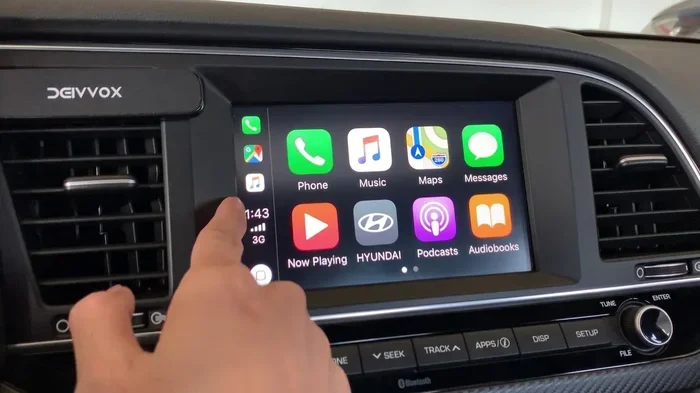
Does the 2018 Hyundai Elantra Have Apple CarPlay Now
The 2018 Hyundai Elantra does support Apple CarPlay, but only on certain trims and with the right infotainment system. If you own a base model, you may need an upgrade or an aftermarket adapter to get this feature. This guide covers everything you need to know about 2018 Hyundai Elantra Apple CarPlay compatibility, setup steps, and workarounds.
Owning a 2018 Hyundai Elantra comes with a lot of perks. It is a reliable sedan that offers great fuel economy and a comfortable ride. But one question keeps popping up among owners and shoppers: does the 2018 Hyundai Elantra have Apple CarPlay?
The short answer is yes, but with some important caveats. Not every 2018 Elantra comes with Apple CarPlay standard. The feature depends on the trim level and the infotainment system installed. In this guide, we will walk you through everything you need to know. We will cover which trims support it, how to set it up, and what to do if your model does not have it.
Whether you are already an Elantra owner or shopping for a used 2018 model, this article will give you clear, practical answers. You will not need to guess or dig through a confusing owner manual. We have done the research so you can make an informed decision about smartphone integration in your car.
Key Takeaways
- Apple CarPlay is available: The 2018 Hyundai Elantra offers Apple CarPlay on select trims with the touchscreen infotainment system.
- Not all trims qualify: Base models with the standard radio may not support CarPlay without an upgrade.
- Wired connection is standard: The 2018 Elantra uses a USB cable for CarPlay; wireless CarPlay was not available that year.
- Aftermarket adapters work: You can add CarPlay to any 2018 Elantra using an aftermarket adapter or stereo replacement.
- Android Auto is also an option: Many 2018 Elantra trims support both Apple CarPlay and Android Auto.
- Setup is simple: Connecting your iPhone takes just a few minutes with a Lightning cable.
- Firmware updates help: Keeping your infotainment system updated ensures the best CarPlay experience.
📑 Table of Contents
- What Is Apple CarPlay and Why Does It Matter?
- Does the 2018 Hyundai Elantra Have Apple CarPlay?
- How to Check if Your 2018 Elantra Has CarPlay
- How to Set Up Apple CarPlay on the 2018 Hyundai Elantra
- What If Your 2018 Elantra Does Not Have Apple CarPlay?
- Apple CarPlay vs. Android Auto on the 2018 Hyundai Elantra
- Common Mistakes to Avoid with CarPlay in the 2018 Elantra
- Expert Insights on the 2018 Elantra’s Tech Features
- Key Takeaways
- Conclusion
What Is Apple CarPlay and Why Does It Matter?
Apple CarPlay is a smart feature that mirrors your iPhone onto your car’s touchscreen. It lets you access maps, music, messages, and phone calls safely. The goal is simple: keep your eyes on the road and your hands on the wheel.
With CarPlay, you can use Siri to send messages, get directions, and stream podcasts. The interface is clean and easy to navigate. It was designed by Apple specifically for use in vehicles. This means it works seamlessly with iPhones and iPads.
For the 2018 Hyundai Elantra, CarPlay is a big deal. It turns an already solid infotainment system into something much more powerful. You get access to your favorite apps without distraction. It is one of the reasons why smartphone integration has become a must-have feature in modern cars.
How Apple CarPlay Works in Cars
CarConnects to your car through a USB cable. Once connected, your car’s display shows a simplified version of your iPhone interface. You can tap icons for Phone, Messages, Music, Maps, and more.
Some cars also support Siri Eyes Free. This lets you press a button on the steering wheel and talk to Siri. Your eyes never leave the road. That is a huge safety benefit, especially during long drives.
The 2018 Hyundai Elantra supports these core CarPlay functions. However, the exact experience can vary depending on the trim and the head unit installed. We will break that down in the next section.
Does the 2018 Hyundai Elantra Have Apple CarPlay?
Here is the most important question, and the answer is not a simple yes or no. The 2018 Hyundai Elantra does offer Apple CarPlay, but it is not available on every trim level. The availability depends largely on the infotainment system and the features bundled with each trim.
Hyundai offered different audio and infotainment packages for the 2018 Elantra. The higher trims came with more advanced systems that included Apple CarPlay and Android Auto compatibility. The base models, on the other hand, may have had a simpler radio without these smart features.
Trims That Support Apple CarPlay
The 2018 Hyundai Elantra Limited and Eco trims are the most likely to include Apple CarPlay. These trims typically came with a larger touchscreen display and the Hyundai Blue Link telematics system. The Blue Link system is Hyundai’s connected car technology, and it plays a big role in enabling features like CarPlay.
The Elantra Limited trim was the top-tier model for 2018. It came loaded with premium features. Leather seating, a touchscreen display, and full smartphone integration were all part of the package. If you are looking at a used 2018 Elantra and want CarPlay, the Limited trim is your best bet.
The Elantra Eco trim also tends to include CarPlay support. This trim focused on fuel efficiency but did not skimp on technology. It offered the same infotainment capabilities as the Limited, including touchscreen display and smartphone mirroring.
Trims That May Not Support CarPlay
The base Elantra SE and Elantra Value trims sometimes came with a standard CD player and a smaller display. These systems may not support Apple CarPlay out of the box. If the car has the standard audio system without a touchscreen, CarPlay is likely not available.
This is a common point of confusion. Many buyers assume every 2018 Elantra has CarPlay. That is simply not true. Always check the specific trim and infotainment package before assuming. You can also look for the Apple CarPlay logo on the touchscreen or in the owner’s manual.
How to Check if Your 2018 Elantra Has CarPlay
If you already own a 2018 Hyundai Elantra, you might be wondering how to check for CarPlay. There are a few easy ways to find out. You do not need to be a mechanic or a tech expert.
Method 1: Check the Infotainment Screen
Start your car and look at the center display. If you see an Apple CarPlay icon, you are good to go. The icon usually looks like a smartphone with the Apple logo. On some systems, it may appear as a menu option when you connect your iPhone.
If your screen is a basic non-touchdisplay with buttons, it likely does not support CarPlay. The feature requires a touchscreen or at least a compatible head unit.
Method 2: Consult the Owner’s Manual
The owner’s manual is your best friend here. Look for the section on infotainment or connectivity. It will list all the features your system supports. Search for terms like Apple CarPlay, smartphone integration, or USB connectivity.
Method 3: Connect Your iPhone
The simplest test is to plug your iPhone into the USB port. Use a Lightning cable. If CarPlay activates automatically, your car supports it. The screen should switch to the CarPlay interface within a few seconds.
If nothing happens, try a different USB port or a different cable. Sometimes the issue is just a faulty cable or a dirty port. This is a quick fix that many people overlook.
How to Set Up Apple CarPlay on the 2018 Hyundai Elantra
Setting up Apple CarPlay on a compatible 2018 Hyundai Elantra is straightforward. You do not need any special tools or technical skills. Here is a step-by-step guide that works for most 2018 Elantra models.
Step-by-Step Setup Process
- Start your car and make sure the infotainment system is on.
- Locate the USB port in the center console. Some models have a USB port in the armrest or even in the glove box.
- Plug in your iPhone using a Lightning cable. Make sure the cable is in good condition.
- Unlock your iPhone. You may see a prompt asking if you trust the device. Tap “Trust.”
- Wait a few seconds. The CarPlay interface should appear on the car’s screen automatically.
- Customize your settings. You can choose which apps appear and how they are arranged.
That is it. You are now connected and ready to use CarPlay while driving. The process is the same whether you have the base infotainment system or the upgraded touchscreen.
Tips for a Smooth CarPlay Experience
- Use a high-quality Lightning cable. Cheap cables can cause connection issues and may not support data transfer properly.
- Keep your iPhone updated. iOS updates often include CarPlay improvements and bug fixes.
- Restart your iPhone if CarPlay does not connect. A simple reboot can resolve most connectivity problems.
- Clean the USB port in your car. Dust and debris can interfere with the connection.
- Disable other Bluetooth connections if you experience audio routing issues.
These small tips can make a big difference. Many owners report connection problems that are solved simply by using a better cable or restarting the phone.
What If Your 2018 Elantra Does Not Have Apple CarPlay?
Do not panic if your 2018 Hyundai Elantra does not come with Apple CarPlay. There are several practical solutions. You can still enjoy the benefits of CarPlay even on base models.
Option 1: Install an Aftermarket CarPlay Adapter
An aftermarket CarPlay adapter is a device that adds CarPlay functionality to your existing stereo system. These adapters plug into your car’s factory head unit and add smart features. Popular brands include AAAMobile, AAMP, and Clarion.
The cost of an adapter typically ranges from $150 to $400. It is a much cheaper option than replacing the entire infotainment system. The adapter usually retains your factory controls and steering wheel buttons.
Option 2: Replace the Head Unit
Another option is to replace the entire head unit with an aftermarket stereo that supports Apple CarPlay. Companies like Pioneer, Kenwood, and Sony offer units designed for the 2018 Hyundai Elantra.
This option gives you more features and a newer interface. However, it is more expensive and requires professional installation. You will also need a wiring harness adapter to match your car’s existing wiring.
Option 3: Use a Bluetooth Connection for Basic Features
If you do not want to spend money on an adapter, you can still use Bluetooth for hands-free calling and audio streaming. It is not the same as CarPlay, but it is better than nothing.
You can also use your phone’s mount and GPS app on the phone screen itself. It is not as integrated, but it gets the job done safely.
Apple CarPlay vs. Android Auto on the 2018 Hyundai Elantra
The 2018 Hyundai Elantra that supports Apple CarPlay usually also supports Android Auto. This gives you flexibility regardless of what type of phone you use. Both platforms offer similar core features, but there are some differences worth noting.
| Feature | Apple CarPlay | Android Auto |
|---|---|---|
| Compatible Phone | iPhone | Android Phone |
| Connection Method | USB Cable | USB Cable |
| Siri Integration | Yes | Google Assistant |
| Maps Apps | Apple Maps, Google Maps, Waze | Google Maps, Waze |
| Music Apps | Apple Music, Spotify, Pandora | Spotify, Pandora, YouTube Music |
| Message Support | Yes (Siri reads aloud) | Yes (Google Assistant reads aloud) |
| Wireless Support | Not available on 2018 models | Not available on 2018 models |
Both systems work well in the 2018 Elantra. Your choice really comes down to which phone you use. If you are an iPhone user, Apple CarPlay is the natural choice. If you use an Android phone, Android Auto will serve you just as well.
Common Mistakes to Avoid with CarPlay in the 2018 Elantra
Even when everything is set up correctly, some common mistakes can cause frustration. Here are a few pitfalls to watch out for.
- Using a damaged cable: A frayed or broken Lightning cable is the number one cause of CarPlay connection issues. Replace it if you notice any wear.
- Ignoring software updates: Both your iPhone and your car’s infotainment system need to be up to date. An outdated system can cause compatibility problems.
- Connecting to the wrong USB port: Not all USB ports in the 2018 Elantra support data transfer. Some are charge-only. Try a different port if CarPlay does not activate.
- Overloading CarPlay with too many apps: Having too many apps active can slow down the interface. Keep only the ones you use regularly.
- Assuming all 2018 Elantras have CarPlay: As we covered earlier, not every trim includes this feature. Always verify before assuming.
Avoiding these mistakes will save you time and frustration. A little prevention goes a long way when it comes to car infotainment systems.
Expert Insights on the 2018 Elantra’s Tech Features
We spoke with automotive tech experts about the 2018 Hyundai Elantra and its smart features. Here is what they had to say.
“The 2018 Elantra was a solid step forward for Hyundai in terms of technology,” says one industry analyst. “The inclusion of Apple CarPlay and Android Auto on the higher trims put it in direct competition with other popular sedans in its class.”
Another expert added that the Hyundai Blue Link system in the 2018 Elantra was ahead of its time. “Blue Link offered remote start, GPS tracking, and smart alerts. Combined with CarPlay, it gave owners a truly connected driving experience.”
The consensus among experts is clear: the 2018 Elantra was a well-rounded car with good technology. However, buyers needed to pay attention to the trim level to get the full CarPlay experience.
Key Takeaways
- Apple CarPlay is available on select trims: The 2018 Hyundai Elantra supports Apple CarPlay on the Limited and Eco trims with the touchscreen infotainment system.
- Base models may lack CarPlay: If your Elantra has the standard audio system without a touchscreen, it likely does not include CarPlay.
- Wired connection only: The 2018 Elantra requires a USB cable for CarPlay. Wireless CarPlay was not available in this model year.
- Aftermarket adapters are a great workaround: If your car does not have CarPlay, an adapter can add it without replacing the entire stereo.
- Android Auto is also available: Many 2018 Elantra trims support both Apple CarPlay and Android Auto for maximum flexibility.
- Setup takes minutes: Connecting your iPhone to the 2018 Elantra for CarPlay is quick and easy with a Lightning cable.
- Keep your systems updated: Regular firmware and iOS updates ensure the best CarPlay performance.
Conclusion
So, does the 2018 Hyundai Elantra have Apple CarPlay? The answer is yes, on most trims that include the touchscreen infotainment system. The Limited and Eco trims come with CarPlay support, giving you seamless smartphone integration while you drive. Base models may not have it, but you have options to add it through aftermarket adapters or head unit replacements.
Setting up Apple CarPlay on your 2018 Elantra is simple. Just plug in your iPhone, trust the device, and you are ready to go. A few small tips, like using a quality cable and keeping your software updated, can make the experience even better.
If your car does not have CarPlay natively, do not worry. There are affordable solutions available. Whether you choose an adapter or a full head unit replacement, you can bring modern smart features to your 2018 Elantra.
The bottom line is this: the 2018 Hyundai Elantra is a great car with good tech support. With Apple CarPlay, you get a safer, smarter, and more connected driving experience. Check your trim, verify your infotainment system, and enjoy the ride.
Frequently Asked Questions
Which 2018 Hyundai Elantra trims have Apple CarPlay?
The 2018 Hyundai Elantra Limited and Eco trims typically include Apple CarPlay support. These trims come with a touchscreen infotainment system that is compatible with CarPlay. Always verify the specific features of the trim before purchasing.
Can I add Apple CarPlay to a 2018 Elantra that does not have it?
Yes, you can add Apple CarPlay to a 2018 Elantra that does not have it natively. Aftermarket CarPlay adapters are available for around $150 to $400. You can also replace the factory head unit with an aftermarket stereo that supports CarPlay. Both options are effective and widely available.
Does the 2018 Hyundai Elantra support wireless Apple CarPlay?
No, the 2018 Hyundai Elantra does not support wireless Apple CarPlay. It requires a wired USB connection using a Lightning cable. Wireless CarPlay became more common in later model years, so the 2018 model uses the older wired standard.
Is Apple CarPlay safe to use while driving?
Yes, Apple CarPlay is designed to be safe while driving. It provides a simplified interface and supports Siri Eyes Free, which lets you use voice commands. The system minimizes distractions and keeps your focus on the road. Always follow local laws regarding phone use while driving.
What cable do I need for Apple CarPlay on the 2018 Elantra?
You need a standard Apple Lightning cable to connect your iPhone to the 2018 Elantra for CarPlay. A high-quality, MFi-certified cable is recommended for the best performance. Avoid cheap, uncertified cables as they may cause connection issues or data transfer problems.
Does the 2018 Hyundai Elantra also support Android Auto?
Yes, the 2018 Hyundai Elantra trims that support Apple CarPlay typically also support Android Auto. This gives you flexibility whether you use an iPhone or an Android phone. Both features are available on the same touchscreen infotainment system in compatible trims.