Does Toyota Have a Free App for Your Next Road Trip
Yes, Toyota offers a free app called the Toyota App that connects you to your vehicle. It includes features like remote start, lock and unlock, and vehicle health checks. Some advanced services require a paid subscription, but the core app is free to download and use.
Does Toyota Have a Free App? Here Is Everything You Need to Know
You have probably heard about car apps that let you control your vehicle from your phone. Maybe you have seen someone start their car from across the parking lot or unlock their doors without digging for keys. It sounds futuristic, but it is very real today. Toyota has jumped into this space with its own mobile app. But the big question is: does Toyota have a free app that is actually worth using?
The short answer is yes. Toyota offers a free app that you can download right now. It lets you do cool things like remote start, lock and unlock your doors, and check your fuel level from your phone. But like most things in life, there is more to the story. Some features are free, and others need a paid plan. In this article, we will break it all down. You will learn exactly what the Toyota app does, what it costs, and whether it is a good fit for your next road trip or daily commute.
Let us dive in.
What Is the Toyota App?
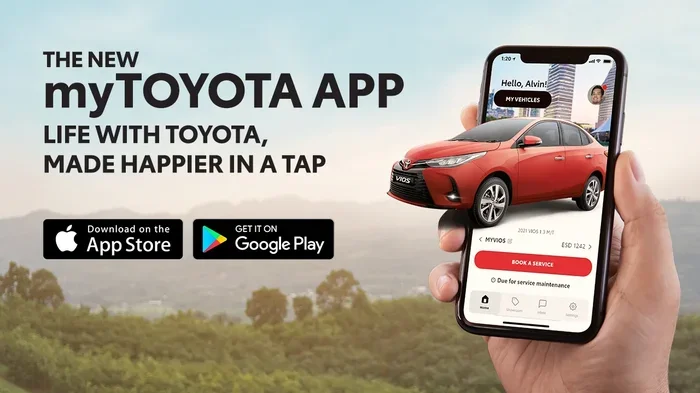
The Toyota App is a mobile application that connects your smartphone to your Toyota vehicle. It works through Toyota Connected Services, which is Toyota’s way of bringing smart technology into your car. The app is available for both iPhone and Android users. You can download it from the Apple App Store or Google Play Store at no cost.
Once you install the app, you pair it with your Toyota vehicle using your vehicle identification number and some basic setup. After that, you can access a range of features right from your phone. The app acts like a remote control for your car. It gives you information and control that you would normally only have from being inside the vehicle.
Toyota has been building its connected car ecosystem for several years now. The app is part of a bigger picture that includes Toyota Remote Connect and Toyota Connected. These services work together to make your driving experience smoother and more convenient. Whether you are heading out on a weekend road trip or just running errands around town, the app aims to make things easier.
Core Free Features of the Toyota App
So what can you actually do with the Toyota App for free? Here is a breakdown of the features that come at no cost when you first set things up.
Remote Start and Lock/Unlock
One of the most popular features is remote start. You can start your Toyota from inside your house on a cold morning and let it warm up before you walk out. Similarly, you can lock and unlock your doors using your phone. This is especially handy if you forget to lock up or if you need to let someone into your car without handing over a physical key.
The remote start and lock/unlock features work through Toyota Remote Connect. This service uses a built-in modem in your Toyota to communicate with the app. As long as your car has the right hardware, you are good to go. Some people also wonder whether you can start a keyless car with a key as a backup, and the answer is yes, most Toyotas still support traditional key entry.
Vehicle Location and GPS Tracking
The app also lets you find your car on a map. Have you ever parked in a huge lot and forgotten where you left your vehicle? The Toyota App shows you exactly where your car is. This is a simple but very useful feature, especially in crowded parking areas or when you are traveling in a new city.
You can also check your vehicle’s status in real time. The app shows you things like fuel level, tire pressure, and oil life. This means you can stay on top of maintenance without opening the hood or reading dashboard lights.
Roadside Assistance and Alerts
Toyota’s app can also connect you to roadside assistance. If you have a flat tire or run out of fuel, you can request help directly through the app. The app sends your location to the service team, which speeds up the process. You also receive alerts about any issues with your vehicle, so you can address problems before they become expensive repairs.
What About Paid Features?
While the free features are impressive, Toyota does offer a premium tier. After your free trial period ends, some features require a subscription. The cost and duration of the trial depend on your specific Toyota model and the package it came with.
Typically, the free trial lasts between one and three years. After that, you may need to pay an annual fee to continue using certain services. These paid features often include things like enhanced GPS navigation, advanced security alerts, and longer remote start sessions.
It is important to note that not every Toyota model supports all features. Newer models from 2018 and newer tend to have the most complete support. Older models may have limited functionality or may not be compatible at all. You can check your specific model’s compatibility on the Toyota website or by contacting your local dealer.
How to Set Up the Toyota App
Setting up the Toyota App is straightforward. Here is a step-by-step guide to get you started.
First, download the app from your phone’s app store. Open it and create an account using your email address. Next, enter your Toyota vehicle information, including the VIN and your personal details. The app will walk you through the pairing process.
Once paired, you can start exploring the features right away. The app has a clean and simple interface. Even if you are not very tech-savvy, you should find it easy to navigate. Most users report that the setup takes less than 10 minutes.
If you run into any issues, Toyota offers support through its website and customer service line. You can also visit your local dealer for help with the initial setup. Some people prefer to handle things like programming a keyless key fob yourself before diving into the app, and that is perfectly fine too.
Toyota App vs. Third-Party Car Apps
There are many car apps out there, so how does the Toyota App compare? Let us look at a few key differences.
First, the Toyota App is designed specifically for Toyota vehicles. This means it is built to work seamlessly with Toyota’s systems. Third-party apps may offer broader compatibility but often lack the deep integration that comes with a manufacturer-specific app.
Second, the Toyota App gives you access to features that are tied directly to your vehicle’s hardware. Things like remote start and vehicle diagnostics rely on sensors and modems built into the car. Third-party apps usually cannot tap into these systems.
Third, the Toyota App is free to download and use for basic features. Many third-party apps charge monthly fees or require in-app purchases for full functionality. The Toyota App gives you a lot of value without asking for a dime upfront.
That said, if you want advanced features like detailed trip tracking or smart home integration, you may need to explore other options or pay for Toyota’s premium services.
Is the Toyota App Worth It?
Whether the Toyota App is worth it depends on how you use your car. If you take regular road trips or simply value convenience, the free features alone make it a solid choice. Remote start, lock/unlock, and vehicle tracking are features that many Toyota owners use daily.
If you are planning a long road trip, the app can add real value. You can check your fuel level before leaving, track your route, and even locate nearby service centers if something goes wrong. It is like having a co-pilot in your pocket.
For those who want more, the premium subscription adds useful extras. But for most casual drivers, the free version is more than enough. The app is easy to use, works well, and does not cost anything to try.
Common Mistakes to Avoid with the Toyota App
There are a few things to watch out for when using the Toyota App.
First, do not skip the free trial. Many people forget to use the premium features during the trial period. Take advantage of it to see if the paid features are worth the cost.
Second, keep your app updated. Toyota releases updates that improve performance and fix bugs. An outdated app may not work properly with the latest Toyota models.
Third, make sure your phone has a stable data connection. The app relies on cellular data to communicate with your vehicle. If you are in a dead zone, some features may not work.
Fourth, do not assume all features work on all models. Check your vehicle’s compatibility before getting too excited about a specific feature.
Finally, if you are having trouble pairing your phone, do not hesitate to contact Toyota support. Sometimes a simple reset or update solves the problem.
Expert Tips for Getting the Most Out of the Toyota App
Here are some tips from experienced Toyota owners and tech experts.
Use the app to pre-condition your car in extreme weather. If it is freezing outside, start your car and turn on the heater remotely. If it is hot, cool down the interior before you get in.
Set up notifications for maintenance alerts. The app can remind you when it is time for an oil change or tire rotation. Staying on top of these alerts can save you money in the long run.
Explore the app settings to customize your experience. You can adjust notification preferences, set default locations, and more.
If you are considering a new Toyota purchase, look for models that come with the connected services package included. Some newer Toyotas offer a free trial of premium features right out of the box.
Also, if you are curious about whether you can program a key fob without going to the dealership, the answer is often yes, and this pairs well with using the Toyota App for keyless convenience.
Frequently Asked Questions
Is the Toyota App completely free?
The Toyota App is free to download and use for basic features like remote start, lock/unlock, and vehicle tracking. Some advanced features require a paid subscription after the free trial period ends. The trial length depends on your vehicle model and package.
Which Toyota models are compatible with the app?
Most Toyota models from 2018 and newer are compatible with the Toyota App. Some older models may also support it, but with limited features. You can check compatibility on the Toyota website or by contacting your local dealer.
Can I use the Toyota App without a subscription?
Yes, you can use the core features of the Toyota App without a subscription. The free version includes remote start, lock/unlock, vehicle location, and basic status checks. A subscription is only needed for premium features.
Does the Toyota App work with Apple and Android?
Yes, the Toyota App is available for both iPhone and Android devices. You can download it from the Apple App Store or Google Play Store. The app works well on both platforms.
Can I use the app to start my car from far away?
Yes, the remote start feature allows you to start your Toyota from a distance using your phone. As long as your vehicle has the connected services hardware, you can start the engine remotely. The range depends on your cellular signal and vehicle compatibility.
What happens when the free trial ends?
When the free trial ends, you will be prompted to subscribe to a paid plan if you want to continue using premium features. You can also continue using the free features without subscribing. Toyota will notify you before the trial expires.
Final Thoughts
So, does Toyota have a free app? Absolutely. The Toyota App is a free, user-friendly tool that gives you real control over your vehicle from your phone. Whether you are planning a road trip or just want the convenience of remote start, it delivers solid value. The core features are free, the setup is simple, and the app works with most modern Toyota models.
If you are still on the fence, download it and try it out. You have nothing to lose and a lot of convenience to gain. The Toyota App is a great example of how smart technology can make everyday driving more enjoyable and less stressful. Give it a try on your next adventure, and you might just wonder how you ever drove without it.
Key Takeaways
- The Toyota App is free to download and works with most Toyota models equipped with connected services.
- Core features like remote start, lock/unlock, and GPS tracking come at no extra cost with a trial period.
- Some premium features require a paid subscription after the free trial ends.
- The app works with both Apple and Android devices, making it widely accessible.
- You can also use Toyota Remote Connect for additional hands-free features in supported models.
- Setting up the app is simple and does not require a trip to the dealership in most cases.
Frequently Asked Questions
What is Does Toyota Have a Free App??
Does Toyota Have a Free App? is an important topic with many practical applications.