How Do I Reset My Subaru Battery After Replacing It
Resetting your Subaru battery after a replacement is essential to clear error codes, restore settings, and ensure your vehicle runs smoothly. Whether you own a Subaru Outback, Forester, or WRX, the process is straightforward and can be done at home with basic tools. This guide walks you through every method, from the simple battery terminal disconnect to the more advanced ECU reset, so your Subaru performs at its best after a fresh battery install.
Replacing the battery in your Subaru is one of those maintenance tasks that feels satisfying once it is done. You grab the new battery, swap it out, and connect the terminals. But then something strange happens. Your radio asks for a code. The clock resets to midnight. A warning light flickers on the dashboard. Maybe the car idles a little rough for the first few minutes.
Here is the thing most Subaru owners do not expect. A new battery does not automatically tell your car to forget everything it learned from the old one. The computer modules still hold onto old data, stored fault codes, and adaptive settings that no longer match your fresh battery. That is where a Subaru battery reset comes in. It is a quick process that clears out the old information and lets your vehicle start fresh.
In this guide, we will walk you through every method to reset your Subaru battery after replacing it. We will cover the simple terminal disconnect, the ECU reset, and what to do about warning lights, radio codes, and more. By the end, you will feel confident handling this yourself in your driveway.
Key Takeaways
- Disconnect the terminals: The simplest and most effective way to reset your Subaru battery after replacement is by disconnecting the negative terminal for 15-30 minutes.
- ECU reset matters: Resetting the engine control unit helps your Subaru relearn driving habits and clears stored fault codes from the old battery.
- Radio and clock settings reset: Expect to re-enter your radio code and reset the clock after a battery swap.
- Watch for warning lights: Dashboard warnings like the check engine light are normal after a battery change and usually clear after a reset.
- Use a battery tender: A Subaru battery tender prevents drain and keeps your new battery healthy during the reset process.
- Seek professional help when needed: If error codes persist, a mechanic or dealership can perform a deeper diagnostic reset.
📑 Table of Contents
- Why You Need to Reset Your Subaru Battery After Replacement
- Method 1: The Battery Terminal Disconnect
- Method 2: The ECU Reset
- Common Issues After a Subaru Battery Replacement
- How to Prevent Battery Drain After Replacement
- When to Seek Professional Help
- Subaru Model-Specific Reset Tips
- Final Thoughts
Why You Need to Reset Your Subaru Battery After Replacement
When you pull the old battery out and slot in a new one, your Subaru does not automatically wipe the slate clean. The various computer modules in your vehicle store information over time. This includes idle speed adjustments, fuel trim values, and adaptive learning data that fine-tunes how your engine runs based on your driving style.
Here is what happens when you skip the reset:
- Error codes linger: Fault codes from battery-related issues stay stored in the system even after you install a new battery.
- Idle roughness: Your engine may idle higher or lower than normal because the computer is still using old adaptive values.
- Warning lights stay on: The check engine light or battery warning light may not turn off on its own.
- Radio and settings reset: Your radio station presets and clock lose power and need to be reprogrammed.
- Reduced fuel efficiency: The engine control unit has not relearned your driving patterns with the new battery.
A proper reset clears all of this out. Think of it like restarting your phone after a major update. It gives the system a clean slate to work with. For Subaru battery maintenance, this step is small but incredibly important.
Method 1: The Battery Terminal Disconnect
This is the easiest and most popular method. It works on nearly every Subaru model, including the Outback, Forester, Legacy, Impreza, and WRX. You do not need any special tools or technical knowledge. Just a basic wrench set and about 15 to 30 minutes of patience.
Step-by-Step Instructions
- Turn off the engine and remove the key from the ignition. Make sure all accessories are off, including the radio, lights, and climate control.
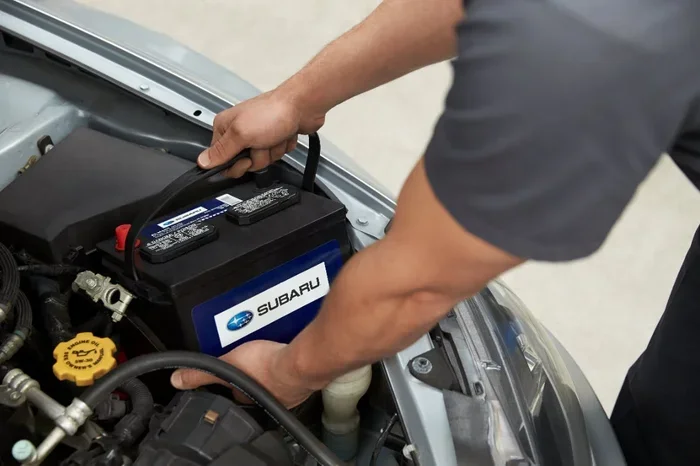
- Open the hood and locate the battery. In most Subarus, the battery sits in the engine bay on the left side.
- Identify the negative terminal. It will have a minus sign (-) and usually a black cable. This is the terminal you want to disconnect first.
- Use a 10mm wrench to loosen the nut on the negative terminal clamp. Once loose, carefully lift the cable off the terminal post.
- Wrap the cable end in a cloth or tuck it away so it cannot accidentally touch the terminal.
- Wait 15 to 30 minutes. This allows the capacitor in the ECU to fully discharge and clear all stored data.
- Reconnect the negative terminal. Place the cable back on the post and tighten the nut securely.
- Start the engine and let it idle for a few minutes. The dashboard lights may flicker, and that is completely normal.
Quick Tip: If your Subaru has a battery saver mode or a power management system, consult your owner manual before disconnecting. Some newer models may require a specific procedure to avoid resetting the infotainment system entirely.
One thing to keep in mind. If you disconnect the battery for too long, you may need to reset your radio code and clock. Some Subarus also require you to re-enter a security PIN for the audio system. Write down your radio code before you disconnect if you have it stored somewhere safe.
Method 2: The ECU Reset
The ECU, or engine control unit, is the brain of your Subaru. It manages fuel injection, ignition timing, and idle speed. When you replace the battery, the ECU loses its stored adaptive values. But sometimes it does not fully clear fault codes or reset itself properly. A dedicated ECU reset ensures everything starts fresh.
If you want to take a more hands-on approach, you can reprogram your ECM yourself using an OBD-II scanner. This method gives you more control over what gets cleared and what stays stored.
What You Will Need
- An OBD-II diagnostic scanner (Bluetooth or wired)
- A smartphone or tablet with compatible software
- Your Subaru’s OBD-II port location (usually under the dashboard on the driver side)
How to Do It
- Plug the scanner into the OBD-II port under your dashboard.
- Turn the ignition to the “ON” position without starting the engine.
- Open the scanning app on your phone or tablet and connect to the scanner.
- Read all fault codes and write them down. This helps you track what was stored before the reset.
- Clear all codes using the scanner’s menu. This erases the stored error data from the ECU.
- Drive your Subaru for 20 to 30 minutes. The ECU will begin relearning your driving patterns and adaptive values.
Expert Insight: After clearing codes, drive in different conditions. Highway cruising, city stop-and-go, and hill climbing all help the ECU adapt to your new battery faster. The more varied your driving, the quicker the system relearns.
Some Subaru owners worry that clearing codes will cause problems. It does not. The ECU simply forgets temporary fault codes that were caused by the old battery dying or low voltage. Permanent codes related to actual mechanical issues will return after a few drive cycles, and that is a good sign because it means the problem still needs attention.
Common Issues After a Subaru Battery Replacement
Even after you reset your battery, you might notice a few things that seem off. This is normal and usually resolves itself within a few days of driving. Let us look at the most common issues and what to do about them.
Dashboard Warning Lights
After a battery swap, you may see several warning lights illuminate on your dashboard. The check engine light, battery light, and even the VDC (Vehicle Dynamics Control) light can come on. These lights are triggered by the sudden power loss during the battery change. They do not mean something is broken.
Here is what to do:
- Start the engine and let it idle for 5 to 10 minutes.
- Check if the lights turn off after a few drive cycles.
- If a light stays on, use an OBD-II scanner to check for codes.
- Clear any codes related to the battery change and monitor the situation.
If a warning light persists after multiple resets, it could indicate a deeper issue. In that case, a visit to a mechanic or a Subaru dealership is a smart move. You can also check if Jiffy Lube diagnostics are available in your area for a quick code check.
Radio and Infotainment Reset
Your Subaru’s radio and infotainment system stores a security code that gets wiped when the battery is disconnected. If you do not have the code, you may need to contact a Subaru dealer to retrieve it. The code is usually printed on a card that came with your vehicle when you purchased it. Check your glove box or paperwork if you cannot find it.
For the clock and radio presets, simply reset them manually once the system powers back up. This takes about two minutes and is a minor inconvenience compared to the benefits of a full battery reset.
Power Windows and Sunroof Recalibration
Some Subaru models require you to recalibrate the power windows and sunroof after a battery disconnect. The auto-up and auto-down features may not work correctly until you run through a quick reset sequence.
Here is the general procedure for most Subarus:
- Turn the ignition to the “ON” position.
- Press and hold the window switch all the way down.
- Continue holding for 2 to 3 seconds after the window is fully down.
- Release the switch and try the auto-up function.
- Repeat for each window and the sunroof if equipped.
How to Prevent Battery Drain After Replacement
Once you have reset your Subaru battery, you want to keep it healthy for as long as possible. A new battery is an investment, and proper care extends its life significantly.
Driving Habits That Help
- Take longer drives: Short trips do not give your alternator enough time to fully recharge the battery. Aim for drives of 20 minutes or longer at least a few times a week.
- Turn off accessories before shutdown: Headlights, radio, and climate control put extra load on the battery when you turn the key off.
- Avoid frequent short trips: Each start draws a large burst of power. Frequent short trips do not allow the battery to recover fully.
If you notice your car won’t start right after turning it off, it could be a sign of a parasitic drain or a failing alternator. Have the electrical system checked to rule out these issues before they damage your new battery.
Using a Battery Tender
A Subaru battery tender is a small device that maintains your battery charge when the car is not in use. It connects to the battery terminals and provides a low, steady charge. This is especially useful if you park your Subaru for extended periods, such as during winter or a vacation.
Battery tenders are affordable and easy to use. Simply clip the positive and negative leads to the corresponding terminals and plug the tender into a wall outlet. Most modern tenders are smart enough to stop charging when the battery is full, so they are safe to leave connected indefinitely.
Regular Terminal Cleaning
Corrosion on battery terminals is one of the leading causes of poor electrical connections and starting problems. Inspect your terminals every few months. If you see a white or greenish buildup, clean it off with a mixture of baking soda and water and a wire brush. This simple habit keeps your connection strong and your battery performing at its best.
When to Seek Professional Help
Most Subaru battery resets are DIY-friendly and do not require a trip to the mechanic. But there are situations where professional help makes sense.
If you have tried the terminal disconnect method and the dashboard warning lights still do not turn off, there may be a deeper electrical issue. If the car struggles to start even after a full reset, the new battery might be defective or the alternator might not be charging properly.
You should also seek professional help if:
- Your Subaru requires a specialized dealer-level reset tool.
- Multiple systems (infotainment, climate control, power features) are still malfunctioning after a reset.
- You are uncomfortable working with the battery terminals or electrical components.
- The check engine light comes back immediately after clearing codes.
A Subaru dealership or trusted independent mechanic can run a full diagnostic and perform a professional-level reset. They also have access to Subaru-specific software that can recalibrate all modules at once. This is especially helpful for newer models with complex computer systems.
Remember, a battery reset is just one part of Subaru maintenance. Regular oil changes, tire rotations, and fluid checks all contribute to a healthy, long-lasting vehicle.
Subaru Model-Specific Reset Tips
While the general methods in this guide apply to all Subaru models, some models have unique quirks worth noting.
- Subaru Outback: The Outback’s power management system may require a longer reset time. Wait at least 30 minutes after disconnecting the negative terminal for a full reset.
- Subaru Forester: Some Forester models have a battery saver mode that keeps certain systems powered even when the engine is off. Disconnect the terminal for a full hour to override this.
- Subaru WRX: The WRX’s ECU is more sensitive to voltage changes. After a battery swap, drive gently for the first 20 minutes to let the system recalibrate smoothly.
- Subaru Legacy: The Legacy’s infotainment system may require a factory reset code. Check the owner manual or contact a dealer for the specific code.
These small differences do not change the core process. They just mean you might need to be a little more patient with certain models. The payoff is worth it. A properly reset battery means a smoother-running Subaru and fewer surprises on the road.
Final Thoughts
Resetting your Subaru battery after replacing it is one of those simple maintenance steps that makes a big difference. Whether you choose the quick terminal disconnect or the more thorough ECU reset, the process is manageable for almost any car owner. It takes less than an hour, requires minimal tools, and gives your Subaru a clean start with your new battery.
Do not skip this step. A proper reset clears error codes, restores adaptive learning, and helps your vehicle run at its best. Combine it with good driving habits and regular maintenance, and your Subaru battery will last for years.
Your Subaru is a well-engineered machine. Give it the reset it deserves after every battery change, and it will reward you with reliable performance mile after mile.
Frequently Asked Questions
How long should I disconnect my Subaru battery to reset it?
Disconnect the negative terminal for 15 to 30 minutes for a basic reset. If your Subaru has a complex electrical system or you are resetting the ECU, waiting 30 minutes to an hour ensures all stored data is fully cleared. The longer wait gives the capacitors in the computer modules time to discharge completely.
Will resetting my Subaru battery erase my radio code?
Yes, disconnecting the battery will erase your radio security code and station presets. Keep your radio code handy before you start. The code is usually on a card in the owner’s manual or glove box. If you cannot find it, a Subaru dealer can retrieve it using your vehicle identification number.
Do I need a special tool to reset my Subaru battery?
For the basic terminal disconnect method, you only need a 10mm wrench. If you want to clear ECU fault codes, an OBD-II scanner is helpful. You can buy a basic scanner for under $30, or use a Bluetooth scanner with a free smartphone app. No specialty tools are required for a standard battery reset.
Why is my check engine light still on after resetting the battery?
The check engine light may stay on if there is a real mechanical issue beyond the battery change. It could also be a sensor that needs a few drive cycles to recalibrate. If the light persists after two or three resets, have a mechanic run a diagnostic to identify the underlying cause.
Can I drive my Subaru immediately after replacing the battery?
Yes, you can drive right away after installing a new battery. However, it is a good idea to let the engine idle for a few minutes before driving. This gives the ECU time to recognize the new battery and begin recalibrating adaptive values. Drive gently for the first 10 to 15 minutes to help the system adjust.
How often should I replace my Subaru battery?
Most Subaru batteries last between 3 to 5 years depending on driving habits and climate. Extreme heat and cold shorten battery life. If you notice slow cranking, dim headlights, or frequent jump starts, it is time to consider a replacement. Regular battery testing at a service center can catch a failing battery before it leaves you stranded.