Does Carfax Show Warranty Information Before You Buy
Does Carfax show warranty information? The short answer is yes, but with limits. A Carfax vehicle history report includes manufacturer warranty details, service records, and recall information that can reveal whether a used car is still covered. Understanding what Carfax displays helps you make a smarter used car buying decision and avoid costly surprises. This guide breaks down exactly what you will find and what you might miss.
This is a comprehensive guide about Does Carfax Show Warranty Information?.
Key Takeaways
- Carfax includes warranty status: It shows whether the manufacturer warranty is still active based on the vehicle’s age and mileage.
- Service records matter: Regular maintenance logged in Carfax can hint at how well the previous owner cared for the car.
- Carfax is not a substitute for a physical inspection: Always get a pre-purchase inspection from a trusted mechanic.
- Extended warranties may not appear: Third-party or dealership extended warranties are not always captured in Carfax reports.
- Use Carfax alongside other tools: Pair your Carfax report with a VIN check and a test drive for the best results.
- Free Carfax reports exist: You can access limited reports for free on certain platforms before committing to a full purchase.
[FEATURED_IMAGE_PLACEHOLDER]
Does Carfax Show Warranty Information Before You Buy
Shopping for a used car can feel overwhelming. There are so many things to check. Mileage. Accident history. Title status. And then there is the question of warranty. Does Carfax show warranty information before you buy? This is one of the most common questions buyers ask, and the answer is more nuanced than you might expect.
Carfax is one of the most popular vehicle history report services on the market. Millions of people rely on it when they are buying a used car. But knowing what Carfax does and does not show can save you from making a expensive mistake. In this article, we will walk through exactly what warranty information appears on a Carfax report. We will also cover what is missing and how to fill in those gaps.
By the end of this guide, you will know whether a Carfax report alone is enough to confirm warranty coverage. You will also learn how to combine Carfax with other tools for a complete picture. Let us dive in.
What Is Carfax and Why Does It Matter?
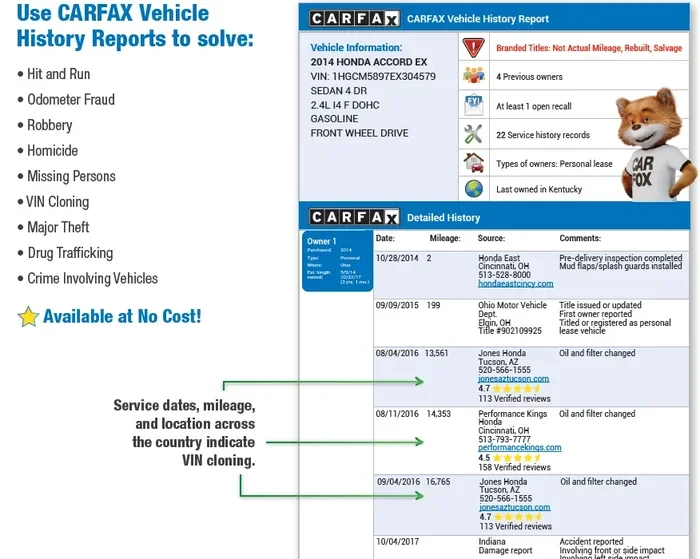
Carfax is a company that collects vehicle data from many sources. These sources include state DMV records, insurance companies, and service shops. The goal is to give buyers a clear picture of a car’s past. A single Carfax report can reveal a lot. But not everything.
When you are considering a used car purchase, a Carfax report acts like a background check. It tells you about accidents, title problems, and service history. Many sellers will offer to pull a report for you. If they hesitate, that is a red flag worth paying attention to.
How Carfax Gathers Its Data
Carfax pulls information from thousands of sources across North America. Here are the main ones:
- State motor vehicle departments
- Insurance claim databases
- Police accident reports
- Service and repair facilities
- Manufacturer warranty records
- Odometer readings from inspections
Because of these many data points, Carfax has a strong reputation. However, it is important to understand that no single report tells the full story. Gaps in data can happen. A car that was never serviced at a licensed shop might have blank spots in its report.
Does Carfax Show Warranty Information?
This is the big question. And the answer is: yes, but with important limitations. Carfax can display manufacturer warranty information in certain cases. Let us break down exactly what you will see and what you might miss.
Manufacturer Warranty Details on Carfax
When a vehicle still falls within its factory warranty period, Carfax may show that information. Most new cars come with a basic limited warranty that covers around three years or 36,000 miles. The powertrain warranty often extends to five years or 60,000 miles. If the car you are looking at is still within these windows, Carfax may reflect that.
Carfax pulls this data from manufacturer records. So if the warranty is active, it should appear in the report. However, the report will typically show the warranty status rather than the full terms and conditions. You will see whether the warranty is active or expired, but not the fine print.
What Warranty Information Carfax Typically Includes
Here is what you can generally expect to find on a Carfax report regarding warranty:
- Warranty status: Active or expired based on the vehicle’s age and mileage
- Manufacturer warranty period: The original coverage dates
- Service history tied to warranty claims: Repairs covered under warranty
- Recall information: Open recalls that may affect coverage
- Odometer readings: To confirm warranty mileage limits have not been exceeded
The warranty section of a Carfax report can be very helpful. It gives you a quick snapshot of what is still covered. But do not treat it as gospel. Always verify with the manufacturer directly if warranty coverage is a dealbreaker for you.
What Carfax Does NOT Show About Warranty
Now for the part that surprises many buyers. Carfax does not always show extended warranties. If the previous owner purchased a third-party or dealership extended warranty, that information may not appear on the report. Carfax focuses primarily on manufacturer records. Third-party warranty providers are not always connected to the Carfax data network.
This is a significant gap. An extended warranty can add real value to a used car. If you are relying solely on Carfax to confirm coverage, you could miss important details. Always ask the seller directly about any additional warranties. Then follow up with the warranty provider to verify.
Also, Carfax may not show service contract details or roadside assistance plans. These are separate from the factory warranty and often exist outside the data sources Carfax uses. Being aware of these limitations helps you set realistic expectations.
How to Read a Carfax Report for Warranty Clues
Reading a Carfax report effectively requires knowing where to look. The report is packed with information. But the warranty-related data lives in specific sections. Here is how to navigate it like a pro.
Understanding the Service History Section
The service history section is one of the most valuable parts of any Carfax report. It shows every recorded service visit. This includes oil changes, tire rotations, and major repairs. When a car has been serviced at a dealership, the warranty work is often logged here.
If you see multiple dealership visits listed, that is a good sign. It suggests the previous owner took the car in for covered repairs. On the other hand, a lack of service records does not necessarily mean the warranty was never used. It might just mean the car was serviced elsewhere or records were not shared.
Checking the Title and Ownership Sections
The title section can also offer clues about warranty status. A clean title with a single owner often means the car was well maintained. Multiple owners might suggest the warranty was transferred or that the car was sold before coverage ended.
Pay attention to the ownership timeline. If a car was owned for only a short period, the warranty might still be valid. This is especially true for certified pre-owned vehicles that are sold within the original warranty window.
Looking for Recall and Safety Information
Carfax also includes recall data. Open recalls can affect warranty coverage in some cases. Manufacturers may extend warranty coverage to address certain defects. Checking the recall section helps you understand if any outstanding issues exist.
If you spot an open recall, contact the manufacturer or a local dealer. They can confirm whether the recall repair is covered under warranty. This is a practical step that many buyers skip, and it can save you money and headaches.
Carfax vs Other Vehicle History Report Services
Carfax is not the only option available. Several other services offer vehicle history reports. Each has its strengths and weaknesses when it comes to warranty information.
Carfax vs AutoCheck
AutoCheck is a competitor owned by Experian. Both services pull from similar data sources. But they present the information differently. AutoCheck uses a scoring system that rates the vehicle’s overall history. Carfax provides a more detailed narrative report.
When it comes to warranty information, both services offer similar coverage. Neither one captures extended warranties from third-party providers. If warranty details are critical to your decision, you may want to use both services for a fuller picture.
Free vs Paid Reports
Many online platforms offer free Carfax reports. These are often limited versions. They may show basic accident and title information but not the full warranty details. A paid report gives you access to the complete service history and warranty status.
If you are serious about buying a car, investing in a full report is worth it. The cost is typically around $40 to $50 for a single report. That is a small price compared to the cost of an unexpected repair on an uncovered vehicle.
Common Mistakes Buyers Make With Carfax Warranty Data
Even experienced car buyers make mistakes when interpreting Carfax warranty data. Here are the most common ones to avoid.
Assuming Carfax Is Always Complete
This is the number one mistake. Carfax is a powerful tool, but it is not infallible. Records can be missing. Data can be delayed. A car that was recently serviced might not show up immediately in the system. Never assume the Carfax report tells you everything you need to know.
Always supplement your Carfax report with a physical inspection. A trusted mechanic can spot issues that no report can capture. They can also confirm whether the car has been properly maintained.
Confusing Expired Warranty With a Bad Car
Just because the warranty has expired does not mean the car is a bad buy. Many vehicles remain reliable long after their factory warranty ends. Regular maintenance and careful driving play a bigger role in longevity than warranty coverage ever could.
If you are considering a car with an expired warranty, look at the service history carefully. A well-documented maintenance record can be more reassuring than an active warranty. This is where the service records in your Carfax report really shine.
Not Asking the Seller About Warranty
Sellers are not always upfront about warranty status. Some might not even know the details. That is why it is on you to ask. Request the original purchase paperwork if possible. Check the manufacturer’s website using the VIN. And consider calling a local dealer with the VIN to confirm warranty status.
Taking these extra steps takes a little time. But it can save you thousands of dollars in repair costs down the road.
Pro Tips for Using Carfax When Buying a Used Car
Getting the most out of your Carfax report requires a smart approach. Here are some expert-backed tips to help you along the way.
Always Run Your Own Report
Do not rely solely on the seller’s report. Ask for the VIN and run your own Carfax check. This ensures you are getting an unbiased and current report. You can also compare the seller’s report with your own to spot any discrepancies.
Many sellers will have a report ready. But their version might be outdated or selectively shared. Running your own report puts you in control of the information.
Cross Reference With a Pre-Purchase Inspection
A Carfax report is a great starting point. But it should never be the final word. A pre-purchase inspection by a qualified mechanic adds a physical layer of verification. The mechanic can check for hidden damage, worn components, and signs of poor maintenance.
Think of Carfax as the background check and the inspection as the physical exam. Both are essential. Together, they give you confidence in your purchase decision.
Use the VIN to Verify Warranty Directly
The vehicle identification number is your best friend when buying a used car. Use it to check warranty status directly with the manufacturer. Most major automakers have online tools where you can enter the VIN and see the exact warranty coverage.
This step takes just a few minutes. But it can confirm or contradict what the Carfax report shows. If there is a mismatch, dig deeper. The manufacturer’s records are typically the most accurate source.
What to Do If Carfax Shows No Warranty Information
Sometimes a Carfax report will not include any warranty details. This can happen for several reasons. The car may be too old. The records may not have been shared. Or the warranty may have been voided due to neglect or misuse.
If your Carfax report shows no warranty information, do not panic. Here is what you should do next.
- Check the vehicle’s age and mileage against typical warranty periods
- Contact the manufacturer with the VIN to confirm warranty status
- Ask the seller if they have any documentation of warranty coverage
- Consider purchasing an extended warranty from a reputable provider
- Factor the lack of warranty into your negotiation and pricing
Missing warranty information does not automatically mean the car is a bad buy. It simply means you need to do a little more homework. The extra effort is well worth the peace of mind it brings.
Final Thoughts
Does Carfax show warranty information before you buy? Yes, it can. But it is not a complete warranty database. Carfax provides valuable insights into manufacturer warranty status, service history, and recall information. It is a powerful tool when used correctly.
However, Carfax has its blind spots. Extended warranties, service contracts, and third-party coverage may not appear. That is why a multi-layered approach works best. Use Carfax as one tool in your toolbox. Pair it with a VIN check, a pre-purchase inspection, and direct verification with the manufacturer.
Buying a used car should feel empowering, not stressful. The more information you have, the better your decisions will be. Carfax gives you a strong foundation. But the final call is always yours. Trust the data, ask the right questions, and never skip the inspection.
Whether you are buying your first used car or your fifth, understanding warranty information on Carfax puts you ahead of most buyers. Use this knowledge wisely. And drive off with confidence.
Frequently Asked Questions
Can I get a free Carfax report that shows warranty details?
Some platforms offer free Carfax reports, but they are usually limited. Full warranty details are typically only available in a paid report. If warranty information is important to you, investing in a complete report is the best choice.
Does Carfax show if a car is still under the powertrain warranty?
Carfax may show powertrain warranty status if the vehicle is still within the coverage period. The report pulls from manufacturer records. However, you should always verify directly with the manufacturer for the most accurate information.
What happens if Carfax shows no service records at all?
Missing service records do not necessarily mean the car was poorly maintained. Some vehicles were serviced at independent shops that do not report to Carfax. Always ask the seller for maintenance documentation and consider a pre-purchase inspection.
Is Carfax accurate for warranty information?
Carfax is generally accurate for manufacturer warranty data. It pulls from official manufacturer and dealership records. However, third-party warranties and recent warranty changes may not be reflected immediately. Always cross-check with the manufacturer when warranty details are critical.
Should I rely on Carfax alone before buying a used car?
No. Carfax is a valuable tool but not a complete picture. Always combine it with a physical inspection from a trusted mechanic. You should also verify warranty details directly with the manufacturer. A multi-step approach gives you the best protection.
Can an extended warranty show up on Carfax?
Extended warranties from third-party providers are not always captured in Carfax reports. Carfax primarily tracks manufacturer warranty records. If you are relying on an extended warranty, contact the warranty provider directly to confirm coverage details and transferability.