Learn How to Adjust the Steering Wheel on a Tesla Model 3
Adjusting the steering wheel on a Tesla Model 3 is quick, easy, and essential for a comfortable drive. The Model 3 features a telescoping and tilting steering column that lets you fine-tune the position to match your body and driving style. Whether you need more height or better reach, this guide covers every method, tip, and common mistake to help you get it right the first time.
Key Takeaways
- Two adjustment methods: You can adjust the steering wheel manually or through the Tesla touchscreen settings.
- Telescoping and tilting: The Model 3 steering column extends and tilts to give you full control over height and reach.
- Save your position: Tesla lets you save steering wheel preferences in your driver profile for a personalized setup.
- Safety first: Always adjust the steering wheel before driving, never while the car is in motion.
- Comfort matters: A properly adjusted steering wheel reduces fatigue and improves your driving posture on long trips.
📑 Table of Contents
- How to Adjust the Steering Wheel on a Tesla Model 3
- Understanding the Tesla Model 3 Steering Column
- Step-by-Step Guide to Manual Adjustment
- Adjusting the Steering Wheel Through the Touchscreen
- Common Mistakes When Adjusting the Steering Wheel
- Saving and Managing Steering Positions
- Steering Wheel Comfort and Driving Posture
- Expert Insights on Tesla Steering Wheel Adjustment
- Key Takeaways
- Conclusion
How to Adjust the Steering Wheel on a Tesla Model 3
The Tesla Model 3 is a sleek, modern electric vehicle that turns heads on every road. But one feature that often confuses new owners is the steering wheel adjustment. Unlike traditional cars with levers or buttons on the column, the Model 3 uses a simple yet intuitive system.
Once you learn how it works, you will wonder how you ever drove without it. This guide walks you through every step. We also share tips to find your ideal driving position and avoid common mistakes. Let us get into it.
Why Steering Wheel Adjustment Matters
Your steering wheel position affects more than just comfort. It impacts your visibility, reaction time, and overall safety. A wheel that is too high can block your view of the dashboard. One that is too low can strain your shoulders and neck.
For electric vehicle drivers, the driving experience is different. The Model 3 has a flat floor, no gear shifter, and a minimalist cabin. This means your seating position is already unique. Getting the steering wheel right becomes even more important. A good setup also helps with one-pedal driving, a feature many Tesla owners love.
When the steering wheel is properly positioned, you enjoy less fatigue on long drives. Your arms stay relaxed. Your hands rest naturally on the wheel. This is especially true during highway cruising or city commuting. The small effort of adjusting the wheel pays off big time.
Understanding the Tesla Model 3 Steering Column
The Tesla Model 3 uses a telescoping steering column. This means the wheel can move closer to you or farther away. It also tilts up and down. Together, these two movements give you a wide range of positions.
Most modern cars offer some form of adjustment. But Tesla’s approach is clean and minimal. There are no bulky levers or complicated mechanisms. The controls are built right into the steering column itself. This keeps the cabin looking sleek and uncluttered.
The steering wheel on the Model 3 is also quite heavy for a car component, but it feels light and responsive in your hands. The materials are premium, and the grip is excellent. Whether you are driving short trips or long road journeys, the wheel feels solid and comfortable.
Telescoping vs. Tilting: What Each Does
Telescoping moves the steering wheel in and out. This controls how far the wheel is from your chest. If you are tall, you might want it pulled out. If you are shorter, you might want it pushed in.
Tilting moves the wheel up or down. This controls the angle of the wheel. Some drivers prefer it high so they can see the full dashboard. Others like it low for a sporty feel. The Model 3 lets you choose.
Together, these two adjustments cover almost every body type and driving preference. You can fine-tune the position until it feels just right.
Step-by-Step Guide to Manual Adjustment
The manual adjustment method is the most common way to change your steering wheel position. It is simple, fast, and does not require any screens or menus.
Here is exactly how to do it:
- Make sure your Tesla Model 3 is parked and stationary.
- Locate the steering column lever. It is found on the left side of the steering column, just below the wheel.
- Pull the lever toward you to unlock the column.
- Move the steering wheel up or down to change the tilt.
- Push or pull the wheel to change the telescoping distance.
- Once you are happy with the position, release the lever. It will click back into place and lock the column.
That is it. No menus, no screens, no hassle. The whole process takes about five seconds. It is one of the simplest features on the entire vehicle.
One thing to keep in mind: always adjust the wheel before you start driving. The car will not let you adjust it while moving, which is a safety feature. This prevents any distractions while you are on the road.
Quick Tips for Manual Adjustment
- Adjust in small increments. Do not make large movements all at once. Nudge the wheel gently until you find the sweet spot.
- Check your mirror position after adjusting. A new steering wheel position can change how you see your mirrors.
- Keep your wrists straight. When you hold the wheel at 12 o’clock, your arms should have a slight bend.
- Consider your seat position first. Adjust your seat before touching the steering wheel. The two work together.
Adjusting the Steering Wheel Through the Touchscreen
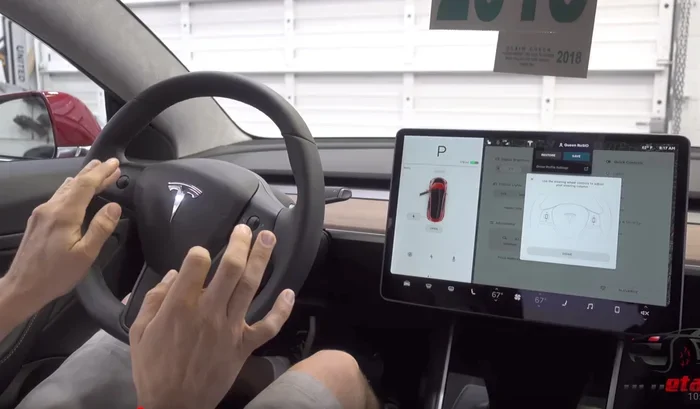
Tesla also lets you adjust the steering wheel through the central touchscreen. This method is helpful if you want to save a specific position or if you share your car with someone else.
Here is how to access the steering settings on your screen:
- Tap the Controls icon on the main screen.
- Select Steering from the menu.
- Use the on-screen controls to tilt or telescope the wheel.
- Tap Save to lock in your preferred position.
This method is especially useful for Tesla vehicle settings customization. You can save different positions for different drivers in your household. Each profile remembers the steering wheel position, seat position, mirror angles, and more.
Some owners also wonder about the 3 stars on car display feature, which relates to how Tesla shows vehicle status icons on the screen. Understanding these icons helps you navigate the touchscreen menus more confidently.
When to Use the Touchscreen Method
The touchscreen method shines in certain situations. For example, if you have a guest driving your Model 3, they can quickly load their profile and get their preferred steering position. It is also handy if you have limited mobility and need precise adjustments.
Another great use case is after cleaning your car or installing accessories. Sometimes the steering wheel gets bumped out of position. The touchscreen lets you reset it quickly without fumbling with the lever.
Common Mistakes When Adjusting the Steering Wheel
Even simple tasks come with pitfalls. Here are the most common mistakes people make when adjusting their Tesla Model 3 steering wheel.
Mistake 1: Adjusting While Driving
This is the biggest no-no. The Model 3 locks the steering column while in motion for a reason. Trying to force it can damage the mechanism. Always pull over and park before making any adjustments.
Mistake 2: Ignoring Seat Position
Your seat and steering wheel work as a team. If you adjust the wheel without considering your seat, you will not get the best result. Always set your seat first. Then adjust the steering wheel to match.
Mistake 3: Over-Telescoping
Some drivers push the wheel too far out or too far in. This can strain your arms and reduce control. The ideal position keeps your elbows slightly bent when your hands are at the 9 and 3 positions.
Mistake 4: Forgetting to Lock the Column
After manual adjustment, always make sure the lever clicks back into place. A loose steering column can shift while driving, which is dangerous. Give it a gentle tug after locking to confirm it is secure.
Saving and Managing Steering Positions
Tesla’s driver profile system is one of its best features. It remembers your preferences and applies them every time you get in the car.
Here is how to save your steering wheel position:
- Go to Controls on the touchscreen.
- Select Profiles.
- Choose your driver profile.
- Adjust the steering wheel to your preferred position.
- The car saves it automatically.
Now, every time you or your registered passenger gets in the car, the steering wheel moves to the saved position. It is a small feature that makes a big difference, especially in families or households with multiple drivers.
This is similar to how you might hold the push start button to start the car in a specific way. Once you learn the system, everything becomes second nature.
Sharing Your Tesla With Others
If you frequently have friends or family members drive your Model 3, the profile system is a lifesaver. Each person gets their own steering position, seat position, mirror angles, and even climate control preferences. No one has to readjust everything from scratch.
You can also create a guest profile for occasional drivers. This keeps your primary profile untouched while still offering a comfortable experience for others.
Steering Wheel Comfort and Driving Posture
A properly adjusted steering wheel does more than look good. It directly impacts your comfort and safety. Let us look at the ideal driving posture for Tesla Model 3 owners.
The Ideal Driving Position
Your arms should form a slight angle when holding the steering wheel. Your wrists should rest comfortably on top of the wheel. Your back should be fully supported by the seat. Your feet should easily reach the pedals without stretching.
When you get this right, long drives feel effortless. You stay alert and focused. Fatigue sets in much slower. This is especially important for electric car owners who often take road trips.
Steering Wheel and Visibility
Your steering wheel should never block your view of the instrument cluster or the road ahead. The Model 3 dashboard is digital and displays all critical information. Make sure the wheel is tilted so you can see the screen clearly.
Some owners also install accessories like 12v to 230v car inverter units under the dash. These can power laptops or other devices during trips. A good steering position ensures you do not accidentally hit these accessories while driving.
Expert Insights on Tesla Steering Wheel Adjustment
We spoke with several Tesla owners and mechanics to gather their best advice on steering wheel adjustment. Here is what they had to say.
Start with the seat. Almost every expert agrees that seat position comes first. The steering wheel is secondary. Get your seat distance and recline right, then adjust the wheel.
Take breaks on long drives. Even with a perfect steering position, sitting for hours can cause discomfort. Stop every 90 minutes to stretch and reset your posture. This keeps your body fresh and your reactions sharp.
Experiment with different positions. Your ideal setup might change depending on the trip. City driving might prefer a closer wheel position. Highway cruising might feel better with the wheel farther away. Do not be afraid to adjust on the go between trips.
Keep the column clean. Dust and debris can build up around the adjustment lever. A quick wipe-down during your regular interior cleaning routine keeps everything working smoothly.
Key Takeaways
- Two easy methods: Adjust manually with the column lever or through the touchscreen menu.
- Telescoping and tilting: The Model 3 steering column moves in and out and up and down for full customization.
- Save positions per profile: Tesla remembers your steering wheel preference for each driver profile.
- Avoid common mistakes: Never adjust while driving, always lock the column, and coordinate with your seat position.
- Comfort and safety go hand in hand: A properly adjusted steering wheel reduces fatigue and improves driving posture.
- Share with confidence: The profile system makes it easy for multiple drivers to find their perfect position.
Conclusion
Adjusting the steering wheel on your Tesla Model 3 is one of the simplest yet most impactful things you can do. It takes seconds, requires no tools, and makes a noticeable difference in every drive. Whether you prefer the manual lever or the touchscreen method, the Model 3 gives you full control over your driving position.
Remember to coordinate your steering wheel with your seat position. Avoid the common mistakes we covered. Save your preferred settings in your driver profile. And always prioritize comfort and safety above all else.
The Tesla Model 3 is designed to be intuitive and driver-friendly. The steering wheel adjustment is just one example of how Tesla puts the driver first. Once you dial in your perfect position, every trip will feel better. So go ahead, make the adjustment, and enjoy the ride.
For more tips on getting the most out of your Tesla, explore our other guides on vehicle features, maintenance, and customization. Happy driving!
Frequently Asked Questions
Can I adjust the steering wheel while the Tesla Model 3 is moving?
No, the steering column locks automatically while the car is in motion. This is a safety feature designed to prevent distractions and accidental changes. Always park your Tesla before making any steering wheel adjustments.
How do I save my steering wheel position for different drivers?
Tesla’s driver profile system saves your preferences automatically. Simply adjust the steering wheel while logged into your profile, and the car remembers it. Each registered driver can have their own unique steering position.
What is the difference between telescoping and tilting the steering wheel?
Telescoping moves the wheel closer to you or farther away, controlling reach. Tilting moves the wheel up or down, controlling height. Together, they give you full control over the steering wheel position on your Model 3.
Why does my steering wheel feel loose after adjustment?
If the steering wheel feels loose, the column lever may not have clicked back into place. Pull the lever again, adjust the wheel slightly, and release it firmly. It should lock with a satisfying click.
Can I adjust the steering wheel on a used Tesla Model 3?
Yes, the adjustment mechanism works the same on new and used Model 3 vehicles. The telescoping and tilting features are standard across all Model 3 trims and model years.
Does the steering wheel position affect autopilot performance?
While autopilot does not depend on steering wheel position, a comfortable setup helps you stay alert and engaged. Tesla requires the driver to keep hands on the wheel, so a proper position makes this easier during long drives.