Do You Have to Reprogram a Toyota Key Fob After Battery
You usually do not have to reprogram a Toyota key fob after changing the battery. Most Toyota models retain their programming even after a battery swap. However, some older models or specific situations may require a simple reset. This guide walks you through everything you need to know about Toyota key fob battery replacement and reprogramming.
Have you just popped open your Toyota key fob to swap out the dead battery? Maybe the remote stopped working, or the signal range dropped to almost nothing. Either way, you are standing there with a tiny coin cell battery in your hand and one big question: do you have to reprogram a Toyota key fob after changing the battery?
The good news is that most of the time, the answer is no. You put the new battery in, snap the fob back together, and you are good to go. But there are exceptions. Some older Toyota models and certain situations do call for a quick reprogramming session. Let us walk through everything you need to know so you do not waste time or money.
In this guide, we cover how Toyota key fobs work, when reprogramming is necessary, and exactly how to handle a Toyota key fob battery replacement like a pro. Whether you drive a brand-new RAV4 or a classic Camry, you will find the answers here.
Key Takeaways
- Most Toyota key fobs do not need reprogramming after a simple battery change.
- The CR2032 battery is the most common type used in Toyota remotes.
- Older Toyota models may require a quick reset after battery replacement.
- You can reprogram your key fob yourself in most cases without expensive dealer visits.
- Signs of a failing key fob include reduced range and unresponsive buttons.
- Keeping spare batteries on hand saves time and hassle.
- Contact a dealer if self-programming methods do not work for your specific Toyota model.
📑 Table of Contents
- Understanding Your Toyota Key Fob and Battery
- Do You Need to Reprogram After a Battery Change?
- Step-by-Step Guide to Changing Your Toyota Key Fob Battery
- When Reprogramming IS Necessary
- How to Reprogram Your Toyota Key Fob
- Preventing Key Fob Issues After Battery Replacement
- Frequently Asked Questions About Toyota Key Fob Programming
- Final Thoughts
Understanding Your Toyota Key Fob and Battery
How Does a Toyota Key Fob Actually Work?
Your Toyota key fob is a small but clever device. It sends a coded radio signal to your car when you press a button. The car receives that signal and responds by locking, unlocking, or even starting the engine. This whole process happens in milliseconds.
Inside every Toyota remote key, there is a tiny circuit board and a battery. The battery powers the signal transmitter. When the battery weakens, the signal gets weaker too. That is when you start noticing problems like the remote not working from across the parking lot.
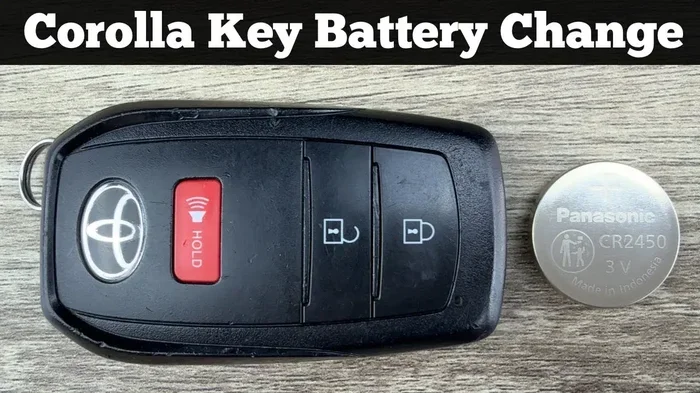
Most Toyota key fobs use a CR2032 battery. This is a standard 3-volt coin cell battery. You can find it at almost any grocery store, pharmacy, or gas station. It costs about a dollar and lasts anywhere from two to four years depending on how often you use the remote.
Why Does the Battery Matter So Much?
The battery is the lifeblood of your Toyota smart key system. Without enough power, the fob cannot send a strong enough signal to reach the car. You might still get the door locks to work if you stand right next to the vehicle. But step back a few feet, and nothing happens.
A weak battery can also cause intermittent issues. One day the remote works fine. The next day, you are standing outside your car pressing the button like a maniac. These unpredictable patterns are a telltale sign that the key fob battery needs replacing.
Do You Need to Reprogram After a Battery Change?
The Short Answer
For the vast majority of Toyota vehicles, changing the battery does not erase the programming. The fob remembers its pairing with the car. You simply pop open the case, swap the old battery for a fresh one, and continue using it as normal. That is it.
However, this is not true for every single Toyota model out there. A handful of older vehicles and some specific trim levels do require a reprogramming step after a battery swap. And sometimes, the reprogramming happens on its own during the battery change process. Let us dig deeper into when each scenario applies.
What Happens When You Change the Battery?
When you remove the battery from your Toyota key fob, the fob loses power temporarily. The memory chip inside the fob is designed to hold its programming even without power. Think of it like your phone saving data when the battery dies. The information stays put.
That said, there are a few situations where the programming can get disrupted:
- You accidentally press buttons while the fob is open.
- The battery orientation is wrong when you insert the new one.
- You use a low-quality replacement battery that does not provide stable power.
- Your Toyota model requires a reset after battery replacement (more on this below).
If any of these happen, your fob might stop communicating with the car. In that case, you will need to reprogram it. But do not panic. Reprogramming is usually quick and easy.
Step-by-Step Guide to Changing Your Toyota Key Fob Battery
What You Will Need
Before you start, gather these simple items:
- A CR2032 battery (brand name or generic both work)
- A small flathead screwdriver or a coin
- A clean, soft surface to work on
- A bright light source
That is really all you need. No special tools. No trips to the dealership. You can do this entire process in under five minutes right at your kitchen table.
How to Open the Key Fob
Opening a Toyota key fob is straightforward, but the method varies slightly depending on your model. Here is the general process:
- Locate the small seam running along the edge of the fob case.
- Insert the flathead screwdriver or coin into the seam.
- Gently twist to pop the case open.
- Carefully remove the old battery. Note which side faces up.
- Insert the new CR2032 battery with the correct orientation.
- Snap the case back together until it clicks.
Take your time with step four. If you pry too hard, you risk damaging the internal buttons or the circuit board. Patience pays off here.
Replacing the Battery Correctly
The orientation of the battery matters. The positive side (marked with a plus sign) usually faces up. Check the inside of the battery compartment for a diagram if you are unsure. Putting the battery in backwards will not damage the fob, but it will not work either.
Once you have the new battery in place, test the fob before snapping the case shut. Stand a few feet from the car and press the unlock button. If the doors respond, you are all set. If not, double-check the battery orientation and try again.
When Reprogramming IS Necessary
Signs Your Key Fob Needs Reprogramming
Sometimes a battery change does not solve the problem. If you have replaced the battery and the fob still does not work, reprogramming might be the answer. Here are the signs that your Toyota key fob needs to be reprogrammed:
- The fob works at very close range but not from a distance.
- The car does not recognize the fob at all.
- You get a flashing security light on the dashboard.
- The fob buttons feel unresponsive even with a new battery installed.
- The car started recognizing the fob inconsistently before the battery died.
If you notice any of these symptoms, your fob likely needs a reprogramming session. The good news is that you can often handle this yourself.
Toyota Models That Require Reprogramming
Not all Toyota models are created equal when it comes to key fob programming. Some older models are more sensitive to battery changes. Here is a quick look at what to expect:
- Toyota models from 2000-2008: These may require a full reprogramming sequence after battery replacement. The older Toyota smart key systems were less sophisticated.
- Toyota models from 2009-2018: Most of these retain programming after a battery change. A simple reset is usually enough if anything.
- Toyota models from 2019 and newer: These modern systems almost never lose programming after a battery swap. They are designed to be foolproof.
If you are unsure about your specific model, check your owner’s manual or search online for your exact year and trim. The information is out there.
How to Reprogram Your Toyota Key Fob
Self-Programming Methods That Work
Many Toyota owners can reprogram their own key fobs without any special equipment. Here is the general process for most Toyota models:
- Sit in the driver’s seat and close all doors.
- Turn the ignition to the ON position (do not start the engine).
- Within five seconds, press and hold the lock and unlock buttons on the fob simultaneously for about three seconds.
- Turn the ignition back to the OFF position.
- Repeat steps two through four two more times for a total of three cycles.
- Turn the ignition back to ON. You should hear a confirmation chime.
- Test the fob by pressing the lock and unlock buttons.
This method works for most Toyota models from the past two decades. If it does not work for your specific vehicle, you can program a key fob yourself using alternative methods. Check your owner’s manual for model-specific instructions.
When to Visit a Dealer for Reprogramming
There are times when DIY reprogramming simply will not cut it. If you have tried the steps above and the fob still does not work, it might be time to visit a Toyota dealership. Here are the situations where professional help makes sense:
- You have a newer Toyota model with advanced security features.
- The fob requires a specialized scan tool that you do not own.
- You have replaced the battery but the fob still shows no signs of life.
- You are dealing with a Toyota immobilizer system that will not reset.
- You have tried everything and the car simply will not recognize the fob.
Dealers have the tools and the expertise to handle complex reprogramming jobs. Yes, it costs more than doing it yourself. But when the alternative is a fob that does not work at all, the investment is worth it.
Before you visit the dealer, consider whether you could program a key fob without going to the dealership. Many modern Toyota key fobs support self-programming methods that save you time and money. A quick search for your specific model can reveal surprisingly simple solutions.
Preventing Key Fob Issues After Battery Replacement
Tips for Long-Lasting Key Fob Performance
A key fob battery replacement should be a simple, stress-free process. But there are steps you can take to prevent problems from cropping up afterward. Follow these tips and your Toyota remote key will keep working smoothly for years to come:
- Use quality batteries. Stick with well-known brands like Energizer or Duracell. Cheap batteries can cause intermittent signal problems.
- Avoid touching the circuit board. Oils from your fingers can corrode the delicate electronics. Handle the fob by the edges only.
- Keep a spare battery in your glovebox. You never know when the remote will die at the worst possible moment.
- Clean the battery contacts with a dry cloth before inserting the new battery.
- Test the fob immediately after replacing the battery. Do not snap the case shut and walk away.
- Store the fob away from extreme temperatures. Heat and cold can drain batteries faster and damage the internal components.
Common Mistakes to Avoid
Even with the best intentions, people make mistakes when changing their Toyota key fob battery. Here are the most common ones and how to avoid them:
- Forcing the case open. If the fob does not pop open easily, you might be using the wrong tool or targeting the wrong seam. Go slow and gentle.
- Mixing up battery types. Not all coin cell batteries are the same. Make sure you are using a CR2032 and not a similar-looking but different battery.
- Pressing buttons while the fob is open. This can reset the programming or drain what little charge remains in the circuit.
- Assuming the car is the problem. Sometimes the issue is not the fob or the battery. It could be a dead key fob battery that simply needs replacement.
By avoiding these pitfalls, you make the entire process smoother and reduce the chances of needing a full reprogramming session afterward.
Frequently Asked Questions About Toyota Key Fob Programming
Let us tackle some of the most common questions people have about Toyota key fob reprogramming after a battery change:
Can I Reprogram My Key Fob Myself?
Yes, in most cases you can reprogram your Toyota key fob yourself without any special tools. The process involves a simple sequence of ignition and button presses. If you are comfortable following step-by-step instructions, self-programming is usually straightforward and saves you a trip to the dealer.
How Much Does It Cost to Reprogram a Toyota Key Fob?
If you do it yourself, the cost is zero beyond the price of the replacement battery, which is around one to three dollars. If you visit a dealership, reprogramming services typically cost between fifty and two hundred dollars depending on your model and location. Some dealerships may do it for free if the car is still under warranty.
Why Does My Key Fob Stop Working After a Battery Change?
The most common reason is that the new battery is not seated properly or has the wrong orientation. Other causes include pressing buttons while the fob was open, which can disrupt the programming. In rare cases, the fob’s internal circuitry may have been damaged during the battery swap. Try reseating the battery first before assuming something more serious is wrong.
How Long Does It Take to Reprogram a Toyota Key Fob?
Self-programming typically takes about five to ten minutes. The process involves cycling the ignition on and off while pressing buttons on the fob. It is a straightforward process that most Toyota owners can complete without any help. If you visit a dealership, expect to wait thirty minutes to an hour for the service.
Will a Dead Key Fob Prevent My Toyota From Starting?
On newer Toyota models with push-button start, a completely dead key fob may prevent the car from recognizing the ignition key. However, most Toyotas have a backup system. You can usually place the fob directly on the start button or near the steering column to start the car even with a dead battery. If you are dealing with a situation where you cannot start your car without the key fob, the backup method should get you going in most cases.
Can I Use Any CR2032 Battery for My Toyota Key Fob?
Most CR2032 batteries will work fine in a Toyota key fob. However, for the best performance and longest life, choose a reputable brand. Cheap off-brand batteries may have inconsistent voltage levels that cause signal issues. A quality CR2032 battery ensures stable power and reliable fob performance for years.
Final Thoughts
So, to answer the question directly: do you have to reprogram a Toyota key fob after changing the battery? In most cases, the answer is a reassuring no. Your Toyota key fob retains its programming through a simple battery swap. You change the battery, test the remote, and carry on with your day.
But life is full of exceptions. Some older Toyota models and specific situations do call for a reprogramming step. Now that you know the signs, the methods, and the prevention tips, you are well-equipped to handle whatever comes up.
Keep spare batteries in your glovebox. Use quality replacements. And remember that reprogramming a key fob is almost always something you can do yourself. You do not need to spend money at a dealership unless the situation truly demands it.
Your Toyota key fob is a small device that plays a huge role in your daily driving experience. Take care of it, and it will take care of you. A quick battery swap every few years keeps everything running smoothly. And now you know exactly how to handle it like a pro.